Building an online store is a massive undertaking, covering everything from the initial spark of an idea and visual design to the nitty-gritty technical setup and launch. From my experience as a marketing agency in Melbourne, I’ve seen that it's about creating a secure, intuitive platform that doesn't just display products, but actually manages inventory, handles payments, and streamlines shipping to get sales over the line.
Building Your Ecommerce Foundation
Before you even think about design mockups or code, you need a rock-solid strategy. I've seen countless promising ecommerce businesses falter because they rushed this critical planning stage. Getting your foundation right from the get-go isn't just important—it's everything.
This is where you make the smart, informed decisions that will define your business's future. The first big choice? Your platform. It almost always comes down to two heavyweights: Shopify and WordPress (with WooCommerce). I've worked extensively with WordPress developers and as a Shopify development partner, so I know the ins and outs of both.
Choosing Your Platform Wisely
I've built countless sites on both, and there's no single "best" answer—only what's best for your specific business.
Shopify Development: This is the usual go-to for startups, dropshippers, and brands that need to get to market, fast. It's an all-in-one solution that takes care of hosting, security, and updates, which is a massive weight off the shoulders of non-technical business owners. It was built for one thing and one thing only: selling. If you need a great-looking site up quickly, a skilled team offering Shopify design can get you there.
WordPress Development: For businesses craving complete customisation, a WordPress web developer using the WooCommerce plugin can build an absolute powerhouse. It gives you total control over every pixel of your site, from one-of-a-kind user experiences to incredibly complex product setups. A key benefit is the ability to build custom blocks in Gutenberg, allowing for truly unique page layouts. If you've got a long-term content marketing plan, the SEO power of a well-built WordPress site is tough to beat. I've seen plenty of clients hire a WordPress developer to move away from Shopify once their business needs grew beyond what the platform could handle.
The decision really boils down to a trade-off: ease of use versus ultimate flexibility. Are you prioritising speed to market or long-term, unshakeable control?
Shopify vs WordPress Which Platform Is Right For You?
This head-to-head comparison breaks down Shopify and WordPress (with WooCommerce) to help you decide which platform best suits your business goals, technical skills, and budget.
| Feature | Shopify | WordPress (WooCommerce) |
|---|---|---|
| Ease of Use | Extremely user-friendly. Built for beginners with a simple interface. | Steeper learning curve. Requires more technical skill to set up and manage. |
| Cost | Monthly subscription ($39 – $399/mo) plus transaction fees. | Free open-source software, but you pay for hosting, themes, and premium plugins. |
| Customisation | Good. Limited to themes and apps available in the Shopify ecosystem. | Excellent. Almost limitless customisation with themes and thousands of plugins. |
| Hosting & Security | Included. Fully managed hosting and security are part of the plan. | Self-managed. You are responsible for finding a host and securing your site. |
| Best For | Startups, dropshippers, and businesses wanting a quick and easy setup. | Businesses needing high customisation, content-heavy sites, and full control. |
Ultimately, if you want to launch quickly with minimal fuss, Shopify is a fantastic choice. If you're building a unique brand experience and want total freedom to grow, a team of WordPress developers in Melbourne is the way to go.
This diagram shows how these foundational steps fit together, from understanding your customer to setting clear goals.
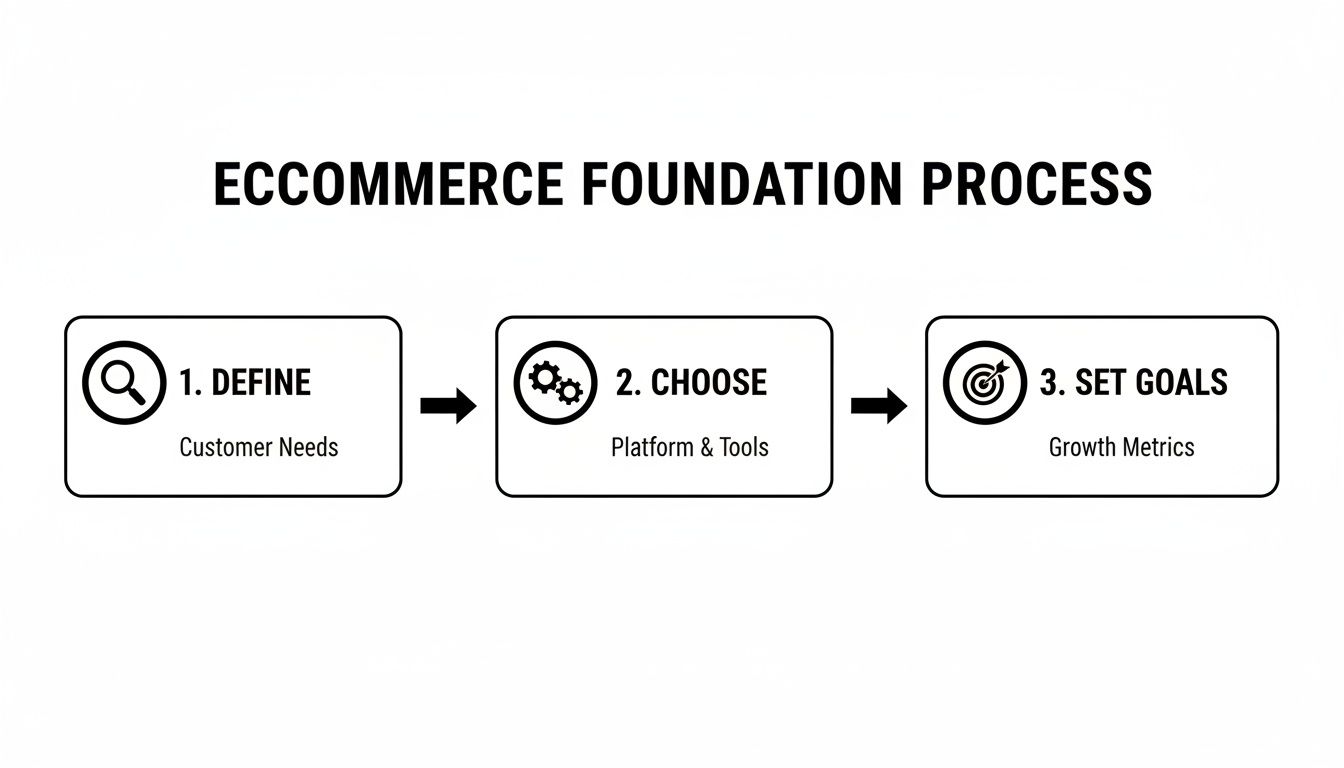
As you can see, choosing your platform is a core decision that stems from knowing your customer and directly impacts the goals you can set.
Defining Your Customer And Unique Edge
With a platform in mind, the real strategic work kicks off. Who are you really selling to? Creating a detailed customer persona isn't just a fluffy marketing task; it dictates everything from your site's navigation to the tone of your product descriptions. What are their frustrations? What makes them click "buy"?
Next, you have to nail your Unique Selling Proposition (USP). In a ridiculously crowded market, what makes you different? Is it your product quality, your ridiculously good customer service, your price point, or your brand's story? Your USP needs to be front and centre on your website, telling a new visitor exactly what you're about in seconds.
A clear USP is the cornerstone of a successful ecommerce store. It’s the answer to the question, "Why should I buy from you and not your competitor?" Without a compelling answer, you're just another store in a sea of options.
Finally, set real, measurable goals. Don't just aim to "increase sales." Get specific. "Achieve a 2.5% conversion rate within six months" or "generate 50 qualified leads per month through the contact form." These targets will steer every single decision you make on your ecommerce journey.
For a practical look at applying these principles, a great guide on starting an online jewelry store offers fantastic insights into nailing the initial setup and defining your niche.
Designing an Experience That Converts Visitors
A beautiful website is completely worthless if it doesn't sell. I’ve worked with countless brands whose sites looked stunning but had awful conversion rates, and trust me, the gap between looking good and selling well is massive.
The difference isn't fancy animations; it's a user experience (UX) and user interface (UI) design that is relentlessly focused on the customer's journey. This is where we move past simple aesthetics and get into the science of conversion-centred design. A skilled WordPress design expert or Shopify design agency knows this is where the real value lies.
Building Intuitive Navigation And Trust
Think of your website’s navigation as the map to a sale. If a customer can't find what they're looking for within a few seconds, they're gone. It’s that simple.
From my experience as both a WordPress developer and a Shopify development partner, I've learned that clean, logical menus are non-negotiable. Your main navigation should feature your most important product categories, and your footer should catch everything else—contact info, return policies, and FAQs.
Good design builds trust instantly. A professional, clean layout tells a visitor you're a serious business, and the small details matter immensely:
- High-Quality Photography: Grainy, low-res product images scream amateur. You have to invest in professional photos that showcase your products from multiple angles.
- Clear Trust Signals: Display security badges, customer reviews, and clear return policies where people can actually see them.
- Professional Branding: Consistent use of your logo, brand colours, and fonts across all pages creates a cohesive and trustworthy experience.
Crafting Product Pages That Compel Action
A product page has one job: to convince the visitor to click "Add to Cart." To do this, it needs to tell a compelling story, not just list specs.
Use a mix of high-quality images, video if possible, and persuasive copy that focuses on benefits, not just features. How will this product make the customer's life better? Answer that question clearly and concisely.
Equally important is a strong, unmissable call-to-action (CTA) button. Use a contrasting colour that makes it pop off the page. The text should be direct and action-oriented, like "Buy Now" or "Add to Bag."
Your checkout process should be so seamless and intuitive that your customers barely notice it. Every extra field, every unnecessary step, is another opportunity for them to abandon their cart.
The Science Behind A Frictionless Checkout
Cart abandonment is the silent killer of ecommerce stores. The Baymard Institute finds the average cart abandonment rate is just under 70%. A huge chunk of this comes down to a clunky, confusing, or untrustworthy checkout process.
To slash abandonment, I always focus on these core principles:
- Minimise Steps: Reduce the process to the absolute minimum number of pages and form fields. Seriously, cut everything that isn't essential.
- Offer Guest Checkout: Forcing users to create an account is a major conversion killer. Always provide a guest checkout option.
- Show Progress: A simple progress bar (e.g., Shipping > Payment > Confirm) lets users know where they are in the process, reducing anxiety.
- Provide Multiple Payment Options: Offer choices like credit cards, PayPal, and buy-now-pay-later services to cater to different preferences.
By streamlining this final step, you create a smooth path from interest to purchase. This focus on user-centric design is a critical part of successful website development ecommerce, ensuring the site not only attracts visitors but effectively converts them into loyal customers.
The Technical Build of Your Ecommerce Store
Alright, let's get into the engine room. As someone who’s spent years as both a Shopify developer and a WordPress developer in Melbourne, I can tell you this is where a great design becomes a functional, money-making machine.
A solid technical build is the backbone of any online business. It’s not just about making things look pretty; it's about connecting all the crucial systems that work behind the scenes to create a customer experience that just works. For complex needs, we even get into building custom Shopify apps using Shopify CLI to solve unique business problems.
Integrating Payments and Shipping Securely
First up, the non-negotiables: getting paid and getting products to customers.
People expect a checkout process to be smooth, secure, and fast. Integrating trusted payment gateways like Stripe and PayPal isn't just a technical task; it's a massive trust signal. If someone feels even slightly unsure about entering their card details, they’ll abandon their cart in a heartbeat.
Shipping is another area I see a lot of businesses stumble. You need rules that accurately calculate costs based on weight, location, and delivery speed. Get this wrong, and you're either losing profit by undercharging or losing sales by overcharging.
And, of course, security is everything. Every single ecommerce site needs an SSL certificate. This encrypts the data between your customer's browser and your server, protecting their information. It’s that little padlock icon in the browser bar, and without it, you'll lose both customer trust and Google rankings.
The Critical Role of Clean Code and Site Speed
I can’t stress this enough: a clean, efficient codebase is everything. Bloated code, messy plugins, and unoptimised images will slow your site to a crawl. In a world where a one-second delay in page load time can slash conversions by 7%, speed isn't a feature—it's a requirement.
A fast site is critical for two main reasons:
- User Experience: Shoppers are impatient. They will simply leave if your pages take too long to load.
- SEO: Google uses site speed as a major ranking factor. A slow site will struggle to get the organic visibility it needs.
A well-structured website, built by a professional WordPress development company or a seasoned Shopify expert, prioritises performance from day one. Think of it as an investment that pays for itself through higher conversions and better search rankings.
Advanced Tracking for Data-Driven Decisions
To really grow your business, you need clear data on what’s working and what isn't. This is where more advanced setups like Google Tag Manager and the Meta Conversions API come in. A crucial part of any WordPress development in Melbourne is setting up this tracking foundation correctly.
Setting up Google Tag Manager containers allows you to manage all your tracking scripts—like Google Analytics and ad pixels—from one central dashboard, without constantly needing a developer. A Google Tag Manager container gives you incredible flexibility to track specific user actions, like button clicks or video views.
The Meta Conversions API installation is now essential for anyone running Facebook or Instagram ads. With browsers cracking down on tracking cookies (thanks, iOS), the API sends conversion data directly from your server to Meta. I've found that a successful Meta Conversions API installation provides a much more accurate picture of your ad performance, helping you make smarter decisions with your budget.
Getting your head around these technical parts is vital. The Australian online shopping industry, now valued at $64.9 billion, is fiercely competitive, with shopper households jumping from 8.2 million in 2019 to 9.8 million. Success in this market depends on having a site that's easy to navigate and backed by secure, hassle-free systems. You can explore more on these Australian ecommerce trends here.
Knowing how your store’s engine works empowers you to make the right investments in your website development ecommerce strategy and stay ahead of the curve.
Launching and Optimising for Maximum Visibility
Hitting 'publish' on a new ecommerce site feels like crossing the finish line, but from my experience, it's really just the starting line. The real work of building a successful online business begins the moment your store goes live. As the head of an SEO agency in Melbourne, I can't stress this enough: your launch plan needs a powerful, ongoing strategy for attracting the right kind of traffic.
This is my personal playbook for a successful launch, focusing on visibility and continuous improvement. It’s all about building momentum from day one.
Nailing Your On-Page and Technical SEO
Before you even think about ads, your on-site SEO has to be flawless. This is the foundation that all your other marketing efforts will build upon.
Every single product and category page needs to be optimised with intention. This means writing unique, compelling meta titles and descriptions that include your target keywords and actually entice people to click from the search results. Your product descriptions should be more than just specs; they need to be persuasive sales copy that answers customer questions before they even think to ask them.
Beyond the content, the technical checks are crucial.
- Submit Your Sitemap: You need to generate an XML sitemap and submit it to Google Search Console. Think of it as handing Google a map of your website, making it easier for them to find and index all your important pages.
- Check for Crawl Errors: Use Search Console to make sure Google can actually access and read your site. Broken links or incorrect "noindex" tags can make entire sections of your store invisible to search engines, which is a disaster for sales.
- Ensure Mobile-Friendliness: With most traffic now coming from mobile, your site has to provide a seamless experience on smaller screens. Google's Mobile-Friendly Test is a quick, non-negotiable check.
Content, Local SEO, and Logistics
A solid content strategy is what separates thriving stores from stagnant ones. Creating valuable blog posts, guides, or videos related to your products positions you as an expert and attracts customers who are still in the research phase. Think "Beginner's guide to Google Shopping ads" if you sell marketing tools, or "How to style a leather jacket" if you're a fashion brand.
For businesses with a physical presence, Local SEO is a goldmine. Optimising your Google Business Profile with accurate info, great photos, and positive reviews can drive serious foot traffic and local online sales.
As you gear up for launch, choosing the right logistics partner is paramount. A customer's experience doesn't end at checkout; it ends when the product is in their hands. You'll want to consult this Best Courier Service Australia Comparison Guide for Ecommerce Success to find a courier that aligns with your brand's promise of quality and speed.
Getting your launch strategy right is more important than ever. The Australian ecommerce market is booming but also incredibly competitive, so you have to fight for every eyeball and every click from day one.
Monitor, Test, and Improve Constantly
Once you're live, your new best friend is data. I live inside Google Analytics, monitoring key metrics like traffic sources, bounce rate, and of course, conversion rate. This data tells you exactly what's working and what isn't.
Don't be afraid to experiment. A/B testing is an incredibly powerful tool for optimisation. Test different headlines, product images, or button colours on key pages to see what resonates most with your audience. I've seen tiny changes lead to significant increases in conversions over time.
This continuous feedback loop of launching, monitoring, testing, and improving is the absolute core of successful website development ecommerce. The Australian market, which hit $63.6 billion in 2023, is full of opportunity, but it rewards those who are agile and data-driven. With 46% of cart abandonment linked to poor returns policies, optimising every single touchpoint, from SEO to shipping, is critical for success.
Scaling Sales With Paid Ads and Automation
Once your store is built, secure, and ready for customers, it's time to add fuel to the fire. As a digital marketing agency in Melbourne, I've seen firsthand how a well-executed paid advertising strategy can transform a business almost overnight. Organic growth is the foundation, but paid ads give you speed, control, and immediate feedback.
This isn’t about just throwing money at Google or Meta and crossing your fingers. It’s a methodical process. The goal is to drive targeted, high-intent traffic directly to your product pages and build a predictable sales engine for your brand.
Getting Started With Google Shopping Ads
For most ecommerce stores, Google Shopping is the most powerful tool in your arsenal. You know the ones—the product listings with images and prices you see right at the top of Google's search results. They grab the attention of people who are literally in the middle of a buying decision, which makes them incredibly effective. This is particularly true for Google Shopping ads for dropshipping, where visibility is key.
Setting up your first campaign can feel a bit daunting, but the core idea is simple. Your product feed from Shopify or WordPress syncs up with Google Merchant Center, which then powers your ads. To really make it work, though, you need to understand a couple of key concepts.
One crucial setting is campaign priority. If you have the same product in multiple campaigns (say, a "Best Sellers" campaign and a "General" campaign), the priority setting (High, Medium, or Low) tells Google which campaign's bid to use. I often use a high-priority campaign with a long list of negative keywords to filter out low-intent searches, forcing that traffic to a lower-priority campaign with smaller bids. It's a great way to control your spend. If you find your Google Shopping ads not spending budget, it's often an issue with bids, product feed quality, or overly restrictive targeting.
PMAX vs Standard Shopping: What's The Difference?
You'll also hear a lot about PMAX vs Google Shopping ads. PMAX is Google's all-in-one, AI-driven campaign that pushes your ads across all of Google's channels—YouTube, Display, Gmail, you name it. Standard Shopping, on the other hand, gives you more granular, manual control over bidding and targeting.
For beginners, PMAX can be a great place to start because it handles a lot of the heavy lifting. However, as an experienced Google ads agency, I find that a hybrid approach often delivers the best results. We might run a standard Shopping campaign for our core, high-margin products where we want total control, and then layer on a PMAX campaign to hunt for new customer segments across the web.
My Meta Ads Creative Testing Process
Over on Facebook and Instagram, success is all about the creative. Your images, videos, and ad copy have to be compelling enough to stop someone mid-scroll and make them pay attention. As a Facebook ads agency, I’ve honed a simple but effective Meta ads creative testing process that helps find winning ads without burning through your budget.
Here’s the basic framework I use:
- Start with 3-4 different ad creatives. This could be a static image, a carousel, and a short video.
- Write 2-3 different hooks for your ad copy. Test different angles—one focusing on a pain point, another on a key benefit, and a third with a direct offer.
- Run these combinations in an A/B test. Let them run for a few days with a small, controlled budget.
- Analyse the data. To measure success on Facebook ads, look at metrics like Click-Through Rate (CTR) and Cost Per Purchase, but the number one metric you should care about is Return On Ad Spend (ROAS). A high CTR means nothing if it doesn't lead to sales.
- Double down on the winners. Take the best-performing creative and copy, and start allocating more budget to them.
This loop of testing, learning, and scaling is the key to mastering Facebook ads. The most important advice I can give is: don't quit too early on Facebook ads. It can take time for the algorithm to find your perfect audience.
The Power of Marketing Automation
Finally, let’s talk about automation. These are the systems that work for you 24/7, recovering lost sales and nurturing customers while you focus on other things.
The single most critical automation for any ecommerce store is the abandoned cart email sequence. Someone adds a product to their cart but gets distracted. An hour later, an automated email gently reminds them. A day later, maybe another one arrives with a small incentive. This simple sequence alone can recover a huge chunk of otherwise lost revenue.
Another powerhouse is a customer win-back campaign. If a customer hasn't purchased from you in, say, 90 days, an automated email can be sent with a special "we miss you" offer to bring them back. It's always cheaper to retain an existing customer than to find a new one. Setting up your Instagram Shop and Facebook Shop and integrating them with your email platform creates even more opportunities for automated marketing.
The Australian eCommerce market shattered records with a staggering $69 billion in total online spend, driven by 9.8 million households. For Melbourne-based SMBs, this just underscores the urgency of using paid ads and automation to capture your piece of this massive pie. You can explore more insights into Australia's ecommerce trends and what they mean for 2025.
Common Ecommerce Development Questions
After building ecommerce sites for years, I get asked the same set of questions by clients here in Melbourne and right across Australia. It's completely understandable—this is a big investment, and you want to get it right. Here are some clear, no-nonsense answers to the most common queries I hear.
How Much Does It Cost to Build an Ecommerce Website?
This is always the first question, and the honest answer is: it varies hugely. The final cost depends entirely on the platform you choose (like Shopify vs. custom WordPress), the complexity of the design, and the specific features you need.
A basic Shopify store, set up professionally with a premium theme, can start from a few thousand dollars. This is a great starting point for many businesses.
However, a custom WordPress development project with unique integrations, custom Gutenberg blocks, and specific functionalities can range anywhere from $10,000 to $50,000+. At our agency, we always conduct a thorough discovery process to give you a detailed quote based on your specific needs, focusing on long-term return on investment over just the initial cost.
How Long Does Ecommerce Website Development Take?
Just like cost, the timeline is completely tied to the project's scope. A straightforward Shopify site using a well-structured premium theme can often be designed, developed, and launched in as little as 4-6 weeks. This is a great entry point for those wanting to learn with a Shopify development crash course in real-time.
On the other hand, a more complex build, such as a custom WordPress site from a WordPress developer in Sydney or one needing a skilled Shopify developer for API integrations, might take 3-6 months. Our process is built around clear milestones and communication to keep projects on track and deliver high-quality results on schedule.
Which Is Better for SEO: Shopify or WordPress?
This is a classic debate, but the truth is both platforms are fantastic for SEO when they're set up correctly. WordPress has traditionally offered more granular control over technical SEO, which is why many SEO agencies, including ours, love it. You have complete freedom.
However, Shopify has made massive improvements in recent years, and its app store is filled with powerful SEO tools that close much of that gap.
Ultimately, your SEO success will come down to your strategy—creating great content, ensuring fast page speed, and providing a superb user experience—not just the platform itself.
Do I Need a Marketing Agency After My Website Is Built?
Your website launch is just the beginning of the journey, not the end. To consistently drive traffic and sales, an ongoing marketing strategy is absolutely essential. This includes things like SEO, content marketing, and paid advertising on platforms like Google and Meta. Marketing your business = consistency.
While you can certainly manage this in-house, partnering with a digital marketing agency in Melbourne allows you to leverage expert knowledge to accelerate your growth. It helps you maximise your ad spend and avoid the costly mistakes many businesses make early on. When I'm asked what budget to spend on Google ads, the answer is always tied to a clear strategy and measurable goals, something an agency excels at defining. Consistency is the real key to marketing, and a dedicated agency ensures your efforts never stop, keeping the sales engine running.
At Alpha Omega Digital, we are a marketing agency based in Melbourne, Australia but also service clients from Sydney, Brisbane, Newcastle, Perth, Adelaide, Darwin and Hobart. Have a project in mind? Contact us.