Think of Google Shopping ads as your digital shop window, placed right where everyone can see it: at the very top of Google. I’m talking about those eye-catching, image-first ads that show a product's photo, its price, and your store name. From my experience, they grab attention in a way plain old text ads just can't.
Why Visual Ads Are Your Secret Weapon
Let’s be honest. When someone’s looking to buy a new pair of shoes or a piece of furniture, a picture is worth a thousand words. That’s the simple truth behind why Google Shopping ads work so well for eCommerce businesses.
From my experience working with eCommerce businesses right here as a marketing agency in Melbourne, I’ve seen firsthand how these visual ads cut through the noise. They don't just tell a potential customer about your product; they show it.
This visual-first approach is brilliant because it pre-qualifies your visitors. Before they even click, a shopper can see:
- What the product looks like
- How much it costs
- Who is selling it
This upfront info means the people who click through to your website are already genuinely interested and have a much higher intent to buy. They aren't just browsing aimlessly; they're actively comparing options and are far closer to making a decision. This is a core principle in any good beginners guide to google shopping ads.
For anyone just setting up their online presence, a solid primer on Starting an Online Business in Australia can give you crucial foundational knowledge before you dive into the world of advertising.
Shopping Ads vs Traditional Search Ads
To really get a feel for their power, it helps to see how they stack up against the standard text ads we’re all used to. It's a pretty stark difference, especially for selling physical products.
Here’s a quick comparison to highlight why Shopping Ads are such a game-changer for eCommerce.
| Feature | Google Shopping Ads | Traditional Search Ads |
|---|---|---|
| Format | Highly visual, featuring a product image, title, price, and store name. | Text-only, consisting of headlines and descriptions. |
| Targeting | Based on your product feed data (titles, descriptions, attributes). | Based on keywords you bid on. |
| User Intent | Catches users with high commercial intent, actively looking to buy a specific product. | Can target users at various stages, from research to purchase. |
| Placement | Prominently displayed at the top of search results or in the "Shopping" tab. | Appears above or below organic search results. |
As you can see, Shopping Ads are built from the ground up to showcase physical products to people who are in the mood to buy. Traditional Search Ads are more versatile but lack that immediate visual punch that drives eCommerce sales. For service businesses, however, Google ads for contact form submissions are a much better fit.
The Data Backs It Up
This isn't just a hunch I have from working with my clients; the numbers tell the same story loud and clear.
In Australia's booming $16.4 billion digital ad market, which shot up 11.1% year-over-year, Google Shopping Ads are an absolute powerhouse. They drive an incredible 85.3% of all Google Ads clicks for retailers. For any Melbourne eCommerce business looking to scale, that makes them non-negotiable.
These ads are also critical for getting noticed in the first place, fuelling 36% of all product discovery that happens on Google.
Ultimately, it’s all about connecting with ready-to-buy customers at the exact moment they’re searching for what you sell. Whether you run a Shopify store or a custom WordPress site, this direct line to high-intent shoppers is why these ads consistently deliver a much stronger return on your ad spend.
Building Your Foundation in Google Merchant Center
Before you can even dream of running a single Google Shopping ad, you need to build the engine room: your Google Merchant Center account. I can't stress this enough – getting this part right is absolutely non-negotiable. I treat it as the central library for all my clients' product data, and a single mistake here can bring your entire advertising effort to a grinding halt.
Think of Merchant Center as the bridge connecting your online store to Google Ads. It’s where you upload all your product info, manage your inventory, and tell Google everything it needs to know to show your products to the right people. It's the source of truth for your ads.
What Exactly Is a Product Feed?
The most critical piece of this puzzle is your product feed. At its core, a product feed is just a structured data file—think of a detailed spreadsheet—that contains all the essential information about every single product you sell. It's how you communicate with Google in a language it understands.
I've seen countless eCommerce businesses stumble at this stage, leading to frustrating product disapprovals and weeks of wasted time. The key is to provide clean, accurate, and comprehensive data from the very beginning.
Here’s a look at the Google Merchant Center dashboard where all this magic happens.
This central hub gives you an at-a-glance overview of your product feed's health, diagnostics, and performance, making it the command centre for your Shopping ads.
Must-Have Attributes for Your Product Feed
Google has a specific set of attributes it needs for each product to be eligible for Shopping ads. While there are dozens you can add to provide more detail, these are the absolute essentials you cannot skip. Getting these right is your first line of defence against disapprovals.
- Product ID (
id): This is a unique identifier for each product. My advice? Use your product’s SKU, as it always stays consistent. - Title (
title): The name of your product. This is incredibly important for SEO, so make it descriptive and pack in relevant keywords. - Description (
description): A detailed summary of your product. This is your chance to tell customers what makes it great. - Link (
link): The direct URL to the product page on your website. No shortcuts here. - Image Link (
image_link): A URL to the main, high-quality image of your product. This is your first impression, so make it count. - Price (
price): The cost of your product. Make sure this exactly matches the price on your website, right down to the cent. - Availability (
availability): Is the productin stock,out of stock, or available forpreorder? - Brand (
brand): The brand name of your product. If you sell your own stuff, just use your store name. - GTIN (
gtin): The Global Trade Item Number, like a UPC or EAN. This is crucial for Google to identify and categorise your product correctly. - Condition (
condition): Is the productnew,refurbished, orused?
My Pro Tip: Don't just fill in the minimum required fields and call it a day. The more high-quality data you provide, the better Google can match your products to relevant search queries. I’ve seen time and time again that detailed feeds consistently lead to better performance.
Linking Merchant Center to Google Ads
Once your account is set up and your product feed is uploaded and approved (which can take a day or two), the final step is to connect it to your Google Ads account. It’s a straightforward process you can find within the Merchant Center settings under "Linked accounts."
This simple link authorises Google Ads to pull all that rich product information from your feed and use it to create your Shopping ads. Without this connection, your ads simply won't run.
By taking the time to set up your Merchant Center and product feed meticulously, you're not just completing a technical step; you're laying the groundwork for a profitable campaign. This foundation ensures that when you're ready to launch, you're doing so with accurate data—and that’s the key to attracting high-intent buyers and getting the best possible return.
Connecting Your Shopify or WordPress Store
Okay, you’ve got your Google Merchant Center account set up. Now for the really important bit: creating a seamless data pipeline from your online store.
Here at our digital marketing agency in Melbourne, the vast majority of eCommerce businesses we work with are built on either Shopify or WordPress, so I’ll focus on making this connection process as painless as possible for both.
The goal here is automation. The last thing you want is to be stuck manually updating a spreadsheet every single time a price changes or a product goes out of stock. A direct, automated link ensures your product feed is always accurate, saving you hours of headaches and preventing expensive mistakes.
This diagram shows the simple, three-step flow from your store's data to live ads.
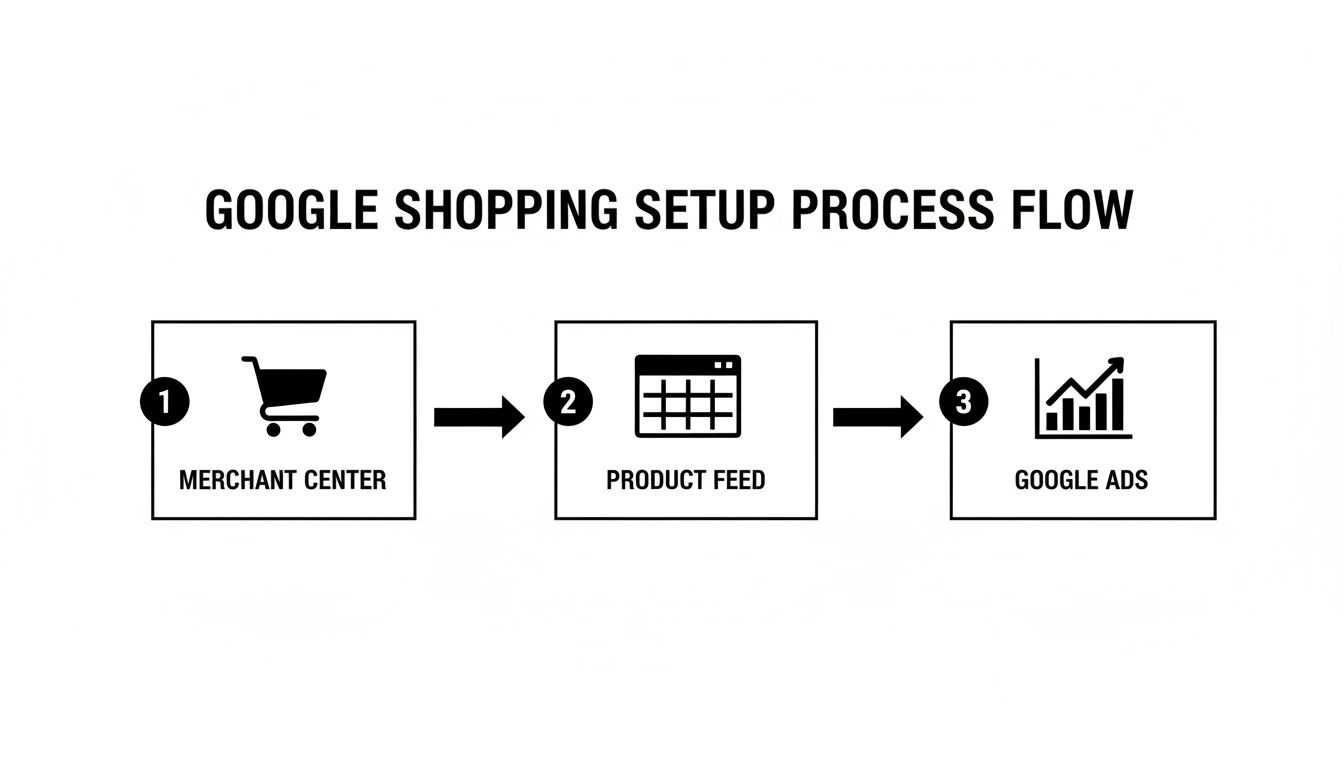
Think of your Merchant Center account as the central hub. It pulls the product feed from your store, then pushes that organised data into your Google Ads campaigns so they can work their magic.
Integrating with Shopify
If you're on Shopify, you're in luck. The process is ridiculously straightforward, thanks to the official Google & YouTube channel app, which you can install right from the Shopify App Store. Honestly, after setting this up for dozens of clients, I can tell you it’s a total game-changer, especially for anyone diving into Shopify development.
Once you install it, the app pretty much handles everything. It automatically syncs your whole product catalogue—titles, descriptions, prices, inventory levels, you name it—with your Google Merchant Center. This creates a live, dynamic feed that updates in near real-time whenever you make a change in your Shopify admin.
A few reasons this app is so good:
- Automatic Syncing: It completely gets rid of manual uploads, so your data is always current.
- Ease of Use: The setup is guided and genuinely user-friendly, even if you’re not super tech-savvy.
- Direct Integration: It links your store directly to Merchant Center, which means fewer things can go wrong.
Of course, a perfect integration is only one piece of the puzzle. The traffic your ads generate needs to land on a store that actually converts. As experienced Shopify developers, we often find that a well-optimised site structure and professional Shopify design can give your ad performance a massive boost.
Connecting Your WordPress and WooCommerce Store
For my fellow WordPress and WooCommerce users, the process involves a plugin, but it's just as effective. While there isn't an "official" app in the same way Shopify has, there are several fantastic plugins that get the job done perfectly.
My go-to recommendation for clients is Product Feed PRO for WooCommerce. It’s powerful, flexible, and the free version has everything you need to get up and running.
Getting it set up is a three-step process:
- Install and activate the plugin from your WordPress dashboard.
- Configure the feed settings. This is where you map your WooCommerce product attributes (like price, SKU, and stock status) to Google's required attributes.
- Generate the feed URL. You then copy this link and paste it into your Google Merchant Center account under the "Feeds" section.
This creates what’s called a scheduled fetch, where Google regularly visits that URL to pull the latest version of your product data. For businesses with more complex needs, a skilled WordPress developer in Melbourne can handle advanced WordPress development to build custom solutions for tricky product variations or unique data requirements.
In Australia, this streamlined setup is really paying off. Health and beauty brands, for example, are seeing average conversion rates of 2.78% from their Google Shopping Ads. This kind of efficiency is gold for Melbourne businesses, where a huge 76% of retail search ad spend now goes into Shopping Ads. You can read more about these valuable Australian Google Ads benchmarks.
At the end of the day, it doesn't matter if you're using Shopify or WordPress. The principle is the same. A reliable, automated connection to Merchant Center is the technical backbone of any successful Google Shopping campaign. It's what makes sure the right information reaches the right shoppers at exactly the right time.
Launching Your First Google Shopping Campaign
Right, let's get into the exciting part—building the actual campaign that will get your products in front of people ready to buy. This is where a lot of businesses stumble, but getting the structure right from the start gives you control, clarity, and the ability to scale without wasting money.
The first big decision you'll need to make is your campaign type. Google gives you two main options for Shopping ads, and they work in completely different ways.
Standard Shopping vs Performance Max Campaigns
This is a question I get from clients all the time. Should you start with a traditional Standard Shopping campaign or dive straight into the AI-driven world of Performance Max (PMax)? The honest answer is: it depends on your goals and how much control you want to have. The PMAX VS google shopping ads debate is a big one.
Think of Standard Shopping like driving a manual car. You're in complete control of the gears and steering. You get to set specific bids for products, add negative keywords to block searches that aren't relevant, and see exactly which search terms are triggering your ads. It's fantastic for hands-on control and gathering that initial, crucial data. This is where you can also manage campaign priority in google ads to funnel traffic exactly where you want it.
Performance Max (PMax), on the other hand, is like getting behind the wheel of a high-tech automatic. It uses Google's AI to run your ads not just on Shopping, but across all of Google's channels—YouTube, Display, Search, Discover, and Gmail. You feed it the inputs (your product feed, ad copy, images, videos), and the AI takes over, driving towards your conversion goals. It's incredibly powerful but offers far less granular control.
To help you decide, here’s a quick breakdown of the core differences.
Standard Shopping vs Performance Max Campaigns
Understanding the core differences to help you choose the right campaign type for your business goals.
| Aspect | Standard Shopping | Performance Max (PMax) |
|---|---|---|
| Control | High. You have manual control over bids, targeting, and negative keywords. | Low. It's heavily automated by Google's AI. |
| Reach | Limited to Google Search and the Shopping tab. | Extends across all of Google's networks (YouTube, Display, etc.). |
| Setup | Simpler. Requires only your product feed. | More complex. Requires creative assets like headlines, images, and videos. |
| Best For | Beginners, businesses wanting granular control, or for gathering initial search term data. | Businesses with conversion tracking, good creative assets, and a goal of maximising reach. |
For anyone just starting out, I almost always recommend beginning with a Standard Shopping campaign. The insights you'll get into what people are actually searching for when they find your products are invaluable.
Setting Your Budget and Bidding Strategy
So, what budget to spend on google ads? There’s no magic number here. I usually advise clients to start with a budget they’re comfortable testing with for at least 30 days. A daily budget of $20-$50 is a realistic starting point for most small eCommerce businesses to gather enough data to make smart decisions.
Next up is your bidding strategy. This is simply telling Google how you want it to spend your money.
- Maximise Clicks: This is the perfect choice for a brand new campaign. The goal is to drive as much traffic to your site as possible within your budget, which helps you collect performance data quickly.
- Target ROAS (Return On Ad Spend): Once you have enough conversion data—Google recommends at least 15 conversions in 30 days—you can switch to this. You set a target return, say 400% (a $4 return for every $1 spent), and Google's AI will work to hit that goal.
Don't forget location targeting. It's crucial. Start by targeting areas where you know your customers live. For an Australian business, this usually means sticking to just Australia at first. You can always expand later.
Campaign Structure: The Secret to Success
Here’s where our experience as a digital marketing agency in Melbourne really makes a difference. A messy, disorganised campaign structure is a recipe for wasted ad spend. We structure campaigns to give our clients maximum control and crystal-clear insights.
A common and highly effective way to do this is by structuring your campaigns by product category.
For example, if you run a clothing store, you could create separate campaigns for:
- Men's T-Shirts
- Women's Jeans
- Kids' Shoes
This approach lets you set different budgets and ROAS targets for each category based on its profitability and performance. You can push more budget towards your best-selling items and be a bit more conservative with new or lower-margin ones. This kind of segmentation is fundamental to scaling your Google Shopping ads effectively.
Optimising Your Campaigns for Maximum Profit
Launching your campaign is a fantastic first step, but it’s just that—a beginning. The real magic, the part where you turn a decent campaign into a seriously profitable one, comes from ongoing optimisation. This is where my team at our Melbourne marketing agency spends most of its time, diving deep into the data to squeeze every last drop of performance out of an account.
It’s all about moving past simply having your ads live and starting to make smart, data-driven decisions that directly boost your bottom line.
Focusing on the Metrics That Truly Matter
When you open your Google Ads dashboard, you're hit with a wall of data. It’s so easy to get lost in vanity metrics that look impressive but don’t actually tell you if you're making money. From my experience, you need to be ruthless and focus on just a few key performance indicators (KPIs) to truly understand what's working.
Here are the non-negotiables:
- Click-Through Rate (CTR): This tells you how compelling your ad is. A low CTR is a red flag. It often means your product image is weak, your price isn't competitive, or your title just isn't grabbing attention.
- Conversion Value: This is the total revenue your ads have generated. It’s the clearest indicator of whether your campaign is actually driving sales or just clicks.
- Return On Ad Spend (ROAS): This is the holy grail. It measures your total revenue (Conversion Value) divided by your ad spend. A ROAS of 400% means you're making $4 for every $1 you spend.
By keeping your eyes glued to these three metrics, you can quickly diagnose the health of your campaign and pinpoint exactly where you need to make improvements.
Finding Winners and Fixing Losers
Not all products are created equal. In every single campaign I’ve ever managed, the Pareto principle holds true: roughly 80% of the profit comes from just 20% of the products. Your job as a smart advertiser is to identify that winning 20% and give it the fuel it needs to grow.
Dive into your 'Products' report in Google Ads and sort the list by Conversion Value. The products sitting at the top are your champions. You should seriously consider giving them more budget, maybe even moving them into their own high-priority campaign.
Now, scroll to the bottom. You'll find products that are happily spending your money but generating zero sales. These are your underperformers. Before you hit the pause button, ask why. Is the landing page weak? Is the price wrong? Is the product out of stock? Often, a quick fix can turn a loser into a winner.
Advanced Optimisation Tactics
Once you've mastered the basics, you can start pulling more advanced levers to improve performance. One of my favourite strategies is using custom labels in your product feed. These let you segment products in ways Google can't automatically, like by profit margin ('high-margin', 'low-margin') or by season ('summer-bestseller'). You can then set up your campaigns to bid more aggressively on your most profitable items.
Another powerful tactic is optimising your product titles for SEO. Put yourself in your customer's shoes. What words would they actually type into Google to find your product? Make sure those keywords are right at the beginning of your title. A title like "Waterproof Hiking Boots – Men's Size 10 Brown Leather" is far more effective than just "Men's Boots".
In the competitive Australian market, these small optimisations can make a huge difference. For clothing and apparel brands, Google Shopping Ads boast an incredibly low average cost per click (CPC) of just $0.69 AUD. That's a massive 43% lower than traditional Search Ads, which is why so many Melbourne-based Shopify stores rely on them to get ahead. You can explore more about these Australian Google Ads industry benchmarks.
A Common Problem I See: If you find your Google Shopping ads not spending budget, the first place I always check is the bids. If they're set too low for the competition, Google simply won't show your ads. Another common culprit is a disapproved product feed in Merchant Center. Always check your diagnostics first
Integrating Shopping Ads into a Full Funnel Strategy
Google Shopping ads are phenomenal at capturing customers right when they’re ready to pull out their wallets. But from my experience running these campaigns, I can tell you they’re even more powerful when they’re not working in isolation.
True success comes when they’re part of a complete marketing system—a full-funnel strategy that guides someone from vaguely interested browser to loyal, repeat buyer.
Think of it like this: your Shopping ad is the perfect hook for a fish that’s already hungry and looking for a meal. But what about all the other fish in the pond? That’s where a more holistic approach comes in.
Amplifying Your Reach with Meta Ads
One of the most effective ways we amplify our clients' Google Shopping efforts is by pairing them with a smart Meta Ads strategy (that’s Facebook and Instagram). As a Facebook ads agency, we know that mastering facebook ads is key.
Let’s say someone clicks on your Shopping ad, browses a product, but doesn’t buy. They've shown clear interest. Now, we can use Facebook and Instagram ads to retarget them, showing them that exact same product again, and maybe even a special offer to nudge them over the line. Our Meta ads creative testing process helps us find the perfect ad to win them back.
This creates a seamless customer journey across different platforms. It keeps your brand top-of-mind and builds that familiarity which is so crucial for turning a 'maybe' into a 'yes'. Beyond just Google Shopping, a comprehensive approach involves a mix of effective online store marketing strategies to make sure you're showing up at every touchpoint.
The Technical Foundation Matters
A full-funnel strategy isn't just about ads; it's also about the experience people have on your website once they click. This is where our technical expertise as a digital marketing agency in Melbourne becomes so important. For our clients, we make sure the entire system works together flawlessly.
This could mean things like:
- Building custom shopify apps using Shopify CLI to create unique shopping experiences that competitors can't just copy.
- Developing custom Gutenberg blocks for a WordPress site, making it easier to spin up beautiful, high-converting landing pages on the fly.
- Ensuring rock-solid tracking with proper setup of GTM and Google Analytics containers, alongside a properly configured Meta Conversions API installation, so that every ad click and conversion is measured accurately.
When your website and your ad campaigns are built to work together, the results are always better. Your ads drive qualified traffic, and your site is perfectly optimised to turn that traffic into sales.
If you're a business with a paid ads budget of at least $3k a month, I'd love to offer you a low-risk deal—get a month of paid ads management FREE. Apply now through our contact page.
A Few Questions I Get Asked All The Time
As a marketing agency in Melbourne, I talk to a lot of eCommerce business owners about Google Shopping ads. It's a seriously powerful platform, but it’s totally normal to have a few questions before jumping in. Here are some of the most common ones I hear from eCommerce clients, along with my straight-up answers.
How Much Do I Need to Spend to Get Started?
This is always the first question, and the honest answer is: it’s up to you. There's no magic number. You're in complete control of the budget. So, how much does it cost to start google ads?
For a small eCommerce business testing the waters, I usually suggest a starting daily budget of $20 to $50. This is enough to gather some meaningful data over a month without having to bet the farm. The goal isn't to get rich overnight; it's to learn what works.
How Long Until I See Results?
You’ll see traffic coming to your site from day one, which is great. But real, tangible results—like a steady flow of sales—take a little more patience. I always tell my clients to give it a solid 1-3 months for testing and tweaking.
Think of it like this:
- Month 1 is all about collecting data. We're learning what people click on.
- Month 2 is for refining. We cut what isn't working and push more budget toward the winners.
- By Month 3, you should have a much clearer picture of your return on ad spend and a campaign that feels more stable and predictable.
Are Google Shopping Ads a Good Fit for My Business?
If you sell physical products online, then yes, absolutely. Google Shopping ads were literally built for businesses like yours. They're perfect for eCommerce stores on platforms like Shopify or WordPress because they put your products right in front of people who are already looking to buy. The same logic applies to using Google shopping ads for dropshipping.
They aren't, however, a great fit for service-based businesses like tradies or consultants. If that's you, you'll get much better value from traditional Google ads for service based businesses that focus on generating leads through calls or contact forms. This is where you might explore PPC for tradies and set up call tracking with software like CallRail or Go High Level.
Can I Actually Compete with a Small Budget?
You sure can. One of the best things about Google Ads is that you don't need a massive corporate budget to get in the game. Starting small is actually a smart strategy. It lets you test the waters, figure out which of your products are most profitable, and gather that all-important performance data.
Once you start seeing a positive return, you can simply reinvest a portion of the profits back into your campaigns. That’s how you scale. Many of our most successful clients started with a modest daily spend and grew it over time as the results proved it was worth every cent.
At Alpha Omega Digital, we're a marketing agency based in Melbourne, Australia, but also service clients from Sydney, Brisbane, Newcastle, Perth, Adelaide, Darwin and Hobart. Have a project in mind? Contact us.
If you're a business with a paid ads budget of at least $3k a month, I'd love to offer you a low-risk deal—get a month of paid ads management FREE. Apply now through the contact page.
[email protected]
Read more insights from our team on web design, paid ads, and growth strategy.