If your store has reached the point where marketing is no longer the hard part, your website probably is.
We see this a lot with growing Australian eCommerce brands. Paid traffic starts working. Organic traffic improves. Product lines expand. Then the cracks show up all at once. Category pages get bloated. Launches take too long. Tracking goes messy. The site feels fine on quiet days, then struggles when a promotion lands.
That’s usually when the conversation shifts from “we need a nicer website” to “we need infrastructure that won’t fight the business”. That’s where wordpress enterprise makes sense. Not as a buzzword. As a practical way to run a serious online store, content engine, and marketing system without locking yourself into a rigid platform that becomes expensive every time you need something custom.
From our side as a digital marketing agency melbourne businesses work with when growth gets more technical, the appeal of WordPress at enterprise level is straightforward. It can handle design freedom, custom development, SEO control, content operations, and integrations in a way many mid-market businesses need.
Is Your eCommerce Store Hitting a Growth Ceiling
A familiar pattern looks like this.
A brand starts on a simple setup. It works well enough in the early stage. The product range is manageable, the team is small, and one campaign at a time is easy to support. Then revenue grows and the website starts acting like an anchor.
The marketing team wants dedicated landing pages for Google Ads. The SEO team wants cleaner category architecture. Operations want regional content for Melbourne, Sydney, and Brisbane. The dev team wants a safer deployment process. None of those requests are strange. They just expose that the original setup was built for a smaller business.
The signs usually show up in operations first
We tend to notice the ceiling before the client names it directly.
- Campaign friction: Paid traffic is ready to scale, but landing pages are slow to build or too limited to test properly.
- Content bottlenecks: Merchandising, buying, and marketing all need site changes, yet every update runs through one overloaded admin path.
- Platform strain: Plugins, apps, and scripts pile up until no one is fully confident what can be removed without breaking something.
- Regional growth pain: Expanding product messaging or content by location becomes awkward fast.
A lot of owners think this means they’ve outgrown WordPress. In practice, they’ve usually outgrown a basic WordPress setup.
Practical rule: If your team spends more time working around the CMS than using it, the issue is architecture, not just design.
The reason WordPress still stays in the frame is scale. Globally, WordPress powers 43.5% of all websites in 2024, up from 13.1% in 2011, and powers over 605 million sites according to WPZOOM’s WordPress statistics roundup. That doesn’t prove every build is enterprise-ready, but it does show the platform itself isn’t the limiting factor.
Growth creates technical debt fast
For eCommerce brands, the pressure lands from multiple directions at once.
You’re not just managing a storefront. You’re managing SEO pages, ad landing pages, collections, CRM flows, analytics, product feeds, and customer expectations around speed. If you’re actively trying to scale an ecommerce business, your website has to support growth without forcing a rebuild every time marketing evolves.
That’s the point where a serious WordPress build becomes a business decision, not just a development preference.
What Exactly is WordPress Enterprise
WordPress enterprise isn’t a separate product you download. It’s a way of building and running WordPress so it can support a larger organisation, more traffic, stricter workflows, and higher operational risk.
A standard install can run a solid business website. An enterprise setup adds the pieces that growing brands usually need but basic builds skip.

It’s an ecosystem, not a licence
When we talk about enterprise WordPress with eCommerce clients, we’re normally talking about a stack that includes:
- Managed hosting: Built for traffic spikes, deployment workflows, backups, and staging.
- Performance controls: Caching layers, CDN strategy, image handling, and code discipline.
- Security governance: Plugin review, access control, update processes, and incident planning.
- Content workflows: Role permissions, approvals, reusable blocks, and publishing standards.
- Integration capability: CRM, ERP, Meta, Google Ads, shipping, inventory, and custom APIs.
That’s why a cheap theme plus a handful of plugins doesn’t count as enterprise, even if the store is doing decent revenue.
The difference is operational maturity
I think of it as the gap between “can it launch?” and “can the business rely on it?”.
A proper enterprise setup supports more than frontend polish. It supports the people behind the site. Marketing can publish without breaking templates. Devs can deploy changes safely. Leadership can approve spend because the system is built to reduce friction, not create it.
Here’s a simple comparison:
| Setup | What it’s good at | Where it breaks |
|---|---|---|
| Basic WordPress | Fast launch, lower upfront cost, simpler brochure or early-stage store builds | Weak governance, fragile plugin stacks, limited scale planning |
| Mid-tier custom build | Better design control, stronger content structure, more customized workflows | Often inconsistent hosting and unclear long-term maintenance |
| WordPress enterprise | Performance, governance, integrations, scalable content and commerce operations | Higher planning requirement, more disciplined implementation |
The value of enterprise WordPress isn’t that it looks enterprise. It’s that the business can keep moving when traffic, staff, and complexity increase.
For a marketing agency melbourne brands hire to connect web development with paid growth, that distinction matters a lot. A site that can’t support tracking, testing, merchandising, and content production will cap performance long before the ad account does.
Choosing Your Enterprise Architecture Headless vs Multisite
Architecture choices shape everything that happens later. Not just development, but editor workflow, SEO control, budget, and how painful the next expansion becomes.
Monolithic WordPress still works in many cases
A traditional setup, where WordPress handles both backend and frontend, is still the right answer for plenty of businesses.
If the store has one main site, a manageable product catalogue, and a team that needs speed over complexity, a well-built monolithic setup is often easier to operate than something more fashionable. It keeps previewing simple, reduces moving parts, and avoids splitting responsibilities across multiple systems.
What doesn’t work is pretending monolithic means careless. It still needs disciplined code, a sane plugin stack, custom blocks where needed, and proper hosting.
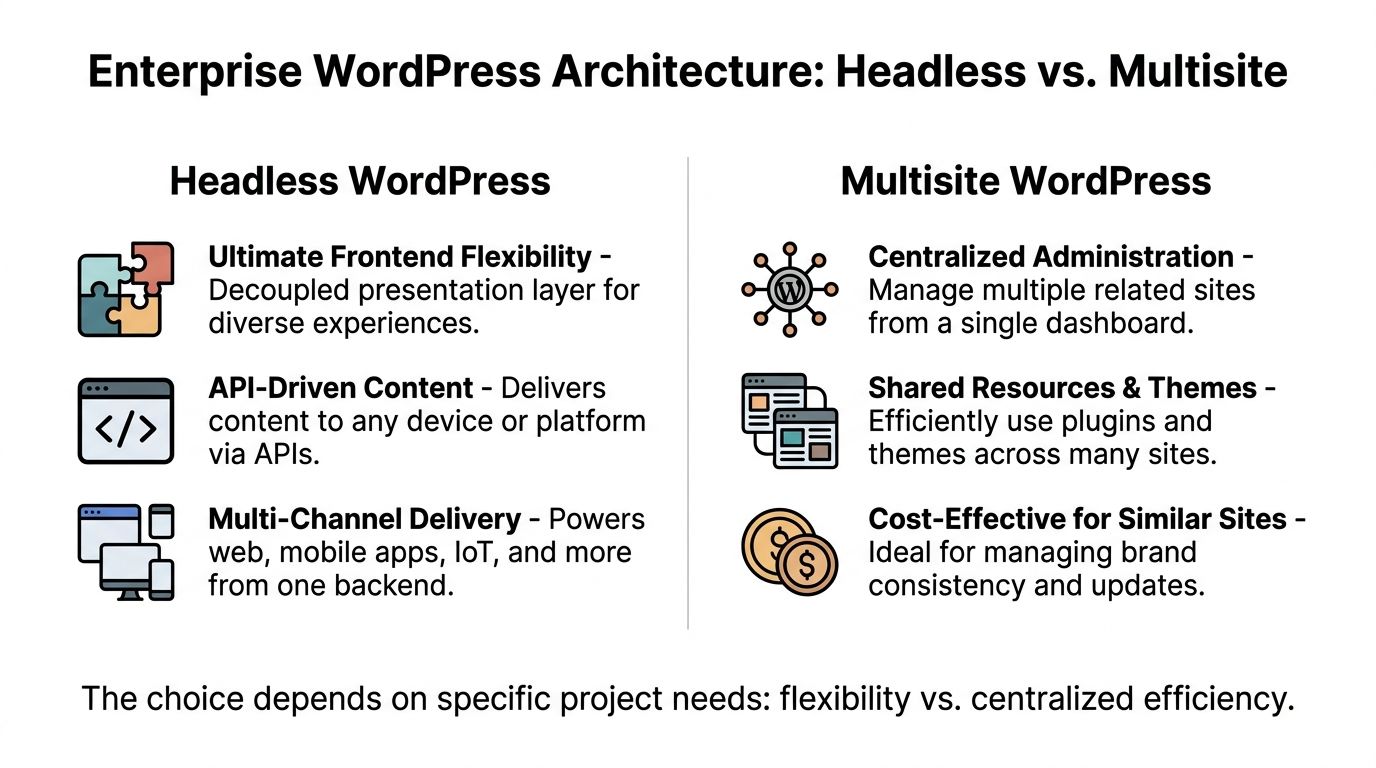
Multisite is strong when brand control matters
WordPress Multisite makes sense when one business runs several related sites that share common governance.
Think of situations like:
- Regional stores: Separate sites for Melbourne, Sydney, or broader AU targeting
- Brand groups: Multiple labels under one parent company
- Franchise structures: Shared components with local content control
- Content hubs: Distinct sections managed by different teams with common infrastructure
The upside is centralised administration. Themes, plugins, and standards can be managed more efficiently. The downside is that multisite can become messy if each site starts demanding completely different logic.
Headless is powerful, but not always practical
Headless WordPress separates the content backend from the frontend. That usually means WordPress manages content while a frontend framework handles presentation.
This can be excellent for custom experiences, app-like interfaces, or brands that need one content source feeding multiple digital touchpoints. It also suits teams with stronger engineering resources and a real need for frontend independence.
Where headless often disappoints is day-to-day publishing. Preview can be clunky. Marketers lose confidence. SEO teams depend more heavily on developers. Costs rise quickly if the architecture was chosen for trend reasons rather than business reasons.
Hybrid usually wins the argument
For many larger Australian marketing and B2B platforms, a hybrid or decoupled architecture is the optimal choice in roughly 70% of cases, and it can improve Core Web Vitals by 25 to 40% compared with fully headless setups by using server-side rendering for SEO-critical pages, based on this enterprise WordPress architecture analysis.
That lines up with what we see in practice. Hybrid tends to give businesses the parts they need:
- fast, SEO-friendly rendered pages for core commercial content
- API access for custom tools, calculators, account areas, or app-like components
- better editor usability than a fully decoupled model
- less operational overhead than full headless
Choose architecture based on who has to use it every day. Editors, marketers, merchandisers, and paid media teams matter just as much as developers.
If a client also sells on Shopify, the conversation gets more interesting. We’ve handled projects where WordPress owns the content and landing page layer while Shopify supports commerce workflows through integration. That can be a strong model when content marketing and paid acquisition matter as much as checkout.
Performance at Scale Enterprise Hosting and Optimization
Site speed stops being a nice extra once paid media is involved.
If you’re driving traffic from Google Shopping, brand search, Meta campaigns, or email promotions, a slow site burns money. It hurts conversion rate, frustrates users, and makes good creative look worse than it is.
Enterprise hosting is about resilience, not branding
A lot of businesses think “premium hosting” means paying more for cPanel with nicer wording around it. That’s not the issue.
The key difference is in how the stack handles load, failures, and repeat traffic. For enterprise WordPress, that usually means horizontal scaling with PHP-FPM, database separation, object caching, and CDN support.
According to Pantheon’s enterprise WordPress guidance, horizontal scaling with PHP-FPM and database read replicas can sustain over 50,000 daily visitors, while Redis or Memcached can reduce database query roundtrips by 85% and support 99.99% uptime.
That matters most when campaigns hit at the same time as normal business traffic.
What improves performance
We focus on the stack and the application together. One without the other doesn’t hold.
- Load balancing: Traffic is distributed across application nodes instead of one server taking the hit.
- Read replicas: Product browsing and content-heavy traffic don’t overwhelm the primary database.
- Redis object caching: Frequent requests are served from memory instead of repeating expensive database work.
- CDN delivery: Static assets are served closer to the visitor, which is especially useful for national traffic.
- Theme discipline: Bloated page builders and script-heavy templates create avoidable slowdown.
- Image handling: Compression, next-gen formats, and responsive sizing reduce waste.
Here’s the catch. Fast hosting won’t save a bad build. We’ve seen expensive infrastructure underneath a frontend weighed down by unnecessary scripts, oversized apps, and poor template logic.
Performance supports marketing
Development and media buying stop being separate conversations here.
A faster product page improves the experience for organic visitors, but it also supports ad performance. Better landing pages usually mean cleaner engagement signals, less wasted spend, and more confidence when scaling campaigns.
For a quick visual on the sort of performance thinking involved, this overview is useful:
A practical enterprise build also needs a staging workflow, release process, cache strategy, and monitoring. Speed is not one plugin. It’s operational discipline.
Locking It Down AU Security and Compliance
Security advice for WordPress often stays generic. Update plugins. use strong passwords. limit admin access. That’s fine as a starting point, but it’s not enough for a business handling customer data in Australia.
The local compliance side changes the stakes.

Australian compliance isn’t optional
Under the Notifiable Data Breaches scheme, Australian businesses can face fines up to AUD 50M for serious privacy breaches, which is one reason region-specific compliance needs to be part of the build from day one, as discussed in this WordPress enterprise security analysis.
For eCommerce brands, that means your site setup needs to support more than security theatre. It needs to support privacy handling, user access controls, vendor review, and incident response.
What we treat as baseline
For enterprise WordPress projects in Australia, the baseline usually includes:
- Hosting choices: Use providers and data arrangements that align with your internal compliance expectations.
- Least-privilege access: Not everyone needs admin. Few individuals require it.
- Plugin scrutiny: Every plugin adds maintenance and risk. Fewer, better tools usually win.
- Audit trails: Teams need to know who changed what, and when.
- Backup and recovery planning: Recovery is part of security, not a separate topic.
- Form and customer data review: Stores and lead-gen sites often collect more personal data than they realise.
A lot of larger businesses also ask about broader assurance frameworks beyond WordPress itself. If that’s part of your vendor review process, this guide to SOC 2 for e-commerce platforms is a useful external read because it helps frame security controls in operational terms rather than plugin terms.
Security fails when responsibility is vague. Someone needs to own plugin review, access review, patching, backups, and incident handling.
Security has a marketing consequence too
When a site goes down, gets injected, or starts behaving unpredictably, the damage isn’t limited to IT.
Campaigns keep spending. Merchant feeds get disrupted. Analytics becomes unreliable. Customer trust drops quickly, especially if checkout or account areas are affected. For an eCommerce brand spending heavily on acquisition, that’s a direct commercial risk.
That’s why we treat AU compliance and WordPress hardening as part of growth infrastructure, not as an afterthought for legal review.
Connecting Your Ecosystem CRM Marketing and Custom APIs
A serious WordPress build should reduce manual work across the business.
That means the site can’t sit in isolation from your CRM, ad platforms, analytics stack, support systems, and operational tools. For eCommerce, the best gains often come from the plumbing behind the site rather than another visual redesign.
The website should move data where the business needs it
We regularly connect WordPress to tools like HubSpot, Klaviyo, Meta, Google Tag Manager, GA4, shipping systems, and internal databases. The exact stack changes, but the pattern is consistent. Someone fills a form, views a product, starts checkout, completes a purchase, or places a call. That event should move into the right systems cleanly.
Where teams get in trouble is trying to patch this together too late. They launch first, then discover:
- paid media events aren’t matching back properly
- lead sources are muddy
- customer segmentation is weak
- duplicate records pollute the CRM
- product or inventory data needs manual syncing
Tracking needs server-side support now
Browser-only tracking has become less reliable. If you’re spending on Meta or Google Ads, that matters.
For that reason, we often set up Google Tag Manager, GA4 event structures, and Meta Conversion API support together. The goal isn’t to chase perfect attribution. The goal is to improve signal quality enough that campaign decisions are grounded in cleaner data.
A solid setup often includes:
- GTM container planning: Define naming conventions, triggers, variables, and version control properly.
- GA4 event mapping: Track the actions that matter to the business, not a random list of clicks.
- Meta Conversion API installation: Pair browser and server events with sensible deduplication.
- Form and call attribution: Make sure lead-gen pathways are measured, not guessed.
- Feed and catalogue alignment: Keep product taxonomy consistent across site and ad platforms.
WordPress and Shopify can work together
A lot of eCommerce businesses in Australia aren’t choosing between WordPress and Shopify in a pure way. They use both.
WordPress might handle content, SEO landing pages, or complex editorial sections. Shopify may run the transactional catalogue and checkout. In that case, development usually involves custom API work, front-end consistency, and careful tracking so both systems report usefully.
That’s where work like Shopify API integration, custom Shopify CLI app development, and bespoke Gutenberg blocks all become relevant. Good architecture lets each platform do what it’s best at.
A practical example that saves leads
For service-driven businesses with call-heavy funnels, we’ve also built setups around Twilio where a custom number routes enquiries more intelligently. The useful part isn’t the phone number itself. It’s what happens after.
The system can support 24-hour answering, won’t get sick or tired, can book appointments into a calendar or Calendly, and helps reduce lost leads when staff miss calls. That’s useful for tradies, hairdressers, beauty therapists, dentists, restaurants, and doctors where missed calls often mean missed revenue.
For businesses comparing options for web build plus performance marketing support, Alpha Omega Digital’s wordpress developer service is one example of a local provider that combines WordPress development with paid ads implementation and conversion tracking work.
When to Make the Leap A Migration Checklist
Some businesses need wordpress enterprise now. Others just need a cleaner rebuild and better operational habits. The trick is knowing which situation you’re in before you overspend or delay too long.
The easiest test is friction
If the site feels annoying but still supports growth, you may not need an enterprise rebuild yet.
If the site repeatedly slows launches, breaks tracking, limits SEO implementation, or creates risk around security and deployment, that’s different. At that point, the website is no longer neutral. It’s actively shaping business performance.
Here’s the checklist we use in practical terms.
Signs you’re ready
- Your team avoids making changes: That usually means the backend is too fragile or too confusing.
- Marketing depends on developers for basic execution: Landing pages, content blocks, and campaign updates should not all require code.
- You’re managing multiple business units or regional content: Governance becomes difficult without the right structure.
- Tracking confidence is low: If no one trusts the data, budget decisions get worse.
- Your current platform is expensive to extend: This often shows up in repeated custom work for simple requirements.
- Security review is now part of procurement or leadership discussion: That changes the standard expected of the stack.
TCO matters more than sticker price
A lot of businesses compare platforms based on launch quotes alone. That’s a mistake.
The better comparison is total cost of ownership over the life of the platform. For Australian SMBs, a WordPress enterprise solution can be 35% cheaper in total cost of ownership than proprietary CMS platforms, largely because of open-source savings and plugin flexibility, according to Post Status’s discussion of the WordPress enterprise paradox.
That doesn’t mean WordPress is always cheaper in every scenario. It means the economics often improve when businesses would otherwise be paying recurring licence and customisation costs on a rigid platform.
A migration should protect commercial performance
The migration plan matters as much as the destination.
A practical migration checklist usually includes:
| Area | What to check |
|---|---|
| SEO | URL mapping, redirects, metadata handling, indexation controls |
| Analytics | GA4, GTM, Meta event continuity, testing and validation |
| Content | Reusable blocks, templates, editor permissions, archive structure |
| Commerce | Catalogue logic, filtering, checkout dependencies, integrations |
| Performance | Caching, media handling, script review, hosting readiness |
| Governance | User roles, staging workflow, deployment approvals, backup policy |
Migrations fail when teams treat them as design projects. They’re operational projects with design attached.
If your website is central to revenue, success should be measured after launch in business terms. Better page speed. Cleaner tracking. Easier publishing. Stronger conversion paths. More confidence in paid scaling.
Your Partner for Enterprise Growth in Australia
The reason more growing brands revisit WordPress isn’t nostalgia. It’s flexibility.
Used properly, wordpress enterprise gives Australian businesses room to scale content, commerce, SEO, and paid acquisition without getting trapped in a system that becomes harder to change every quarter. It supports custom design, custom blocks in Gutenberg, marketing integrations, Shopify connections, Google Ads landing pages, local SEO work, and stronger reporting through GTM and analytics.
That matters when you’re trying to grow in a market where every click costs money and every delay affects execution.
We work with businesses that need both sides handled properly. The build and the growth layer. That includes WordPress development, WordPress design, Shopify development, Shopify design, Google Ads, Meta ads creative testing, Conversions API setup, Google Shopping campaign structure, local SEO, and the reporting layer that ties it together.
We’re based in Melbourne and work with clients across Sydney, Brisbane, Newcastle, Perth, Adelaide, Darwin, and Hobart. If you’re looking for a marketing agency melbourne businesses use for both technical web work and performance marketing, the important thing is choosing a team that understands trade-offs. Not just one platform. Not just one channel.
The right setup is the one your team can run confidently while your marketing keeps scaling.
If you're a business with a paid ads budget of at least $3k a month, I'd love to offer you a low risk deal, get a month of paid ads management FREE. Apply now through the Alpha Omega Digital contact page if you have a project in mind.
[email protected]
Read more insights from our team on web design, paid ads, and growth strategy.