A lot of growing businesses do not notice the website problem straight away.
Revenue is up. The ad account is active. Google Ads, Meta ads, email flows, SEO content, product launches, and seasonal campaigns are all moving. Then the cracks start showing. The site slows down during promotions, your team hesitates to publish changes, and every new integration feels like surgery.
That is the point where a basic setup stops being an asset and starts acting like a constraint. For many Australian eCommerce brands and established service businesses, enterprise wordpress is not about getting something flashy. It is about getting a platform that can support growth without creating operational drag.
When Your Successful Business Outgrows Its Website
I see the same pattern with successful brands around Melbourne. They launch on Shopify, or on a standard WordPress build that was perfectly fine at the start. Then marketing matures, the catalogue grows, the team gets bigger, and the website that once felt nimble starts fighting back.

The growth wall is usually operational first
Most owners expect a technical failure. A crash. A broken checkout. A major outage.
Often, the first signs are smaller and more expensive over time.
- Marketing waits on development: Your team wants a landing page for Google Ads, a custom collection page, or a new content block for SEO. It sits in a queue.
- Reporting gets messy: GTM, Google Analytics, Meta Conversion API, CRM events, and call tracking all exist, but the setup is patched together.
- Content becomes fragile: Editors are nervous about changing templates because one wrong move can affect the whole site.
- Platform limits shape strategy: Instead of asking what would convert best, the team asks what the current stack can tolerate.
For an eCommerce business, that hurts twice. It slows the customer experience and it slows the team behind it.
WordPress at enterprise level is mainstream
There is still a stale idea that WordPress is mainly for blogs or small brochure sites. That is out of date.
WordPress powers over 40% of Australian websites, and enterprise adoption is growing. A 2023 survey found only 14% of enterprises primarily use it for blogging, while globally 4 out of 10 Fortune 500 companies use WordPress, according to NeuraLab’s State of Enterprise WordPress overview.
That matters because it changes the conversation. The question is not whether WordPress is credible enough for enterprise use. A better question is whether your implementation is built like an enterprise system.
A standard WordPress install can be fine for a smaller business. Enterprise WordPress starts when the website becomes a core business system, not just a marketing asset.
The common trigger points
A business starts looking seriously at enterprise wordpress when one of these happens:
| Trigger | What it often means |
|---|---|
| Paid traffic is rising | The site needs stronger performance and tighter tracking |
| Multiple brands or regions emerge | Governance and shared infrastructure become important |
| The marketing team needs autonomy | Gutenberg blocks, workflows, and permissions need to be planned properly |
| Security concerns keep coming up | Hosting, access control, and deployment processes need lifting |
| Shopify or a simple build feels restrictive | Custom workflows and deeper integrations are now worth the effort |
Once you reach that point, staying on a lightweight setup can cost more than upgrading. Not just in developer hours, but in missed sales, delayed campaigns, and avoidable friction across the team.
Defining Enterprise WordPress Beyond the Buzzwords
Enterprise WordPress is not a separate product. It is WordPress designed, hosted, governed, and maintained for a business that depends on it.
That distinction matters. Anyone can install WordPress in a few minutes. Very few teams can architect it properly for a business that relies on paid traffic, content production, CRM sync, stock updates, and multiple internal stakeholders.
A warehouse, not a shopfront
A standard site is like a neat retail store. It looks good, serves customers, and works fine at moderate volume.
Enterprise wordpress is the full logistics system behind the store. It needs reliable stock movement, controlled access, repeatable processes, clear responsibilities, and enough capacity to handle peak periods without chaos.
The software is still WordPress. The difference is in the discipline around it.
What changes at enterprise level
The shift appears in four areas.
Architecture
A smaller site grows by adding plugins until the stack becomes heavy and unpredictable.
An enterprise build is planned. Custom Gutenberg blocks replace bloated page builder patterns. Integrations are chosen with intent. Core functionality is separated cleanly from presentation so updates do not feel dangerous.
Hosting
Cheap shared hosting can survive for a while. It is a poor fit once the site matters commercially.
Enterprise hosting decisions are tied to scale, caching, resilience, backup strategy, and the business’s tolerance for downtime during campaigns or launches.
Workflow
This is the part many businesses underestimate.
If content editors, marketers, developers, agency partners, and store managers all need access, then permissions, staging, approvals, and deployment practices become part of the product. Without that, small errors turn into production issues.
Governance
Good enterprise WordPress setups have rules. Who can publish. Who can install plugins. How code moves from development to live. How tracking is validated. How old accounts are removed.
That sounds less exciting than design or features, but it is the difference between a site that scales and a site that becomes brittle.
What it is not
A few things are mistaken for enterprise WordPress:
- More plugins: A bigger plugin list is not maturity. It is often the opposite.
- A fancy theme: Enterprise readiness is not visual polish alone.
- A high hosting bill: Expensive hosting does not fix poor architecture.
- Custom code everywhere: Good custom development is selective, not reckless.
If your website needs a developer for every marketing change, the problem usually is not WordPress itself. It is the way the system was assembled.
The practical test
When I assess whether a business needs enterprise wordpress, I look at questions like these:
- Can the marketing team launch pages without risking layout issues across the site?
- Can the business integrate Google Ads, Meta, CRM, email, and analytics cleanly?
- Can the site handle busy campaign periods without becoming sluggish?
- Can access be controlled properly across staff, contractors, and agencies?
- Can the business add functionality without turning every release into a gamble?
If the answer is no to several of those, the business is usually not dealing with a CMS problem. It is dealing with an operating model problem.
That is what enterprise wordpress solves when it is implemented properly.
The Business Case for an Enterprise WordPress Upgrade
For growing brands, the strongest case for enterprise wordpress is rarely technical purity. It offers commercial influence.
You get more control over the customer journey, more freedom in how you market, and fewer platform trade-offs dictating what your team can build.
Better fit for brands with mature marketing
Many businesses outgrow simple theme-based builds because the marketing operation becomes more advanced than the website.
That usually includes things like:
- Google Ads landing pages for separate campaigns
- Meta ads creative testing with different offers and page structures
- Google Shopping support alongside richer content pages
- custom post-purchase flows
- local SEO landing pages
- advanced event tracking through GTM and Google Analytics
- Meta Conversion API integration
- CRM and lead source attribution
At that point, flexibility matters. Not in a vague way. In a very practical way.
A rigid setup makes every test slower. A strong enterprise WordPress setup lets the business launch faster, track better, and iterate without rebuilding the whole site every quarter.
WooCommerce is already proven at serious scale
For eCommerce, this makes WordPress especially compelling.
WooCommerce powers over 4.17 million stores globally, generates an estimated $30 to $35 billion in GMV, includes over 12,600 stores earning over $100K per year, and sits inside an ecosystem of more than 59,000 free plugins, according to AIOSEO’s WordPress statistics roundup.
Those numbers do not mean every store should move immediately. They do show that WooCommerce is not a fringe option. It is a serious commerce platform for brands that want deeper control.
Where Shopify starts to feel tight
I like Shopify for the right business. It is often the right first move.
But businesses start to feel the ceiling when they need more than catalogue management and standard storefront behaviour. The friction usually appears in one of these areas:
| Need | Why a more advanced WordPress setup can help |
|---|---|
| Content-heavy SEO strategy | WordPress handles structured content more naturally |
| Complex landing page variations | Gutenberg blocks and custom templates allow tighter control |
| Hybrid content and commerce experiences | Product storytelling, guides, quizzes, and resource hubs fit well |
| Deeper data ownership | More flexibility around integrations and tracking logic |
| Custom business rules | Easier to tailor workflows without forcing everything through apps |
If your team is using workarounds for basic strategy ideas, you are paying a hidden tax already.
The primary upside is not just features
The biggest win is usually operational.
A mature WordPress build can align design, development, SEO, paid media, and analytics inside one platform. That makes a difference if you are working with a marketing agency Melbourne businesses trust to connect web performance with paid media performance.
That alignment shows up in everyday work:
- landing pages can be built around ad intent
- creative tests can map to page variants
- conversion events can be validated properly
- merchandising pages can support SEO and paid campaigns together
- content blocks can be reused without rebuilding layouts from scratch
What works and what does not
What works
A focused stack works. Custom blocks. Lean plugins. Clear event tracking. Templates built around actual marketing use cases.
Strong editorial control works too. If the team can update headlines, imagery, modules, FAQs, trust sections, and promotional messaging without touching code, campaigns move faster.
What does not
Page builder bloat does not scale well.
Neither does a plugin pile where every new requirement gets solved by installing another tool. That approach often creates conflicts, slows performance, and makes debugging harder when ads are live and every hour matters.
If your paid traffic depends on pages that are fragile, your media buying is exposed to a web development problem.
The business case for enterprise wordpress is simple. It gives successful businesses room to keep growing without their website becoming the bottleneck.
A Look Under the Hood Enterprise Architecture and Hosting
When people hear enterprise wordpress, they think about design or admin features first. The key difference is lower down the stack.
A site that supports serious traffic, active campaigns, and multiple internal users needs architecture that spreads the workload properly.
Why a single-box setup becomes a problem
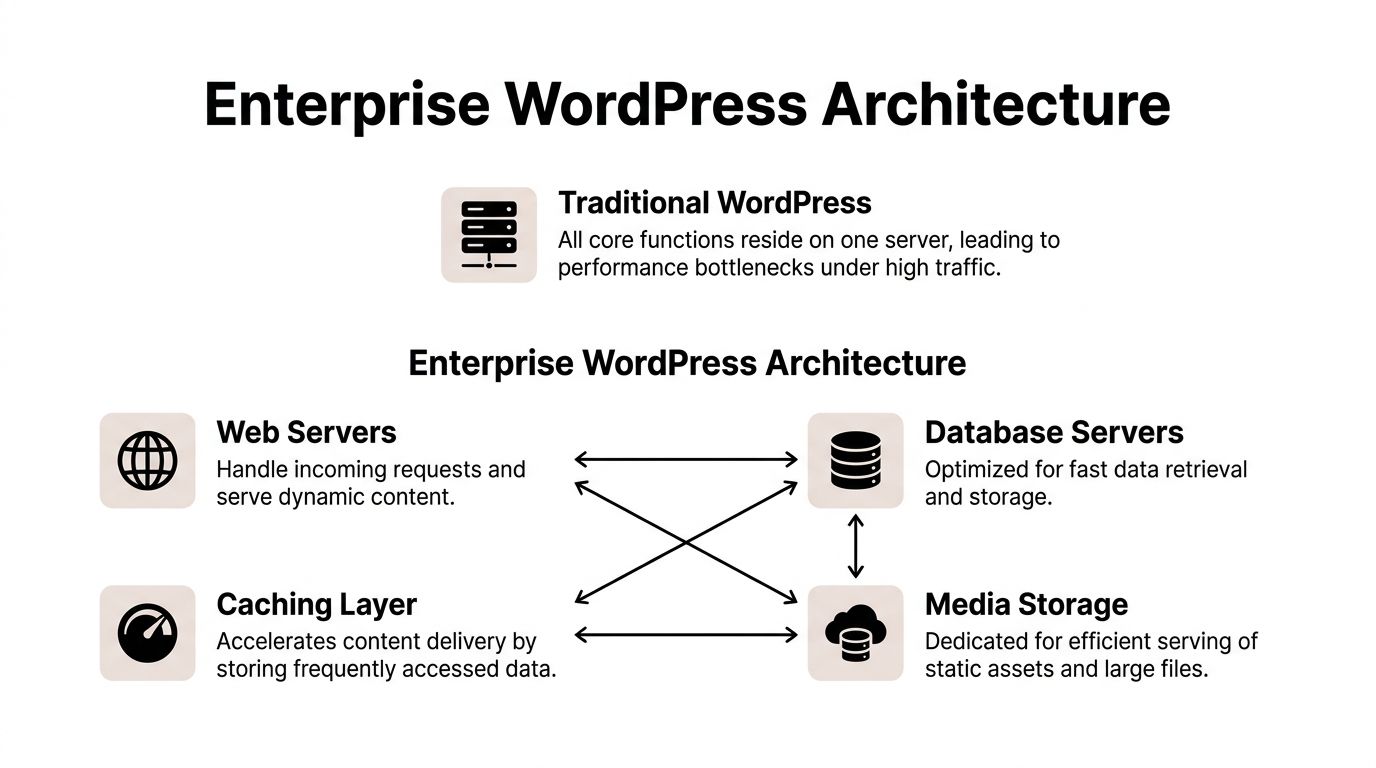
A traditional small WordPress site asks one server to do everything. Render pages, query the database, serve media, manage sessions, and absorb traffic spikes.
That is manageable until it is not.
When an eCommerce promotion lands, or a paid campaign ramps up, the bottleneck shows up fast. Database calls stack up. Cached pages help for some visitors but not all. Logged-in experiences, search, cart actions, and dynamic content begin to strain the setup.
What better architecture looks like
An enterprise setup usually separates responsibilities.
Web servers handle incoming requests. Databases focus on data retrieval and writes. Caching layers reduce repeated work. Media is served more efficiently. A CDN helps users across Australia get faster delivery, whether they are in Melbourne, Sydney, Brisbane, Perth, or regional areas.
The principle is straightforward. Each part should do its own job well.
The role of multisite
For businesses managing multiple brands, regions, store views, franchise locations, or campaign microsites, WordPress multisite can reduce administrative overhead by up to 70% by centralising themes, plugins, and user permissions, as described by Path to Project’s enterprise WordPress architecture guide.
That is useful when you want consistency without manually maintaining separate installs.
A well-planned multisite setup can help with:
- Brand governance: Shared design systems and approved components across multiple sites
- User control: Central permission management for internal teams and external partners
- Maintenance: Fewer duplicate update routines
- Expansion: Faster launch of regional or campaign-specific sites
Multisite is not always the answer. If brands are operationally very different, or if plugin conflicts are likely, separate installs may still be better. But for many businesses, it is one of the most practical enterprise WordPress tools available.
Hosting choices have trade-offs
There is no single best host for every enterprise wordpress project. The right choice depends on team capability, budget, compliance needs, and tolerance for complexity.
Managed enterprise hosting
This suits businesses that want specialist support and predictable operations. It is the best option when internal technical resources are limited.
Cloud infrastructure with a custom setup
This gives more control and can suit businesses with in-house engineering support or complex integration needs.
Hybrid approaches
Some businesses split workloads, use managed services for one layer, and custom infrastructure for another. That can work well, but only when governance is clear.
| Hosting path | Best fit | Main caution |
|—|—|
| Managed enterprise WordPress hosting | Brands that want expert support and lower operational burden | Less low-level control |
| Custom cloud stack | Businesses with advanced requirements and technical leadership | More internal responsibility |
| Hybrid model | Businesses balancing flexibility with support | More moving parts to coordinate |
Performance is built, not wished into existence
Fast sites do not come from one plugin or one speed score trick.
They come from choices such as:
- avoiding bloated page builders
- using purposeful caching
- keeping database activity clean
- serving media properly
- reducing unnecessary third-party scripts
- building reusable Gutenberg blocks instead of ad hoc layouts
That matters for conversion, but also for campaign stability. Paid traffic magnifies technical weaknesses. If your site is fragile, traffic reaches failure faster.
A capable WordPress developer Melbourne businesses work with should be able to explain architecture choices in business terms, not just server jargon.
Mastering Security Performance and Governance
Most businesses think of security, performance, and governance as separate topics. On enterprise wordpress builds, they are tightly connected.
A slow site creates pressure to add quick fixes. Poor governance creates risky permissions. Weak hosting decisions expose the whole stack. One weak area often drags the others down.
Security starts above the plugin layer
Much WordPress advice stops at update your plugins, use strong passwords, install a firewall plugin.
That is incomplete for enterprise use.
Server-level vulnerabilities enable 67% of successful WordPress compromises, and 95% of consultants do not specialise in the thorough security reviews enterprise setups need. Permission sprawl is also a primary risk, according to Mario Peshev’s analysis of enterprise WordPress obstacles.
That lines up with what I see in audits. The dangerous issue is not one vulnerable plugin by itself. It is the combination of weak infrastructure, old accounts, unclear access rules, and no proper release process.
Permission sprawl is a significant business risk
This catches growing teams.
Marketing staff need publishing access. An external paid media agency wants GTM access. A developer needs temporary admin rights. A former contractor still has an account. A store manager gets broad access because it was faster than configuring roles properly.
That is how a manageable site turns into a messy one.
What good access control looks like
- Role-based permissions: Give people the minimum access they need
- Named accounts only: Avoid shared logins
- Offboarding discipline: Remove former staff and agency access promptly
- Environment separation: Keep development, staging, and production clearly separated
Performance is governance too
Teams treat speed as a development-only issue. It is not.
If marketers can paste any script into the site, upload oversized assets, and add heavy tools without review, performance degrades. Then the dev team spends time cleaning up symptoms.
Governance protects speed.
A practical setup usually includes content rules, script management rules, media handling standards, and a release checklist for new features. That matters for eCommerce especially, where campaign tags, chat widgets, reviews tools, heatmaps, and ad scripts can stack up quickly.
Good enterprise governance is not bureaucracy. It is the minimum structure that lets a business move quickly without breaking revenue-critical systems.
A workable operating model
For most growing Australian businesses, a sensible enterprise WordPress operating model includes these habits:
Use staging properly
Test theme updates, plugin changes, checkout adjustments, and tracking changes before they hit live traffic.Treat analytics as part of the build
GTM, Google Analytics, enhanced eCommerce events, Meta Pixel, and Conversion API should be validated as part of deployment, not as an afterthought.Prefer custom Gutenberg blocks over unrestricted page builders
Editors keep flexibility, while development retains control over markup and performance.Audit third-party scripts regularly
A script that was useful six months ago may now be dead weight.Define who owns what
Marketing owns content. Development owns code. Someone owns hosting. Someone owns user access. Ambiguity causes gaps.
The payoff
When security, performance, and governance are handled together, the website becomes calmer to run.
Editors publish with confidence. Developers release with less risk. Paid campaigns have a more stable destination. Management spends less time reacting to avoidable issues.
That is what mature enterprise wordpress feels like in practice. Not flashy. Reliable.
Your Roadmap Migration Costs and Finding the Right Partner
A move to enterprise wordpress should be planned like an upgrade to business infrastructure, not treated like a theme refresh.
That is especially true if you are moving from Shopify, from a bloated WordPress build, or from a site where multiple agencies have layered in patches over time.

Start with a pre-migration audit
Before discussing design direction or features, get clear on what exists now.
That audit should cover:
- current content types and page templates
- product data and catalogue logic
- checkout dependencies
- app or plugin stack
- analytics setup in GTM and Google Analytics
- Meta Pixel and Conversion API status
- CRM or ESP integrations
- SEO-critical URLs and metadata
- redirect requirements
- user roles and admin access
- hosting and backup arrangements
A migration goes wrong when a business discovers hidden dependencies late. That is common with older sites where no one person understands the full stack anymore.
Cost should be framed as total ownership
Many businesses compare only the build cost.
That is too narrow.
Many sources claim WordPress has a lower TCO, but for Australian SMBs, the actual 3-year cost should include managed hosting, security audits, and team training, along with compliance considerations such as Privacy Act and data residency requirements, as discussed in WP Brigade’s piece on WordPress for enterprise websites.
That is the right way to assess it. Not cheap versus expensive. Better-fit system versus accumulating hidden costs.
The hidden costs businesses miss
These are the line items that get ignored early and become painful later:
| Cost area | Why it matters |
|---|---|
| Managed hosting | Stability and support become part of business continuity |
| Security reviews | Important before scale exposes weaknesses |
| Team training | Editors and marketers need to use the system properly |
| Analytics validation | Broken event tracking makes paid media optimisation harder |
| Ongoing maintenance | Updates, testing, and fixes do not disappear after launch |
| Compliance planning | Data handling choices affect hosting and process decisions |
If a proposal looks cheap because these are missing, the cost has not vanished. It has just been deferred.
How to choose the right partner
This matters as much as the platform itself.
A business that needs enterprise wordpress does not just need a coder. It needs a partner who understands architecture, UX, conversion, analytics, and how the site supports channels like Google Ads and Meta.
Ask practical questions.
Ask how they build content systems
Do they rely heavily on page builders, or do they create custom Gutenberg blocks? Can your team edit pages safely without design drift?
Ask how they handle tracking
Can they implement GTM cleanly, validate GA events, support Meta Conversion API, and preserve attribution through redesign or migration?
Ask how they manage environments
Do they use staging properly? How do they handle releases? Who approves production changes?
Ask about access control
How do they handle user roles, old accounts, and agency access? If they do not have a clear answer, governance is probably weak.
Ask how they think about paid media
A site built in isolation from performance marketing creates friction later. A strong digital marketing agency Melbourne businesses hire should be able to connect landing page logic, conversion tracking, and campaign strategy.
A good enterprise WordPress partner should be able to explain not only how the site will be built, but how your team will run it six months after launch.
Migration timing matters
Do not migrate during peak trade if avoidable. Give the team room to test thoroughly.
For eCommerce, product feeds, promotions, pixels, checkout events, and transactional flows all need careful review. For lead generation businesses, forms, call tracking, CRM routing, and offline conversion handling need the same attention.
A clean migration is not just a development job. It is a business operations project.
Conclusion Is Enterprise WordPress Your Next Move
Enterprise wordpress is not the right answer for every business.
If you are early-stage, have a simple catalogue, and your marketing is still fairly light, Shopify or a well-built standard WordPress site may be exactly what you need. There is no prize for overbuilding too soon.
But once the website starts limiting campaigns, slowing the team down, creating tracking issues, or raising constant security concerns, the conversation changes.
The decision usually comes down to three questions
First, has the website become important enough that downtime, delays, or platform limits now affect revenue?
Second, does the business need more control over content, integrations, and customer experience than the current platform comfortably allows?
Third, can the business support a more disciplined setup with proper hosting, governance, and ongoing maintenance?
If the answer is yes, enterprise wordpress is often the logical next step.
What good looks like
A strong enterprise setup gives your team speed without fragility.
Marketing can launch. Content can scale. Paid traffic lands on pages built for conversion. Tracking works. Permissions are controlled. Hosting is not an afterthought. Development stops being a series of patches and starts becoming a system.
That is the primary appeal. Not buzzwords. Operational confidence.
For Australian eCommerce brands and growing service businesses, that confidence can create room to scale harder, test more aggressively, and stop making platform decisions from a place of constraint.
If your current site feels like it is always one campaign away from stress, you are probably already seeing the signal.
If you want a team that can connect enterprise WordPress, Shopify, conversion tracking, and paid media properly, have a look at Alpha Omega Digital. We are a Melbourne-based agency working with businesses across Melbourne, Sydney, Brisbane, Newcastle, Perth, Adelaide, Darwin and Hobart. If your business has a paid ads budget of at least 3k a month, I would love to offer a low-risk deal: get a month of paid ads management free. Apply through the contact page.