A lot of businesses don’t realise they’ve outgrown their website until it starts costing them money.
At first, WordPress feels simple. You launch with a theme, a few plugins, a contact form, maybe WooCommerce, and it does the job. Then traffic grows. Your team grows. Marketing gets more ambitious. You add landing pages, tracking, GTM, Google Analytics, Meta Conversion API, Shopify integrations, custom forms, maybe a booking flow, maybe ERP or CRM sync. That’s when the cracks show.
I’ve built sites like this for growing Australian businesses, and the pattern is always the same. What looked like a web design problem turns out to be an operations problem, a security problem, and a revenue problem. Enterprise wordpress development is what happens when you stop treating the website like a brochure and start treating it like core business infrastructure.
For a business owner comparing a freelancer, a generic theme setup, and a proper marketing agency melbourne team, that distinction matters. The cheap option can work for a while. It rarely works for long.
Is Your Website Holding Your Business Back?
A business can be doing well on paper and still be held back by its website.
I’ve seen this with ecommerce brands that are spending more on Google Ads and Meta ads, getting more traffic, and wondering why revenue isn’t rising at the same pace. The issue often isn’t the campaign. It’s the site underneath it.
The familiar growth ceiling
It starts with a few warning signs.
- Sales periods become stressful: Every promotion feels risky because the site slows down or breaks under traffic.
- Simple updates take too long: Your team is scared to change content because one plugin conflict can knock out a page.
- Tracking becomes unreliable: Google Tag Manager, GA4, Meta Pixel, and Conversion API stop lining up cleanly.
- Security feels uncertain: Nobody is fully sure which plugins are safe, who has admin access, or how updates are being handled.
- The store feels patched together: WordPress, Shopify, a CRM, a booking tool, and ad platforms are all connected, but not in a clean way.
That’s not merely annoying. It affects lead flow, ad efficiency, customer trust, and your internal workload.
What this looks like in practice
A growing retailer might run WordPress for content and Shopify for checkout. On top of that, they want Google Shopping, PMAX, Meta ads creative testing, server-side tracking, email automation, and product feed control. None of that is unusual anymore.
The problem is that a standard setup frequently isn’t built for that level of complexity. It was built to launch quickly, not to support a business that now depends on digital channels every day.
A slow, unstable site doesn’t merely frustrate users. It makes every other marketing investment less efficient.
For a digital marketing agency melbourne client, this is often a critical turning point. They don’t need “a nicer website”. They need a platform that can support growth without creating chaos every time the business moves faster.
What Is Enterprise WordPress Development Really?
Enterprise wordpress development isn’t a special edition of WordPress. It’s a different way of building with WordPress.
That matters because many businesses hear the word “enterprise” and assume it means expensive hosting, a fancy theme, and a bigger invoice. It doesn’t. It means the website is being treated as a mission-critical system.
It’s about architecture, not appearance
A normal site can look polished and still be fragile underneath.
An enterprise build is designed around questions like these:
- How are changes tested before they go live?
- How do multiple staff work in the CMS without stepping on each other?
- What happens when traffic surges?
- How are plugins controlled?
- How does the site connect to Shopify, Salesforce, Xero, a booking system, or a custom app?
- What’s the rollback plan if an update fails?
Those aren’t edge-case concerns. For established businesses, they’re everyday concerns.
The difference between standard and enterprise
Here’s the practical distinction I use with clients.
| Build type | Typical setup | What usually happens |
|---|---|---|
| Standard WordPress site | Premium theme, many plugins, shared workflows | Fast to launch, but harder to maintain as complexity grows |
| Enterprise WordPress site | Custom architecture, controlled integrations, governed workflows | Slower to scope, but far more reliable and scalable |
A standard setup can be fine for a smaller business. An enterprise setup becomes necessary when the site supports serious lead generation, ecommerce operations, editorial teams, member access, or multi-system data flow.
What it does for the business
Enterprise wordpress development helps with four things that owners and marketing managers care about.
Reliable publishing and updates
Your team can launch campaigns, publish content, and update product or service pages without fearing that one change will break another.
Better control over who does what
Not every user should have admin access. In bigger teams, editors, marketers, managers, developers, and external contractors all need different permissions.
Cleaner integrations
A strong wordpress web developer earns their keep by doing this. The job isn’t merely making pages look good. It’s making systems work together properly.
That can include:
- GTM and GA4 setups
- Meta Conversion API installation
- Shopify API connections
- Custom Gutenberg blocks
- CRM and ERP sync
- Call tracking and booking workflows
- Twilio-based lead handling
A better editorial experience
When custom blocks are built well in Gutenberg, internal teams can move faster without wrecking layouts. That’s a big deal for ecommerce brands running offers, landing pages, local SEO pages, and category content at speed.
Practical rule: If your website drives revenue every week, build it like software, not like a once-off brochure.
That’s the heart of enterprise wordpress development.
Business Triggers That Signal an Enterprise Upgrade
A Melbourne retailer runs a promotion on Thursday night, paid traffic ramps up, and by Friday morning the site is slow, orders are half-recorded, and the marketing team has no confidence in the numbers. That is usually the point where “enterprise” stops sounding like agency jargon and starts looking like risk control.
Traffic spikes are exposing weak foundations
A good week should not put the website under pressure.
If campaign launches, EOFY sales, media coverage, or product drops regularly cause slowdowns, checkout issues, or admin timeouts, the current setup is already costing money. I have seen this with Australian ecommerce stores that looked fine at average traffic levels but struggled the moment paid media started working. The problem was rarely design. It was usually weak hosting, too many plugin dependencies, and no safe deployment process.
For businesses at that stage, reviewing the best WordPress hosting options in Australia is often part of the fix, because local support, environment management, and performance under load matter a lot more than headline pricing.
Your systems are starting to fight each other
The clearest trigger is operational sprawl.
A growing business might be running WordPress, Shopify, GA4, GTM, Meta ads, a CRM, Xero, Klaviyo, SMS tools, and a booking or enquiry system at the same time. Each tool can be reasonable on its own. The trouble starts when data has to move cleanly between them and nobody is sure which platform is the source of truth.
That is where a basic build starts to crack. Plugin stacking can get a site online quickly, but it often creates duplicate tracking, messy customer records, unreliable event data, and hard-to-diagnose performance issues.
Teams need governance, not just logins
Once several people touch the site every week, process matters as much as code.
Common warning signs include:
- Pages published without review
- Different teams using different layouts and components
- Admin access given out as the default
- Theme or plugin updates applied directly on live
- No clear owner for technical decisions
In practice, those problems slow down campaigns, create avoidable brand issues, and increase the chance of a security incident. Enterprise WordPress usually becomes the right move when the website needs rules, approvals, and accountability instead of informal habits.
Compliance has become a business issue
Australian businesses hit this trigger earlier than many overseas guides suggest.
If the site collects leads, stores customer details, processes payments, or passes data into CRMs and ad platforms, privacy and compliance stop being background concerns. Melbourne health providers, education groups, professional services firms, and larger retailers often need tighter control over user access, audit trails, hosting decisions, and third-party scripts. Data handling expectations in Australia are not identical to the US, and that changes how a WordPress stack should be set up.
I would treat this as an upgrade signal any time leadership starts asking where customer data lives, who can access it, and what happens if a plugin introduces a security problem.
Marketing performance is flattening for technical reasons
Some sites still look acceptable in a report while limiting growth.
The usual signs are familiar:
- Landing pages that are hard to test or launch
- Inconsistent attribution across GA4, Meta, and CRM data
- Slow mobile pages hurting paid and organic performance
- Forms that send low-quality or incomplete lead data
- Feed, tracking, or checkout issues that reduce ecommerce efficiency
At that point, the problem is not only campaign strategy. The platform is setting the ceiling.
If your team is spending more time working around WordPress than using it to grow the business, the site has already outgrown its original build.
Core Architecture for Scale and Security
A Melbourne retailer runs a major EOFY campaign, traffic jumps, the site slows, forms fail, and support is left chasing problems instead of sales. That is usually the point where "enterprise" stops sounding theoretical.
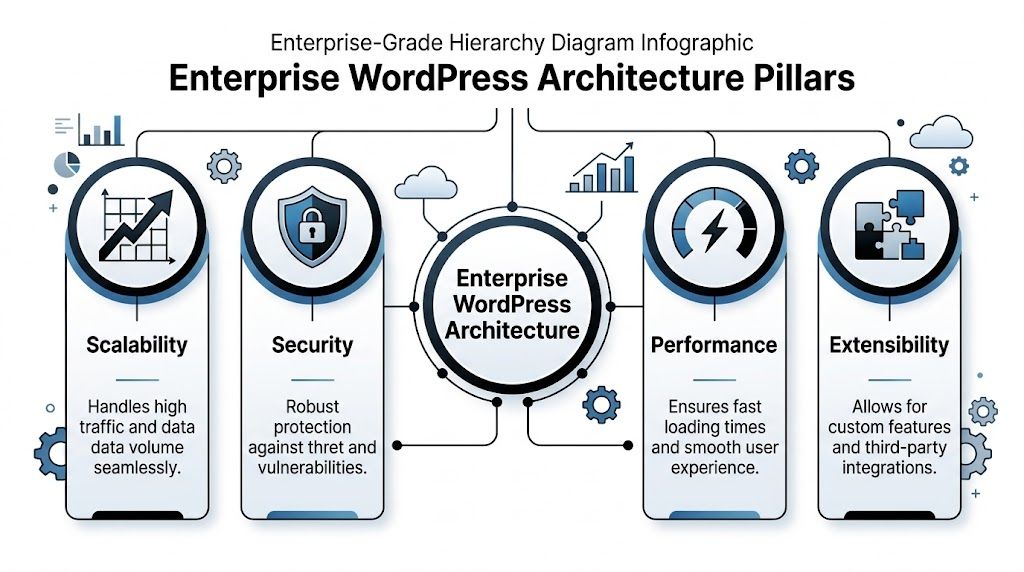
Enterprise wordpress development starts with architecture decisions that protect revenue, reduce operational risk, and give teams room to grow without rebuilding every 18 months.
Scalability
Hosting shapes far more than uptime. It affects release processes, backup quality, recovery speed, editor workflows, and how well the site handles a spike from paid media, TV, radio, or seasonal demand.
For Australian businesses, especially those balancing local support expectations, privacy concerns, and tighter budgets than large US enterprises, reviewing the best WordPress hosting options in Australia is a sensible starting point before choosing a build partner.
A scalable setup usually includes:
- Separate development, staging, and production environments
- Git-based deployments instead of live file edits
- CDN support for national traffic distribution
- Infrastructure that can absorb campaign and seasonal spikes
- Role-based access controls instead of shared admin logins
I have built sites where the difference between a mid-market stack and a properly planned one was simple. One survived a traffic surge. The other turned a successful campaign into a support issue.
Security
Security is not a final checklist item. It needs to be built into how the site is configured, who can change it, and how those changes are approved.
That matters more in Australia than many global guides admit. A business handling health enquiries, finance leads, education records, or ecommerce transactions has to think about access, logging, hosting, payment flows, and third-party scripts from day one. If leadership is asking where customer data sits and who can touch it, the WordPress setup needs tighter controls.
The baseline should look like this:
| Security layer | Good practice | Weak practice |
|---|---|---|
| Plugin governance | Approved plugin list and documented review process | Anyone installs anything |
| Access control | Role-based users, SSO where appropriate | Shared admin accounts |
| Deployment | Version control and staged releases | Editing live site files |
| Monitoring | Logging, alerts, and routine review | Waiting for a customer complaint |
For larger organisations, SAML SSO, stricter permissions, and audit logs are often worth the extra setup time. They add complexity, but they also make incidents easier to prevent and far easier to investigate.
Performance
Performance problems usually come from architecture, not one bad image.
I regularly see enterprise WordPress sites weighed down by bloated themes, heavy page builders, unnecessary plugins, and caching that was never configured properly. The business impact is straightforward. Paid traffic becomes less efficient, organic rankings are harder to hold, and conversion rates drop on mobile first.
A better approach is usually a lighter custom build with well-scoped Gutenberg blocks, disciplined plugin choices, and caching set up at the server and application level. For the right project, that can include object caching, full-page caching, image optimisation, and CDN delivery working together instead of fighting each other.
Headless WordPress also has a place here. It is not the default answer, and I would not recommend it for every Australian SMB. It adds cost, development overhead, and hosting complexity. But for businesses that need highly customised front-end experiences, multiple content outputs, or tighter separation between content and application layers, it can be the right call.
Extensibility
Architecture becomes visible here to the business.
A strong enterprise build connects WordPress to the systems the team already relies on, using stable APIs and planned workflows instead of ad hoc plugins. That might include Salesforce, HubSpot, a booking platform, an ERP, a stock system, or a custom quoting tool.
For ecommerce brands, this often overlaps with work done by Shopify development partners. WordPress can handle SEO content, campaign landing pages, and brand storytelling, while Shopify handles catalogue, checkout, and order management. The value comes from making the two platforms work together cleanly.
Typical integration examples include:
- Shopify API for product or order display
- Meta Conversion API for server-side event tracking
- Google Tag Manager containers for event consistency
- CRM sync for lead routing
- Twilio workflows for inbound call handling
- Calendly or custom booking logic
I have also seen service businesses get more value from workflow improvements than from a visual redesign. A tradie, clinic, restaurant, or beauty business that routes calls properly, captures leads after hours, and books appointments automatically will usually see a better commercial result than one that only refreshes the homepage.
A good enterprise WordPress stack makes marketing, sales, and operations easier to run. If every integration introduces new failure points, the architecture needs work.
Governance Workflows and Long-Term Maintenance
A Melbourne retailer launches a new campaign on Thursday afternoon. Marketing updates the landing page, someone adds a plugin to support a form change, and by Friday morning conversion tracking is broken, the mobile layout is off, and nobody is sure who approved what. That is usually how enterprise WordPress problems manifest in practical scenarios. Not as a dramatic hack, but as a slow drain on leads, reporting, and team confidence.
Governance beats heroics
Enterprise sites need operating rules, not one reliable person who remembers how everything works.
I have built and inherited WordPress setups where the business depended on a single staff member, freelancer, or agency contact. It works until that person goes on leave, changes roles, or misses one update window. For Australian businesses with multiple stakeholders across marketing, sales, compliance, and operations, that risk gets expensive quickly.
A workable governance model answers a few practical questions before problems start:
- Who can publish content
- Who approves design changes
- Who manages plugins and themes
- Who reviews tracking changes
- Who owns security updates
- Who has final sign-off before deployment
Clear ownership keeps the site stable and keeps internal politics out of release decisions.
Why CI/CD matters in plain English
CI/CD is just a disciplined release process. Changes are tracked, tested, reviewed, and pushed live in the right order.
For any serious wordpress developer or wordpress developers team, that should be normal. Code goes through version control. Content or feature changes are checked on staging. Deployment follows a repeatable process instead of a late-night login to the live server.
That matters for more than development hygiene. It protects enquiry forms, paid landing pages, GA4 events, checkout journeys, and lead routing. If a business is spending real money on Google Ads, Meta, SEO, or email, sloppy deployment wastes that budget.
The biggest maintenance mistake isn’t skipping updates. It’s updating without a process.
Plugin governance is a business issue
Plugin sprawl is one of the fastest ways a good WordPress build turns into a maintenance burden.
The pattern is familiar. A campaign needs a popup, a booking tweak, a schema tool, a temporary redirect manager, a form add-on, then a duplicate SEO feature because nobody checked what was already installed. Six months later, the admin is cluttered, update conflicts are common, and nobody can say with confidence which plugins are safe to remove.
Mature teams use an approved stack with review rules. That is especially important in Australia where privacy obligations, customer data handling, and uptime expectations are harder to ignore once a site supports lead generation or ecommerce at scale.
A sensible policy looks like this:
| Area | Healthy workflow | Risky workflow |
|---|---|---|
| Plugins | Reviewed and approved | Installed ad hoc |
| Themes | Custom or tightly managed | Purchased and heavily modified |
| Updates | Tested on staging | Run on live site |
| Monitoring | Unified dashboard | No central view |
If you are comparing agencies, ask how they document plugin approvals, rollback plans, and release ownership. The right WordPress web design company in Australia should be able to answer that clearly, without hand-waving.
A quick visual explainer helps if you want to see the thinking behind structured deployment workflows:
Maintenance should support marketing, not block it
Good maintenance gives marketing room to work inside guardrails.
That means the team can launch a landing page, update local service content, test new offers, refine forms, or change product messaging without asking a developer to rebuild layouts every time. In my experience, custom Gutenberg blocks do this well when they are planned properly. They give content teams flexibility while protecting brand consistency, page structure, and performance.
This point is often overlooked.
If every campaign request turns into a dev ticket, the site becomes a bottleneck. If everyone gets full freedom in the CMS, brand quality and tracking accuracy slip. Enterprise WordPress works best in the middle. Fast content changes, controlled components, clear approvals, and a maintenance rhythm the business can sustain.
How to Choose Your Enterprise Partner in Australia
A Melbourne retailer spends $20,000 on a rebuild, launches on time, then hits trouble three months later. Forms stop syncing with the CRM. Product pages slow down after a plugin update. Nobody is sure who approves changes, who owns releases, or how to roll back safely. That is usually a partner problem, not a WordPress problem.
For Australian businesses, the right enterprise partner needs to understand more than design and development. They need to handle compliance, integrations, hosting decisions, reporting, and the commercial pressure behind the site. I have seen cheap builds turn into expensive recovery projects once the business needs proper workflows, local support hours, or help tying the website to sales and marketing systems.
Why Australian experience matters
Global enterprise WordPress advice often stays high level. Australian businesses have more practical constraints.
Privacy obligations, local hosting preferences, stakeholder approval cycles, and platform choices all affect the build. A Melbourne health provider, franchise group, or ecommerce brand usually needs clearer answers on data handling, support coverage, and system ownership than a generic agency sales deck provides. If the partner cannot explain how they approach Australian privacy expectations or where key systems are hosted, keep asking.
Local market knowledge also helps on the commercial side. Traffic patterns, mobile performance in Australia, GST and checkout requirements, and local campaign tracking all influence technical decisions. A partner who works in this market will usually spot these issues earlier.
Questions to ask in the first meeting
A good wordpress development company should answer direct questions without drifting into jargon.
| Area | Ask this | Strong answer sounds like |
|---|---|---|
| Delivery process | How do you handle staging, version control, and releases? | A clear Git workflow, separate environments, release approvals, rollback steps |
| Security | How do you review plugins and manage permissions? | Approved plugin process, least-privilege access, update policy, audit trail |
| Integrations | Have you connected WordPress to Shopify, CRMs, ERPs, or custom APIs? | Specific project examples, limitations, and how data flows between systems |
| Performance | How do you improve Core Web Vitals and mobile speed? | Image, code, cache, hosting, and template decisions tied to measurable outcomes |
| Support | What happens after launch? | Named support process, monitoring, response times, maintenance schedule |
| Compliance | How do you handle AU hosting, privacy, and consent requirements? | Practical familiarity with Australian business obligations and implementation trade-offs |
The useful follow-up question is, “Who owns what after go-live?” That quickly shows whether the agency has worked on serious builds or mainly smaller brochure sites.
Red flags worth taking seriously
Some problems appear before a proposal is even signed.
- They use plugins as the default answer for core business logic
- They cannot explain deployment in plain English
- They treat staging as optional
- They talk about visual design but avoid data, integrations, or governance
- They never ask about CRM, analytics, lead handling, or ad tracking
- They have no clear view on hosting location, privacy, or access control
- They cannot show examples of support after launch
If you are comparing providers, this guide on choosing the right WordPress web design company in Australia is also worth reading because it focuses on fit, process, and long-term capability.
Choose a partner who can talk business, not just code
Enterprise WordPress projects succeed when the technical team understands how the business makes money.
That means they can discuss lead quality, sales handover, campaign landing pages, product data, reporting accuracy, and editor workflows with the same confidence they discuss hosting or code reviews. For an Australian SMB or ecommerce brand, that matters more than hearing that the agency has worked with a long list of plugins.
I would also ask for examples that match your operating model. A service business may need multi-location SEO, form routing, and CRM syncing. An ecommerce store may need WordPress and Shopify working together without breaking attribution, page speed, or content workflows. Those are different problems and they should be treated that way.
A strong partner asks better questions early. How many people publish content? What breaks if the CRM sync fails? Which reports does management read? What needs approval from legal or operations? Good answers here usually tell you more than a polished proposal.
Good enterprise partners do not just ask what pages you want. They ask how the business runs, who owns risk, and what the site needs to improve commercially.
Cost and ROI for Australian Businesses
Vague advice can become expensive in this area. Enterprise wordpress development isn’t cheap, but the wrong frame is “How little can we spend?”
The better question is, “What is the current website costing us in lost conversions, wasted ad spend, slow operations, and avoidable risk?”

Australian economics matter
Much global content talks about headless WordPress and enterprise ROI in broad terms. That’s not enough for Melbourne businesses making a budget decision.
Local economics shift the equation. In the verified AU-specific data, Melbourne development rates are noted as 12% above US equivalents, and AU agencies report 2.8x ROAS uplift from headless WordPress combined with ads automation. The same dataset gives a practical benchmark where a $45K AUD headless setup can return 180% ROI in 9 months for a Victorian service firm, especially when the build fixes conversion issues that can cost some ecommerce owners over $200K AUD per year (multidots.com).
That doesn’t mean every project should go headless. It means ROI needs to be assessed with local costs and local ad economics in mind.
What drives cost
The main cost factors are typically:
- Custom design and theme development
- Complex integrations
- Migration work
- User roles and governance setup
- Tracking and analytics implementation
- Testing and deployment workflow
- Ongoing support and optimisation
A site with custom Gutenberg blocks, Shopify API integration, GTM, GA4, Meta Conversion API, advanced forms, and ad landing page requirements is not the same project as a brochure site with a contact form.
ROI is bigger than direct sales
I typically look at return across four areas.
Better ad efficiency
A fast, stable site improves the quality of traffic you’re already paying for. That matters whether you’re running campaigns through a Google Ads agency, a Facebook Meta ads agency, or both.
Stronger ecommerce conversion
For brands selling online, site performance, cleaner product flows, better mobile UX, and accurate tracking all contribute to higher quality optimisation. That’s why this work often sits close to an ecommerce marketing agency strategy, not separate from it.
Lower operational friction
When your team can publish, edit, launch, and report without relying on hacks, hidden work disappears. That’s a return, even if it doesn’t show up as a single sales number.
Reduced risk
Security governance, cleaner deployments, and less plugin sprawl lower the chance of expensive incidents and rushed rebuilds.
The best enterprise builds don’t only generate more revenue. They remove waste from the whole system.
Your Next Steps and Enterprise FAQ
If your business depends on its website for sales, leads, tracking, or operations, enterprise wordpress development is not overkill. It’s frequently the point where the site finally catches up with the business.
The shift is largely mental. Stop thinking in pages and plugins. Start thinking in systems, workflows, governance, and commercial performance.
When should I choose enterprise WordPress over Shopify
Choose WordPress when content, SEO structure, custom publishing workflows, or complex integrations are central to the business.
Choose Shopify when the commerce layer is the main priority and your catalogue, checkout, and store operations fit Shopify cleanly. Many ecommerce brands end up with both. WordPress handles content and landing page flexibility, while Shopify handles transactions. A capable shopify developer, shopify developers, or shopify developer api specialist often works alongside a strong WordPress team in these scenarios.
Can’t I just use a premium theme
You can, if the site is somewhat simple.
You likely shouldn’t if the business needs custom workflows, significant performance, controlled permissions, reliable tracking, and multiple integrations. Premium themes frequently save money upfront and create limitations later.
What’s the difference between a WordPress developer and a Shopify developer
A wordpress developer, wordpress-developers, or wordpress development melbourne specialist focuses on content architecture, CMS workflows, custom blocks in Gutenberg, plugin governance, and broader integration flexibility.
A Shopify specialist focuses more tightly on store architecture, theme customisation, Shopify CLI workflows, app logic, and platform-specific API patterns. Businesses using both platforms typically need each role to stay in their lane and collaborate effectively.
What should I do next
Audit your current site thoroughly.
Look at:
- How updates are deployed
- How many plugins are business-critical
- How tracking is being managed
- How the site performs during campaigns
- How content and permissions are controlled
- How well WordPress and Shopify or other systems are connected
If the answers feel messy, they likely are.
If you're a business with a paid ads budget of at least 3k a month, I'd love to offer you a low risk deal. Get a month of paid ads management FREE. Apply now through the contact page. Alpha Omega Digital is a Melbourne-based agency working with clients across Sydney, Brisbane, Newcastle, Perth, Adelaide, Darwin and Hobart. If you need help with enterprise WordPress, Shopify, paid media, or conversion-focused web work, get in touch.