You launch a campaign. The creative is sharp, the offer is right, Google Ads or Meta finally starts sending qualified traffic, and your numbers look healthy for the first time in weeks.
Then the site buckles.
I’ve seen this with ecommerce brands that did the hard part well. They fixed product pages, improved tracking, cleaned up the checkout flow, and got their paid traffic dialled in. But they were still sitting on hosting that was built for a brochure site, not a revenue engine. The result is predictable: Slow pages, checkout lag, random errors in peak periods, and support teams that reply after the damage is done.
This provides the context for enterprise wordpress hosting. It is not a vanity upgrade. It is what happens when the website becomes tightly connected to paid media, conversion rate, customer trust, and operational stability.
For a marketing agency Melbourne businesses work with on growth, this is one of the most common infrastructure ceilings I see. Brands often assume poor ROAS means the campaign needs work. Sometimes it does. Sometimes the ads are fine and the hosting is the bottleneck.
Introduction When Good Marketing Breaks Bad Hosting
A Melbourne ecommerce store does not need a traffic problem to feel hosting pain. It only needs one strong campaign.
When ad traffic rises fast, weak hosting shows itself immediately. Product pages start loading unevenly. Add-to-cart actions feel delayed. The admin slows down when the team is trying to update stock, publish banners, or check orders. Then support blames plugins, the plugins blame the host, and the owner loses confidence in every part of the stack.
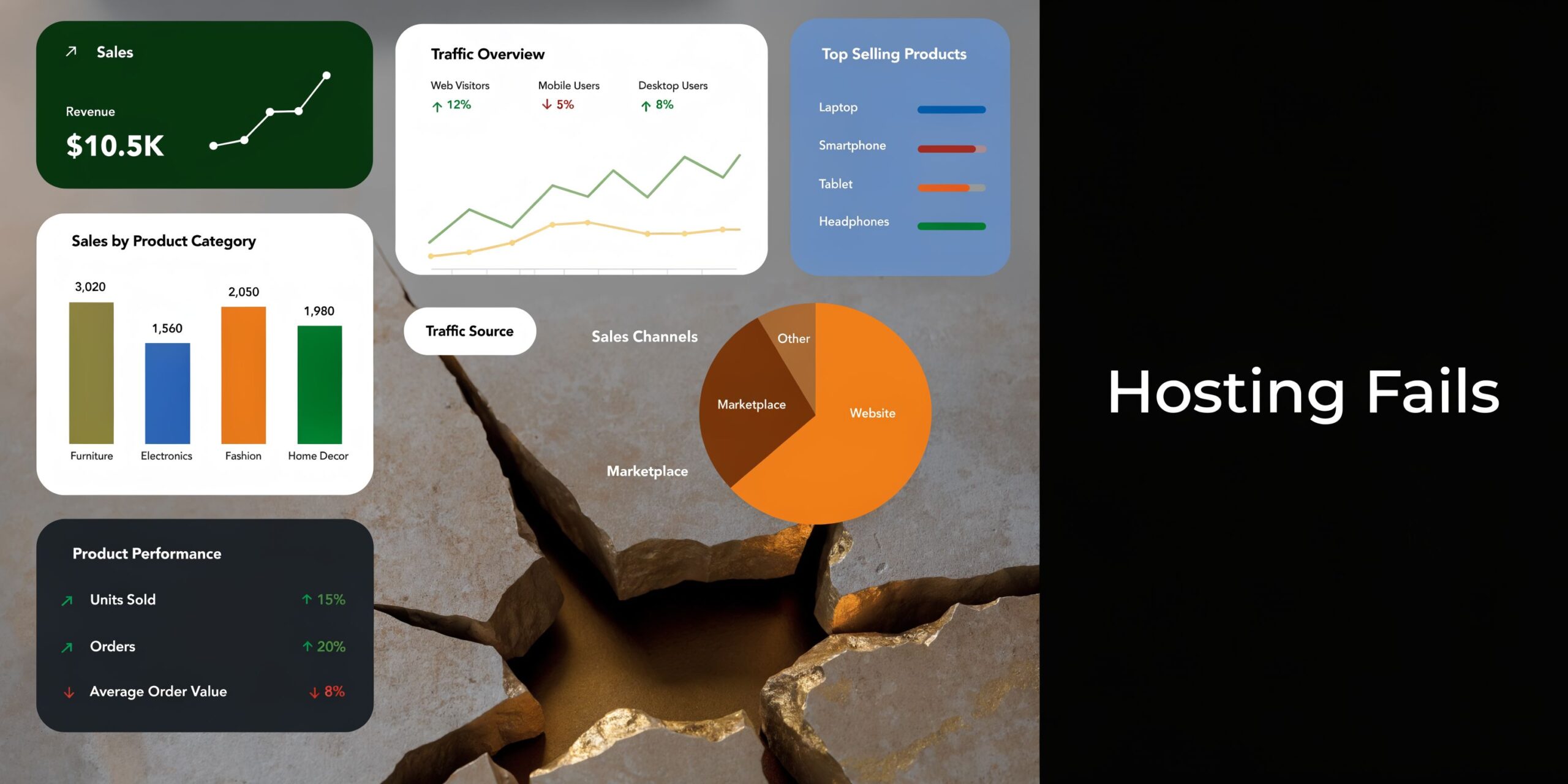
Hosting stops being a background decision here and becomes a commercial one. A Google study found that a 1-second delay in mobile page load times can impact conversion rates by up to 20% (Think with Google). If you run an ecommerce store and buy traffic every day, that delay is not abstract. It affects conversion rate, wasted ad spend, and the confidence your team has in scaling budgets.
What this looks like in practice
The warning signs are rarely dramatic at first.
- Backend slowdown: Your team clicks around WooCommerce and waits.
- Campaign instability: Paid traffic lands on pages that perform differently depending on server load.
- Checkout friction: Customers hit delays at the worst possible point in the funnel.
- Launch anxiety: Big promotions feel risky because the site may not hold up.
I do not look at hosting as a separate technical topic anymore. For ecommerce, it sits right beside feed quality, landing page design, event tracking, and offer strategy. If the server layer is weak, every improvement above it becomes less reliable.
Key takeaway: Good marketing can expose bad hosting faster than almost anything else.
The businesses that move cleanly through growth stages usually make this shift earlier than expected. They stop buying the cheapest infrastructure that can keep the site online and start investing in infrastructure that can support more sessions, more transactions, heavier plugin stacks, and more complex reporting.
That is the difference between a site that merely exists and a site that can handle sustained acquisition.
What Enterprise WordPress Hosting Means
Many people hear enterprise wordpress hosting and think it means a larger server. That is too narrow.
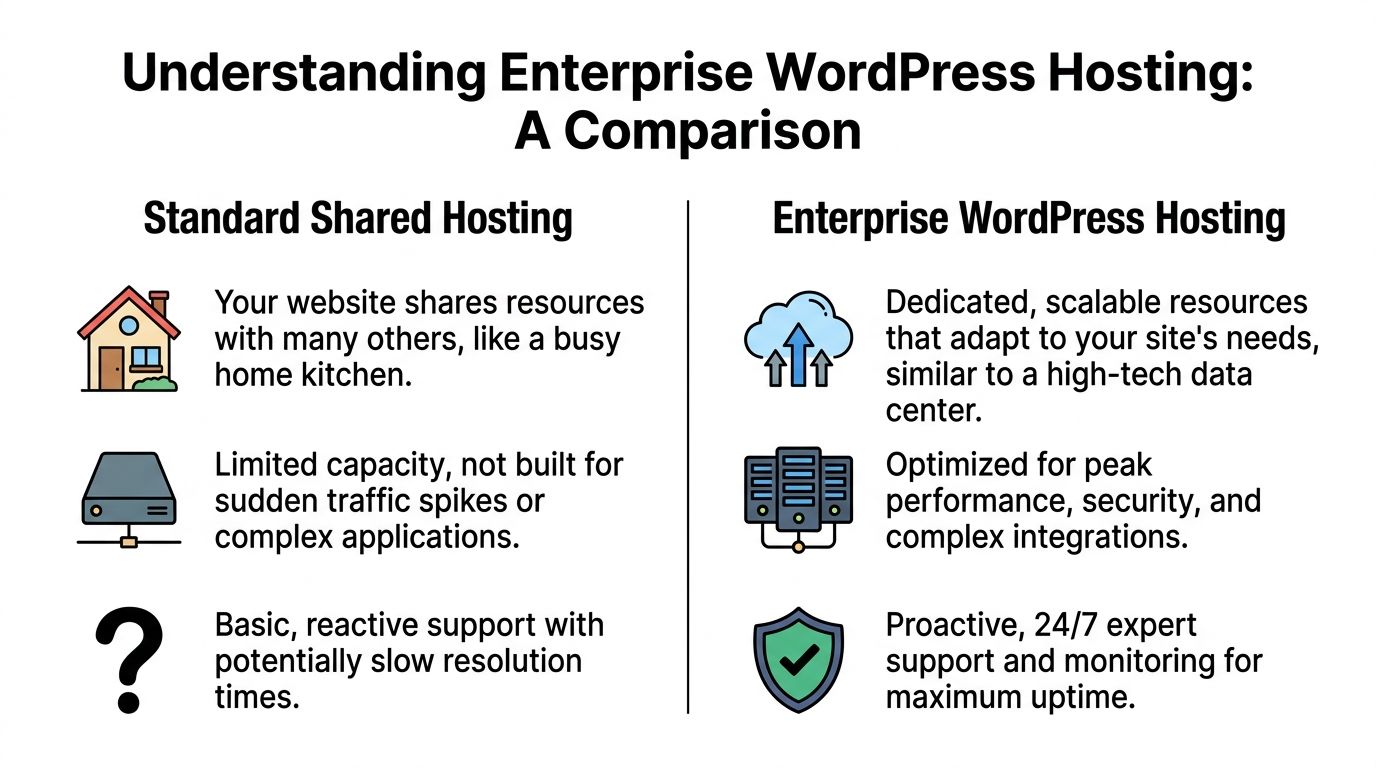
The better way to think about it is this: Shared hosting is a home kitchen. It can make dinner. It cannot reliably cater a packed event. Enterprise hosting is a commercial kitchen with dedicated stations, proper workflow, specialist equipment, and staff who know what happens when service gets busy.
It is a service model, not just infrastructure
At lower hosting tiers, you mostly rent space.
At the enterprise level, you are paying for an operating environment. That includes infrastructure choices, performance tuning, security controls, update processes, isolation, monitoring, and support from people who understand WordPress and WooCommerce behaviour under load.
That distinction matters because most ecommerce failures do not come from one dramatic issue. They come from several smaller problems combining at the same time. A plugin update introduces friction. Cache behaviour is inconsistent. Database queries slow down during a sale. Someone adds a script that pushes the page over the edge. Basic hosting leaves you to untangle that stack yourself.
Enterprise hosting is built to reduce that fragility.
What changes when you move up
The practical shift looks like this:
- Resources are isolated: Your site is not competing with unknown neighbours for the same pool of compute.
- Performance is tuned for WordPress: Caching, database handling, and server rules are designed around how WordPress behaves.
- Support gets more technical: You are not dealing with a generic first-line help desk reading scripts.
- Operational risk drops: Backups, monitoring, and incident response are handled with more discipline.
A lot of businesses reach for a VPS before they reach for enterprise. Sometimes that is reasonable. But a VPS often just gives you more responsibility, not better outcomes. You still need someone who understands PHP versions, database load, caching layers, update sequencing, and rollback planning. If your store is doing real volume, self-managing that stack becomes a hidden tax on the business.
Enterprise hosting suits stores with moving parts
This matters even more when the website is not simple.
An ecommerce setup might include WooCommerce, a page builder or custom Gutenberg blocks, a subscription layer, event tracking through GTM, Meta Conversions API, search tools, shipping integrations, email platform scripts, reviews, and custom checkout logic. That is a lot of dependency. It only takes one weak point to slow down the whole experience.
Practical rule: If your store depends on paid traffic and several core integrations, your hosting choice is now a business system decision.
That is why I explain enterprise hosting to clients as part infrastructure, part risk management, part growth readiness. It is not there to impress anyone. It is there so your site can absorb marketing success without falling apart.
The Core Pillars of Enterprise Grade Performance
Enterprise hosting needs to do three jobs well. It needs to keep the site fast, keep it stable when demand jumps, and keep it secure while the stack gets more complex.
Those are the pillars that matter in practical scenarios.

Speed that holds up under pressure
Fast on an empty site is easy. Fast during peak usage is the ultimate test.
In the Australian region, top-tier enterprise WordPress hosts use dedicated NVMe SSD storage and isolated CPU cores on platforms like Google Cloud to achieve sub-second load times and 99.99% uptime SLAs, and this architecture can handle over 10,000 concurrent users without performance degradation (Parachute Design). For ecommerce brands running serious Google Ads campaigns, that matters because campaign success often creates burst traffic rather than a smooth, predictable load.
The key word there is dedicated. Shared environments create I/O contention. Too many sites ask for resources at once and everybody slows down. With enterprise infrastructure, your store has room to breathe.
A proper setup usually includes:
- Dedicated NVMe storage: Faster data access for product pages, carts, and checkout actions.
- Isolated CPU allocation: Better consistency when traffic rises.
- CDN delivery: Static assets get served closer to users, which helps stores selling across Australia.
- Adaptive caching: Repeated requests are handled efficiently without breaking dynamic ecommerce behaviour.
Scalability without manual scrambling
The worst version of “scaling” is when your team has to watch campaigns nervously and hope the site survives.
Enterprise setups usually rely on multi-tier architecture, load balancing, and more disciplined caching logic. That means traffic is distributed more cleanly. One spike does not have to become one outage. Your store can absorb campaign surges, seasonal promotions, or a burst from influencer activity without someone jumping into panic mode.
For paid media, this has a very practical effect. It gives you permission to scale what is working.
If a campaign suddenly lifts, you should be deciding whether to expand the budget, not whether to pause ads because the server is struggling.
Signs your current setup does not scale well
- Traffic spikes cause random slowness: The site performs well until volume lands quickly.
- Admin actions lag during promotions: Your team struggles to make updates when speed matters most.
- Caching creates inconsistent experiences: Some users get a fast page, others get a broken or stale version.
- Server limits become part of marketing planning: You reduce spend because infrastructure cannot keep up.
Security built around the attack surface
Security conversations often focus too much on WordPress core and not enough on the attack surface.
For most ecommerce stores, the danger sits in the surrounding stack. Plugins, themes, third-party integrations, custom code, admin access, and rushed updates create more exposure than the CMS itself. Enterprise hosting deals with that reality by tightening the environment around the site, not just around the server.
That usually includes isolated environments, malware scanning, managed updates, stronger review processes, access controls, and monitoring that catches problems before customers notice them.
My view: A secure store is not the one with the longest feature list. It is the one with fewer weak points, cleaner update discipline, and better isolation when something goes wrong.
Why this matters to a developer and to a marketer
Performance and security are not separate tracks.
A bloated site on weak hosting hurts the customer experience. A brittle site under poor update discipline hurts the business. The development team feels it in debugging time. The marketing team feels it in conversion quality. The owner feels it in lower trust and higher operating stress.
That is why a serious ecommerce stack needs infrastructure that supports both code and campaigns. If the site is central to acquisition, enterprise hosting stops being overkill and starts looking like basic commercial sense.
Beyond Tech Specs The Business and Support Guarantees
A high-growth store rarely fails at the quiet times. It fails at the worst possible moment. Meta ads are converting, email traffic lands at once, support tickets start coming in, and checkout slows or breaks while the campaign is still spending. At that point, server specs stop being an abstract technical discussion. Hosting starts showing up in ROAS, conversion rate, and refunded orders.
That is why I tell ecommerce teams to assess the operating model, not just the plan features. A bigger server helps. A host that can respond fast, diagnose WordPress problems properly, and recover cleanly protects revenue.
Support quality changes the commercial risk
Support quality is easy to underrate until you need it.
On lower-tier hosting, support often works like a queue. You explain the issue, get a generic reply, test suggestions that do not fit your stack, and lose an hour while paid traffic keeps flowing to a degraded store. For ecommerce, that delay has a cost. Campaign efficiency drops. Conversion rate slips. The marketing team starts blaming creative or audience quality when the underlying issue sits in infrastructure and response time.
Enterprise hosting providers should operate closer to an extension of your technical team. They need clear escalation paths, WordPress and WooCommerce fluency, visibility into the environment, and people who can separate a caching issue from a plugin conflict or database bottleneck quickly. If you are reviewing providers, it helps to compare what mature extensive support and hosting services typically include, especially around incident handling, maintenance ownership, and response commitments.
I have seen stores lose more money from slow support than from a slightly slower server.
Security process protects revenue, not just code
Security should be judged by process quality and recovery discipline, not by a checklist of features.
Analysts at WordPress security analyses from Wordfence found that over 70% of vulnerabilities originate from plugins or themes, not the core software. For ecommerce businesses, that matters because the biggest risk usually sits in the surrounding stack. Payment extensions, shipping tools, marketing scripts, custom functionality, and admin workflows create far more exposure than a simple question of whether core is current.
Strong enterprise hosting reduces that exposure by enforcing tighter operational habits:
- Managed update workflows: Changes are tested before they reach production.
- Malware and file integrity scanning: Problems are caught earlier, often before customers report them.
- Environment isolation: A compromised site or faulty process is less likely to affect other properties.
- Reliable rollback points: Bad deployments and failed updates are reversed faster, with less revenue loss.
Those controls affect marketing performance too. A hacked or unstable store does not just create cleanup work. It disrupts tracking, damages trust at checkout, and wastes acquisition spend while the site underperforms.
SLAs define what the host will stand behind
An SLA is a commercial document with technical consequences.
It sets the floor for uptime, response times, backup frequency, and recovery expectations. If those terms are vague, the business carries the risk. If those terms are clear, the host carries part of it with you. That difference matters for stores where an hour of instability can wipe out the margin from a strong campaign day.
I look for providers that spell out what happens during an incident, how quickly qualified staff respond, what backup and restore windows apply, and who owns the first move when something breaks. Fancy dashboards do not answer those questions. Contracts and operating discipline do.
Strong guarantees do more than reduce stress. They make marketing more efficient because the business can spend with more confidence, push harder during peak periods, and protect the conversion gains it has already paid to acquire.
Comparing Hosting Tiers for Your Ecommerce Store
Most stores do not jump straight into enterprise wordpress hosting. They move through stages.
That progression is normal. The issue is staying too long at a lower tier after the store has already outgrown it. When that happens, hosting starts dictating marketing decisions, development timelines, and customer experience.
Hosting Tier Comparison for Ecommerce
| Feature | Shared Hosting | VPS Hosting | Managed WordPress | Enterprise WordPress |
|---|---|---|---|---|
| Resource allocation | Shared with many other sites | More isolated than shared, but depends on setup | Optimised for WordPress with managed layers | Dedicated and highly isolated for demanding workloads |
| Performance consistency | Unpredictable under load | Better, but varies with configuration quality | Generally strong for growing sites | Built for sustained high traffic and complex stores |
| Technical management | Low control, low support depth | Higher control, higher responsibility | Host manages many WordPress tasks | Deep operational support and customized environment |
| Scalability | Limited | Possible, but often manual | Good until you hit plan ceilings | Designed for high-demand scaling |
| Ecommerce suitability | Basic stores only | Can work with technical oversight | Good for established stores | Best fit for mission-critical ecommerce |
| Common breaking point | Noisy neighbours and slow checkouts | Server management burden and misconfiguration | Resource ceilings during heavy campaigns | Usually business process, not hosting, becomes the next constraint |
Shared hosting breaks first and often without immediate notice.
Shared hosting is where many stores begin. It is cheap, simple, and fine for low-stakes websites.
It becomes a problem when the store starts attracting meaningful traffic. The classic issue is the noisy neighbour problem. Your site can slow down because other sites on the same environment are consuming resources. You have little visibility and even less control.
For ecommerce, that means pages can feel inconsistent. Sometimes fast enough. Sometimes not. That inconsistency is terrible for paid traffic.
VPS gives control, but also adds work
A VPS sounds like a serious upgrade because it gives you more dedicated resources and more flexibility.
The trap is that many business owners buy a VPS when what you need is managed expertise. A VPS can absolutely work, but only if someone is actively handling server optimisation, update planning, monitoring, and troubleshooting. Without that, you have moved from a cheap problem to a more technical one.
I see this a lot with growing brands that have a freelancer or in-house developer making ad hoc server changes. It can run well for a while. Then the stack gets heavier, staff change, documentation fades, and nobody wants to touch production.
Managed WordPress is often the middle ground
Managed WordPress hosting is where many serious stores should be before they need enterprise.
It usually gives you a better WordPress environment, stronger support, backups, and sensible performance tools without forcing the business to manage everything itself. For many brands, this is enough for a meaningful period.
The issue comes when the store becomes more custom, more reliant on paid acquisition, and more sensitive to traffic bursts. Standard managed plans still have boundaries. At some point, your store stops fitting neatly inside them.
Enterprise is for stores that cannot afford uncertainty
Enterprise is the right tier when your website is a core commercial system.
That usually applies when you have:
- Heavy campaign dependence: Revenue is closely tied to Google Ads, Meta, email launches, or influencer spikes.
- Complex integrations: Your site connects with multiple tools that all need stable performance.
- Operational pressure: Downtime or instability creates immediate commercial fallout.
- Growth plans that require confidence: You want to scale traffic without wondering if the site will fold.
A business looking for a wordpress developer melbourne team or a digital marketing agency melbourne partner should not assess hosting in isolation. The hosting tier has to fit the traffic model, the checkout flow, the plugin stack, and the growth plan.
Your Migration Checklist for Moving to Enterprise Hosting
Moving to enterprise hosting is not just a file transfer. Done properly, it is a re-platforming exercise that should reduce fragility and set the site up for growth.
Done poorly, it creates downtime, tracking issues, broken integrations, and search visibility problems.
The signs you have outgrown your current host
You do not need a dramatic crash to justify the move.
Look for patterns like these:
- Repeated errors during peak activity: Especially around promotions, launches, or paid traffic surges.
- Slow admin and backend actions: The team feels it daily inside WooCommerce.
- Support that cannot diagnose WordPress-specific issues: Tickets get answered, but not solved.
- Workarounds becoming normal: Developers disable features, reduce scripts, or delay campaigns to protect the server.
- Security and update stress: Every plugin update feels risky.
Migration trigger: If your team plans marketing around what the host might not handle, the business has probably outgrown that environment.
A practical migration sequence
I prefer a disciplined sequence over a rushed move.
Audit the current stack
Review themes, plugins, custom code, cron behaviour, payment flows, tracking scripts, and integrations. Remove dead weight before migrating.Map business-critical paths
Product pages, cart, checkout, payment callbacks, order emails, event tracking, and admin workflows all need explicit testing.Build a staging environment
Never migrate blind. Test the environment with realistic functionality before touching production.Validate analytics and ad tracking
GTM, GA4, Meta signals, and conversion events need checking after the move. A “successful” migration that breaks attribution is not successful.Plan rollback conditions
Decide in advance what constitutes failure and how you will revert if needed.Choose a low-risk window
Avoid product launches, major campaigns, and heavy trade periods.
Businesses planning a move should also review broader guidance on cloud migration planning because the hosting change often intersects with operational planning, stakeholder coordination, and environment testing beyond WordPress alone.
Do not migrate without ownership clarity
One of the biggest migration problems is confusion over who owns what.
Make sure someone is clearly responsible for:
- Hosting coordination
- Developer checks
- Tracking validation
- Stakeholder sign-off
- Post-launch monitoring
If nobody owns the full migration process, small mistakes slip through. And in ecommerce, small mistakes show up as lost orders, broken events, or support tickets from customers before your internal team notices.
Calculating the ROI of Your Hosting Investment
Most businesses still evaluate hosting like a utility bill. That is the wrong frame for a high-growth store.
Hosting affects the experience customers get after you have already paid to acquire the click. It also affects your team’s ability to launch, test, optimise, and scale without fear. That makes hosting part of revenue performance, not just infrastructure overhead.
There is also a significant content gap in the market. Discussion around enterprise hosting focuses heavily on specs, but there is virtually no framework for calculating hosting ROI, benchmarking performance against revenue goals, or showing how hosting affects conversion optimisation (BigScoots).
A better way to think about hosting ROI
I use a much simpler commercial lens.
Ask four questions:
- Does the site convert more reliably when traffic scales?
- Does the business lose fewer sales to slowness, outages, or checkout instability?
- Can the team launch campaigns and changes with less operational risk?
- Does paid traffic become easier to scale because landing experiences are more consistent?
That is the ROI conversation. Not whether the monthly invoice went up: Whether the site became a stronger platform for acquisition and conversion.
The hidden costs of cheap hosting
Weak hosting creates losses that often go unattributed.
Those costs can include:
- Wasted ad spend: Paid traffic hits slow or unstable pages.
- Lost revenue during peak periods: The site underperforms when demand is highest.
- Developer time spent firefighting: Your technical team works on hosting symptoms instead of growth work.
- Reporting confusion: Tracking and attribution become less trustworthy when performance is inconsistent.
- Hesitation to scale: The team avoids aggressive campaigns because the infrastructure feels fragile.
A business can save money on hosting and still make worse commercial decisions because the stack is holding back confidence.
Connect hosting to your marketing stack
For ecommerce brands, hosting becomes a marketing issue in this scenario.
A faster and more stable site supports cleaner landing page experiences, smoother event collection, and stronger post-click performance. If you run Google Ads, Meta campaigns, email launches, or shopping feeds, the site is where those efforts either turn into revenue or get diluted.
One option businesses can consider when they need both site performance and growth support is Alpha Omega Digital, which works across ecommerce websites and paid acquisition. The value in that model is alignment: The people improving campaigns also understand how website performance affects conversion outcomes.
A short walkthrough on the commercial side of hosting and growth can help frame the decision:
If your store relies on paid traffic, your hosting should be judged by what it protects and enables. Better uptime protects revenue. Better speed protects conversion rate. Better support protects execution. Better scalability protects momentum.
That is why I treat enterprise wordpress hosting as part of the growth stack. Not a backend luxury, a front-line investment.
If you’re running an ecommerce business and your website is central to paid growth, Alpha Omega Digital can help assess whether your current setup is limiting performance. We’re a Melbourne-based agency working with businesses across Australia, including Sydney, Brisbane, Perth, Adelaide, Newcastle, Darwin and Hobart. If your paid ads budget is at least 3k a month, apply through the contact page and get a month of paid ads management FREE as a low-risk way to see how we work.