
When I first started my journey as a marketing agency in Melbourne, I learned a hard lesson very quickly: a beautiful website that nobody sees is just an expensive digital business card. The real magic happens when you fuse brilliant design with a relentless, data-driven marketing engine. This isn't just theory; it’s the core philosophy I’ve used to help countless ecommerce businesses go from struggling to scaling.
My experience has shown me that whether you're building a store on Shopify or a service-based site on WordPress, the game is won by connecting the dots between technology and marketing. You need a partner who understands not just how to build something, but how to make that something sell.
This guide is everything I've learned from being in the trenches. It's not a high-level overview. It's a 10,000-word deep dive into the specific strategies, technical setups, and marketing playbooks that I personally use to drive real, measurable growth for businesses. We're going to cover everything from the nuts and bolts of Shopify and WordPress development to mastering Google and Meta Ads, and everything in between.
Let’s get started.
Table of Contents
- Why Your Business Needs a True Growth Partner, Not Just a Developer
- Shopify Mastery: More Than Just a Pretty Store
- WordPress Development: The Power of Flexibility
- Mastering Paid Advertising: A Beginner's Guide to Profit
- The Unseen Engine: Technical Marketing & Analytics
- Local SEO & Google Business Profile: Winning Your Neighbourhood
- The Smart Call System: Never Lose a Lead Again
- Your Questions Answered: Budget, Costs, and Getting Started
Why Your Business Needs a True Growth Partner, Not Just a Developer
Let’s get one thing straight: not all Shopify experts are the same. I've seen too many Melbourne businesses pour their budget into a beautiful website, only to watch it sit there, not making a single sale. The market is packed with options, and understanding one critical difference will save you a world of pain and money.
You absolutely need to know whether you’re hiring a freelance developer who just writes code, or a strategic growth partner who is obsessed with your bottom line.
Moving Beyond Just Building the Store
A developer's job, most of the time, is to build what you ask them to build. They’ll get your theme set up, add your products, and check all the technical boxes. It's an important role, don't get me wrong, but it’s only one part of the equation. Once they hand over the keys, their job is usually done.
A growth partner, on the other hand, sees the website launch as the starting line, not the finish. From day one, we're thinking about how this store is going to actually make money. It's a completely different mindset.
A developer builds you a car. A growth partner not only builds the car but also maps out the fastest route, fills the tank with high-octane fuel (your marketing spend), and tunes the engine for peak performance. Their job isn’t done until you reach your destination: profitable sales.
This partnership approach is becoming vital as the e-commerce space gets more crowded. Melbourne's Shopify partner scene is exploding, which mirrors a huge global trend. In fact, there are now over 100,000 partners operating worldwide, generating billions from services just like this. You can explore the full Shopify partner statistics to get a sense of just how massive this world has become.
Connecting the Tech to Your Marketing Engine
So, what does this actually look like in practice? A true growth-focused Shopify partner in Melbourne brings marketing into the conversation from the very first strategy session. Before we even think about writing a single line of code, we're asking questions like:
- How are we going to track every single conversion, attribution, and customer touchpoint?
- Is the site’s architecture optimised for both organic SEO and paid traffic from the get-go?
- Which marketing channels are going to drive your most profitable customers, and how do we build for that?
This means we’re not just building a store; we’re building a sales engine. It involves setting up and connecting all of your most important marketing tools properly from the start. For us, this includes the non-negotiables:
- Google Tag Manager (GTM): We'll set up a clean GTM container to manage all your tracking scripts without killing your site speed. It keeps things organised and scalable.
- Google Analytics 4 (GA4): We make sure your e-commerce event tracking is flawless so you know exactly where your sales are coming from and what’s working.
- Meta Conversions API (CAPI): Implementing server-side tracking is essential for getting reliable data from Facebook and Instagram, especially with all the iOS updates.
Whether we’re tackling a custom Shopify development project or a full-blown marketing campaign, this technical marketing foundation is something we never skip. It’s what allows our Google Ads agency and Facebook & Meta Ads agency teams to drive real, measurable growth for your business.
The goal is to build an asset that generates a return, not just a digital brochure that looks pretty.
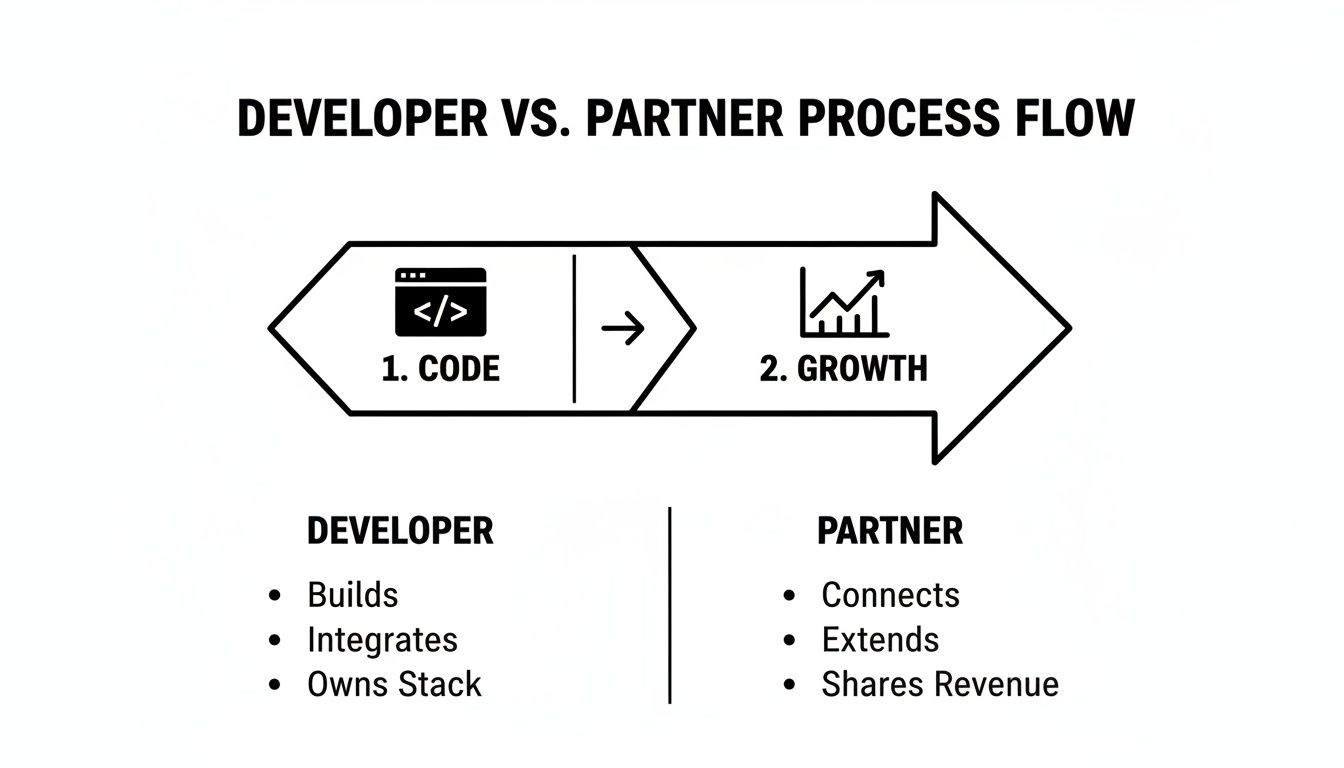
As you can see, a partner’s focus extends well into that crucial growth phase that comes after the launch.
Shopify Mastery: More Than Just a Pretty Store
When you’re running an ecommerce business in Melbourne, you learn pretty quickly that it’s about more than just a pretty website. A local Shopify Partner in Melbourne is your strategic advantage—someone who genuinely gets the local market and can turn that understanding into real, tangible growth for your store. This is what we specialise in as a digital marketing agency in Melbourne.
The Aussie ecommerce scene is absolutely exploding. By 2026, Australia is projected to have over 171,480 Shopify stores, making us the fourth-largest market for the platform in the world. This boom cements Melbourne's role as a major ecommerce hub, and you can dig into more of these ecommerce statistics and Shopify's growth yourself.
Shopify Development & Design: Building a Sales Machine
I've seen it a hundred times: a business pays for a stunning Shopify design, but it's slow, clunky on mobile, and impossible to navigate. It looks great in a portfolio but fails at its one true job: selling products.
A great Shopify design is invisible. It guides the user from discovery to checkout so smoothly they don't even have to think about it. Here’s what my team and I focus on:
- Mobile-First, Always: Over 70% of e-commerce traffic comes from mobile. If your store isn't flawless on a phone, you're losing sales. Period. We design for the smallest screen first and then scale up.
- Speed, Speed, Speed: Every second a page takes to load, your conversion rate plummets. We obsess over clean code, optimised images, and minimal app bloat to ensure your site is lightning-fast.
- Conversion Rate Optimisation (CRO) Baked In: From the placement of the "Add to Cart" button to the trust signals in your checkout, every element is designed with one question in mind: "Will this help more people buy?"
This is the level of detail our Shopify developers in Melbourne bring to every project.
Shopify API & Custom App Development Crash Course
Sometimes, a pre-built app from the Shopify App Store just doesn't cut it. You have a unique business need—a custom product builder, a complex inventory sync, or a special loyalty program. This is where the Shopify API comes in.
Think of the API as a toolkit that lets a skilled Shopify developer build custom solutions that plug directly into your store. It’s how you get Shopify to do things it wasn’t originally built to do.
Building a Custom Shopify App using Shopify CLI
Here’s a simplified look at how my team approaches building a custom app. It's not as scary as it sounds:
- Setup the Environment: We use Shopify's own tool, the Shopify CLI (Command Line Interface). It's a program that lets us quickly create the basic structure of a new app.
- Choose the Tech Stack: We typically use technologies like Node.js and React – these are modern, reliable, and perfect for building fast, interactive apps.
- Authentication: The first technical step is handling authentication. Our app needs to securely connect to your Shopify store. We use a method called OAuth to make sure this connection is safe.
- Using the API: This is where the magic happens. We write code to "talk" to the Shopify API. For example, if we're building a custom reporting dashboard, our code will make API calls to fetch order data, customer data, and product data from your store.
- Building the Frontend: This is the part of the app you actually see and interact with. We use Shopify's Polaris design system to make sure our custom app looks and feels like a natural part of your Shopify admin.
- Deployment: Once the app is built and tested, we deploy it to a web server (like Heroku or Vercel) so it's live and running 24/7.
Hiring skilled Shopify developers who understand this process is how you unlock the true potential of the platform.
WordPress Development: The Power of Flexibility
While Shopify is the king of ecommerce, WordPress is the undisputed ruler of the rest of the web. It powers over 43% of all websites for a reason: it's incredibly flexible. I've worked on countless projects where businesses use WordPress for their main "brochure" site, content marketing, and lead generation, while running their store on Shopify. A great marketing agency in Melbourne needs to be an expert in both.
As a WordPress development company, my team and I love the creative freedom it gives us.
WordPress Design and Building Custom Gutenberg Blocks
WordPress design has evolved far beyond basic templates. With the Gutenberg block editor, we can create truly custom, flexible page layouts for our clients.
But what happens when the default blocks (like Paragraph, Image, Heading) aren't enough? That's when we build custom Gutenberg blocks.
Imagine you're a real estate agent. We could build a custom "Property Listing" block. You'd simply add this block to a page, and it would give you fields to enter the price, number of bedrooms, a photo gallery, and a map. No complex shortcodes, no messing with code. Just a simple, reusable component.
Here’s how a WordPress developer on my team would do it:
- Scaffolding: We use a tool called
@wordpress/create-blockto generate all the necessary starter files for a new block. This saves a ton of time. - Defining Attributes: We define the "data" our block will store. For the property example, this would be attributes for
price,bedrooms,bathrooms, etc. - Building the 'Edit' Component: This is what the client sees in the backend editor. We use JavaScript (specifically React) to create the input fields and controls for the block.
- Building the 'Save' Component: This is the code that determines the final HTML that gets saved to the database and displayed on the front end of the site.
- Styling: We write custom CSS to make the block look perfect on both the backend and the frontend.
This ability to create bespoke solutions is why so many businesses rely on an expert WordPress developer in Melbourne. It turns a standard website into a custom-built business tool.
Mastering Paid Advertising: A Beginner's Guide to Profit
Let me be blunt: a beautiful website is completely worthless if no one ever sees it. This is a core belief I operate on. Your partner has to be a marketing agency at its core, not just a team of developers. A great design is the foundation, sure, but without traffic, it’s just a digital ghost town.
This is where my team at our Google Ads agency and Facebook Meta Ads agency comes in. We're obsessed with turning ad spend into profit.
The Google Ads Ecosystem: Your Key to High-Intent Customers
Google Ads is powerful because you're reaching people who are actively searching for what you sell. That intent is pure gold. But it’s a complex beast.
Google Ads for Service-Based Businesses
If you're a service business (like a plumber, dentist, or lawyer), your goal is simple: get leads. The most common way we do this is by optimising for contact form submissions or phone calls. We build dedicated landing pages that are laser-focused on one thing: getting that visitor to fill out the form or pick up the phone. We track every single form submission as a conversion, so we know exactly which keywords and ads are driving real business.
Google Ads for Contact Form Submissions:
- Keyword Strategy: We focus on long-tail, high-intent keywords like "emergency plumber near me" or "cosmetic dentist consultation Melbourne."
- Landing Page: The ad clicks through to a page with a clear headline, compelling benefits, social proof (reviews), and a simple, prominent contact form.
- Conversion Tracking: We use Google Tag Manager to set up a trigger that fires a conversion event every time that form's "thank you" page is viewed. This data feeds back into Google Ads, allowing the algorithm to find more people likely to convert.
Google Shopping Ads: The Ecommerce Goldmine
For most e-commerce stores, Google Shopping is the bread and butter. Those product images you see at the top of the search results? That's Google Shopping.
A Beginner's Guide to Google Shopping Ads:
- Product Feed: It all starts with your product feed. This is a file that contains all your product data (title, price, image, etc.). We meticulously optimise this feed in Shopify to make sure Google has the best possible information.
- Google Merchant Center: You upload your feed to Google Merchant Center. This is where Google reviews your products and approves them for advertising.
- Campaign Setup in Google Ads: You link Merchant Center to Google Ads and build your campaign. You can start with a Standard Shopping campaign or a Performance Max (PMAX) campaign.
Google Shopping Ads for Dropshipping: The rules are the same, but the margins are thinner. This means you have to be even more ruthless with your data. We focus heavily on finding winning products quickly and cutting the losers before they burn through the budget. Tracking profit margin is key.
PMAX vs Google Shopping Ads:
- Standard Shopping: Gives you more manual control. You can set negative keywords and have more control over bidding. I often use this when I want to isolate specific products or brands.
- Performance Max (PMAX): This is Google's automated, all-in-one campaign type. It runs ads across Shopping, Search, YouTube, and Display. It's powerful but gives you less direct control. I often test PMAX against Standard Shopping to see what delivers the best Return On Ad Spend (ROAS).
Common Problem: Google Shopping Ads Not Spending Budget
This is a frequent issue. I usually check these things first:
- Disapproved Products: Are your products approved in Merchant Center?
- Low Bids: Is your bid high enough to enter the auction?
- Small Audience: Is your targeting too narrow?
- Campaign Priority: If you're running multiple Shopping campaigns for the same products, the "Campaign Priority" setting (High, Medium, Low) determines which campaign's bid is used. A common mistake is having a low-priority campaign with a low bid block a high-priority campaign.
Mastering Meta Ads (Facebook & Instagram)
If Google is about capturing intent, Meta (Facebook and Instagram) is about creating demand. You're showing your products to people who might love them but aren't actively searching for them right now. This is where being the best Facebook Ads agency comes down to science and creativity.
The Meta Ads Creative Testing Process:
You can't just guess what ad will work. You have to test. Here's a simplified version of my process:
- Hypothesis: We start with a hypothesis. "We believe a video showing the product in use will perform better than a static image."
- Create Variations: We create 3-5 different ad creatives (videos, images, carousels) and 2-3 different versions of ad copy.
- Launch a Testing Campaign: We launch a campaign with a controlled budget, using a broad audience. Each ad set might test a different creative angle.
- Analyze the Data: After 3-7 days, we look at the key metrics: Click-Through Rate (CTR), Cost Per Click (CPC), and most importantly, Add to Carts and Purchases.
- Iterate: We turn off the losing ads and scale the budget on the winners. Then, we take what we learned from the winner and use it to create our next round of testing hypotheses.
How to Measure Success on Facebook Ads:
Don't just look at vanity metrics like 'likes' or 'reach'. I focus on:
- Return on Ad Spend (ROAS): For every $1 you put in, how many dollars in revenue did you get out? A 3x ROAS means you made $3 for every $1 spent.
- Cost Per Purchase (CPP): How much did it cost to acquire one customer?
- Click-Through Rate (CTR): What percentage of people who saw your ad clicked on it? This tells you if your creative is engaging.
A Critical Piece of Advice: Don't Quit Too Early!
I've seen so many businesses turn off their Facebook ads after 2-3 days because they weren't profitable. The algorithm needs time and data to learn who your customers are. The first week is often about gathering data, not making a profit. You have to trust the process. Consistency is everything in marketing your business.
The Unseen Engine: Technical Marketing & Analytics
Brilliant marketing isn't just about clever ads; it's about flawless technical execution. This is where a partner's development skills and marketing knowledge must intersect. If your tracking is broken, you're flying blind and burning cash. As a technical ecommerce marketing agency, we live by this.
Google Tag Manager & GA4: The Foundation of Data
Setting up Google Tag Manager (GTM) Containers: Every single site we build gets a clean Google Tag Manager container. Think of GTM as a toolbox that sits on your website. Instead of asking a developer to add tracking codes (like the Meta Pixel or Google Analytics code) directly to the site, we add them inside GTM. This keeps the website code clean, improves site speed, and lets our marketing team manage tracking without needing a developer for every little change.
Google Analytics 4 (GA4): We ensure that enhanced ecommerce tracking is set up perfectly in GA4. This means we can track not just purchases, but the entire customer journey: viewing a product, adding to cart, initiating checkout, and finally purchasing. This data is invaluable for finding out where users are dropping off in the funnel.
Setting up the Meta Conversions API (CAPI)
With all the iOS updates and increasing browser privacy, the standard Meta Pixel (which runs in the user's browser) has become less reliable. The Conversions API (CAPI) is the solution.
Conversions API Installation for Meta:
CAPI works by sending conversion data from your website's server directly to Meta's server. It’s a more reliable, server-to-server connection that isn't affected by browser ad blockers or privacy settings.
Here’s the simplified process:
- Generate a Token: In your Facebook Events Manager, you generate an access token. This is like a secret password for your server to talk to Facebook.
- Implementation: We implement the CAPI connection. On Shopify, this can often be done through their native integration. For WordPress, we might use a plugin or write custom code.
- Event Deduplication: This is a crucial step. You're now sending conversion data from two sources (the browser Pixel and the server CAPI). We need to set it up so that Facebook can recognize when the same purchase event is sent twice, and only count it once. This prevents your conversion numbers from being inflated.
Setting this up correctly makes your ad targeting infinitely more effective because Meta is getting more accurate data.
Local SEO & Google Business Profile: Winning Your Neighbourhood
For any business with a physical presence or a defined service area in Melbourne, Local SEO is not optional. It’s how you show up in the "Map Pack" when someone searches for "cafe near me" or "electrician in Richmond." As a top SEO agency in Melbourne, this is a foundational part of our strategy.
Google Business Profile (formerly Google My Business):
Your Google Business Profile (GBP) is your most important tool for Local SEO. It's that panel of information that appears on the right side of a Google search. Optimising it is a quick win.
My process:
- Complete Every Section: Fill out everything. Services, products, opening hours, attributes (like "women-led" or "wheelchair accessible"), and a detailed business description packed with keywords.
- Photos, Photos, Photos: Add high-quality photos of your storefront, your team, your products, and your work. Geo-tag them to Melbourne if you can.
- Get Reviews: Actively ask your happy customers for reviews. More positive reviews are one of the strongest ranking factors for the Map Pack.
- Google Posts: Use Google Posts to share updates, offers, and news. Think of it as a free mini-ad right on your profile.
- Q&A: Proactively populate the Questions & Answers section with common questions your customers ask.
These simple steps can dramatically improve your visibility in local search results, driving foot traffic and phone calls for free.
The Smart Call System: Never Lose a Lead Again
This is a game-changer I’ve started implementing for my service-based clients, especially tradies like plumbers and electricians. A missed phone call is a lost job. Period. If a potential customer calls you and gets voicemail, they're not going to leave a message; they're going to call the next person on the Google search results page. I've seen it happen over and over.
To solve this, we set up a custom phone number through a service like Twilio. This isn't just a regular phone number; it's a smart, programmable number that becomes your perfect receptionist.
Here's how we set it up and the features it includes:
- 24/7 Call Answering: The system answers every single call, day or night, holiday or weekend. It never gets sick, never takes a break, and never has a bad day.
- Intelligent Call Routing & Screening: The automated system can ask initial screening questions like, "Are you a new or existing customer?" or "Is this an emergency call-out?". It can then route the call to the right person's mobile or take a message.
- Automatic Appointment Booking: This is the magic part. The system can integrate directly with your calendar (like Google Calendar or Calendly). The caller can book an appointment right on the phone with the AI assistant, which then automatically appears in your schedule. No more phone tag trying to find a time that works.
- Saves Thousands in Lost Business: For tradies, hairdressers, beauty therapists, dentists, restaurants, and doctors, this system can be the difference between a fully booked week and a schedule full of holes. It captures every single lead, guaranteed.
- PPC Call Tracking: For our Google Ads call campaigns, we use this system or other great call tracking software like CallRail. This allows us to know exactly which keywords and ads are making the phone ring. We can see which ad a caller saw before they called, which is essential for optimising ad spend.
This one piece of technology has saved my clients thousands of dollars in lost revenue and completely transformed their lead capture process.
Your Questions Answered: Budget, Costs, and Getting Started
I've had countless conversations with Melbourne business owners trying to navigate the digital marketing world. A few questions pop up every single time. Here are the straight-talking answers you need.
How Much Does It Cost to Start Google Ads?
This is always the first question. My honest answer is you need two budgets:
- Your Ad Spend: This is the money you pay directly to Google. I tell new clients to be prepared to spend at least $1,000 – $1,500 in the first month purely on data acquisition. You likely won't be profitable in this phase. You're paying to learn what works.
- Management Fee: This is what you pay an agency like mine to manage the campaigns.
So, for a serious first month on Google Ads, a business should budget a minimum of around $2,000 to $3,000 total.
What Budget Should I Spend on Google Ads Monthly?
After the initial learning phase, your budget should be based on your goals and your ROAS. If we're spending $3,000 a month and generating $15,000 in profitable revenue (a 5x ROAS), the question isn't "how can we spend less?" The question becomes, "how much more can we profitably spend to scale this to $30,000?" I always tell clients: you don't have a budget problem; you have a ROAS problem. If the return is there, the budget will follow.
Should I Hire a Partner Agency or Just a Freelancer?
A good freelancer can be perfect for small, isolated tasks. Need a bit of code tweaked? A single banner designed? A freelancer is a great fit. But if you're genuinely serious about growth, you need an integrated team.
A Partner agency brings all the specialists—Shopify developers, WordPress developers, SEO, and paid advertising—under one roof. We see this constantly: a business comes to us after a freelancer built them a site, only to discover it wasn't engineered for marketing from the ground up.
A real growth partner makes sure your store is built to convert and be found right from the start. It’s the difference between hiring a coder and bringing on a full-stack growth team.
If you're a business with a paid ads budget of at least 3k a month, I'd love to offer you a low risk deal- get a month of paid ads management FREE. Alpha Omega Digital is a marketing agency based in Melbourne, Australia but also services clients from Sydney, Brisbane, Newcastle, Perth, Adelaide, Darwin and Hobart. Have a project in mind? Apply now through the contact page.