So, you're thinking about moving from Shopify to Shopify Plus. I've been there with many clients, and let me tell you, it's a huge step. It’s not just a casual upgrade; it's a serious business decision that, in my experience, boils down to one simple question: are the limitations of your current plan costing you more in lost sales and wasted time than the upgrade would?
I've seen it time and time again with eCommerce brands I've worked with as a digital marketing agency in Melbourne. You'll know it’s time when you stop feeling like you're outgrowing your plan and start seeing it in the cold, hard data.
Knowing When It's Time to Upgrade to Shopify Plus

I've seen this exact scenario play out countless times with clients. A fantastic eCommerce brand hits a ceiling with their standard Shopify plan. Sales are climbing, which is great, but the website crashes during flash sales, the tech stack is a clumsy patchwork of apps, and those transaction fees are starting to seriously erode profit margins.
This is the classic signal. You're spending more time fighting the platform's constraints than you are actually growing the business.
Revenue Milestones and Transaction Fees
One of the clearest signs I look for is monthly turnover. While there isn't a single magic number, most businesses I work with start getting serious about Shopify Plus when they're consistently pulling in $80,000 to $100,000 AUD per month.
Why that range? From what I've seen, it's the tipping point where the savings on transaction fees alone can start to offset the higher monthly cost of Plus. Standard Shopify plans add transaction fees on top of what your payment processor charges (unless you're using Shopify Payments). On Plus, those fees are dramatically reduced or even waived.
When your transaction fees start to look like a full-time salary, it's no longer just a "cost of doing business"—it's a clear sign you're outgrowing your current plan and leaving money on the table every single month.
Operational Bottlenecks and Manual Workloads
It’s not just about the numbers, though. I always ask my clients to look at their team's day-to-day. Are they spending hours manually segmenting customer lists, processing wholesale orders one by one, or trying to rig up complex promotions that the platform wasn't built for? These are precisely the kinds of tasks that tools like Shopify Flow (exclusive to Plus) can automate.
I've worked with brands that have freed up entire team members to focus on marketing and growth, simply by automating the repetitive jobs they were bogged down with on a standard plan.
Some of the most common bottlenecks I see include:
- A rigid checkout you can't customise: You’re losing sales at the last hurdle because you can't offer a fully branded, frictionless experience with custom fields or upsells.
- Juggling multiple stores: Managing separate sites for different regions or a B2B channel quickly turns into an administrative nightmare.
- Flash sale failures: The site can't handle the traffic spike from a big promotion, leading to lost revenue and angry customers.
The rapid growth of Shopify Plus shows just how many businesses are hitting these walls. As of 2026, there are over 60,268 websites on the platform, and the 31% year-over-year increase from 2021 to 2022 shows how fast it's expanding. Australia is the third-largest market with 3,056 users, which tells you that local brands are making this strategic move for a reason.
To really see what's on offer, a direct comparison between Shopify Plus vs Shopify is the best way to understand the specific capabilities you'll unlock.
The table below breaks down the key differences to help you see exactly what you stand to gain.
Shopify vs Shopify Plus Key Differences
| Feature | Standard Shopify | Shopify Plus |
|---|---|---|
| Checkout Customisation | Limited to colours, fonts, and logo. | Full control over the checkout.liquid file for a completely branded experience. |
| Automation | Relies on third-party apps, often with extra costs and complexity. | Includes Shopify Flow for building custom automated workflows. |
| Wholesale/B2B | Requires apps or a separate store. | Dedicated B2B storefront with custom pricing, net terms, and catalogues. |
| Multi-Store Management | Requires separate accounts and logins for each store. | A single dashboard to manage up to 10 stores for different regions or brands. |
| Exclusive Apps & APIs | Standard app ecosystem. | Access to exclusive apps like Shopify Flow, Launchpad, and Scripts Editor. |
| Staff Accounts | Limited (e.g., 15 on Advanced). | Unlimited staff accounts with advanced permission settings. |
| Transaction Fees | 0.5%–2% if not using Shopify Payments. | 0.25% if not using Shopify Payments (negotiable at high volume). |
| Dedicated Support | Standard email, chat, and phone support. | Dedicated Launch Engineer and ongoing Merchant Success Manager. |
Ultimately, if you're nodding along while reading through these pain points and features, my advice is that the question is no longer if you should upgrade, but when.
Making the Business Case for Shopify Plus

Moving up to Shopify Plus isn't just about getting a few new bells and whistles; I see it as a serious investment that has to pay for itself. So, let’s get down to brass tacks and actually run the numbers. I've seen many Aussie brands justify the entire upgrade based on a single Plus-exclusive feature, so let's break down exactly how I help them build a rock-solid financial case.
The most common starting point, and often the most compelling, is the checkout. On a standard Shopify plan, your checkout is essentially locked down. But with Plus, you gain full access to the checkout.liquid file. This unlocks the ability to create a completely branded, frictionless experience that matches the rest of your site.
This isn't just about making things look pretty. In my experience, it's about directly tackling cart abandonment where it happens most.
How I Slash Costs and Lift Conversions
When you can customise your checkout, you can add trust badges, display live shipping estimates, and even embed one-click upsells right on the page. I’ve worked with clients where these checkout optimisations alone boosted conversions enough to cover the Plus platform fees several times over.
Now, let's talk transaction fees. If you're not using Shopify Payments, you're currently paying between 0.5% and 2% on every single sale. Shopify Plus drops that fee to just 0.25%, and for high-volume stores, I've seen that rate negotiated even lower.
For a business turning over $1 million in annual revenue, that's an immediate saving of up to $17,500 a year. That alone can make a huge difference.
For many growing Australian stores, the combined impact of reduced transaction fees and a higher-converting checkout creates a powerful financial case. From what I've seen, the upgrade often pays for itself much faster than anticipated.
While the average Shopify store converts somewhere between 1.4% and 1.8%, Plus stores often see much higher rates. Features like Shop Pay can increase conversions by up to 50% compared to a standard guest checkout. Even more impressive, mobile conversions can see an improvement of up to 91%. With so much of our traffic coming from mobile devices, this is a massive win.
Automating Your Way to Better Efficiency
Beyond the immediate revenue gains, I always tell clients to factor in the operational savings. This is where two of my favourite Plus tools come into play: Shopify Flow and Shopify Scripts.
Shopify Flow is essentially your own in-house automation engine. I've used it to help businesses automate all sorts of tedious tasks that were soaking up hours every week.
Here are a few real-world examples of what we've set up:
- Tagging High-Value Customers: We can automatically tag customers who spend over a certain threshold, instantly adding them to a VIP segment for exclusive marketing campaigns.
- Smarter Fraud Prevention: You can build rules to automatically flag and hold high-risk orders for a manual review, helping to prevent costly chargebacks.
- Low-Stock Alerts: Get an instant Slack notification when a product’s inventory drops below a set level, so you never miss a reorder and lose out on sales.
Shopify Scripts, on the other hand, gives you the power to run complex promotions without relying on clunky, site-slowing apps. Imagine being able to offer things like:
- Tiered discounts (e.g., 10% off $100, 15% off $150).
- Automatic "Buy One, Get One" deals that just work in the cart.
- A free gift with purchase that’s automatically added when a cart hits a specific value.
These aren't just minor tweaks. Automating your internal workflows frees up your team to focus on what actually grows the business. Running sophisticated promotions directly in the checkout boosts your average order value (AOV) and customer lifetime value (LTV) without adding friction.
As you build your business case, I advise tying every one of these features back to a real number. Calculate the hours your team would save with automation, estimate the AOV increase from better promotions, and project the conversion rate lift from a custom checkout. You’ll quickly realise that moving to Shopify Plus isn't just an expense—it's an investment in scalable, efficient growth.
Your Pre-Migration Technical Audit Checklist
A successful move from Shopify to Shopify Plus is all about solid preparation. I can't stress this enough: rushing your pre-migration audit is the fastest way to derail your launch and create massive headaches down the line. From my experience as a Shopify developer here in Melbourne, I’ve seen that a meticulous audit isn't just a box-ticking exercise—it's the very foundation of a smooth transition.
I think of it as the pre-flight check a pilot runs before take-off. You need to know that every single part of your store is ready for the journey. This means methodically digging into every technical component of your current setup, leaving no stone unturned.
Take a look at the Shopify Plus landing page below. It gives you a great overview of the core capabilities you’ll be auditing your current store against.
This page really highlights the platform's focus on customisation, automation, and multi-channel expansion. These are the exact areas your technical audit needs to tackle head-on.
The App Stack Review
First thing's first: you need a complete inventory of every single app installed on your store. Don't just list them; for each one, you have to ask a few critical questions.
- What does it actually do? I get my clients to be specific and document the exact problem the app solves for their business.
- How critical is it? Is this a nice-to-have feature or a mission-critical part of your daily operations? Be honest.
- Can a native Shopify Plus feature replace it? This is a huge one. Many apps you pay for—think promotions, workflows, or B2B functions—can often be replaced by native Plus tools like Shopify Scripts, Flow, or the B2B storefront.
I've had clients save hundreds of dollars a month in app fees just by finding redundancies during this stage. For example, if you're using an app to create "Buy One, Get One" deals, you can build that logic directly with Shopify Scripts. It's not only cheaper in the long run but also faster and more reliable.
Creating a detailed spreadsheet of your apps, their costs, and their functions is non-negotiable. This document becomes your roadmap for deciding what to keep, what to replace, and what to discard entirely.
Assessing Your Theme and Custom Code
Once you have a handle on your apps, the next big piece of the puzzle is your theme. If you're already on a modern Online Store 2.0 theme, the transition is usually quite smooth. But if you're working with an older theme or one that has been heavily customised, you'll need to be much more careful.
This is where you or your Shopify developers will need to get into the codebase. We're hunting for outdated code, dependencies on deprecated APIs, or hard-coded elements that are likely to break during the upgrade. Honestly, it's also the perfect time to evaluate your site's performance and spot opportunities for optimisation that a move to Plus can really unlock.
As a Shopify developer in Melbourne, I always create a staging version of the site to test theme compatibility thoroughly before ever touching the live store. It’s an essential safety net you can't afford to skip.
Documenting Integrations and APIs
Now, let's talk about connections. Do you have any third-party systems hooked into your store? This could be anything from an ERP or a 3PL partner to a custom-built analytics dashboard.
You must document every single integration. For each one, you need to:
- Pinpoint all the API endpoints your store is talking to.
- Double-check the authentication methods being used for each connection.
- Confirm everything is compatible with Shopify Plus, paying close attention to any changes in API rate limits or access scopes.
This is often where the hidden 'gotchas' pop up. I once worked on a migration where a critical inventory sync relied on a private app making an outdated Shopify developer API call. Catching this during the audit saved us from what would have been a major inventory crisis right after launch.
Data Backups and a Rollback Plan
Finally, before you make any changes, you need a solid backup and a clear rollback plan. While Shopify handles migrating your core data (products, customers, orders), you are responsible for your theme files, app configurations, and any other custom assets.
I always use a trusted backup app from the Shopify App Store to create a complete snapshot of the store. More importantly, I document the exact steps we would take to revert to your standard Shopify plan if something goes critically wrong. You’ll probably never need it, but having a documented rollback plan provides immense peace of mind. A successful Shopify to Shopify Plus migration is all about being prepared for every possibility.
The Hands-On Migration Process Demystified
Alright, with the audit done and the business case signed off, it’s time to roll up our sleeves. This is where we get into the nuts and bolts of the technical migration from a standard Shopify plan to Shopify Plus. It might sound daunting, but I promise it's just a series of clear, manageable actions.
The first official step is getting your new Shopify Plus organisation activated. Shopify actually handles this initial part of the process, essentially "flipping the switch" on your account. Once that's done, you'll get access to the Plus-specific admin, which is your new command centre for everything from user permissions to your entire portfolio of stores.
This brings us to one of the most powerful features straight away: the multi-store architecture. If your growth plan involves separate storefronts for B2B/wholesale, different countries, or even distinct brand spin-offs, this is where you'll set them up. I've found that being able to manage them all from a single login is a massive efficiency gain compared to juggling separate standard Shopify accounts.
Customising Your Checkout Experience
Now for the part that gets most merchants I work with really excited: finally getting to customise the checkout. Standard Shopify keeps this area locked down, but with Plus, you gain full control over the checkout.liquid file. This means you can create a completely branded, high-converting checkout experience that feels like a natural extension of your website.
So, what does that look like in practice?
- Adding trust badges and testimonials directly on the payment page.
- Creating a custom layout that surfaces key information and reduces friction.
- Embedding custom fields to capture things like gift messages or special delivery instructions.
As Shopify developers in Melbourne, this is where we often see some of the biggest conversion rate lifts for our clients. A seamless, trustworthy checkout is frequently the final push a customer needs to complete their purchase.
Implementing Shopify Scripts and APIs
Another game-changer is Shopify Scripts. This is your chance to ditch many of those clunky, paid promotional apps that can weigh down your site. Scripts are small snippets of Ruby code that run directly on Shopify's servers, allowing you to create sophisticated promotions that just work, without affecting site speed.
I've used Scripts to build all sorts of custom logic for clients, from the simple to the complex:
- Tiered Discounts: “Spend $100 get 10% off, spend $200 get 20% off.”
- Automatic Gift with Purchase: Automatically add a free product to the cart once a certain condition is met.
- Dynamic Shipping Options: Hide or show specific shipping methods based on what’s in the cart (e.g., hide express for bulky items).
This is exactly why that initial audit is so important. This process chart shows the fundamental flow for reviewing your existing setup before you dive into these new tools, so you know precisely which apps can be replaced.
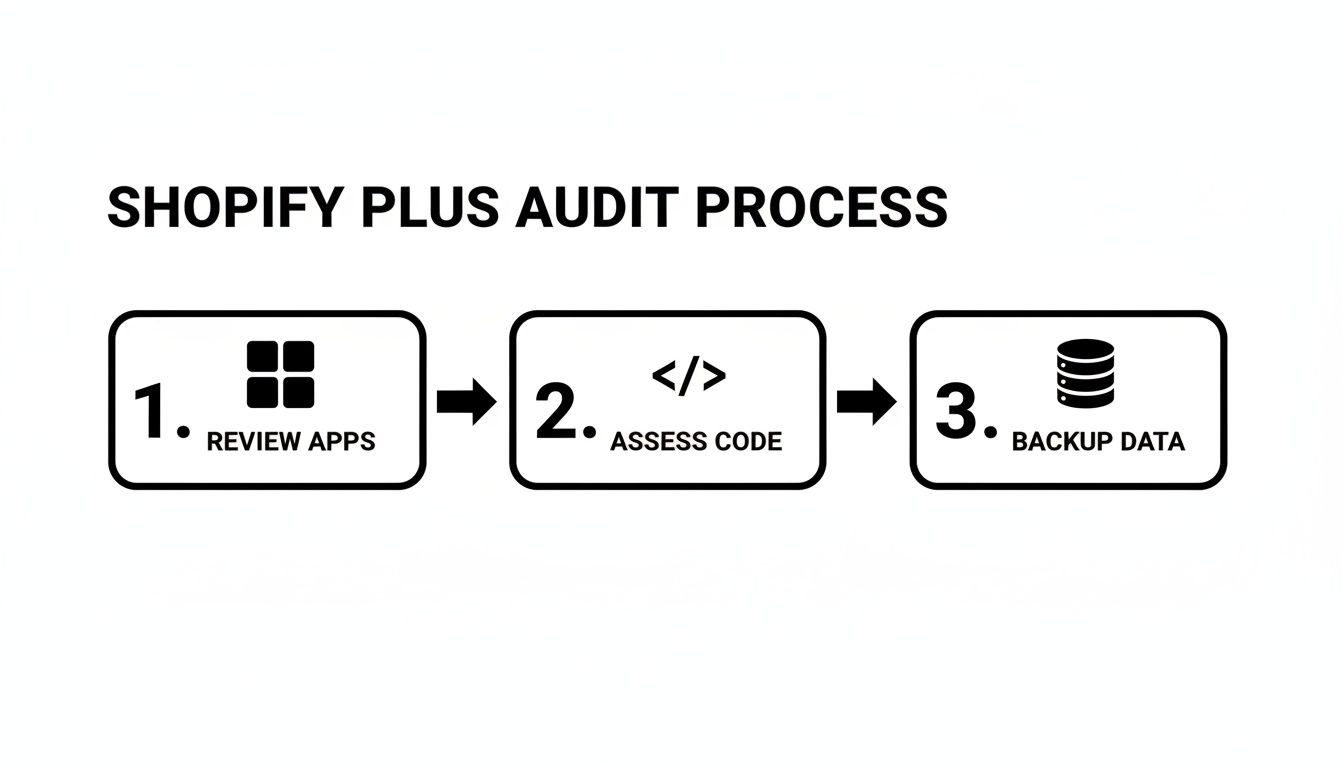
The diagram really hits home that a successful migration starts with a thorough review of your apps, code, and data. This groundwork is what sets the stage for a smooth transition to more advanced features.
Beyond Scripts, you also get expanded access to the Shopify API. This is absolutely crucial if you need to build custom integrations with an ERP, a 3PL, or any other external system. A skilled Shopify developer with API experience can use this to create seamless data flows between your store and the other tools that run your business.
My Key Takeaway: The hands-on migration is less about a single 'move' and more about configuring these powerful new tools—checkout customisation, Scripts, and APIs—to fit your specific business needs.
Using Multipass for Seamless Logins
Finally, let’s talk about Multipass. This feature is a must-have if you run a separate but connected platform, like a community forum, a members-only content portal, or a loyalty program on a different domain.
In short, Multipass creates a seamless single sign-on (SSO) experience. When a customer logs into your main Shopify Plus store, they are automatically logged into your secondary platform as well. It completely removes the friction of your customers having to remember two separate sets of login details.
I find this creates a much more unified and professional brand experience. It's one of those small details that makes a big difference in how customers perceive your brand's polish and attention to user experience. The migration process is your opportunity to implement these foundational improvements that will support your growth for years to come.
Right, you’ve made it. Your shiny new Shopify Plus store is live. But popping the champagne isn’t the end of the project—in my book, it’s the starting gun. The real work of scaling your business begins now, and Plus gives you an incredible toolkit to do it. This is where the potential you planned for turns into real, measurable profit.
So, where do you start? Once the launch-day dust has settled, the first place I always point clients towards is Shopify Flow. Honestly, it's like hiring a tireless automation army to handle all the repetitive, manual jobs that used to clog up your team's day. We’re not talking about basic triggers, either. I've built out sophisticated workflows that directly impact customer experience and the bottom line.
Put Your Business on Autopilot with Shopify Flow
I've seen some incredibly creative automation transform businesses with Flow. For example, you can get much smarter with fraud analysis. We’ve set up rules that flag orders based on multiple risk factors—say, a mismatch between the billing and shipping address plus a high order value. The flow can automatically tag the order and ping your team for a manual review before any money is lost.
But its real power stretches across the entire customer journey. Here are a few automation recipes that I’ve seen deliver huge value for brands just like yours:
- Proactive Customer Service: Imagine a flow that spots a delayed shipment for a customer with a lifetime spend over $1,000. It could automatically create a support ticket and tag them as "High-Value," letting your team get ahead of the problem.
- Smarter Inventory Control: When a popular product variant sells out, a flow can instantly hide it from your website to prevent overselling and simultaneously send a Slack notification to your purchasing manager to kick off a reorder.
- Automated VIP Segmentation: You can set up a rule to automatically tag any customer who makes three or more purchases within 90 days as a "Loyal VIP." That tag can then unlock exclusive access to new products or special sales, all without lifting a finger.
By getting these small but critical tasks off your team's plate, you free them up to focus on strategy, marketing, and building customer relationships. That's where the real growth happens.
Expand Your Footprint with New Storefronts
Another game-changing feature of Shopify Plus is the ability to run up to nine expansion stores from a single backend. For ambitious brands I've worked with, this is how you launch entirely new revenue streams without the headache of managing completely separate accounts.
Here in Australia, the most common strategy I see is launching a dedicated wholesale or B2B channel. A separate storefront lets you create a completely tailored experience for your B2B partners, offering things like tiered pricing, net payment terms, and curated product catalogues. It instantly professionalises your wholesale operations.
Beyond B2B, expansion stores are your ticket to global growth. You can spin up localised storefronts for different countries, complete with the local language, currency, and relevant product collections. This creates a much more native user experience and has a proven, direct impact on conversion rates when you're expanding into new territories.
Tap into the Plus Community and Resources
Finally, don't overlook the incredible support network that comes with your Plus membership. You gain access to the exclusive Shopify Plus Partner network, which is a hand-picked directory of the best agencies and tech experts in the ecosystem. If you need a specialist—whether it's a WordPress developer in Melbourne for a complex blog integration or an expert in international tax compliance—this is your go-to resource.
The results speak for themselves. Shopify Plus merchants in Australia are seeing phenomenal growth, with the platform powering a 126% year-over-year revenue increase for enterprise brands. A huge driver of this is mobile, which now accounts for 60% of all traffic on the platform. This just underscores how vital a mobile-first optimisation strategy is from day one.
Your migration to Shopify Plus has given you the foundation. Now it's time to use these tools to build your future.
Your Shopify Plus Migration Questions Answered
Over the years, I've guided countless business owners in Melbourne, Sydney, and right across Australia through the move from Shopify to Shopify Plus. After dozens of these migrations, you start to see the same critical questions come up every single time.
So, I’ve put together the answers you're probably looking for. This is the straight-up, practical advice from the trenches—no fluff, just what you need to know to make the right call with confidence.
How Long Does a Shopify to Shopify Plus Migration Take?
This is always the first question, and the honest answer is: it depends. From my experience, a typical migration project will land somewhere between 4 to 8 weeks.
But that number can stretch. A simple store with a clean theme and a handful of apps is one thing. A site with years of custom code, complex integrations into a warehouse management system, and dozens of apps is a completely different beast.
Things that really influence the timeline are:
- App Complexity: How many apps do you have, and what do they do? Each one needs to be audited to see if it's still needed or if a native Plus feature can replace it.
- Custom Code: Heavily customised themes or functionalities require meticulous review and testing to ensure they work perfectly on the new platform.
- Integrations: Connecting to third-party systems like an ERP or a 3PL partner always requires careful planning and coordination.
The only way to get a firm timeline is with a thorough pre-migration audit. It’s a crucial first step that sets the stage for everything else.
Will I Lose My SEO Rankings During the Migration?
The fear of watching your hard-earned SEO rankings evaporate overnight is very real, but let me put your mind at ease. With a solid plan, the impact is minimal to non-existent.
One of the biggest advantages of this upgrade is that your core domain doesn't change. You aren't moving to a new website; you're just unlocking more powerful features on the same foundation. The key is meticulous preservation—making sure every URL, meta title, and description is carried over perfectly.
We treat this as a non-negotiable. Before we touch anything, we run a full SEO crawl. After the migration goes live, we run another one to confirm every page is working as it should and all your rankings are safe. As an SEO agency in Melbourne, this is a part of the process where we absolutely refuse to cut corners.
A well-executed migration should have no negative impact on your search engine rankings. It all comes down to meticulous planning and post-launch verification.
Can I Keep My Existing Shopify Theme?
In most cases, yes, you absolutely can. The vast majority of themes built for Shopify's Online Store 2.0 are fully compatible with Shopify Plus.
During the initial audit, we'll take a look under the hood of your theme to double-check for any potential compatibility issues. Honestly, though, this is the perfect time to think bigger. While keeping your theme is an option, the upgrade to Plus is often the perfect excuse to enhance your design or invest in a custom build. You want to make sure your storefront can actually take advantage of all the powerful new tools you're now paying for.
What Happens to My Apps and Customer Data?
This is one of the smoothest parts of the entire process. Your core data—all your customers, orders, products, and analytics—is seamlessly migrated by Shopify itself. It's all just there when you switch over, so you don't need to worry about losing a single piece of your business history.
Your apps, however, are a different story. This is where the technical audit really proves its worth. We go through every app you're using and ask a simple question: is this still necessary?
You’d be surprised how many paid apps for things like promotions or basic workflows can be completely replaced by native Shopify Plus features. Tools like Shopify Scripts and Shopify Flow are incredibly powerful. Switching to them not only saves you a fortune in monthly subscription fees but also makes your site faster and more reliable by cutting down on third-party code. For any critical apps you do need to keep, we'll map out a clear plan to make sure they transition without a hitch.
At Alpha Omega Digital, we're a marketing agency in Melbourne that specialises in helping brands scale with platforms like Shopify Plus. We also service clients across Sydney, Brisbane, Newcastle, and all of Australia.
If you're a business with a paid ads budget of at least 3k a month, I'd love to offer you a low-risk deal—get a month of paid ads management FREE. Apply now through the contact page. Have a project in mind? Contact us.