
Most enterprise buyers still get the same lazy advice about WordPress. It is either framed as a cheap CMS for small sites, or sold as a magic platform that can do anything without compromise. Both takes are wrong.
For large Australian businesses, wordpress for enterprise works when the architecture is right, the hosting is local enough to stay fast, the governance is strict, and the integrations are planned before design starts. It fails when teams treat it like a theme install with extra plugins.
At Alpha Omega Digital, a marketing agency Melbourne businesses come to when they need both build quality and commercial outcomes, we’ve seen WordPress perform well for complex eCommerce, lead generation, and multi-site brand environments. We’ve also seen projects go sideways because decision-makers underestimated payment flows, privacy obligations, analytics setup, or editorial workflow.
This guide is the practical version. No fluff. No “WordPress can do everything” claims. Just what tends to work, what usually breaks, and what Australian enterprise teams should care about before they commit.
From Blog to Boardroom My Experience with Enterprise WordPress
When I tell people we build serious enterprise platforms on WordPress, I still get the occasional raised eyebrow. The old assumption is that WordPress belongs to bloggers, small businesses, or brochure sites.
That assumption is expensive.
A lot of businesses reject WordPress before they’ve looked at the actual requirements of their project. They assume “enterprise” means proprietary software, long contracts, heavy licensing, and a platform only a certified specialist can touch. In practice, many of those setups create more friction than value.
What matters is not the label. It is whether the platform can support your publishing model, integrations, growth plans, governance, and performance needs.
For large Australian businesses, especially in eCommerce, the questions are usually practical:
- Can the site stay fast during campaign spikes?
- Can marketing publish without dev bottlenecks?
- Can product, content, and sales systems sync cleanly?
- Can the stack support privacy and security controls properly?
- Can the team keep evolving the site without being trapped by one vendor?
Those are the questions we use when we assess wordpress for enterprise.
What I trust and what I do not
I trust WordPress when the project has clear content models, disciplined development standards, staged release workflows, and hosting built for traffic variability.
I do not trust it when the plan relies on piling up plugins, skipping QA, and fixing performance after launch.
That trade-off matters. WordPress gives teams flexibility, but flexibility without governance creates mess quickly. Enterprise builds need component rules, coding standards, permission controls, and a proper deployment process.
Tip: If a team cannot explain how content changes move from staging to production, they are not building an enterprise WordPress system. They are building a risk.
I also recommend separating business goals from platform hype. A retailer scaling paid traffic has different needs from a publisher, a franchise network, or a service brand rolling out local landing pages. Same CMS. Different architecture.
That is why I rarely start with design. I start with operations, risk, and conversion paths. The boardroom cares about revenue, resilience, and control. WordPress can support that well, but only when the build is treated like business infrastructure, not just web design.
Why WordPress Is a Serious Enterprise Contender
There is a reason more large organisations take WordPress seriously now. The platform is no longer a niche choice for low-complexity sites.
According to the 2024 State of Enterprise WordPress Report, 55% of surveyed organizations now rely exclusively on WordPress for their enterprise needs. Nearly one in five of these organizations attract over 10 million unique visitors monthly, proving its capability in high-traffic environments.
That does not mean WordPress is automatically right for every enterprise build. It means the “too small for enterprise” argument no longer holds up.
Open source changes the commercial equation
For enterprise teams, one of the biggest advantages is control.
With a proprietary CMS, you are often tied to the vendor’s roadmap, pricing model, partner ecosystem, and release schedule. With WordPress, your team owns far more of the direction. You can build custom editorial flows, create custom Gutenberg blocks, connect external systems, and shape the admin experience around the business.
That matters when different departments need different things.
A content team wants speed.
A dev team wants maintainability.
Marketing wants landing page agility.
Leadership wants lower lock-in risk.
WordPress can satisfy all four, but only if the implementation is disciplined.
Talent availability is a real advantage
Large organisations do not just buy software. They buy access to people who can support it.
That is one of the strongest arguments for WordPress. The talent pool is broad. Good developers, designers, SEO specialists, analytics consultants, and growth teams already know how to work with it. That lowers dependency on one supplier and gives businesses more choice when hiring or outsourcing.
For companies comparing platforms, a grounded resource like Shopify vs. WordPress is useful because it frames the decision around business fit, not fan loyalty.
A significant enterprise benefit is operational flexibility
The biggest win is not that WordPress is “easy”. It is that it can be shaped around the business instead of forcing the business to adapt to the CMS.
That shows up in areas like:
- Editorial workflow: teams can publish quickly without touching code
- Custom blocks: developers can create controlled design systems in Gutenberg
- SEO and local content: regional teams can manage their own pages within guardrails
- Paid media support: landing pages can be built and tested without waiting on a platform vendor
- Commerce extensions: WooCommerce can be customised extensively when checkout, catalogue, or integration requirements are unusual
For teams looking for a partner that handles both build and growth, a strong web design Melbourne team should understand the commercial side, not just the visual side.
Key takeaway: Enterprise WordPress works best when the business wants flexibility and governance at the same time. It works badly when teams want flexibility without process.
Where it is not the best fit
I would not recommend WordPress for every scenario.
If a business wants a tightly standardised SaaS commerce setup with minimal customisation, Shopify may be cleaner. If internal governance demands a very specific vendor-certified stack, another platform may win politically even if not technically.
The mistake is treating enterprise platform choice like a badge decision. The better approach is to map the operating model first, then choose the stack that supports it with the least friction over time.
Architecting for Scale Multisite, Headless, and Decoupled
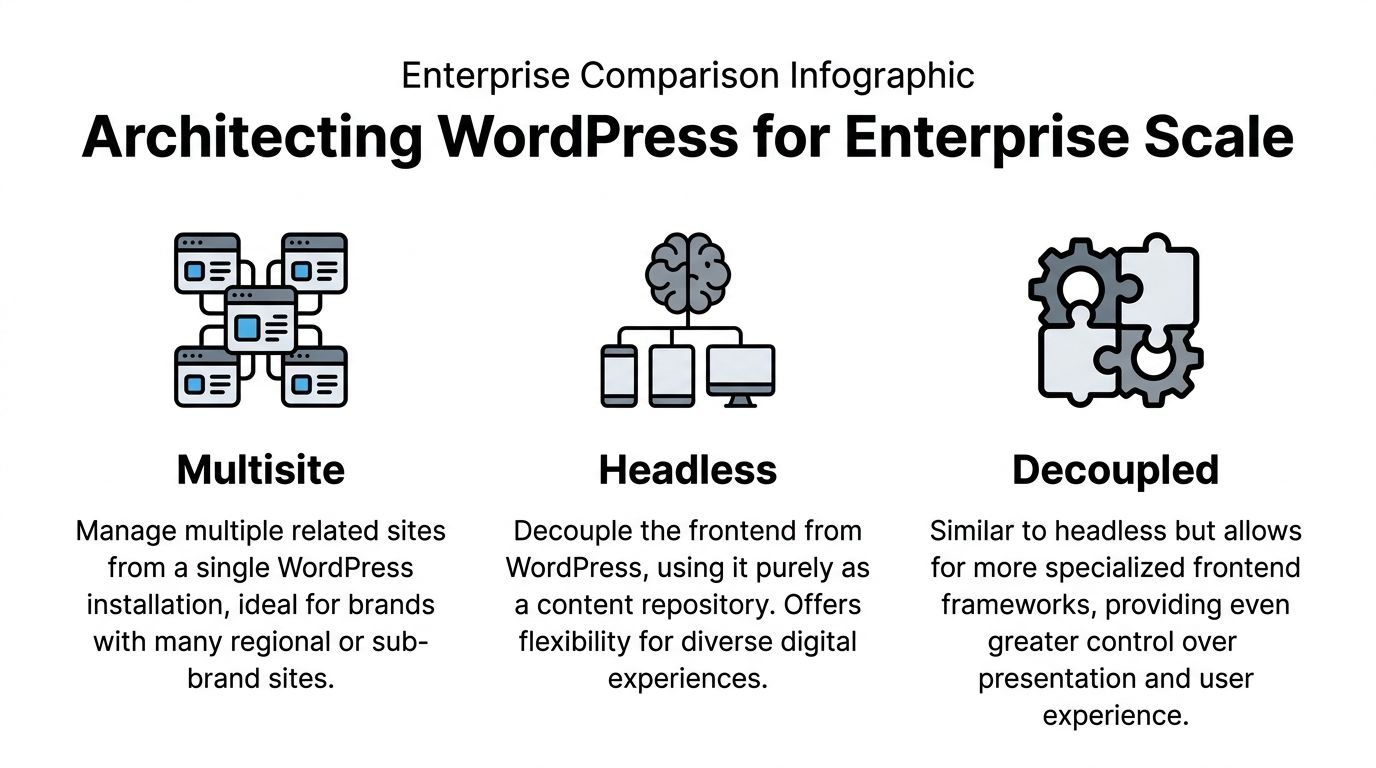
Enterprise WordPress is not one architecture. It is a family of possible architectures, and the wrong choice creates pain that no redesign can fix later.
I usually explain it with a restaurant analogy.
A standard WordPress site is one restaurant serving one dining room.
A multisite setup is a franchise system with shared standards.
A headless setup is a central kitchen feeding multiple frontends.
A decoupled setup is similar, but with a more specialised front-of-house layer that still keeps some WordPress-connected behaviour.
When multisite is the right answer
Multisite suits organisations managing multiple related brands, regions, store locators, campaign microsites, or franchise content hubs.
It is strong when you need:
- Shared governance: one codebase, common plugins, central user rules
- Brand consistency: controlled templates across business units
- Operational efficiency: updates and maintenance done centrally
- Regional flexibility: local teams can edit their own content inside defined boundaries
This model works well for Australian brands with state-based content needs. A national retailer can keep one technical foundation while allowing teams in Melbourne, Sydney, Brisbane, and Perth to manage store-specific pages or campaign content.
The weakness is complexity in governance. If permissions are poorly mapped, one team can step on another team’s workflow. Multisite also becomes awkward when business units are not aligned in process or roadmap.
When headless earns its keep
Headless WordPress makes sense when WordPress should manage content, but not render the customer-facing experience directly.
That usually comes up when a business needs:
- a custom frontend framework
- app and web content from one source
- stronger separation between editorial and presentation layers
- more control over performance under heavy traffic
For high-volume eCommerce, headless can reduce pressure on transactional systems by separating frontend delivery from backend operations. A 2025 AU Ecommerce Association study revealed that 35% of cart abandonment during peak sales comes from payment failures. Headless WordPress architectures can mitigate this by isolating the front-end from back-end transactional load, a key strategy for ensuring Afterpay/Zip integrations remain stable under pressure.
That matters for Black Friday, EOFY campaigns, product drops, and influencer-led traffic spikes.
If we are working with a retailer using local gateways and aggressive paid traffic, headless is often worth considering. It can help protect the customer experience when the backend is under pressure.
Decoupled is often the practical middle ground
Some businesses do not need fully headless. They need a more flexible frontend while still preserving useful WordPress functionality.
That is where decoupled builds can work well.
You keep WordPress as the content and admin engine, but use a more specific presentation layer where needed. This can help with:
- advanced product storytelling
- custom landing page experiences
- selective frontend performance improvements
- integration-heavy customer journeys
The trade-off is development overhead. A decoupled build can be brilliant, but it asks more from your team. More moving parts. More testing. More coordination between frontend and backend developers.
Tip: If your internal team is small and you need the marketing team to move quickly every week, do not choose headless just because it sounds modern.
A simple decision view
| Model | Best for | Main strength | Main risk |
|---|---|---|---|
| Traditional WordPress | Single brand sites with moderate complexity | Simpler management | Can become bloated if over-customised |
| Multisite | Regional, franchise, or multi-brand groups | Central governance | Permission and workflow complexity |
| Headless | High-traffic commerce and multi-channel content | Frontend flexibility and resilience | Higher build and maintenance load |
| Decoupled | Businesses needing selective frontend control | Balance of flexibility and editorial continuity | More technical coordination |
What usually works in Australian eCommerce
For enterprise retail in Australia, I usually see three patterns work well:
- Multisite for brand groups
Good for state-based content, dealer networks, or franchise rollouts. - Headless for traffic volatility
Better when paid media spikes hard and checkout reliability is critical. - Decoupled for content-heavy commerce
Useful when the business needs rich storytelling, buyer education, and performance improvements without going fully headless.
If the project includes custom checkout logic, local gateway handling, or advanced content blocks, you need experienced WordPress developers involved early. Architecture decisions made late are usually expensive.
High-Performance Hosting for Australian Audiences
A slow enterprise site wastes media budget. That is the simplest way to put it.
You can run strong Google Ads, smart Meta campaigns, polished creative, and solid email automation, but if the site drags for Australian users, conversion rates suffer and acquisition costs get ugly fast.

Why local delivery matters more than teams think
Many enterprise sites in Australia are still hosted in ways that make local delivery an afterthought. That shows up in sluggish first loads, inconsistent checkout steps, and poor paid traffic performance outside the east coast.
Enterprise WordPress implementations on optimised infrastructure achieve sub-200ms Time to First Byte globally through edge computing and multi-layered caching. For Australian enterprises, using Sydney-based edge CDNs is critical to meeting these benchmarks and keeping users engaged.
That is not just a hosting detail. It affects revenue.
If your campaigns target users across Melbourne, Adelaide, Brisbane, Perth, and regional centres, your stack needs to deliver assets fast without relying on distant origin processing for every request.
What I look for in enterprise hosting
I care less about marketing slogans from hosts and more about the actual delivery model.
The essentials are usually:
- Australian edge presence: Sydney is particularly important for reducing delay to local audiences
- Multi-layered caching: full-page, object, and edge caching all matter
- Scalable infrastructure: traffic spikes should not force emergency interventions
- Staging and deployment controls: updates need a safe path to release
- Monitoring and rollback capability: issues should be reversible quickly
A lot of underperforming builds are not failing because WordPress is weak. They are failing because hosting is generic and the stack is badly tuned.
Performance is a systems problem
I do not treat performance as a “developer issue” or “host issue” on its own. It sits across design, frontend code, image handling, database behaviour, plugin choices, scripts, and infrastructure.
That means fast enterprise WordPress usually requires all of these to work together:
| Area | What helps |
|---|---|
| Theme and block system | Lightweight templates and controlled component libraries |
| Caching | Server cache, object cache, CDN edge cache |
| Media | Compressed images, selective loading, format optimisation |
| Third-party scripts | Fewer tags, cleaner GTM setup, less duplication |
| Backend load | Efficient queries, fewer unnecessary plugin calls |
| Scaling model | Auto-scaling or resilient container-based setups |
Key takeaway: If your paid media team is sending traffic to a slow site, your ad account often gets blamed for a website problem.
What does not work
A few common mistakes come up repeatedly:
- Global hosting with no AU delivery strategy
- Heavy builders stacked with script-heavy apps
- Too many plugins doing overlapping jobs
- No separation between testing and production
- Launching campaign pages without load testing
For businesses working with an ecommerce marketing agency, site speed should be treated as part of campaign readiness, not a post-launch tidy-up.
A fast site does not come from one “performance plugin”. It comes from architecture, hosting, and restraint. The more disciplined the build, the easier it is to keep the site fast as marketing activity grows.
Fortifying Your Digital Fortress with AU Compliance
Security advice around WordPress is often too generic to be useful. “Keep plugins updated” is correct, but it is nowhere near enough for an enterprise deployment handling customer data, sales records, internal users, and campaign tracking.
Australian businesses have an extra layer to manage. They are not only protecting a site. They are operating inside privacy and breach notification obligations.

The Office of the Australian Information Commissioner reported 1,247 notifiable data breaches in 2025, with CMS misconfigurations cited in 22% of cases. Proper WordPress configuration for the Australian Privacy Act is essential to avoid becoming a statistic.
That line matters because many enterprise teams focus heavily on perimeter security and not enough on configuration discipline.
Security starts with governance, not plugins
A secure enterprise WordPress setup usually includes technical controls, but the bigger issue is process.
The strongest setups tend to have:
- role-based access for editors, marketers, developers, and admins
- staging environments for updates and testing
- approval workflows for code and plugin changes
- logging around content, user, and configuration changes
- a clear owner for privacy and data handling decisions
What causes trouble is not always a dramatic attack. It is often ordinary sloppiness. Old integrations. Excessive admin access. Form tools collecting more data than needed. Tags firing without review. API endpoints left too open.
Privacy Act alignment in practice
For Australian enterprise sites, privacy compliance needs to be built into how the platform handles forms, user accounts, tracking, customer requests, and retention.
That usually means reviewing:
- what personal information is collected
- where it flows after submission
- who can access it
- how long it is retained
- how consent and disclosures are presented
- how the business responds if something goes wrong
I also recommend looking beyond generic CMS advice and reading broader pieces on mastering compliance because they help frame governance as an operating discipline, not a legal box-tick.
The practical controls I recommend
Here is the baseline I like to see for wordpress for enterprise in Australia:
- Limit admin privileges: most users do not need full backend access
- Audit plugins and integrations: remove abandoned tools and duplicate functions
- Harden forms and APIs: collect only needed data and validate requests carefully
- Use staged updates: never push major changes straight into production
- Document breach response: your team should know what happens if a misconfiguration is found
- Review analytics setup: GTM, GA4, Meta events, and server-side tagging all need privacy consideration
That last one gets missed often. Marketing teams install tracking quickly, but enterprise environments need sign-off on what is being passed, stored, and shared.
A short explainer on modern security thinking is worth watching before teams set policy:
Where businesses expose themselves
The biggest risks I see are not usually in WordPress core. They sit in the layer around it.
Examples include:
- plugins that store customer data without clear retention rules
- form submissions emailed broadly across the business
- unmanaged user accounts from old staff or contractors
- checkout customisations that skip proper validation
- analytics and CRM integrations that no one has reviewed for months
Tip: Compliance gets easier when the site architecture is simpler. Every extra plugin, script, and data handoff creates another review point.
For enterprise teams running paid acquisition, lead generation, or WooCommerce at scale, security cannot be separated from marketing operations. If your site is feeding a CRM, ad platforms, reporting dashboards, and fulfilment tools, governance needs to cover the full chain, not just the CMS login screen.
Seamlessly Integrating WordPress with Your Business Engine
The enterprise site that performs best is usually the one that stops acting like a standalone website.
A good WordPress build should sit in the middle of the business. It should receive, send, validate, and structure information cleanly across sales, fulfilment, customer service, and marketing systems.
A common eCommerce bottleneck
Take a growing online store.
Marketing launches campaigns. Product launches speed up. The catalogue changes often. Customer service needs clean order visibility. Finance wants cleaner reconciliation. The warehouse needs reliable product and stock sync. Suddenly the website is no longer just the frontend. It is part of the operating system of the business.
When integrations are weak, teams start working around the site:
- product details are updated manually in multiple places
- customer data lands in the wrong lists
- reporting conflicts across platforms
- fulfilment and promotions fall out of sync
That is where WordPress can either become a problem or a strong central layer.
What good integration looks like
In enterprise WordPress, I usually want to see these relationships designed upfront:
| Business function | WordPress integration goal |
|---|---|
| CRM | Send leads, customer events, and segmentation data cleanly |
| ERP | Sync order, inventory, or operational data where required |
| PIM | Maintain product accuracy across channels |
| Analytics stack | Feed GA4, GTM, Meta, and reporting tools consistently |
| Marketing automation | Trigger emails, audience updates, and lead flows |
| Commerce systems | Support checkout logic, payment methods, and fulfilment rules |
The point is not to integrate everything possible. It is to integrate what removes friction and improves decision-making.
WordPress is strong when the data model is planned
WordPress works well here because the REST API and custom content structures give developers room to build around the business process.
That can include:
- custom Gutenberg blocks pulling structured product or campaign content
- landing pages tied to ad campaigns and CRM routing
- event tracking aligned with GA4 and Meta Conversions API
- product feeds and content hubs built from a shared content model
- WooCommerce logic extended for B2B or mixed catalogue workflows
For teams comparing platforms, a specialised WordPress development company should be able to explain the data flow before discussing design polish.
If your business also sells on Shopify, the integration discussion gets even more important. Cross-platform brands often need custom feed handling, Shopify API work, analytics consistency, and frontend alignment. That is why businesses also look for Shopify developers in Melbourne who understand the operational side, not just theme edits.
Key takeaway: Integration work is where enterprise projects become commercially useful. A nice website that does not talk properly to the rest of the business becomes admin overhead.
What does not scale
Three patterns usually cause trouble later:
- Manual exports between systems
- Custom integrations with poor documentation
- Marketing tools added without data ownership rules
When those pile up, the website becomes a patchwork. Reporting becomes unreliable. Campaign attribution gets muddy. Staff start double-handling work.
A better approach is to decide which platform owns which data, then make WordPress exchange only the information it should. Enterprise systems stay healthy when responsibilities are clear.
The Business Case TCO and Your Next Step
Enterprise platform decisions often get reduced to build cost. That is too narrow.
The smarter question is total cost of ownership. Not just what it costs to launch, but what it costs to run, adapt, support, and grow without friction.
That is where WordPress often compares well.
The WordPress economy was valued at $596.7 billion, with enterprise WooCommerce stores often generating $25-50 million in annual revenue. This highlights the platform's capacity to be a significant economic engine for businesses, not just a cost centre.
That does not mean every WordPress project prints money. It means the platform is already operating at serious commercial scale.
What belongs in a real TCO discussion
I recommend looking at five areas.
Licensing and platform lock-in
Open source changes the cost structure. You are usually not trapped by escalating CMS licensing in the same way you might be elsewhere.
That does not make the project cheap. It makes the spend more controllable.
Build and maintenance complexity
A clean WordPress implementation can be efficient to maintain. A messy one becomes expensive fast.
The question is not “WordPress or not”. It is whether the build uses a sensible component system, controlled plugin use, and documented release workflows.
Marketing agility
In this area, many businesses underestimate value.
If your team can launch pages faster, test offers faster, adjust campaigns faster, and integrate analytics properly, the website contributes directly to growth. If every change sits in a queue, that delay has a cost.
Talent and continuity
WordPress is easier to staff around than many enterprise alternatives. That reduces key-person risk.
If one agency, contractor, or internal team member disappears, another skilled team can usually step in faster than they could on a highly specialised proprietary stack.
Performance and conversion impact
A fast, stable, conversion-focused site lowers the hidden cost of wasted traffic.
That matters if you are spending into Google Ads, Meta, Shopping campaigns, SEO content, email, or influencer traffic. Media efficiency and web performance are tied together whether finance teams separate them or not.
The wrong way to compare platforms
Do not compare a minimal WordPress build to a fully resourced enterprise platform and assume the cheaper quote is the smarter decision.
Compare:
- business flexibility
- implementation quality
- ongoing operating load
- governance fit
- ability to support revenue growth
That is the appropriate commercial lens.
If your business is investing in traffic acquisition, local SEO, shopping campaigns, Meta ads, or broader digital growth, the website is not a side asset. It is the conversion layer that either amplifies spend or wastes it.
If you’re working with a significant paid ads budget, Alpha Omega Digital can offer a low-risk way to test fit. We’re a Melbourne-based agency working with businesses across Melbourne, Sydney, Brisbane, Newcastle, Perth, Adelaide, Darwin and Hobart, building high-converting WordPress and Shopify sites and supporting growth through paid media. If you want a stronger website and sharper acquisition performance, get a month of paid ads management FREE when you partner with us on a project. Apply through the contact page or learn more about Alpha Omega Digital.