A lot of business owners only start looking at AWS EC2 after something has already gone wrong. A promo goes live, Google Ads starts sending decent traffic, Facebook creative finally clicks, and then the site slows to a crawl or falls over completely. If you run ecommerce, that's a brutal moment. You're paying for traffic, customers are ready to buy, and the website becomes the bottleneck.
I've seen this with WooCommerce stores, brochure sites that evolved into lead engines, and businesses that outgrew cheap hosting without realising it. At that point, someone usually says, “Maybe we need AWS.” Sometimes that's right. Sometimes it's expensive overkill. The hard part is telling the difference before you waste money or create a maintenance headache.
For a smart business owner, AWS EC2 matters because it gives you control. Real control. But control and simplicity rarely come together. If you're working with a marketing agency Melbourne business owners rely on for WordPress development, Shopify development, Google Ads, GTM and Google Analytics, or Meta conversion API setup, the hosting choice affects all of it. Slow checkout pages hurt ROAS. Unstable servers skew tracking. Bad infrastructure makes good marketing look bad.
Your Website Deserves More Than Shared Hosting
Shared hosting works until it doesn't.
For a small brochure site with modest traffic, it can be perfectly fine. But once you're running serious Google Ads, sending traffic from a Facebook ads agency, launching local SEO campaigns, or pushing product drops through Instagram Shop and Facebook Shop, the weakness shows up fast. You're sharing resources with other sites, and you have very little say over how that environment is configured.
What that looks like in practice
A business starts with a basic WordPress site. Then they add landing pages, contact forms, call tracking, GTM, Google Analytics, a few plugins, maybe custom Gutenberg blocks, maybe some location pages for SEO agency Melbourne terms, and suddenly the site is doing much more than it was built for. The owner assumes the problem is “just website speed”. Often the actual issue is the hosting environment.
The same thing happens with ecommerce. A Shopify store is usually spared server management because Shopify handles that layer, but connected apps, custom storefront logic, Shopify API tasks, and external systems still need reliable infrastructure somewhere. A WooCommerce store has even less margin for sloppy hosting. Every plugin, every feed sync, every checkout event and every conversion script adds weight.
Practical rule: If your website has become part of your sales system, treat hosting like business infrastructure, not a commodity.
Why Melbourne businesses now look at AWS differently
On January 24, 2023, AWS launched its Asia Pacific (Melbourne) Region, which changed the conversation for Victorian businesses because they could run cloud infrastructure locally within Victoria for better performance and easier compliance with Australian data sovereignty requirements, as noted in this summary of the AWS Melbourne Region launch.
That matters more than many non-technical owners realise. For some businesses, especially those handling customer data carefully, local hosting options are no longer just a nice extra. They shape procurement, compliance, and risk decisions.
Here's the honest part. AWS EC2 is powerful, but it's not friendly by default. If your current host feels limiting, EC2 might be the right next step. It also might be the wrong one if what you really need is better managed hosting, cleaner WordPress design, stronger Shopify design, or tighter conversion tracking rather than raw server control.
What Is AWS EC2 in Plain English
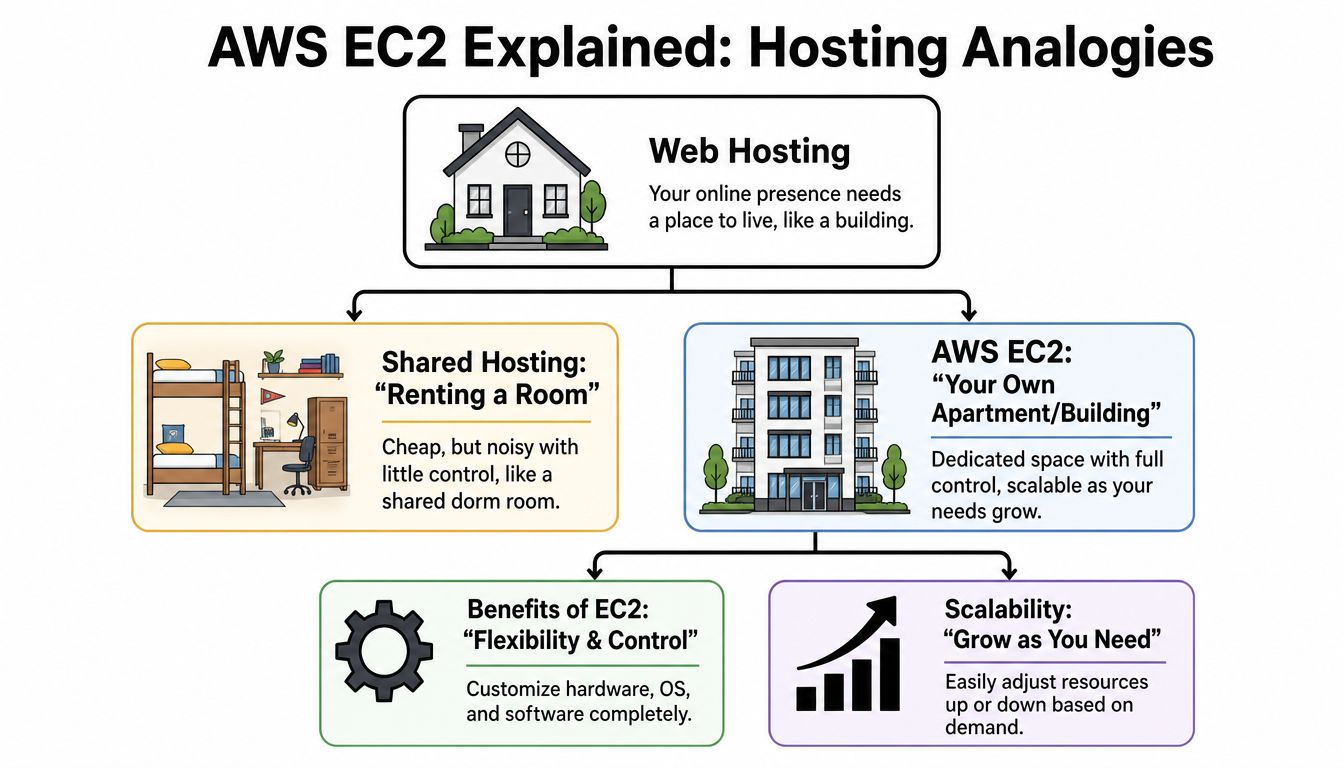
AWS EC2 is a virtual server you rent from Amazon. That's the cleanest explanation.
If shared hosting is like renting one room in a crowded share house, AWS EC2 is more like leasing your own warehouse shell. The structure exists. Power and access exist. But nothing useful happens until someone fits it out properly.
The three parts most business owners should understand
You don't need to become a cloud engineer, but you do need to know the basics.
Instance
An instance is the actual virtual machine. It's the server that runs your website, app, scripts, feeds, cron jobs, APIs, or admin tools. If you're hosting a custom WordPress stack, a Laravel app, a headless backend for Shopify, or a reporting layer that connects ad platforms with your CRM, that runtime lives on the instance.
AMI
An AMI is the starting template. Think of it as the base fit-out plan. It defines the operating system and sometimes preconfigured software. You can launch a plain Linux server, or a prepared image with a specific stack.
For a developer doing WordPress development or building custom Shopify apps using Shopify CLI, the AMI affects setup speed and consistency. For a business owner, it affects whether the environment is clean and maintainable or messy from day one.
Instance type
The instance type defines the shape of the machine. More CPU, more memory, different networking behaviour, and different use cases. Some are better for application logic. Some suit databases better. Some are overpowered for a normal website and end up costing money for no business reason.
Why people like EC2
EC2 gives you room to customise.
That matters when you need:
- Custom software stacks that don't fit managed hosting rules
- Specific deployment workflows for WordPress web developer or Shopify developer API work
- Background processing for imports, feeds, analytics jobs, or API syncs
- Separation of environments so staging, production, and support tools don't all live in one fragile setup
A digital marketing agency Melbourne teams work with also benefits from that flexibility. Better control means cleaner GTM container setups, more dependable server-side tracking, easier Conversions API installation for Meta, and fewer platform limitations when troubleshooting why Google Shopping Ads aren't spending budget.
Why people struggle with EC2
You're responsible for the machine.
That includes:
- Security updates
- Backups
- Monitoring
- Server performance
- Scaling decisions
- Access control
- Recovery planning
AWS EC2 is excellent when you need a custom environment. It's a poor fit when you really want somebody else to handle the boring but critical server work.
For non-technical owners, that's the fork in the road. If your competitive edge comes from a custom app, unusual integrations, or heavy operational logic, EC2 can be the right tool. If your business mainly needs a reliable site for local SEO, Google My Business, Google Ads for contact form submissions, or a clean Shopify store, a managed platform often creates less risk.
When EC2 Is the Right Move for Your Business
EC2 earns its keep in specific situations. Not fashionable situations. Necessary ones.
A standard website usually doesn't need it
If you run a straightforward business site with normal service pages, blog content, contact forms, and local lead generation, EC2 is rarely the first thing I'd recommend. The same goes for many ecommerce brands using Shopify in a fairly standard way. If the business runs on catalogue management, theme customisation, email flows, Meta ads creative testing process, and Google Shopping campaigns, the bottleneck usually isn't the lack of raw server control.
In those cases, stronger fundamentals matter more:
- Better WordPress design and lighter templates
- Smarter Shopify design and cleaner theme code
- Cleaner GTM and Google Analytics implementation
- Correct Meta Conversions API setup
- Feed quality for Google Shopping ads for dropshipping or standard retail
- Landing page speed and message match for service businesses
Where EC2 becomes the right tool
EC2 makes sense when the website is no longer “just a website”.
Custom applications attached to ecommerce
Some stores need custom stock syncing, ERP connectors, product configurators, post-purchase workflows, or private tools that sit beside Shopify or WordPress. Managed platforms can handle the storefront but not always the supporting infrastructure. EC2 is useful when you need a server that can run that logic on your terms.
WooCommerce builds with unusual demands
A normal WooCommerce setup can often live happily on strong managed hosting. A heavily customised one is different. If the store has bespoke plugins, custom blocks in Gutenberg, external inventory logic, advanced filtering, multiple integrations, or back-office workflows, EC2 can give you more breathing room.
Businesses with internal systems or niche software
Some companies need a server for more than a public website. They might need a private admin tool, middleware, scheduled reporting, API connectors, or a processing layer used by staff and customers. That's where EC2 starts to look practical rather than excessive.
The best reason to use EC2 is not “AWS is better”. It's “our business needs a server we can shape around the way we operate”.
Why this matters in Australia
AWS said its investment in Australia, including the Melbourne Region, is projected to support more than 2,500 full-time jobs annually at external businesses across Australia, which shows how extensively this infrastructure is being built into the local economy, according to the AWS Australia announcement.
That doesn't mean every Melbourne business should rush onto EC2. It means local businesses now have a serious cloud option close to home, and that choice is becoming part of ordinary commercial decision-making rather than something only enterprise companies worry about.
A quick fit check
EC2 is more likely to fit if your business needs one or more of these:
| Business need | EC2 fit |
|---|---|
| Custom web app or private tool | Strong |
| Complex WooCommerce infrastructure | Strong |
| Shopify plus external backend services | Strong |
| Basic brochure site | Weak |
| Standard Shopify store | Usually weak |
| Lead gen site with minimal custom logic | Weak to moderate |
If your core challenge is campaign strategy, local SEO, mastering Facebook ads, beginners guide to Google Shopping Ads issues, or what budget to spend on Google Ads, better marketing execution will usually beat a more complex hosting stack.
Understanding the Real Cost of an EC2 Instance
The hourly server price is the part people notice. It's not the part that hurts.
A lot of owners look at EC2 and think, “That's cheaper than my current host.” Sometimes the instance itself is. The total setup often isn't. The bill grows because EC2 pricing is modular, and the management burden sits outside the AWS invoice entirely.
The visible costs
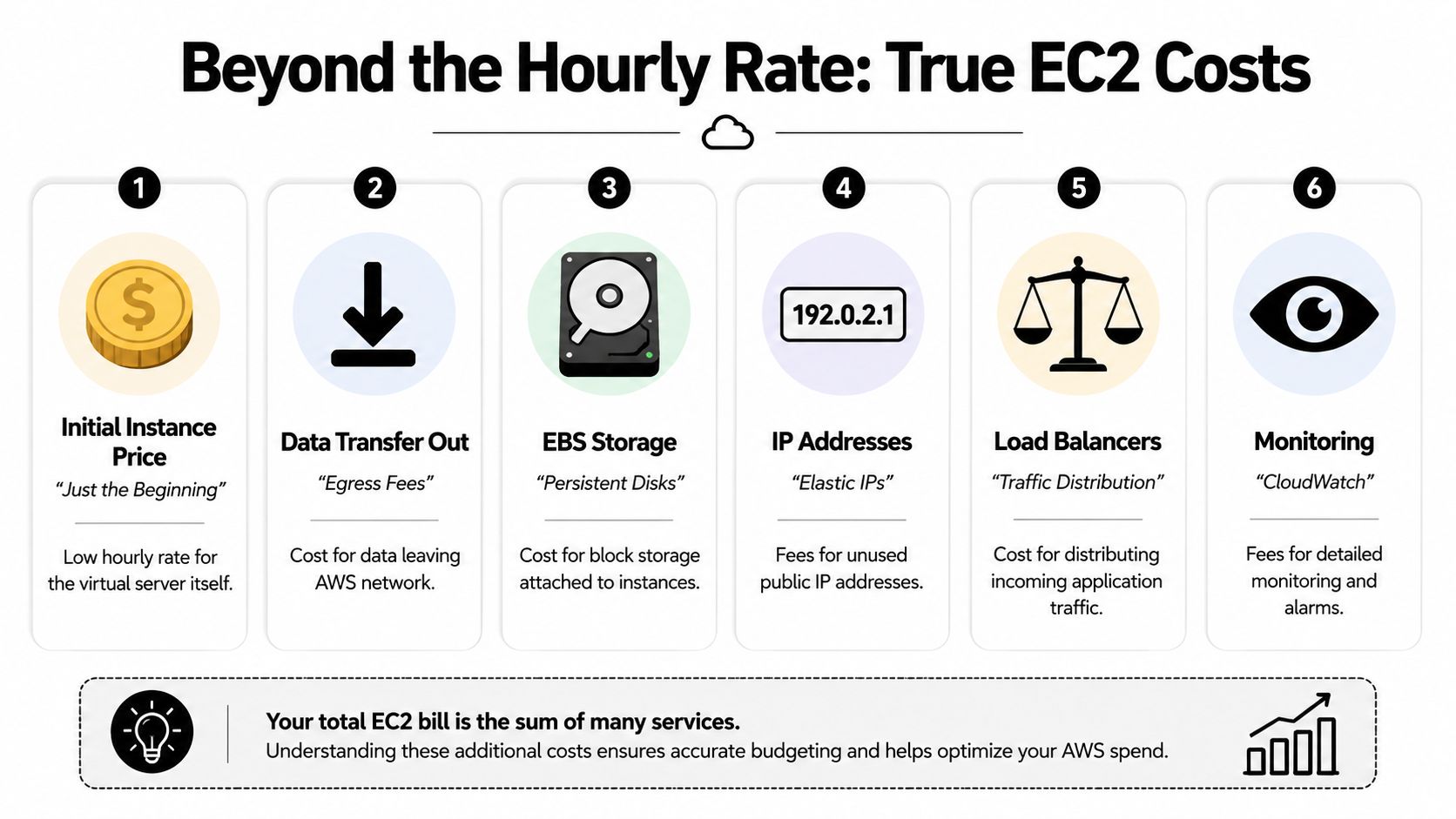
An EC2 setup usually includes more than the instance itself.
- Compute cost for the server runtime
- Storage cost for attached disks
- Data transfer cost for traffic leaving AWS
- Load balancing cost if you distribute traffic properly
- Monitoring cost if you want deeper visibility
- Backup cost for snapshots and retained recovery points
Those line items are normal. The problem is that many first-time AWS users compare EC2 against a flat monthly hosting plan and assume they're comparing like for like. They aren't.
A useful outside perspective on this is future cloud cost reduction, because it reinforces the basic truth that cloud costs need active management. They don't stay tidy by themselves.
The hidden cost that matters more
The expensive part is ownership.
If you run EC2 properly, somebody has to:
- patch the server
- secure access
- watch uptime
- test backups
- tune performance
- investigate incidents
- decide when to scale
- document what was built
That person might be you, your in-house developer, or an agency partner. Either way, it's labour. If nobody owns it, the risk goes up and the value of using EC2 drops sharply.
A cheap server becomes an expensive decision when no one budgets for maintenance.
Monitoring is a good example
By default, Amazon CloudWatch collects EC2 metrics at 5-minute intervals, and enabling Detailed Monitoring reduces that to 1-minute intervals, which gives much tighter visibility into CPU, network activity and packet counts, as explained in this CloudWatch walkthrough.
That tighter interval is useful when you're trying to catch performance issues during live campaigns. But it also shows the pattern with AWS. Better visibility usually means extra setup, extra decisions, and sometimes extra spend.
Later in the same stack, EC2 also offers five instance-level network performance metrics covering inbound and outbound bandwidth, packets per second, tracked connections, and packets per second to link-local services, which helps teams see when an instance exceeds network allowances, according to the EC2 network metrics announcement.
For an ecommerce store, that sort of observability matters during launches, sales events, and ad spikes. But again, useful doesn't mean simple.
A short explainer on AWS billing helps here if you need a visual overview before deciding whether cloud complexity is worth it.
The business lens
If you're weighing EC2 against a managed WordPress host or Shopify, don't ask only, “What's the monthly server cost?” Ask:
- Who will manage it?
- What breaks if that person is away?
- Do we need custom infrastructure?
- Would that budget produce more return in development or ads instead?
For many businesses, the right answer is still managed hosting. For the few that need EC2, the right answer is to cost the whole system, not the headline server price.
Essential Best Practices for Managing EC2
Running EC2 without discipline is how businesses create avoidable outages.
The server might launch in minutes, but a production-grade setup takes more thought than that. If a website supports ecommerce revenue, paid traffic, bookings, or internal operations, the EC2 environment needs proper guardrails from the start.

Start with access and security
A business owner doesn't need to know every AWS screen, but they should expect the setup to cover the basics well.
Lock down network access
Your security groups act like a gatekeeper. Only required traffic should be allowed in. The “let's open everything while we test it” approach is fine for causing future problems and bad for everything else.
Keep permissions tight
Not every staff member or contractor needs broad AWS access. Clean separation matters. The person editing Google Ads shouldn't have the same cloud permissions as the person maintaining infrastructure.
Patch the server
Servers age badly when no one updates them. Plugin updates get most of the attention in WordPress conversations, but operating system maintenance matters just as much on EC2.
Backups need to be boring and reliable
Backups are one of those topics where people sound confident until restore day.
A good EC2 setup includes automated backups, retained recovery points, and actual restore testing. Not “we think snapshots are running”. Tested recovery. If your store breaks after a deploy, plugin conflict, failed integration, or corrupted update, the backup strategy decides whether the incident is annoying or catastrophic.
Backups only count if someone can restore them quickly and calmly.
Monitoring should answer business questions
A dashboard full of graphs is not the same as useful monitoring.
The setup should help answer questions like:
- Is the site under stress right now?
- Is one server node struggling more than another?
- Did performance drop during a campaign launch?
- Are checkout or API processes hitting resource limits?
For non-technical founders, insights for non-technical founders on uptime are worth reading because uptime planning is really about risk reduction, not engineering theatre.
The Melbourne-specific trap many guides miss
For regions introduced after March 2019, including Melbourne (ap-southeast-4), you must manually enable the region in your AWS account before launching resources like EC2 instances, which AWS documents in its AWS Regions enablement guidance.
This catches people because it doesn't feel like a server issue. It feels like AWS is randomly failing. A lot of generic tutorials skip this entirely, so Australian users can burn time troubleshooting the wrong thing.
Resilience is not just “use multiple zones”
Another mistake is assuming availability zone labels work the way people casually describe them online. They don't.
If your developer says, “We'll use A, B and C,” that needs more care than it sounds. The operational goal is proper separation and resilience, not ticking a box with assumed labels.
A practical checklist
Here's what I'd treat as essential on any serious EC2 deployment:
- Defined ownership so someone is accountable for updates, incidents, and vendor coordination
- Restricted access with only necessary permissions for each person
- Automated backups with restore testing, not just backup creation
- Monitoring and alerts tied to issues that affect sales, leads, and operations
- Documented recovery steps so the system isn't dependent on one person's memory
- Environment separation between production and any staging or development setup
If a business can't support that level of care, EC2 may still be possible, but it probably isn't the best operational choice.
EC2 Compared to Simpler Alternatives
The best hosting choice is usually the one that gives you enough control without forcing you to become a part-time infrastructure manager.
EC2 versus Lightsail versus managed platforms
AWS EC2 gives you the most flexibility. That's also why it creates the most responsibility. AWS Lightsail simplifies part of that by bundling compute and related resources into a more predictable package. Managed platforms push simplicity even further by handling most of the stack for you.
For many businesses, the practical difference comes down to one question. Do you want to manage infrastructure, or do you want to use infrastructure?
Hosting Comparison EC2 vs. Lightsail vs. Managed Platforms
| Feature | AWS EC2 | AWS Lightsail | Managed Platform (e.g., Kinsta/Shopify) |
|---|---|---|---|
| Control | Highest | Moderate | Lowest |
| Setup complexity | Highest | Lower | Lowest |
| Flexibility for custom apps | Strong | Moderate | Limited |
| Predictability of cost | Lower | Higher | Higher |
| Maintenance burden | Highest | Moderate | Lowest |
| Fit for standard business websites | Often excessive | Sometimes suitable | Usually strongest |
| Fit for advanced custom stacks | Strongest | Limited compared with EC2 | Often restrictive |
Where each option usually fits
EC2
Best when the business has custom infrastructure needs, experienced technical support, or application requirements that don't fit a managed box. That can include complex WordPress development, private APIs, custom backends, or middleware supporting Shopify development partners work.
Lightsail
Useful when a business wants more control than standard hosting but less complexity than full AWS. It's often a middle ground for teams that are outgrowing basic hosting and need something cleaner before moving to a more advanced stack.
Managed platforms
Usually the right call for standard WordPress websites, local business sites, Shopify stores, content-led marketing sites, and ecommerce brands that care more about stability, conversion tracking, and campaign performance than server customisation.
Most businesses don't need the most powerful hosting option. They need the option with the fewest ways to make expensive mistakes.
One technical detail owners should know
Many users assume AWS Availability Zones are labelled consistently as A, B, and C across accounts. In reality, AWS randomises those mappings, and that can create poor resilience decisions for Melbourne-based deployments across the region's three availability zones, as discussed in this community explanation of Availability Zone mapping.
That sounds small, but it shows why EC2 isn't just “better hosting”. It has infrastructure concepts that matter. On a managed platform, much of that complexity is abstracted away. On EC2, you or your provider need to understand it properly.
The plain-English trade-off
If your business depends on selling products, generating leads, running PPC for tradies, measuring success in Facebook ads, or keeping Google Shopping campaigns stable, simplicity often wins. If your business depends on custom systems, specialist integrations, and precise infrastructure control, EC2 can be the right long-term foundation.
The mistake is using EC2 to solve a marketing, UX, tracking, or development problem that had nothing to do with server flexibility in the first place.
Next Steps Our Recommendation for Your Business
If you run a standard WordPress website or Shopify store, the safest answer is usually a managed platform. It lets you focus on sales, creative, offers, SEO, Google Ads, Meta ads, email flows, and customer experience instead of kernel updates and server alerts. For many businesses, that is the smarter commercial decision, even if it feels less “advanced”.
If you've got a more demanding setup, the answer changes. A custom ecommerce workflow, private app layer, advanced API integration, unusual WooCommerce build, or operational tool that supports the business directly can justify EC2. In that case, the infrastructure should be designed deliberately, not bolted together because someone said AWS is what serious companies use.
There's also a middle ground. If you've outgrown bargain hosting but don't need a fully custom cloud setup, simpler cloud products or higher-end managed hosting can give you breathing room without the full weight of EC2 administration. That's often the most sensible step for growing Australian SMBs.
A simple decision filter
Use this as a gut check:
- Choose managed hosting if your main goal is growth, lead generation, ecommerce conversion, or easier maintenance
- Choose Lightsail or a middle-ground setup if you need more flexibility but want clearer packaging
- Choose EC2 if custom infrastructure is a core part of how your business operates
That same thinking applies whether you're comparing WordPress developer Melbourne options, Shopify developers Melbourne support, a digital marketing agency Melbourne business owners trust, or a broader marketing agency Melbourne partner for web and paid media. Infrastructure should support the growth plan, not distract from it.
For ecommerce businesses especially, the highest-return work is often still on the front end. Better product pages. Stronger Shopify API use. Cleaner custom blocks in Gutenberg. Better Meta creative testing. Smarter PMAX vs Google Shopping Ads decisions. More reliable Google tag manager containers. A proper Conversions API installation for Meta. Better call tracking for lead campaigns using tools like CallRail or Go High Level. In some cases, even a custom Twilio number workflow that answers calls around the clock, books into your calendar or Calendly, and catches missed opportunities for tradies, hairdressers, beauty therapists, dentists, restaurants, and doctors will move the business faster than a more complex server stack.
For build budgets, the gap between “simple” and “serious” is real. In Melbourne, professional Shopify development agencies commonly charge AUD 90 to AUD 140 per hour, with medium-to-large builds often sitting between AUD 12,000 and AUD 35,000, while more advanced stores can reach AUD 15,000 to AUD 40,000 or more, according to this Australian Shopify development cost guide. Broader ecommerce platform costs in Australia can range from AUD $10,000 to $25,000 for starter stores, AUD $25,000 to $80,000 for growth builds, and AUD $80,000 to $250,000+ for enterprise work, based on this ecommerce platform cost overview. General ecommerce website development costs in Australia also commonly start around AUD $20,000+, especially in Sydney and Melbourne, as outlined in this Australia website development cost guide. At the lighter end, some basic Shopify customisation quotes can start around $2,000, while more complete builds often sit around $5,000 to $7,000, based on this Shopify cost discussion.
Those numbers are useful because they frame the core decision. If you're already investing properly in WordPress development, Shopify development, Google Ads, local SEO, Google My Business, Meta ads, and analytics, the infrastructure choice should match the seriousness of the business.
If you're working with at least $3k a month in paid ads budget, Alpha Omega Digital is offering a low-risk deal: get one month of paid ads management free when you apply through the contact page. Alpha Omega Digital is a Melbourne-based agency serving businesses across Sydney, Brisbane, Newcastle, Perth, Adelaide, Darwin and Hobart. If you need support with WordPress Developer, Google Ads for plumbers, best Facebook ads agency, Facebook ads for electricians, Shopify developers Melbourne, ecommerce marketing agency, Google Ads agency, Facebook Meta ads agency, WordPress developers Melbourne or web design Melbourne, get in touch.