A Melbourne online store can look healthy in the morning and become expensive by lunchtime. A campaign starts sending visitors, a customer reports that checkout won't load, a plugin update creates a payment error, and the analytics dashboard suddenly shows no purchases. The owner sees a website problem. The business is experiencing an operational failure.
That distinction matters. WordPress support in Melbourne should protect the revenue system around your store, not install updates when someone remembers. It should cover hosting, compatibility, security, performance, checkout, tracking, integrations and the technical decisions that keep marketing data trustworthy.
I've worked across WordPress, WooCommerce and Shopify environments where the visible issue was rarely the root cause. A slow product page might come from database inefficiency, excessive plugins, poor caching or an unsuitable hosting stack. A broken Meta campaign might be a failed browser event, a misconfigured Google Tag Manager container or a missing server-side signal.
This guide is for Melbourne ecommerce operators, marketing managers and business owners deciding whether they need a maintenance provider, a WordPress developer, a broader digital marketing agency Melbourne partner, or a technical team that can connect the whole system. It covers practical support needs, pricing models, service levels, accessibility, incident readiness and the wider web development and advertising work that often sits beside WordPress.
When Your WordPress Store Needs Real Support in Melbourne
A retailer in Richmond launches a weekend promotion. The ads are approved, stock is ready and the email has gone out. Within the first hour, customers report that the cart is slow on mobile. The owner disables a recently updated plugin, the cart behaves differently, and the team spends the afternoon trying to identify which change affected checkout.
That situation doesn't need a dramatic cyberattack to cost money. A theme conflict, an outdated PHP environment, a blocked script or a failed tracking tag can interrupt sales while the store appears normal to someone browsing the homepage. The business needs someone who understands the relationship between WordPress development, hosting, analytics and conversion paths.
Melbourne stores also operate in a crowded local market. Customers compare product pages quickly, expect reliable checkout and often arrive from paid search or social campaigns with a clear buying intention. A support partner should therefore treat every technical change as a commercial decision. Updating a plugin may improve security, but deploying it directly on a revenue-critical store without a backup, staging check or rollback plan creates a different risk.
Practical rule: If a technical issue can affect checkout, lead capture, advertising attribution or search visibility, it belongs in an operational support process, not an informal favour.
The Australian WordPress ecosystem contains varied combinations of WordPress versions, PHP versions, database stacks and languages, as reflected by the local community reference discussed by Melbourne Web Solutions. That diversity means a Melbourne support provider can't assume every site runs on the same theme, plugin set or hosting configuration.
The useful question isn't, “Can someone update my site?” Ask whether the provider can investigate a failed order, trace a missing conversion, tune a WooCommerce database, coordinate a hosting change and explain the commercial impact in plain English. For businesses comparing a WordPress developer Melbourne service with a broader marketing agency Melbourne partner, that difference usually determines whether support remains reactive or becomes a reliable growth foundation.
For a technical explanation of the page experience signals that matter, the Core Web Vitals guide is a useful resource. It helps owners connect front-end speed issues with what customers experience.
What WordPress Support Really Means Beyond Updates
WordPress support is closer to managing a physical shop than changing a few files in an admin panel. The storefront needs a stable building, working doors, safe payment handling, clean shelves, accurate signage and a plan for emergencies. A WordPress website has the digital equivalent of each requirement.
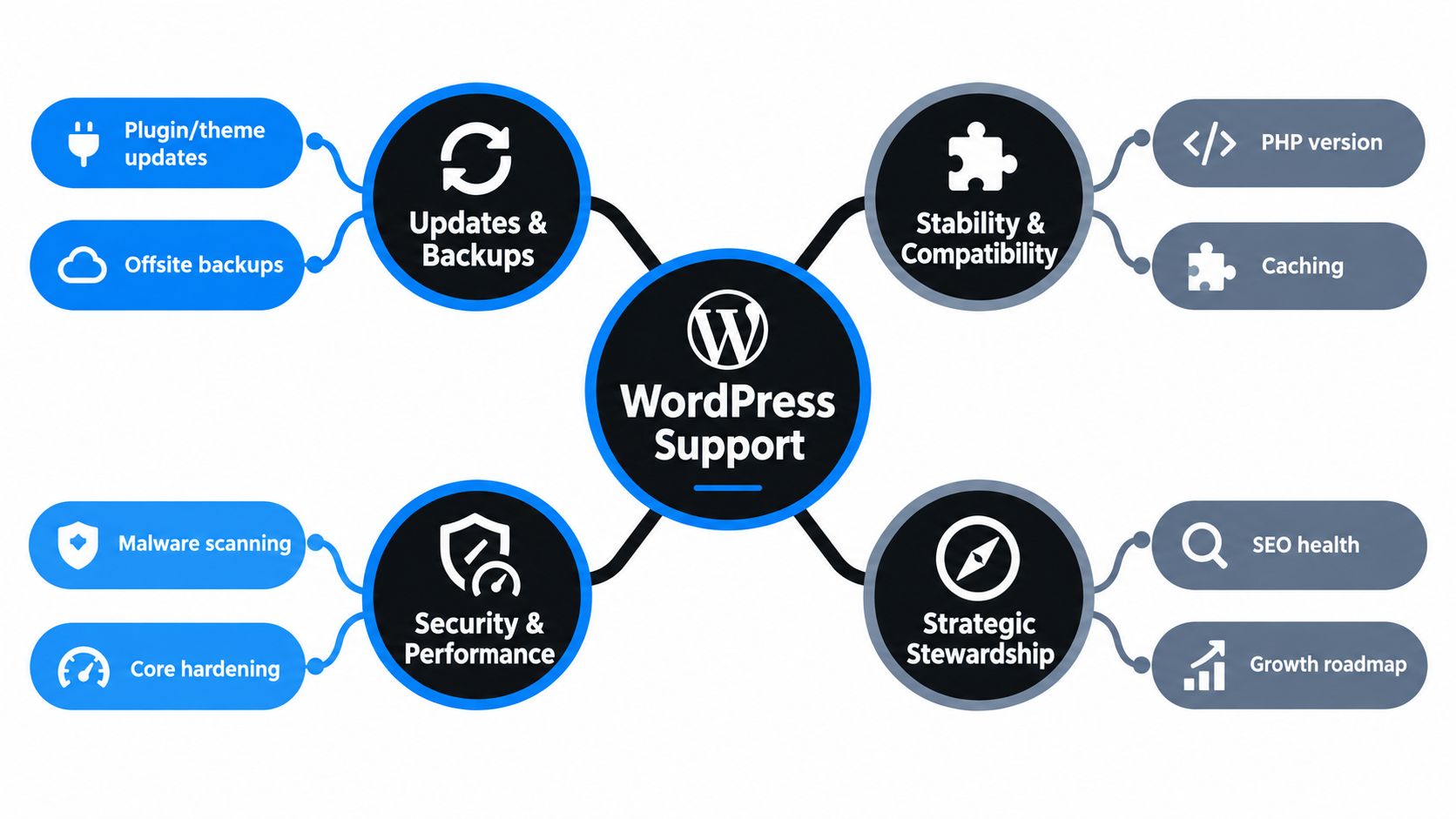
The work usually starts with visibility. The provider needs to know which WordPress core version, PHP environment, theme, plugins, database and hosting services are active. Without that inventory, an update plan is guesswork. A local WordPress support team also needs to understand which components are business-critical, such as payment gateways, subscriptions, shipping calculators, product filters, booking tools and customer account functions.
The maintenance layer
Routine maintenance includes plugin and theme updates, WordPress core management, off-site backups, uptime checks, malware scanning and review of administrator access. Good support also tests whether those changes work. An update that completes successfully in the dashboard can still break a product template, search filter, form or checkout flow.
Australian WordPress environments aren't uniform. The WordPress Australia community statistics provide useful local context around the versions, PHP configurations, database stacks and languages in use. For a support provider, that means compatibility work matters as much as the update itself.
The performance layer
A fast store needs more than compressed images. Server location, PHP resources, database queries, page caching, object caching and plugin behaviour all contribute to the result. Guidance for Australian hosting commonly points to Australian data centres, PHP 8.1 or later, HTTP/2 or HTTP/3, NVMe or SSD storage and server-side object caching such as Redis or Memcached, with practical targets of TTFB under 200 to 500 milliseconds and LCP under 2.5 seconds, as outlined by Uptime Web Hosting.
The stewardship layer
Support becomes strategic when the team uses technical findings to guide commercial decisions. That might mean replacing an abandoned plugin, rebuilding a product section with custom Gutenberg blocks, separating editorial content from the store, or deciding that a specific catalogue is better suited to Shopify.
A WordPress website developer should be able to maintain the existing system, but shouldn't be afraid to recommend a rebuild when the current architecture makes reliable operation impossible. The goal is a safer, faster and more measurable store, not endless patching.
Common WordPress Support Needs We See for Melbourne Businesses
A Melbourne store can lose sales before anyone reports a fault. Checkout may fail after a plugin update, tracking can stop recording campaigns, or slow hosting can push customers away. Effective support starts with the symptom, then traces it to the underlying system. “The website is slow” could mean an overloaded server, inefficient query, unoptimised image, render-blocking script or plugin loading unnecessary features across the site.
Maintenance and compatibility
WooCommerce stores rely on connected components. A product page might combine a page builder, review system, payment extension, shipping calculator and marketing scripts. Updating one component without testing the others can break checkout, product display or order notifications, even when the change appeared unrelated.
A useful support review should cover:
- Plugin and theme condition: Identify abandoned, duplicated or unnecessary components, then document replacement or removal decisions.
- PHP and database compatibility: Confirm that the Melbourne hosting environment supports the application's current requirements.
- Checkout and form paths: Test transactions, coupon codes, account creation, contact forms and confirmation messages.
- Custom code ownership: Record snippets, child-theme changes and integrations so updates do not overwrite undocumented work.
The output should be an operating record, not just a list of updates. It gives the next technician enough context to release changes safely and check the revenue paths first.
Security and incident response
Security support requires a response process for vulnerability alerts, patch decisions, backup verification, access control and recovery. Australian coverage has reported an ACSC warning about large-scale exploitation of Australian websites and identified a WordPress plugin CVE. That makes plugin response a local operating concern, as reported by WordPress Support Melbourne.
Automatic updates can suit low-risk components. A payment extension, shipping rule or product customisation needs more control. Staging, a verified backup and a tested rollback procedure reduce the risk of turning a routine patch into a trading outage. WCAG 2.2 checks also belong in release readiness, particularly for checkout, forms, keyboard access and error messages.
Performance, tracking and integration
Australian testing across Melbourne, Sydney and Perth found optimised WordPress stacks with average load times as low as 0.9 to 1.4 seconds and TTFB as low as 120 to 210 milliseconds. Slower providers recorded load times of 1.5 seconds or more and TTFB of 230 milliseconds or more, according to Max Jacobs' Australian WordPress hosting testing. These figures do not guarantee a result for every store. They show why data-centre location, caching and server configuration deserve a proper review.
Support should also verify the measurement layer. That can include Google Tag Manager containers, Google Analytics event mapping, Meta Conversions API installation, consent handling and Shopify API connections. Where WordPress and Shopify operate together, the team must document which platform owns product, customer and order data.
For WooCommerce stores, Cometly's WooCommerce integration for optimising ad spend can connect advertising decisions with store activity. It cannot correct broken tracking, consent or order data, so the integration needs testing alongside the checkout and analytics paths.
Watch the following explanation of operational issues that often sit behind WordPress failures.
WordPress Support Pricing Models and Typical Costs in Melbourne
The cheapest support arrangement is rarely the lowest-cost option when the store depends on reliable transactions. Pay-as-you-go help can suit a small site with occasional content changes. It becomes uncomfortable when a plugin vulnerability appears during a promotion and the owner has no reserved capacity, documented backup process or agreed response path.
A monthly care plan generally works better for a store that needs predictable oversight. The scope should say whether it includes updates, staging, backups, restore testing, performance work, security monitoring, small changes and emergency assistance. “Unlimited support” sounds attractive, but it isn't useful unless the agreement defines what counts as a small request, a project and an incident.
Project-based custom work belongs outside ordinary maintenance. A custom Gutenberg block, WooCommerce integration, Shopify API connection, theme rebuild or migration needs discovery, development, testing and release management. Combining that work with a low-cost care plan often creates unclear expectations on both sides.
A practical comparison
| Pricing Model | What Is Included | Best For |
|---|---|---|
| Pay as you go | Individual fixes, audits or development tasks | Businesses with low support frequency and internal technical oversight |
| Hourly retainer | Reserved capacity for agreed technical work | Stores with recurring changes and a need for faster access |
| Fixed monthly care plan | Scheduled updates, backups, monitoring, maintenance and defined support | Ecommerce stores where downtime, broken checkout or security gaps carry commercial risk |
| Project-based development | Discovery, design, development, testing, launch and handover | Rebuilds, custom blocks, integrations, migrations and new ecommerce functionality |
What to compare in proposals
Look beyond the monthly fee. A proposal should make clear who owns hosting, whether backups are stored off-site, how restore testing works, whether updates happen in staging, and whether accessibility remediation is included. It should also explain how the provider handles a broken payment gateway or an urgent vulnerability.
A support price can't be judged without understanding the site. A simple brochure site and a WooCommerce catalogue with subscriptions, custom shipping and multiple integrations carry different maintenance demands. Ask for an initial health check before accepting a package, especially if another agency built the website.
Service Levels and SLAs You Should Expect From a Melbourne Partner
An SLA matters when a Melbourne store has a failed checkout, a broken deployment or a security alert. “Fast support” is too vague. The agreement should state who acknowledges the incident, what happens first and when the team may restore a backup instead of attempting a risky fix.
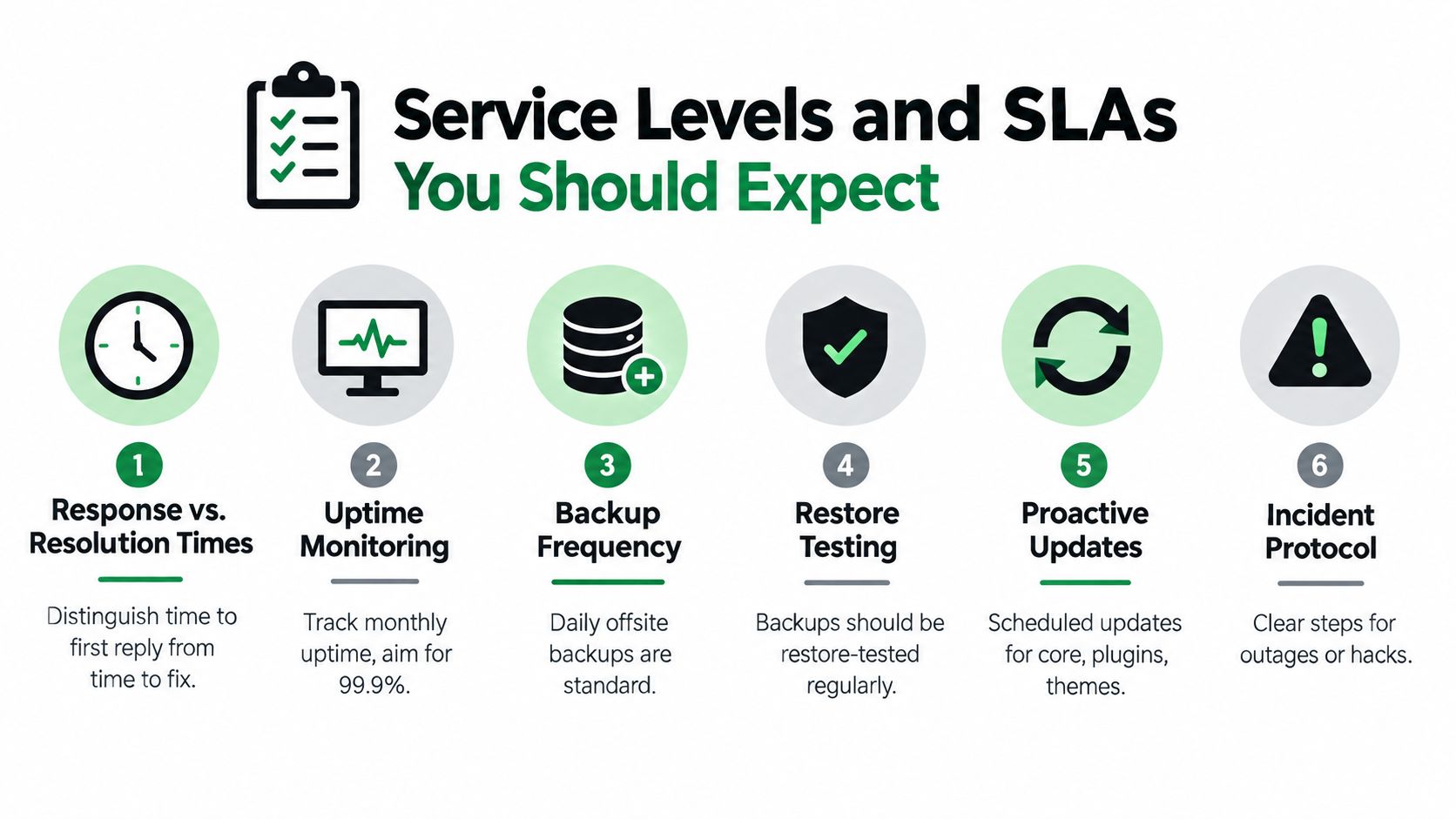
Separate response time from resolution time. Response time records when a person acknowledges the issue. Resolution time depends on the cause, system access, third-party providers and the availability of a safe remedy. A responsible provider can commit to prompt acknowledgement while allowing for different recovery paths.
The clauses worth reading carefully
- Response and resolution definitions: Confirm what qualifies as an incident, how it is reported and who receives the first notification.
- Uptime monitoring: Ask how downtime is detected and whether checks include checkout, product and contact pages, not only the homepage.
- Backup frequency: Confirm where backups are stored, how long they remain available and whether order data is covered.
- Restore testing: A backup has value only when restoration works. Ask how and when that process is tested.
- Update procedure: Check whether updates run in staging, receive review and are followed by checkout, payment and form tests.
- Incident protocol: Request written steps for hacking, plugin exploitation, failed deployments and hosting outages.
Melbourne hosting and accessibility questions
Hosting near Australian customers can support quicker initial delivery, but server location is only one part of performance. Database tuning, caching, theme quality and content delivery configuration also affect a store. Ask the partner to measure real customer paths from Melbourne and other Australian locations, rather than relying on a hosting label.
Accessibility needs a separate scope. Australia's benchmark is WCAG 2.2 Level AA, with the Advisory Note updated in April 2025 and applied to people developing or maintaining a web resource in Australia, according to WP Sparks. Routine maintenance does not automatically include an accessibility audit or remediation.
Ask whether the SLA covers keyboard navigation, contrast, alternative-text workflows, form labels and error messaging. It should also state whether fixes are included, excluded or quoted separately. For ecommerce, plugin incidents and accessibility defects belong in operational planning because either can interrupt revenue or prevent customers from completing a purchase.
How to Vet a WordPress Support Partner With Confidence
A provider can promise security and performance without showing how the work happens. The useful test is to ask for the process behind the promise.
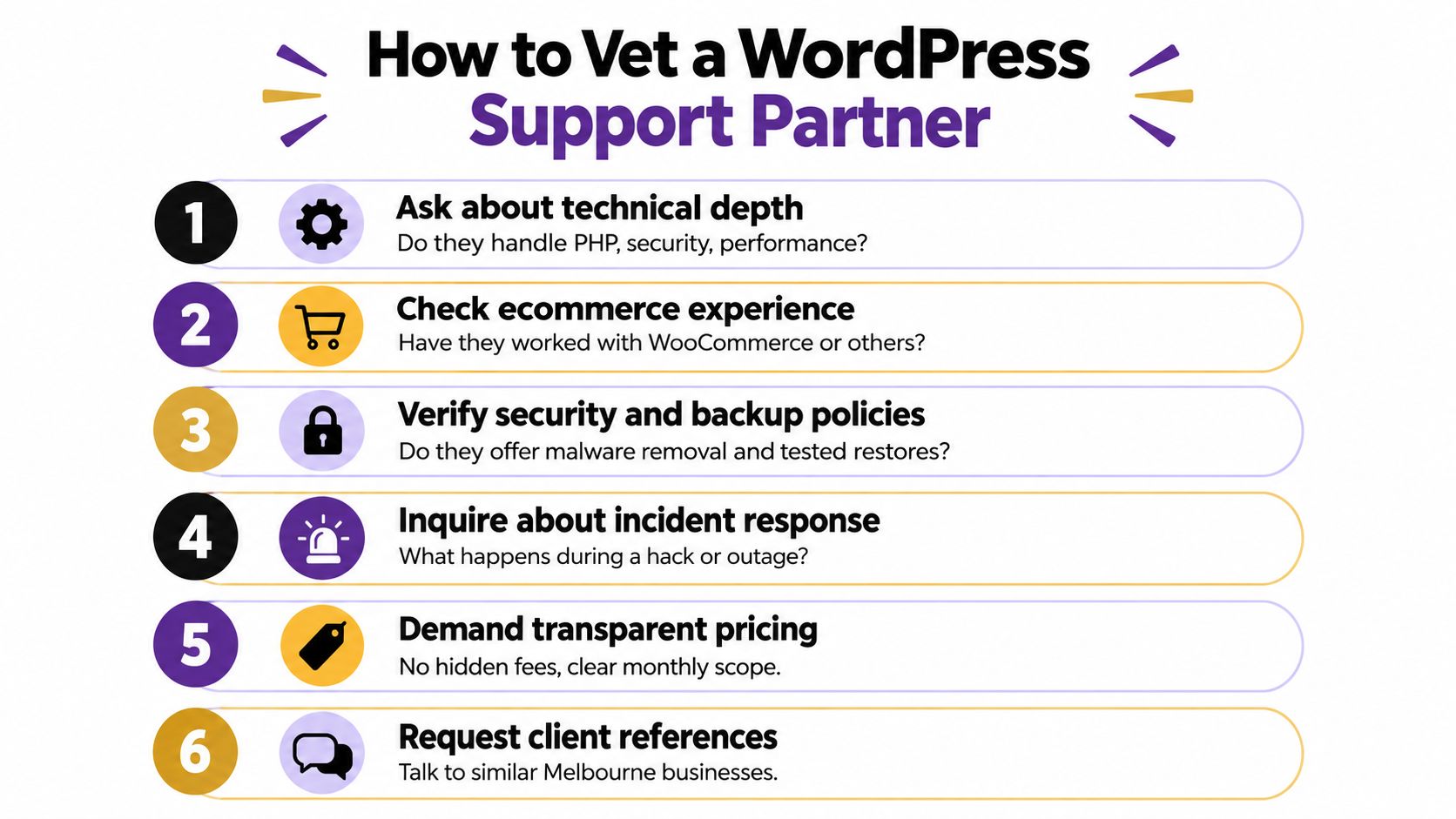
Start with the technical handover. A capable WordPress development company should be able to explain the current theme structure, plugin dependencies, PHP environment, database condition, hosting setup and custom code. If the proposal only mentions updates and backups, it may be a maintenance checklist rather than ecommerce support.
Questions for the first call
- How do you protect checkout during updates? Look for staging, backups, testing and rollback, not a promise that updates are automatic.
- Can you work with WooCommerce and Shopify? Ecommerce experience should include product data, payments, shipping, APIs and analytics.
- What happens after a plugin vulnerability is announced? Ask who assesses the risk, how fast patching occurs and how stability is checked.
- Do you separate accessibility from ordinary maintenance? A provider should define whether WCAG 2.2 Level AA review and remediation are included.
- How do you validate tracking? Request a clear approach to GTM, Google Analytics, Meta browser events and Conversions API.
- Can you show relevant references? Speak with a business that has a similar catalogue, sales path or technical environment.
Test the marketing connection
The site team should understand what paid traffic needs from the website. Google Ads landing pages, Google Shopping feeds, Meta catalogues, Instagram Shop and Facebook Shop all depend on accurate product, event and destination data. If a provider can't explain why a campaign is spending without recorded purchases, the technical and advertising teams may be operating separately.
The same applies to lead-generation businesses. A trades campaign may need call tracking through CallRail or GoHighLevel, a dedicated number, form event validation and a CRM handoff. A store may need product-level revenue reporting, feed diagnostics and a clean purchase event.
Cheap automatic updates aren't always safer. Cheap design isn't always easier to maintain. A reliable partner gives you clear boundaries, documents decisions and tells you when a requested shortcut creates future risk.
Choosing Your Support Plan and Taking the Next Step With Alpha Omega Digital
Choose support according to the cost of failure. A small catalogue with infrequent orders may need a structured care plan and occasional development. A busy store running Google Ads, Meta campaigns and email promotions needs monitored infrastructure, protected checkout, reliable tracking and access to development capacity.
A sensible onboarding process starts with discovery, then moves through a technical health check, prioritised recommendations, implementation, measurement and ongoing optimisation. The work might include WordPress development, WordPress design, WooCommerce improvements, custom Gutenberg blocks, Shopify development, Shopify design or a decision to move platforms.
For Shopify stores, a Shopify developer should be comfortable with the Shopify API, theme architecture, product and collection data, pixels, checkout constraints and custom apps built using Shopify CLI. For WordPress stores, a WordPress web developer should understand child themes, custom blocks, WooCommerce templates, database performance and third-party integrations. The right platform depends on the commercial and operational requirements, not a generic preference.
Advertising support can sit beside technical support:
- Google Ads: Search, Shopping, Performance Max and campaign priority should reflect margin, stock, location and intent.
- Meta advertising: A Facebook ads agency should use a documented creative testing process, not replace every ad before the data is useful.
- Measurement: Google Tag Manager containers, Google Analytics events and Meta Conversions API installation should be tested against real actions.
- Local growth: Local SEO and Google Business Profile management matter when customers search by suburb, service or pickup location.
- Call campaigns: CallRail and GoHighLevel can support PPC call tracking, while a custom Twilio number can route calls, provide 24-hour answering and book appointments into a calendar or Calendly. That model can reduce missed opportunities for tradies, hairdressers, beauty therapists, dentists, restaurants and doctors.
For stores considering advertising budgets, Google Ads lets advertisers choose an individual daily budget or shared budget during campaign setup, as explained in Google Ads Help for Australia. Australia-focused guidance places ecommerce starting budgets at AUD $1,500 to $3,000 per month for small catalogues, AUD $3,000 to $6,000 for mid-size stores, and AUD $6,000 or more for larger or higher-ticket stores, as outlined by Adstralis' ecommerce budgeting guide. Other Australian guidance gives testing and local visibility a range of AUD $500 to $1,000 per month, small-business lead generation AUD $1,500 to $3,000, growing businesses AUD $3,000 to $5,000, scaling campaigns AUD $5,000 to $10,000, and enterprise activity AUD $15,000 or more, according to Digital Zoop's pricing guide.
The budget question should follow the numbers your business can measure. A planning formula from Adstralis' Australian Google Ads budget guide is Budget = (Target leads × Average CPC) / Conversion rate. Use it as a planning model, then validate the assumptions against margins, conversion quality and sales capacity.
Alpha Omega Digital is a Melbourne-based option for businesses that need WordPress and Shopify development alongside Google Ads, Meta advertising, analytics and conversion-focused improvements. The team services Melbourne, Sydney, Brisbane, Newcastle, Perth, Adelaide, Darwin and Hobart, with relevant services including WordPress developers Melbourne, Shopify developers Melbourne, Google Ads management and ecommerce marketing.
If you're comparing a WordPress developer Sydney provider, a WordPress development Melbourne team or Shopify development partners, ask each one to connect the technical scope to revenue protection. A good proposal should show what happens before launch, during updates, after incidents and when advertising data disagrees with the store.
If you're a business with a paid ads budget of at least $3k a month, I'd love to offer you a low risk deal, get a month of paid ads management FREE. Apply now through the contact page.
Alpha Omega Digital can support Melbourne ecommerce businesses with WordPress and Shopify development, ongoing technical care, Google Ads, Meta campaigns, analytics and conversion tracking. If your store is slow, unreliable or difficult to measure, visit Alpha Omega Digital to discuss a practical support and growth plan.
Alpha Omega Digital
Read more insights from our team on web design, paid ads, and growth strategy.