You're probably here because your current site looks acceptable at a glance, but it's not doing the job. It might load slowly on a phone, miss local searches, or send people to a contact form that never turns into real leads. I see that pattern all the time with small businesses around Melbourne's north-east.
A common version is the local tradie who paid for a cheap build a few years ago, got a tidy homepage, and then waited for the phone to ring. It didn't. The problem usually isn't that the business needed “a website”. It needed a site built to win local searches, load fast on mobile, and give people an easy next step.
What Eltham Businesses Actually Need from a Website
I've looked at plenty of small business sites that fail in the same four places. They're too slow on mobile, they don't target suburb-level intent, they bury the contact path, and they lean on generic stock imagery instead of trust signals that feel local.
That matters more in Eltham than a lot of owners realise. Household internet access in Eltham sat at 92.2% in the Census data, above Victoria at 83.7% and Australia at 83.2%, while only 6.2% of Eltham households were recorded as not accessing the internet from the dwelling according to the Australian communications data referenced here. If local households are already highly connected, your website isn't a side asset. It's part of how people decide whether to call, book, or keep scrolling.
What that looks like in practice
A café needs different mechanics from a plumber. The café usually needs a clean menu flow, easy booking links, trading hours that are obvious, and mobile tap targets that don't frustrate people standing on Main Road. A tradie needs separate service pages for actual jobs, not one vague services page trying to rank for everything.
Here's the basic self-check I give owners:
- Open it on your phone: If the text is cramped, buttons are awkward, or images load late, that's a problem.
- Search your core service plus Eltham: See what appears. If competitors show stronger service pages and map listings, your site structure is probably weak.
- Try to contact yourself: Count the taps it takes to call or send an enquiry. If it feels annoying, your customers feel the same thing.
Practical rule: If a customer has to think too hard about what to click next, the page isn't working.
A lot of generic advice on design focuses on colours, fonts, and hero sections. That stuff matters, but only after the basics are right. If you want a broader look at what web design done right looks like from a business outcomes perspective, that's a useful companion read.
The real brief
Most Eltham businesses don't need a “beautiful website” in the abstract. They need a sales tool that works when they're on the tools, in a consult, serving tables, or driving between jobs. That means local relevance, fast mobile experience, clear service messaging, and obvious next steps.
How to Read a Web Design Portfolio Without Getting Fooled
A polished portfolio can hide a lot. I've seen agencies present lovely screenshots that tell you nothing about whether the sites rank locally, load properly, or produce enquiries. Decorative work and commercial work aren't the same thing.
Start with the agency's own site
Open their site on your phone first. Don't inspect the mockups. Inspect the agency itself.
If their own site feels clunky, over-animated, or hard to use on mobile, I wouldn't trust them with a local service business build. Owners often skip this step, but it tells you more than the dribbble-style visuals ever will.
Then check the live examples they send you. Don't settle for screenshots in a PDF.
- Test the live site: Click through pages, forms, menus, and service layouts.
- Look for conversion thinking: Phone number placement, trust signals near the top, short forms, sensible page hierarchy.
- Ask who built it: Some firms sell locally and outsource the work entirely. That can create handover issues, slower revisions, and vague accountability.
What a useful portfolio should show
A portfolio worth taking seriously usually reveals the thinking behind the build. Not just the final paint job.
Good signs include:
Clear purpose per site
You can tell whether the site was built for bookings, quote requests, product sales, or lead capture.Logical service page structure
Instead of one generic services page, there are pages built around actual buyer intent.Evidence of UX judgement
The contact flow is short. Headlines make sense. The page doesn't rely on fluff.
A strong portfolio doesn't just show what the homepage looks like. It shows whether the business owner got a useful asset at the end.
Questions that expose weak agencies
When I'm helping a business review providers, I'd ask things like:
- How do you approach mobile layout first?
- What's your process for service page architecture?
- Who handles copy, SEO basics, and analytics setup?
- What happens after launch if enquiry volume is flat?
- Do you build in WordPress, Shopify, or page builders only?
The wrong provider usually answers in broad creative language. The right one talks about trade-offs, constraints, and what they'll prioritise when budget is tight.
Realistic Budget Ranges for Web Design in Eltham
Pricing gets murky because people compare unlike-for-unlike builds. A cheap template install and a proper custom site are not the same product, even if both end with a homepage and contact page.
At the same time, there's a wider market issue behind the quotes owners see. Australian SME data showed 94% of SMEs were connected to the internet, yet only 64% had a website, with just 18% advertising on other websites. Later business statistics showed internet access at 97.0% overall in 2018–19, but web presence at 54.5% and social media presence at 47.8% in the reporting covered by this Australian business summary. That gap is one reason pricing ranges are so wide. Plenty of businesses are online in a basic sense, but not strategically represented.
What different budget bands usually buy
| Budget | What's Included | Best For |
|---|---|---|
| Lower budget | Template-led setup, limited customisation, light content entry, basic contact details | Side hustles, temporary sites, very early-stage operators |
| Mid-range | Customised WordPress or Shopify build, stronger page structure, mobile QA, basic on-page SEO foundations | Most Eltham service businesses, cafés, clinics, and small retailers |
| Higher tier | Custom design, deeper UX work, content planning, integrations, stronger local SEO setup, accessibility consideration | Established businesses that rely on consistent lead flow or online sales |
| Advanced build | More complex eCommerce, custom functionality, app or CRM integration, deeper testing and iteration | Stores with larger catalogues or businesses with operational complexity |
Where quotes usually become misleading
The biggest issue isn't the headline price. It's what's excluded.
Ask specifically about:
- Copywriting: Is anyone writing the service pages?
- Photography: Are they using your assets, stock, or arranging a shoot?
- Licences and plugins: Who pays yearly renewals?
- Hosting and maintenance: Is support included after launch?
- Analytics and tracking: Are forms, calls, and events measured properly?
Cheap builds often become expensive after launch because every useful feature turns into an extra invoice.
A realistic budget starts with the role the site plays. If the website is central to leads or sales, cutting corners at build stage usually creates a more expensive rebuild later.
WordPress vs Shopify for Eltham Service and Retail Businesses
This decision causes more long-term pain than almost any design choice. Owners often pick a platform because someone said it was popular, not because it matched how the business runs.
When WordPress makes more sense
For service businesses, I still lean toward WordPress most of the time. It gives you more freedom with page structure, content depth, service-area SEO, blog content, and custom layouts.
That matters for trades, allied health, consultants, cafés with events or seasonal content, and any business that wants flexibility beyond a catalogue. It's also a strong fit if you need custom Gutenberg blocks, specific landing page layouts, GTM and Google Analytics setup, or lead-generation flows designed for your needs. For businesses comparing providers, a specialised WordPress developer can help with that side of the decision.
When Shopify is the cleaner choice
If you're selling products consistently, Shopify is usually easier to live with day to day. Inventory, payments, shipping, product variants, and store management are more straightforward for non-technical owners.
For local retailers moving online, that operational simplicity matters more than design theory. If the plan includes product growth, feeds, Google Shopping, Meta ads, Shopify API work, or custom Shopify app builds later, Shopify is often the safer base. Businesses weighing that route can compare options with Shopify developers in Melbourne.
| Criterion | WordPress | Shopify |
|---|---|---|
| Best fit | Service businesses, content-heavy sites, flexible page structures | Product stores, inventory-led retail, streamlined store management |
| Content control | Strong for custom service pages and editorial content | Good, but more commerce-oriented |
| Day-to-day maintenance | More hands-on, especially with plugins and updates | Simpler for most store owners |
| eCommerce operations | Works well with WooCommerce, but needs careful setup | Strong native commerce workflows |
| Custom development path | Good for bespoke layouts and content models | Good for store extensions, app connections, and product workflows |
Don't blame the CMS for bad execution
Neither platform guarantees speed or conversion by itself. A bloated WordPress build can be terrible. A messy Shopify theme can be terrible too.
The better question is simpler. What will your team maintain without letting it slide for six months? That answer usually points you to the right platform.
Technical Foundations That Matter for Eltham Websites
This is the part many owners never see during sales meetings, yet it affects rankings, usability, and lead quality more than most visual choices.
Mobile-first is the baseline
For Australian websites, mobile phones account for around 70% of traffic, and shifting design effort toward mobile improved site speed and performance by 19%, while the overall Australian score rose from 58/100 in 2022 to 68.4/100 in 2023 in the study cited by this mobile performance summary. If your designer still treats desktop as the full version and mobile as the cut-down version, they're behind.
That's why I review wireframes on a phone mindset first. Menu depth, thumb reach, button spacing, sticky calls to action, image sizing, and form behaviour all show their flaws faster on mobile.
The performance numbers that matter
Core Web Vitals aren't agency jargon. They're practical thresholds for user experience. Google's good thresholds are LCP under 2.5 seconds, INP under 200 ms, and CLS under 0.1, and a 1-second delay is associated with a 7% conversion drop in the guidance referenced by this performance article.
That doesn't mean every Eltham owner needs to stare at technical dashboards all day. It means your build process should protect performance from the start.
A decent workflow looks like this:
- Measure mobile first: Not desktop vanity scores.
- Trim heavy assets: Oversized images, unnecessary scripts, cluttered sliders.
- Retest with real usage data: Lab tools help, but field data matters.
If you want a rough external benchmark process for competitor visibility and site demand patterns, even though it's framed around another trade, this traffic analysis for HVAC brands piece gives a useful example of how to think about market comparisons.
Accessibility and local SEO basics
Accessibility has moved from “nice to have” to baseline responsibility. Australia formally adopted WCAG 2.2 Level AA in April 2025 according to Accessibility.org.au's WCAG 2.2 update. For local businesses, that has practical implications. Navigation should work with a keyboard. Colour contrast needs to be readable. Captions and transcripts need consideration where relevant.
The local SEO side is less glamorous but just as important:
- Structured data: Helps search engines understand your business details.
- Heading hierarchy: Keeps content scannable for users and search engines.
- XML sitemap and indexation checks: Basic, but too often missed.
- HTTPS and stable hosting: Standard, not premium add-ons.
If an agency charges professional rates and treats these items as optional extras, I'd keep looking.
Designing for Local Search and Conversion in Eltham
A good-looking site that doesn't generate enquiries is just a polished brochure. For Eltham businesses, the pages that matter most are usually the ones tied to specific services, suburb intent, and an obvious action.
Local search becomes commercial, not theoretical. In Australia, 46% of Google searches are local-intent searches, and 78% of mobile local searches lead to an offline purchase within 24 hours. The same source also notes that small-business SEO spending is rising to around A$1.5 billion in 2025 as a projection in these Australian local SEO statistics. If your site isn't built around local intent and conversion flow, you're leaving demand on the table.
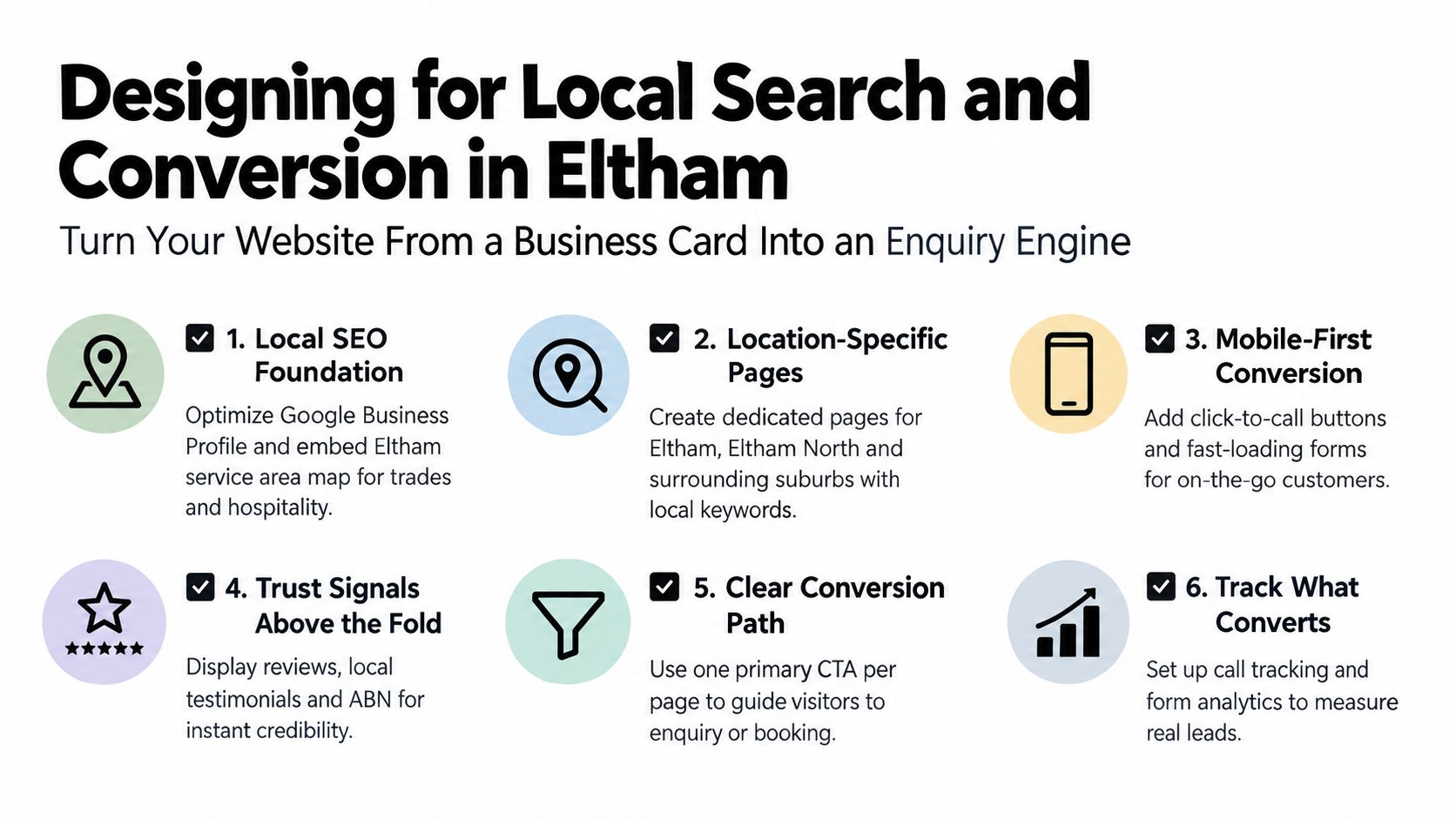
Here's the checklist I'd use for a local business site.
What actually improves enquiries
- Service pages with intent: “Emergency plumber Eltham” and “hot water repairs Eltham” should not be buried on one catch-all page.
- Google Business Profile alignment: Your site details, categories, and contact info need to match your local listing.
- Visible trust: Real photos, reviews, licence details, and local job context beat generic stock images every time.
- Friction-aware forms: Ask for what you need, not everything you can think of.
Some businesses also benefit from a proper local listing workflow or a dedicated local seo platform when citations, reviews, and location consistency start getting messy across directories.
This walkthrough is also worth watching if you want a practical visual sense of conversion-focused local setup:
What usually hurts trust
I'd avoid these common mistakes:
Stock-heavy hero sections
Locals can tell when the “team” photo was bought from a stock library.One giant services page
It weakens relevance and gives buyers no direct path.Too many calls to action
One page should usually have one primary next step.
The best-performing local pages tend to feel obvious. Clear offer, clear proof, clear action.
Onboarding, Maintenance, and the First 90 Days
The handover after signing matters almost as much as the build itself. Good agencies separate themselves from the ones that disappear once the invoice is paid.
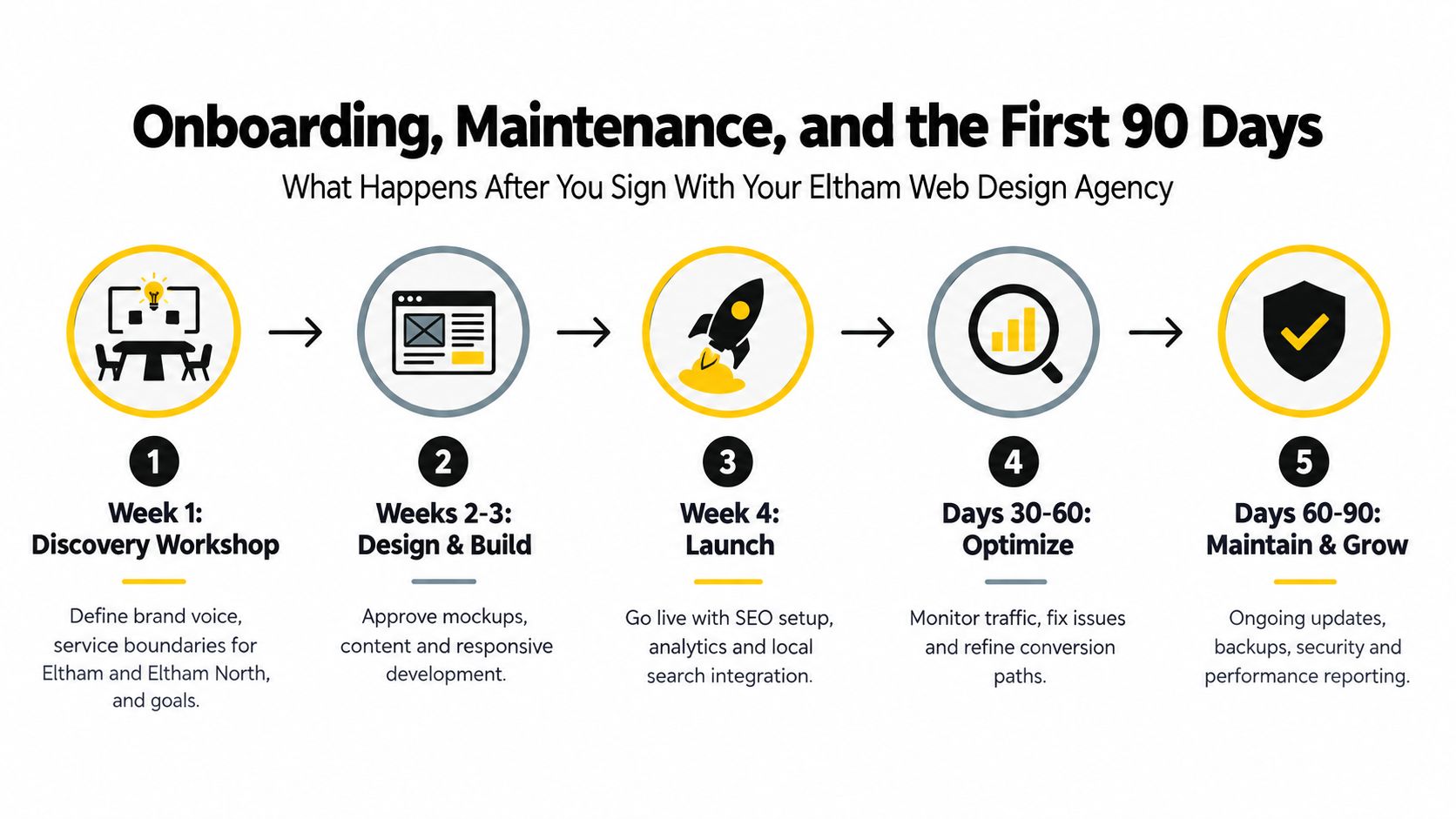
Week one should settle ownership and scope
I like onboarding to start with a proper discovery session. Not a rushed questionnaire. The business owner, decision-maker, and whoever handles enquiries should all be in the room.
That early stage should lock down:
- Domain ownership and access
- Hosting arrangement
- Who approves content
- What pages matter most
- What counts as success
If you skip that, projects drift. Worse, businesses sometimes end up without clear access to their own site, analytics, or forms. That's a mess to untangle later.
The build phase should stay close to the commercial goal
By this point, the project shouldn't be about abstract creativity. It should be tied to the job of the website.
For a service business, that often means prioritising homepage hierarchy, key service pages, suburb relevance, call tracking, form testing, and mobile conversion flow. For retail, the focus shifts toward collection logic, product templates, cart behaviour, and feed readiness for channels like Google Shopping and Meta.
I also like to make sure tracking is not left until the end. GTM and Google Analytics setup, event tracking, and where relevant, Meta Conversions API installation should be part of the plan, not a forgotten extra. The same goes for things like Google Ads landing page preparation, contact form submission tracking, and practical integrations if paid traffic is coming later. If a business needs a single provider that covers both the website and the acquisition side, Alpha Omega Digital is one Melbourne option that works across web builds and performance marketing.
A website launch without tracking is guesswork with nicer graphics.
The first month after launch
The early post-launch period is where hidden issues show up. Forms fail. Indexation stalls. Mobile layouts break on odd devices. Phone numbers aren't clickable in the way they should be.
That's why the first few weeks should include a tight checklist:
- Form tests: Every form, every confirmation state, every destination email.
- Indexation checks: Make sure key pages can appear in search.
- Google Business Profile sync: Confirm consistency across site and listing.
- Call path review: Especially important for tradies and bookings-led businesses.
For businesses running paid traffic, this is also when budget discipline matters. Google states that the average daily budget is what you set per day, the daily spending limit is typically 2x that amount for most campaigns, and the monthly spending limit is usually the average daily budget multiplied by 30.4. The example provided is a $10 AUD daily budget, a $20 AUD daily limit, and a $304 AUD monthly limit in the explanation referenced by this Google Ads budget guide. Owners launching a new site and ads together need to understand that spending pattern before they panic at a high-spend day.
Days 30 to 90 are for refinement
Weaker agencies often go quiet here, but it's the window that tells you whether the site is improving or just existing.
I'd be looking at:
Lead quality
Are the enquiries relevant, or just more noise?User flow drop-offs
Are people abandoning service pages before they contact you?Call and form tracking accuracy
If you can't measure the path, you can't improve it.
Some businesses also benefit from proper call handling once traffic starts to build. I've seen strong results from setting up a custom number through Twilio with call routing and AI-assisted answering for missed calls. The appeal is practical: it can handle after-hours enquiries, doesn't get tired, can answer common questions, and can book into a calendar or Calendly flow when configured properly. For tradies, hairdressers, beauty therapists, dentists, restaurants, and clinics, that can stop good leads falling through the cracks when staff are flat out.
Ongoing maintenance should be boring and reliable
This part shouldn't be mysterious. A maintenance plan should clearly state what gets updated, how often backups run, how issues are reported, and who handles content changes.
Ask these questions before you sign:
- How are plugin or theme updates handled?
- What's included in monthly maintenance?
- How fast are urgent fixes turned around?
- Do I keep full ownership of the domain, hosting, and assets?
- What happens if I leave?
If the answers are vague, expect trouble later.
The best next step is a proper discovery call where the agency can answer specific questions about your service mix, current site issues, platform fit, and what the first quarter after launch will look like. If you're also planning paid traffic, bring your rough monthly ad budget into that conversation early. It changes the build priorities straight away.
If you're serious about Web Design Eltham and you want a site that's built to support rankings, enquiries, and paid traffic, Alpha Omega Digital offers WordPress, Shopify, and performance marketing support from Melbourne for businesses across Eltham and beyond. If your business has a paid ads budget of at least 3k a month, there's a low-risk offer on the table: get a month of paid ads management free, then apply through the contact page and start with a proper scoping conversation.
Alpha Omega Digital
Read more insights from our team on web design, paid ads, and growth strategy.