You can spend weeks polishing a homepage, then launch and wonder why enquiries are flat, ad clicks are expensive, and your team still can't trust the numbers. I've seen Melbourne founders walk into that exact problem after a “modern” rebuild that looked good but missed mobile performance, accessibility, and the hand-off into Google Ads and CRM tracking. A strong design agency WordPress partner fixes the commercial system, not just the surface.
For Australian SMBs and ecommerce brands, the agency choice affects conversion rate, compliance, patching discipline, and how cleanly the site feeds paid media. A quick way to sanity-check the process is to compare proposals against a proper agency selection framework before you sign anything. If the brief doesn't cover speed, accessibility, tracking, and ongoing care, the build usually costs more later.
Why Choosing the Right Design Agency WordPress Partner Matters
A Melbourne founder once brought me a Shopify-style rebuild that looked premium on the surface but didn't move the business at all. The site had pretty templates, weak mobile performance, and no clear plan for analytics or lead hand-off, so every ad dollar had to work harder than it should. That's the trap with a design agency WordPress project, it's not a visual purchase, it's a revenue decision.
Design that affects conversion, not just aesthetics
The right partner thinks about how the page behaves when real customers land on it from paid search, social, or local discovery. In Australia, that matters because WordPress performance still lags across the market, with only 43.44% of WordPress sites passing all three Core Web Vitals on mobile in a 2026 benchmark, and the median mobile Lighthouse performance score sitting at 38/100 (StudioSlate research). If your agency ignores that, the site can look finished and still lose buyers before the first interaction.
Accessibility is the other essential requirement. Australian guidance now points to WCAG 2.2 Level AA as the current minimum, so a redesign needs to cover keyboard navigation, contrast, forms, and content workflows from day one, not as a “later” task (Accessibility.org.au policy guidance). That's especially important when your business sells online, because a site that's hard to use also becomes harder to convert.
Practical rule: if the agency talks about colours, fonts, and templates before it talks about conversion, accessibility, and measurement, you're probably buying decoration rather than a business asset.
A good partner also understands that your site won't live alone. It needs to support ads, email, CRM follow-up, and search visibility without breaking every time someone publishes a new landing page or swaps a plugin. That's where a disciplined agency protects both your build and your budget.
How to Read an Agency's Track Record in the Australian Market
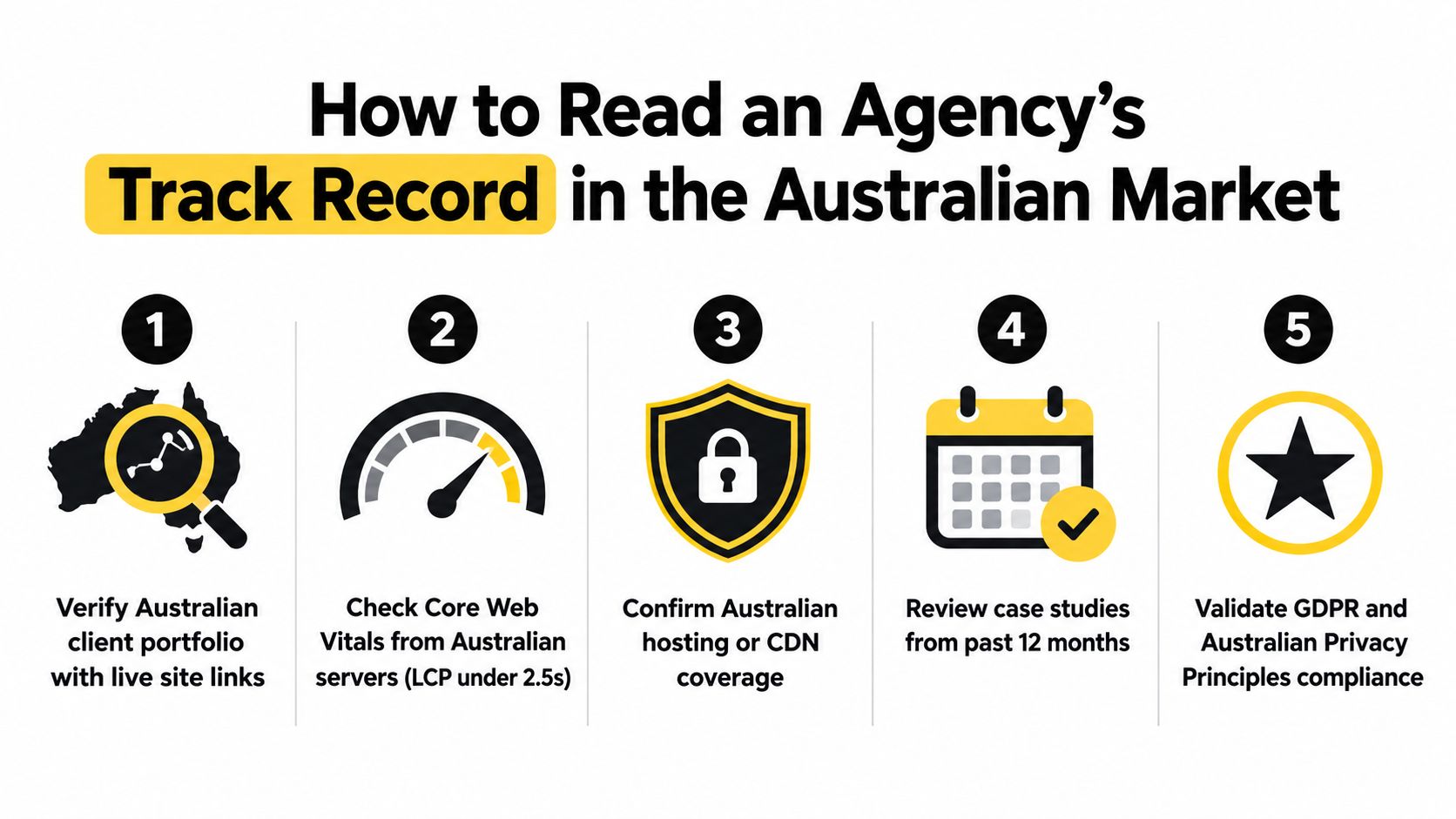
I look at an agency's work in the same way I'd review a used car, I don't care how shiny it looks if the engine and service record are poor. For an Australian design agency WordPress buyer, that means checking live sites, not just portfolio screenshots. It also means testing them from here, not from a vague overseas server that masks the actual experience your customers get.
Look at live performance, not polished mockups
Open the agency's client sites in PageSpeed Insights and WebPageTest using an Australian test location, ideally Sydney or Melbourne. Check whether the site feels stable on mobile, whether the hero loads quickly, and whether layout shift makes buttons jump around. The technical baseline I use is the same one I'd expect a serious partner to understand, LCP ≤ 2.5 seconds, INP ≤ 200 milliseconds, CLS ≤ 0.1, and TTFB under 500 milliseconds on representative URLs, with cache and CDN state fixed.
Then ask for evidence of actual accessibility thinking. A credible agency should be able to explain how they tested against the current Australian expectation, what they did for forms and focus states, and where they document content standards for future updates. If they can't speak clearly about that, they usually haven't built a process, they've just shipped pages.
Read the case study for operational proof
For ecommerce, I want to see the boring details, because boring details are what survive launch. Did the team use version control and a staging workflow, or did they build directly on the live site? Did they explain who owns plugin licences, who patches the stack, and how quickly they deal with security issues? Those answers matter more than a glossy homepage.
A hosting conversation tells you a lot. Ask where the site is hosted, whether the setup uses Australian infrastructure or a CDN with sensible local coverage, and whether the agency can show a maintenance cadence instead of a vague “we'll support it” promise. If the answer wanders, the process usually will too.
If an agency can't walk you through its post-launch discipline, it probably doesn't have one.
You should also ask whether analytics, schema, and conversion tracking were wired before launch. A site that launches without clean measurement usually forces a second project later, and that second project is always more annoying than doing it properly the first time.
Engagement Models, Pricing, and Timelines Compared
The wrong engagement model can wreck a good brief. I've seen founder teams choose a cheap fixed build when they really needed iteration, or buy a retainer before they had a stable site to maintain. The smarter choice is the one that matches your stage, not the one that sounds most comfortable in a sales call.
What each model is good for
A fixed-scope project works when you need a clean, contained outcome and the content is mostly known. That's why a smaller local services site or tradie site can sometimes succeed with a lean build, especially if the goal is to replace an outdated brochure site and get moving quickly. A monthly retainer makes sense when you want ongoing CRO, security, landing page iteration, and tracking improvements after launch. A hybrid sprint model sits between those two, which is useful when your ecommerce team needs regular progress but not a full in-house department.
For Australian buyers, the budgets need to be realistic. A simple 6 to 12 page build can live in a lower fixed-scope bracket if the scope is tight, while a custom ecommerce build with deeper design and development work usually sits higher because it takes more strategy, content, and testing. The budget killers are usually copywriting, photography, plugin licences, and accessibility work, not the visible design itself.
| Engagement Model | Typical AUD Range | Timeline | Best For |
|---|---|---|---|
| Fixed-scope project | Lower thousands for a simple brochure-style site, higher for custom ecommerce scope | Fastest when content is ready | Tradies, local services, lean lead-gen sites |
| Monthly retainer | Ongoing monthly fee for care and optimisation | Continuous after launch | CRO, security, landing pages, measurement |
| Hybrid sprint model | Project fee plus monthly optimisation | Moderate, with phased releases | Ecommerce brands that need frequent iteration |
A practical buyer reads this table and asks one question, “What am I buying, delivery or improvement?” That answer should decide the model, not the other way around. If the agency can't explain the trade-off, they're probably selling process language instead of outcomes.
Briefing the Agency and Asking the Right Questions
The best briefing call feels like a working session, not an interrogation. You're trying to find out how the team thinks, how they build, and how they protect the site after launch. A strong agency answers clearly, because the substantive work starts when the brief becomes a live project.
Questions that expose the real delivery model
Ask who builds the site. If the agency says the project will be mostly white-labelled, you need to know who's accountable when a bug appears or a deadline slips. Ask how they test performance before launch, and whether they review pages from an Australian location rather than only on their own office connection.
Accessibility should be a direct question, not a side note. Ask which standard they target, how they handle forms and keyboard navigation, and how they make sure content editors don't break the structure later. If they specialise in ecommerce, ask how they handle migrations, product structures, and checkout friction when moving from Shopify to WordPress or the other way around.
Here's the short version I'd use on a call:
- Who builds it: in-house team, contractors, or a white-label hand-off.
- How launch readiness is checked: performance, forms, tracking, and browser QA.
- What accessibility standard is used: and who verifies it before launch.
- How migrations are handled: especially product data, URLs, and redirects.
- What support looks like after go-live: patching, uptime, and response times.
| Question to ask | Good answer looks like | Walk-away answer |
|---|---|---|
| Who builds the site? | Clear names, roles, and accountability | “Our team” with no detail |
| How do you test performance? | Staging, Australian testing, documented QA | “We'll see after launch” |
| What's your accessibility standard? | Specific standard and workflow | “We try to keep it accessible” |
| How do you handle migrations? | Plan for data, redirects, and QA | “We'll copy the content over” |
| What happens after launch? | Patching, monitoring, reporting | “Launch is included” and nothing more |
The red flags are simple. I walk away if there's no discovery call, no staging link, or no Australian context in the portfolio. An overseas-only portfolio isn't a dealbreaker on its own, but if they can't translate the work into your market, they're not ready for an Australian SMB brief.
What Most Agencies Get Wrong After Launch
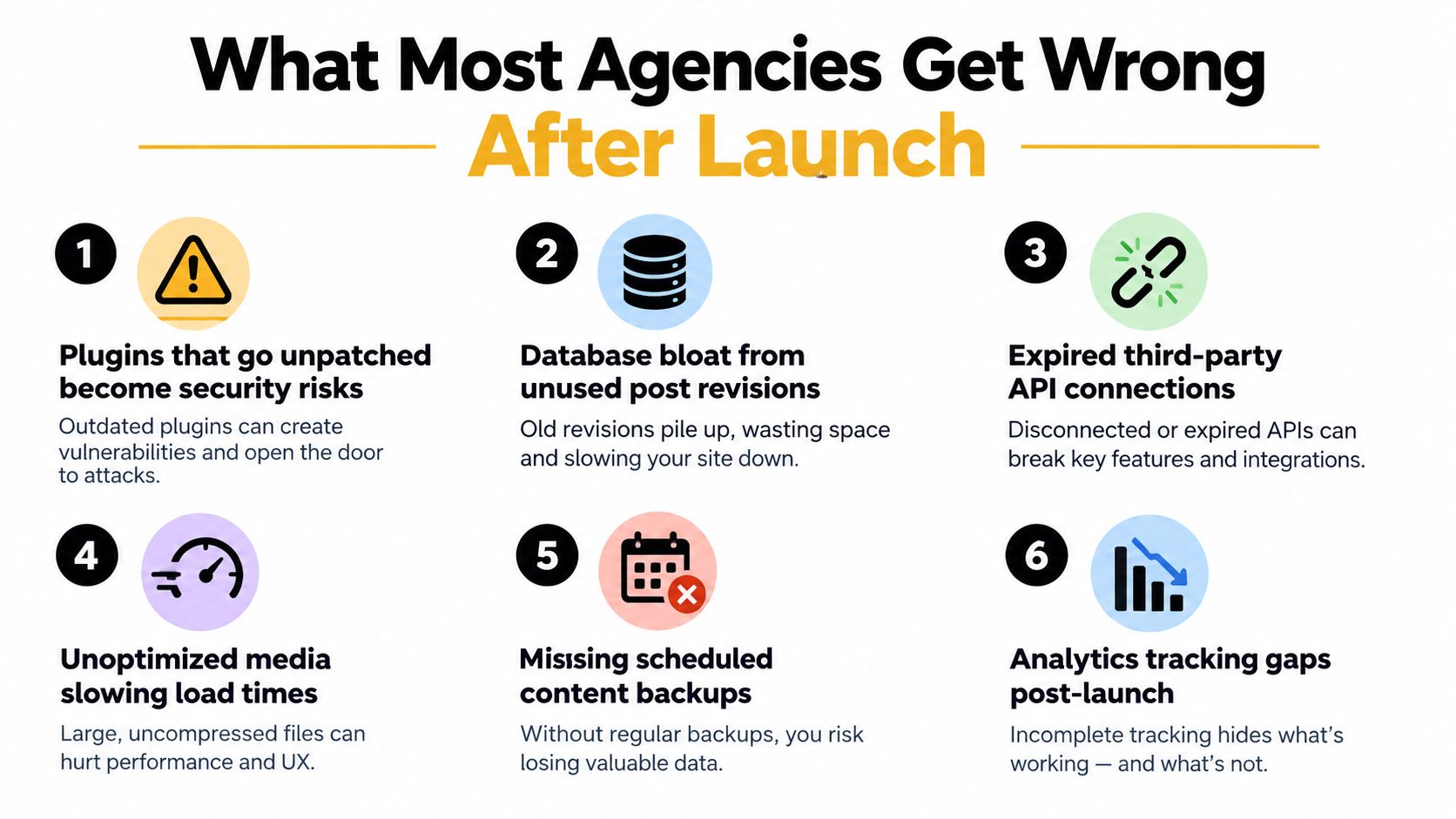
Launch day is where a lot of agencies mentally check out. That's a mistake, because the first few months after launch are usually where value is either protected or lost. A site that isn't maintained becomes slower, harder to trust, and more expensive to fix later.
Security and maintenance are part of the product
If plugins sit unpatched for months, you're not managing a website, you're managing risk. Australian-focused reporting cites 11,334 new WordPress-ecosystem vulnerabilities in 2025, up 42% year on year from 7,966 in 2024, with 43% exploitable without authentication and a median gap of about five hours between disclosure and active exploitation (Uptime Web Hosting). Those numbers make the point clearly, patching is not admin work, it's operational defence.
The right maintenance stack is boring in the best way. Inventory the themes and plugins, remove dead components, patch quickly, and verify backups restore. If your agency doesn't talk about runtime monitoring and recovery drills, it's leaving you exposed.
Measurement and content drift matter too
A lot of agencies also fail on the analytics side. They ship the site, then forget that forms, buttons, cart events, and landing page variants need ongoing tracking checks as the site evolves. That problem gets worse when content teams publish new pages without anyone verifying whether the tracking still fires correctly.
A sensible post-launch review should cover four areas:
- Security: patching, backups, and monitoring.
- Accessibility: keyboard navigation, contrast, and content updates.
- Performance: media optimisation, unused code, and load times.
- Measurement: events, conversion tracking, and attribution integrity.
I separate a maintenance-only retainer from a growth retainer by one thing, whether the team is still improving revenue outcomes. Hosting and patching keep the lights on, but CRO, content updates, and landing page iteration are what usually move the commercial needle. If you're paying for growth, make sure the agency can show the work, not just the invoice.
Connecting the Build to Paid Ads and Conversion
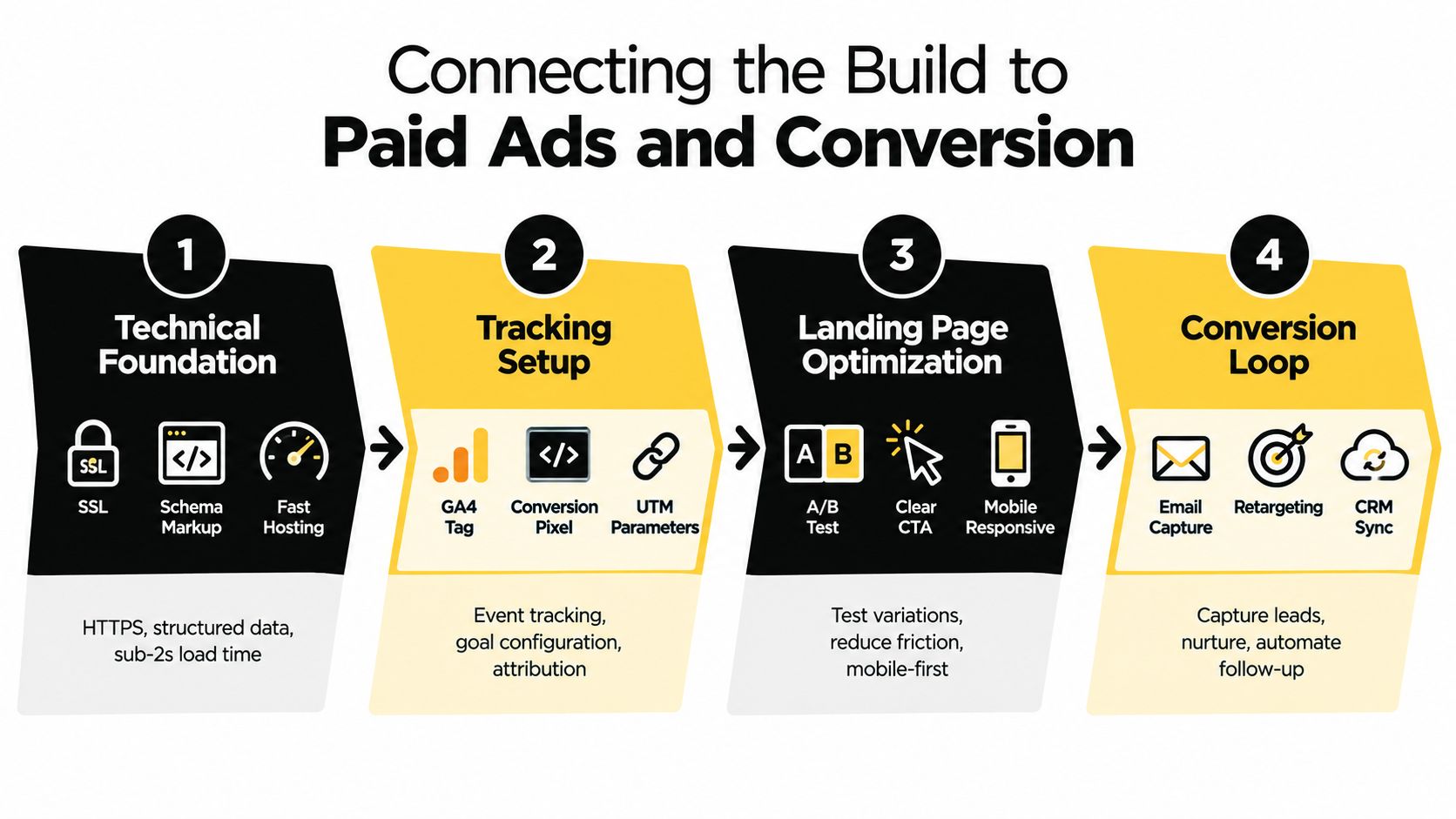
A WordPress site becomes more valuable when it's built to receive traffic, not just display it. That's where a design agency WordPress partner earns its keep for ecommerce and lead-gen brands, because the site has to work with ads, analytics, and CRM workflows from day one. If the build and the media plan don't talk to each other, you pay for traffic twice, once in ads and once in fixes.
Build the technical base before spend goes up
For paid traffic, the site needs clean event tracking in GA4, reliable conversion signals, and mobile pages that don't stall on load. Google Ads budgeting also works differently than many owners expect, because Google says an average daily budget is what you're roughly comfortable spending each day over a month, and the system can bill up to 2 times that amount on a given day, with a monthly cap of 30.4 times the average daily budget for most campaigns (Google Ads help). That matters because your landing page and tracking have to be ready for the days when spend spikes.
For Meta, the setup should go beyond a browser pixel. Meta's end-to-end Conversions API documentation says you need a Business Manager and an asset stack that includes Meta Pixel, Meta Application, Business Manager, Server Connection, and System User (Meta Conversions API guide). Shopify's AU guidance also notes that Meta Pixel and Conversions API are configured through Meta Business Suite under Settings > Data sources > Datasets, where Meta generates a pixel linked to the dataset with the same ID. If your agency can't speak fluently about that hand-off, they're not ready for serious media.
Make the landing page do the selling
The test comes when spend lands on the page. Variant landing pages, clear CTA hierarchy, form simplification, and checkout or lead-gen friction all need to be tested against actual buyer behaviour in Australia. That's where paid social creative testing, Google Ads structure, and site design converge, and it's also where many agencies over-focus on aesthetics while under-investing in conversion logic.
For service brands, I also like to see the site wired for call tracking and appointment booking. A custom number through Twilio can support 24-hour call answering, never gets sick or tired, and can book appointments into a calendar or Calendly, which is practical for tradies, hairdressers, beauty therapists, dentists, restaurants, and doctors who lose value when calls go unanswered. That kind of setup only works properly when the site and the ads are built around the same conversion path.
You can judge the agency on post-launch KPIs that matter more than traffic alone:
- Qualified leads or orders: not just clicks.
- Conversion rate by device: especially mobile.
- Cost per acquisition trend: across channels.
- Tracked events: forms, calls, add-to-cart, and checkout steps.
- Speed and stability: so ad traffic isn't wasted.
I've also seen teams use Alpha Omega Digital for WordPress builds that connect structure to paid growth work, which is the right direction for this kind of project. The point is the same regardless of provider, the site should feed the funnel, not sit beside it.
Good ad traffic can't rescue a slow or confusing landing page. It can only reveal the problem faster.
Your 30, 60, and 90 Day Plan With a Design Agency WordPress Partner
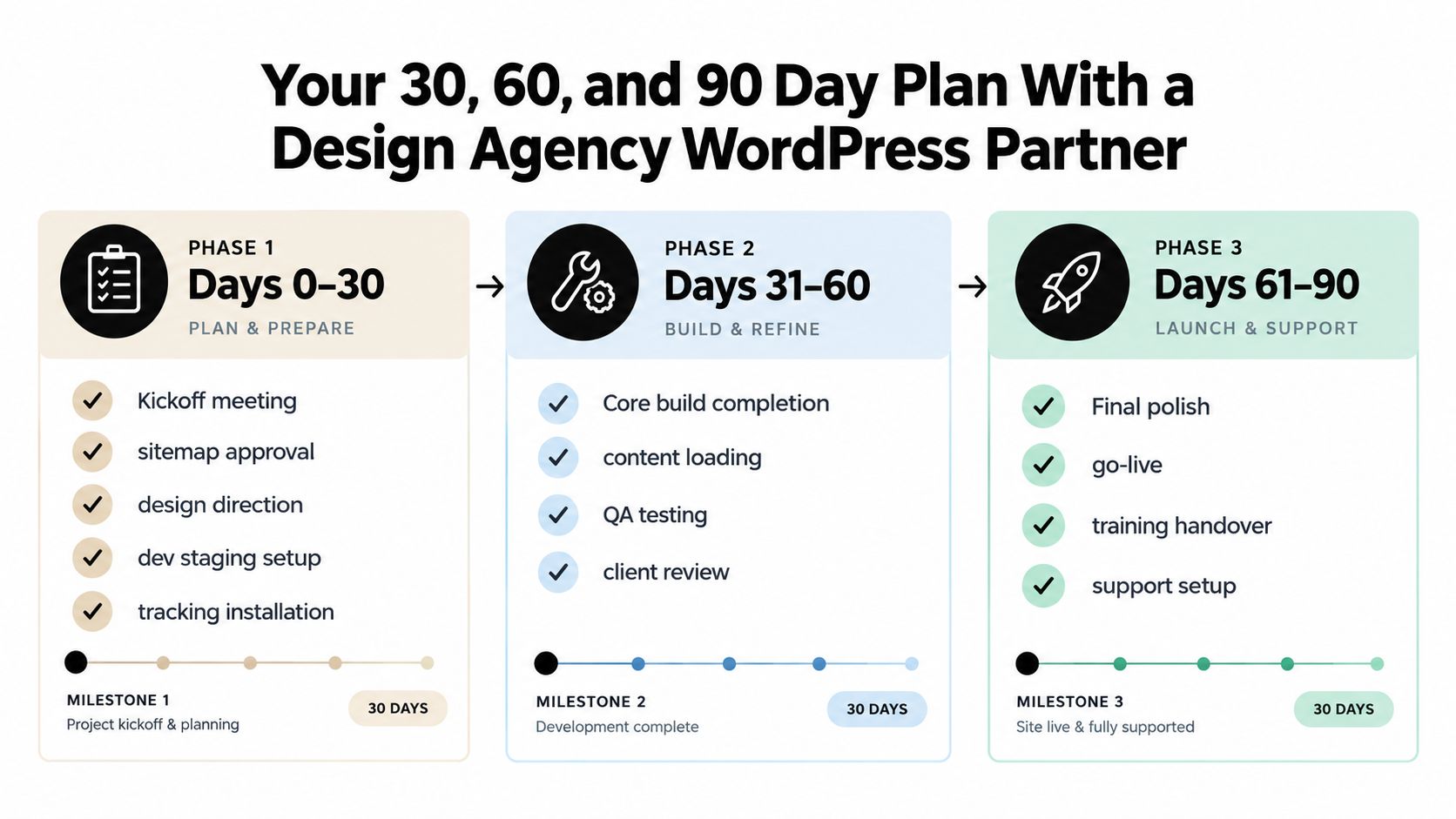
The cleanest projects I've run follow a simple rhythm. The agency doesn't disappear after kickoff, and the client doesn't wait until launch day to inspect everything. Each milestone has artefacts, ownership, and a yes or no decision, which keeps the build from turning into a vague progress story.
Days 0 to 30
This phase should lock the direction. Kickoff, sitemap approval, design direction, staging setup, and tracking installation all belong here. By the end of the month, you should have Figma files, a staging link, and a clear approval trail, not just a mood board and a promise.
Days 31 to 60
This is the build-and-verify phase. Content goes in, QA starts, accessibility issues get fixed, and speed gets tested before any public launch. I like a soft launch on a hidden URL here, because it catches the expensive mistakes while the stakes are still low.
Days 61 to 90
Now the site goes live, paid ads hand over into the new pages, and CRO experiments begin. The agency should already have a security patching cadence, a maintenance runbook, and a monthly reporting rhythm in place. If they don't, the partnership isn't finished, it's just started.
A useful kickoff checklist looks like this:
- Meeting cadence: weekly during build, monthly after launch.
- Deliverables: sitemap, Figma, staging URL, launch checklist, runbook.
- Acceptance criteria: speed, accessibility, tracking, content sign-off, and backup validation.
If you use that structure, the brief becomes a working contract instead of a wishlist. That's how a design agency WordPress engagement survives the hand-off from build to growth.
If you want a Melbourne team that can handle WordPress builds, Shopify projects, and the paid ads layer that sits on top, Alpha Omega Digital offers that mix in one place. Visit Alpha Omega Digital to talk through your site, your ads, and the conversion gaps that are costing you enquiries right now.
Alpha Omega Digital
Read more insights from our team on web design, paid ads, and growth strategy.