A lead generation website can lose qualified customers before they read a single line of copy. In Australia, Google's mobile benchmark found average mobile load times of nine seconds, extending to 15 seconds including backend processing, against a recommended three-second experience. Above three seconds, 53% of mobile visits are likely to be abandoned (Google's Australia and New Zealand mobile benchmark). A polished website that loads slowly is not polished from the customer's perspective.
I've seen this repeatedly with Melbourne ecommerce brands and service businesses. The homepage looks impressive, the paid campaigns attract clicks, and the analytics account records traffic. Yet the form is difficult to complete, the phone link doesn't work properly on mobile, or the enquiry reaches nobody until the next business day. Lead generation website design only works when the visual experience, advertising, analytics, follow-up, and sales process operate as one system.
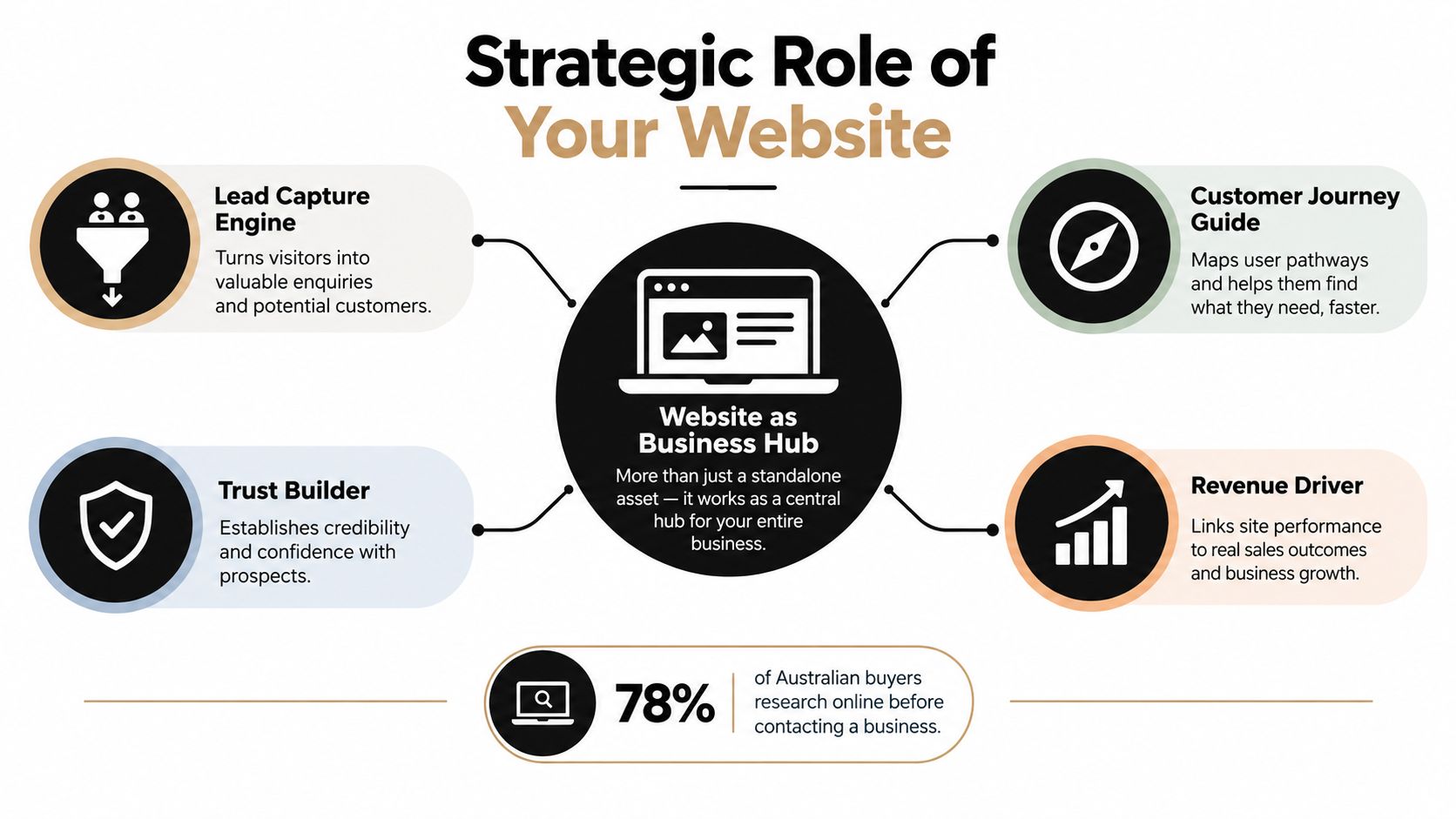
Understanding the Strategic Role of Your Website
Australian businesses are already operating across connected digital channels. The Australian Bureau of Statistics reported that 91% of businesses in 2024–25 said their internet connection met most or all of their business needs, up from 88% in 2021–22. The same release found that 51% used social media as part of their online presence, compared with 47% in 2021–22, while 32% received orders online, up from 30% in 2021–22 (Australian Bureau of Statistics).
Those figures matter because your website isn't competing only with other websites. It's receiving attention from Google Ads, Google Shopping, Facebook and Instagram ads, organic search, email, referrals, marketplaces, and social content. Each visitor arrives with a different level of intent, but the website needs to make the next step obvious for all of them.
From brochure to business hub
A brochure site explains what a company does. A performance website helps a visitor decide what to do next, captures useful information, and passes that information into a sales or fulfilment process.
For an ecommerce business, that may mean moving a shopper from a product page to checkout, recovering an abandoned cart, or answering an objection through product education. For a service business, it may mean choosing between a phone call, booking calendar, quote request, or short qualification form.
The important distinction is owned conversion data. Social platforms can generate attention, but your website gives you a controlled environment for product information, consent, analytics, first-party customer details, and follow-up. That's why a campaign shouldn't automatically send every visitor to the homepage. A Google Ads search for a specific service deserves a relevant landing page. A Facebook ad featuring a product should lead to the product or collection that matches the creative.
The website has to match the channel
A high-intent Google Ads visitor often needs a direct offer, evidence, service area, and immediate contact option. Someone arriving from Instagram may need more visual proof, reviews, demonstrations, and reassurance before buying. Sending both audiences to the same generic page creates measurement noise and weakens relevance.
Useful channel decisions include:
- Google Ads: Match the landing page headline and offer to the search term and campaign.
- Meta ads: Use creative-led landing pages that continue the story introduced in the ad.
- Organic search: Answer the question clearly, then provide a relevant next action.
- Email: Send subscribers to a page designed around the promotion or product category.
- Referrals: Make trust signals, credentials, locations, and contact options easy to find.
For teams refining paid social, this practical guide to improve lead quality with Rapid Ads is useful because lead quality depends on the connection between audience, offer, form, and follow-up, not on the ad creative alone.
The Technical Foundations for High-Converting Designs
A conversion-focused design should pass a technical gate before it receives approval. I'd rather launch a simpler page that loads quickly and tracks every meaningful action than a visually ambitious page that delays content, hides the CTA, or breaks on a mid-range Australian mobile device.
Start with mobile and measurement
Build the primary CTA for thumb access. Keep the phone button visible where a call is a sensible option, make form controls large enough to use comfortably, and ensure browser autofill works for names, email addresses, and phone numbers. ACMA reported that 99.7% of Australian adults used at least one device to go online in 2025, while internet use among Australians aged 65–74 reached nearly 100%, up from 71% in 2019 (ACMA internet use findings).
That audience shouldn't be treated as an offline segment. For ecommerce, test product filters, variant selectors, payment steps, and sticky add-to-cart controls. For lead generation, test click-to-call, booking options, readable contrast, short forms, and plain-language explanations.
Set a performance budget
Use image compression, modern formats, lazy loading below the fold, deferred non-critical JavaScript, and restrained app installation. A slow hero video, render-blocking font, excessive tracking script, or poorly configured Shopify app can suppress enquiries before the visitor sees your value proposition.
I recommend an enforced maximum three-second load target, followed by Core Web Vitals validation. Record Largest Contentful Paint and Interaction to Next Paint, then test the complete journey on 4G and 5G devices. Segment Australian traffic by device type rather than relying only on an aggregate conversion figure.
Practical rule: Don't approve visual polish until the page has passed the performance gate on the devices your customers actually use.
Build trust into the interface
Trust isn't a decorative section added near the footer. It belongs beside the decision. Use independently verifiable testimonials, relevant Australian customer evidence, clear privacy wording, secure checkout indicators where appropriate, service locations, realistic response-time expectations, and a visible business identity.
Technical foundations also include:
- Crawlable content: Core messaging must be readable without JavaScript.
- Structured data: Add LocalBusiness and relevant service markup where it accurately describes the business.
- Site hygiene: Use HTTPS redirects, a real 404 page, and an XML sitemap.
- Conversion integrity: Send form submissions, phone clicks, bookings, and purchases into the CRM or ecommerce reporting layer.
- Consent clarity: Explain how contact details will be used before a visitor submits them.
A useful technical reference for teams thinking beyond a standard site is this build a web app guide. The same principle applies to lead generation website design: functionality should support a clear customer task, not exist merely because a platform makes it possible.
Choosing Between WordPress and Shopify for Lead Generation
WordPress and Shopify can both support strong commercial websites, but they solve different operational problems. The right choice depends on whether the core conversion is a product transaction, a service enquiry, a content-led research journey, or a combination of these.
For a content-heavy site with custom service pages, location pages, editorial resources, and complex lead forms, WordPress gives developers broad control. A capable WordPress web developer can create custom blocks in Gutenberg, connect forms to a CRM, build campaign-specific templates, and manage technical SEO without forcing every page into a rigid store structure.
Shopify is usually the more direct option for physical product sales. Its hosted infrastructure, product catalogue, checkout, payment integrations, and order management reduce operational overhead. A Shopify developer can extend the store through the Shopify API, develop custom sections, connect external systems, and build custom Shopify apps using Shopify CLI when the standard app ecosystem isn't enough.
Platform Comparison for Lead Generation
| Feature | WordPress | Shopify |
|---|---|---|
| Primary strength | Flexible publishing, service pages, and custom lead journeys | Product catalogue, checkout, fulfilment, and ecommerce operations |
| Design control | Extensive control through themes, custom development, and Gutenberg blocks | Strong theme and section system, with deeper changes requiring development |
| Lead forms | Highly flexible through custom forms and CRM integrations | Possible through apps, custom development, and external form systems |
| Ecommerce | Powerful with WooCommerce, but requires careful hosting and maintenance | Native ecommerce foundation with hosted infrastructure |
| Content strategy | Well suited to long-form SEO, resources, and location-led content | Strong for product-led content, collections, buying guides, and merchandising |
| Development pathway | WordPress development company, custom plugins, Gutenberg blocks | Shopify developer, Shopify API, Shopify CLI, and custom apps |
| Best fit | Service businesses, publishers, complex marketing sites, and hybrid models | Ecommerce brands wanting a focused store operating system |
A WordPress website developer should treat speed, plugin governance, backups, and security as part of the build, not post-launch cleanup. A Shopify developer should audit app scripts, theme code, checkout dependencies, and tracking events so the store doesn't accumulate unnecessary friction.
For Melbourne ecommerce operators, the decision often comes down to where the commercial complexity sits. If the complexity is in content, qualification, and multiple service pathways, WordPress may provide more control. If it's in products, variants, stock, shipping, and payments, Shopify usually offers a cleaner foundation.
Searches such as WordPress developer Melbourne, WordPress development Melbourne, WordPress development company, and Shopify development partners reflect different buying needs. Don't select a platform because it's fashionable. Select the one your team can maintain and your customers can use without friction.
Designing Effective Forms and Calls to Action
Every page should make the next useful action clear. That doesn't mean placing the same “Contact us” button everywhere. It means matching the action to the visitor's intent.
A product page may need “Add to cart”, “View ingredients”, or “Check delivery information”. A high-consideration service page may need “Book a consultation”, “Call now”, “Request a quote”, or “Download the specification”. A single dominant CTA keeps the interface focused, while a secondary option supports visitors who aren't ready for the main commitment.
Build the page around one decision
Start with a specific headline that states the service or product, audience, and outcome. Follow it with concise supporting copy, a proof point, and the primary action. Don't make visitors decode a clever slogan before they understand what you sell.
A practical landing page sequence is:
- Clear promise: State the offer in customer language.
- Relevant proof: Show reviews, evidence, credentials, or product detail near the decision.
- Objection handling: Explain delivery, timing, process, returns, privacy, or compatibility.
- Low-friction action: Use a short form, click-to-call, booking tool, or checkout.
- Expectation setting: Tell people what happens after they submit or book.
Reduce friction without removing qualification
Shorter forms can increase completion, but fewer fields aren't automatically better. A form that asks only for an email may produce contacts your sales team can't use. A form that asks for every possible detail may discourage a genuinely interested buyer.
Ask for information that changes the next step. A quote request may need name, contact details, service type, location, and a short description. An ecommerce enquiry may need order number, product, and issue. If the visitor needs a conversation rather than a form, make the phone number prominent and offer a booking pathway.
For businesses that miss calls, a custom Twilio number can support 24-hour call answering, appointment booking into a calendar or Calendly, and consistent handling when staff are busy, sick, or unavailable. This can be valuable for tradies, hairdressers, beauty therapists, dentists, restaurants, and doctors, where a missed call may represent a substantial lost opportunity.
The best call tracking software for PPC call campaigns depends on the workflow. CallRail is useful for attribution and call recording workflows, while GoHighLevel can combine call handling, CRM stages, automation, and appointment processes. Whichever platform you choose, connect call outcomes to campaign data. A long call isn't necessarily a qualified opportunity, and a short call may still resolve a valuable purchase question.
Why Tracking and Data Integration Matter More Than You Think
A website can look successful while sending poor information into the business. Form volume, traffic, and button clicks matter only when they connect to qualified opportunities, revenue, or a useful next action.

Create a dependable event layer
Set up Google Tag Manager containers before campaigns go live, then use GA4 events for form submissions, phone clicks, booking completions, purchases, add-to-cart actions, checkout starts, and meaningful CTA clicks. Name events consistently and define which ones count as primary conversions.
For Google Ads, import the conversions that reflect business value rather than every minor interaction. For Meta, configure browser-side tracking alongside a properly managed Meta Conversions API installation. Deduplicate events, preserve consent choices, and pass useful identifiers where permitted.
A form-start event can reveal friction before completion. A phone-click event can show intent, but the CRM should record whether the call became a qualified lead. Ecommerce teams should connect purchase, refund, and customer value data so campaign decisions don't rely on surface-level conversions.
Connect the website to follow-up
The website is only one stage of the customer journey. ACMA found that 98% of Australian adults used at least one communication or social-media website or app for personal purposes in the previous six months, using an average of 5.5 platforms. The same research found that 83% used at least one app for messaging or video or voice calls (ACMA communication findings).
That doesn't mean adding every possible widget. More options can reduce trust and overwhelm visitors. Decide whether each audience should receive a form-first, phone-first, booking-first, or messaging-first pathway, then make sure staff can respond through the channel you offer.
The reporting layer should answer practical questions:
- Which campaign generated the enquiry?
- Which service or product created the interaction?
- Was the contact qualified?
- How quickly did someone respond?
- Did the enquiry become a booked appointment or sale?
- Which landing page and device type were involved?
A short walkthrough can help internal teams understand the relationship between implementation and reporting:
For an ecommerce business, this data supports Google Shopping Ads, PMAX versus standard Google Shopping Ads decisions, campaign priority, and budget allocation. For a service business, it supports Google Ads for contact form submissions, PPC for tradies, and call campaign optimisation.
Moving From Design to Growth and Ongoing Optimisation
A launch is a starting point, not proof that the website works. The first version should establish a reliable baseline, then controlled changes should improve the customer journey without creating reporting confusion.
I prefer sequential testing with a pre-declared primary metric. Test one meaningful variable at a time, such as the headline, proof position, form length, CTA language, product imagery, or booking pathway. Segment by device, service area, campaign, and intent where the traffic volume supports a useful comparison.
Make ecommerce testing commercially useful
For a Shopify store, begin with product page clarity, collection navigation, search, filters, delivery information, returns, reviews, and checkout confidence. Don't judge a design only by add-to-cart activity. A product can attract carts while creating refunds, support tickets, or low-margin orders.
A Shopify development crash course for a marketing team should include theme sections, metafields, product data, the Shopify API, app governance, and tracking. Custom blocks can help merchandising teams build campaign pages without asking a developer to hard-code every variation. Shopify CLI is useful when a brand needs a custom app or workflow that standard apps can't provide.
For WordPress, a disciplined WordPress developer can build reusable Gutenberg blocks around real content needs, rather than giving editors a page builder full of unused controls. Custom WordPress development is particularly useful when a business needs structured service pages, location content, lead routing, resource downloads, and CRM automation in one environment.
Paid media requires consistency
Google Ads should reflect landing page intent. A beginner's guide to Google Shopping Ads should start with clean product data, accurate titles, useful descriptions, high-quality images, and sensible segmentation. Google Shopping Ads for dropshipping require additional care around product availability, delivery expectations, margins, and customer support.
For service businesses, campaign structure should reflect the customer problem. Google Ads for plumbers, electricians, and other tradies should send people to pages that make the service area, urgency, phone option, and response process clear. A Facebook Ads agency should also maintain a structured Meta ads creative testing process, with distinct hooks, formats, offers, and audience assumptions.
Don't quit Facebook Ads too early, but don't keep spending blindly either. Establish a learning period, review qualified outcomes, refresh creative when the message becomes stale, and ensure the website and CRM can explain what happened after the click. Marketing your business requires consistency across message, measurement, follow-up, and iteration.
Businesses comparing a marketing agency Melbourne or digital marketing agency Melbourne should ask how the website, Google Ads, Meta advertising, GTM, GA4, CRM, and sales response process fit together. Local SEO, Google Business Profile optimisation, and location-specific landing pages can support Melbourne visibility, while a broader SEO agency Melbourne strategy can develop content for Sydney, Brisbane, Newcastle, Perth, Adelaide, Darwin, and Hobart without creating thin location pages.
Operational support matters too. Some businesses may need SDRs for hire to follow up qualified opportunities when internal staff can't maintain a consistent sales process. The website should make that handover clear, with documented lead stages and response ownership.
A practical partner can combine WordPress development services, Shopify development in Melbourne, paid search, Meta advertising, automation, and reporting. The right solution may also involve a specialised Google Ads agency, a dedicated Facebook and Meta Ads agency, or a focused ecommerce marketing agency, depending on where the commercial bottleneck sits.
If you're a business with a paid ads budget of at least 3k a month, I'd love to offer you a low risk deal, get a month of paid ads management FREE. Apply now through the contact page. Visit Alpha Omega Digital to connect your website design, tracking, paid campaigns, and follow-up into one measurable growth system.
Alpha Omega Digital
Read more insights from our team on web design, paid ads, and growth strategy.