A prospective customer searches for a local provider from their phone, lands on your website, and needs one answer immediately: can this business solve my problem, and can I trust it with my details? Instead, they find a slow hero image, a vague “welcome” message, a phone number they can't tap, and a contact form asking for information nobody has explained. They return to Google and call the competitor whose website makes the next step obvious.
That pattern appears across service-business website design, from plumbers and electricians to dentists, beauty therapists, restaurants, doctors, and ecommerce brands that combine products with appointments. A polished layout helps, but commercial performance depends on the less visible parts of the experience: mobile task completion, privacy-aware trust architecture, accessible forms, accurate attribution, and a reliable response after the enquiry arrives.
Designing for Modern Australian Digital Behaviour
Australia has broad internet access, so a service website can't be designed around the assumption that people will patiently browse from a desktop. At June 2025, 99% of Australian adults had internet access at home, 93% had a fixed or wireless home connection excluding 4G and 5G, and 99.7% had used at least one device to go online during the previous six months, according to the Australian Communications and Media Authority's telecommunications research. Mobile phones were used multiple times a day to access the internet.
That changes the starting point. I don't begin a service business website design project with a colour palette or a stock hero image. I begin with the moment a customer decides whether to call, request a quote, book a consultation, or buy. The page must make that action easy on a small screen, while answering the doubts that stop people from submitting personal information.
The business case for having a useful website is also stronger than it was a decade ago. The Australian Bureau of Statistics reported that 67.2% of businesses had some form of online presence in 2021–22, including 50.7% with their own website or app, 46.7% using social media, and 13.1% using a third-party website, platform, app, or marketplace. The ABS business use of information technology data also records that only 47% of businesses had a web presence in 2013–14, showing how much the baseline has shifted.
Mobile is the first commercial environment
A mobile-first layout isn't just a desktop page that collapses neatly. It prioritises the task a visitor came to complete. For a local service business, that could be finding the service area, checking availability, calling an emergency number, or booking a time. For an ecommerce hybrid, it could be comparing a product with an installation or consultation option.
ACMA reported that 95% of Australian adults used a mobile phone to access the internet in 2024, while 99% accessed the internet overall. The ACMA telecommunications trends report also notes particularly frequent mobile internet use among adults aged 18 to 44. That audience may be researching a provider between meetings, while commuting, or standing in a retail environment. A design that hides the phone number in a navigation menu has already created unnecessary friction.
I usually prioritise the mobile screen in this order:
- Outcome: Say what the business does and who it serves.
- Location: Show Melbourne suburbs, service areas, delivery coverage, or clinic location.
- Proof: Add relevant reviews, credentials, guarantees, product evidence, or genuine project context.
- Action: Present one primary option, such as “Call now”, “Request a quote”, “Book a consultation”, or “Shop the collection”.
- Reassurance: Explain what happens after the visitor submits the form.
Trust has to appear beside the request
Privacy concerns affect the point of conversion, not only the legal footer. In 2025, 58% of Australian consumers said online privacy and data security was a major concern, 57% said knowing who could be trusted to keep information secure was a major concern, and 90% reported taking steps to reinforce their online privacy and security, according to the Digital Lives of Australians report.
A lead form that asks for a phone number, budget, address, and detailed project information without explanation can feel intrusive. The solution isn't always to remove useful qualification questions. Explain why each field is needed, keep the wording in plain English, link to the privacy policy in context, and give visitors a visible phone or email alternative.
Practical rule: A conversion element should answer two questions at once, “What will happen next?” and “What will you do with my information?”
Trust architecture includes the business name, Australian contact details, a real location or service area, transparent operating hours, realistic testimonials, and a booking process that behaves as expected. A service page for a Melbourne dentist should make the clinic identity and appointment path clear. A product page for a Shopify brand should explain delivery, returns, payment options, and stock status without forcing the customer to hunt through the footer.
For brands that need short-form visual content to support their website and paid social campaigns, ClipNova AI video generator can help teams create marketing assets that explain services or products without turning the website into an overloaded video gallery. Use motion selectively. A fast, clear page with one useful demonstration is usually more persuasive than a heavy autoplay background.
Mapping High-Value Service Journeys
A homepage isn't a journey. It's an entry point. The journey starts when a visitor arrives with a specific intent and ends when the business receives a useful commercial signal, such as a qualified enquiry, completed booking, phone conversation, or purchase.
Before opening Figma or writing code, list the actions that create value. A plumber may need an urgent call path and a quote path. A beauty therapist may need treatment selection, availability, and booking. An ecommerce business may need product discovery, checkout, and a service add-on. Each action deserves its own route, not a generic “Contact us” destination.
Start with intent, not page types
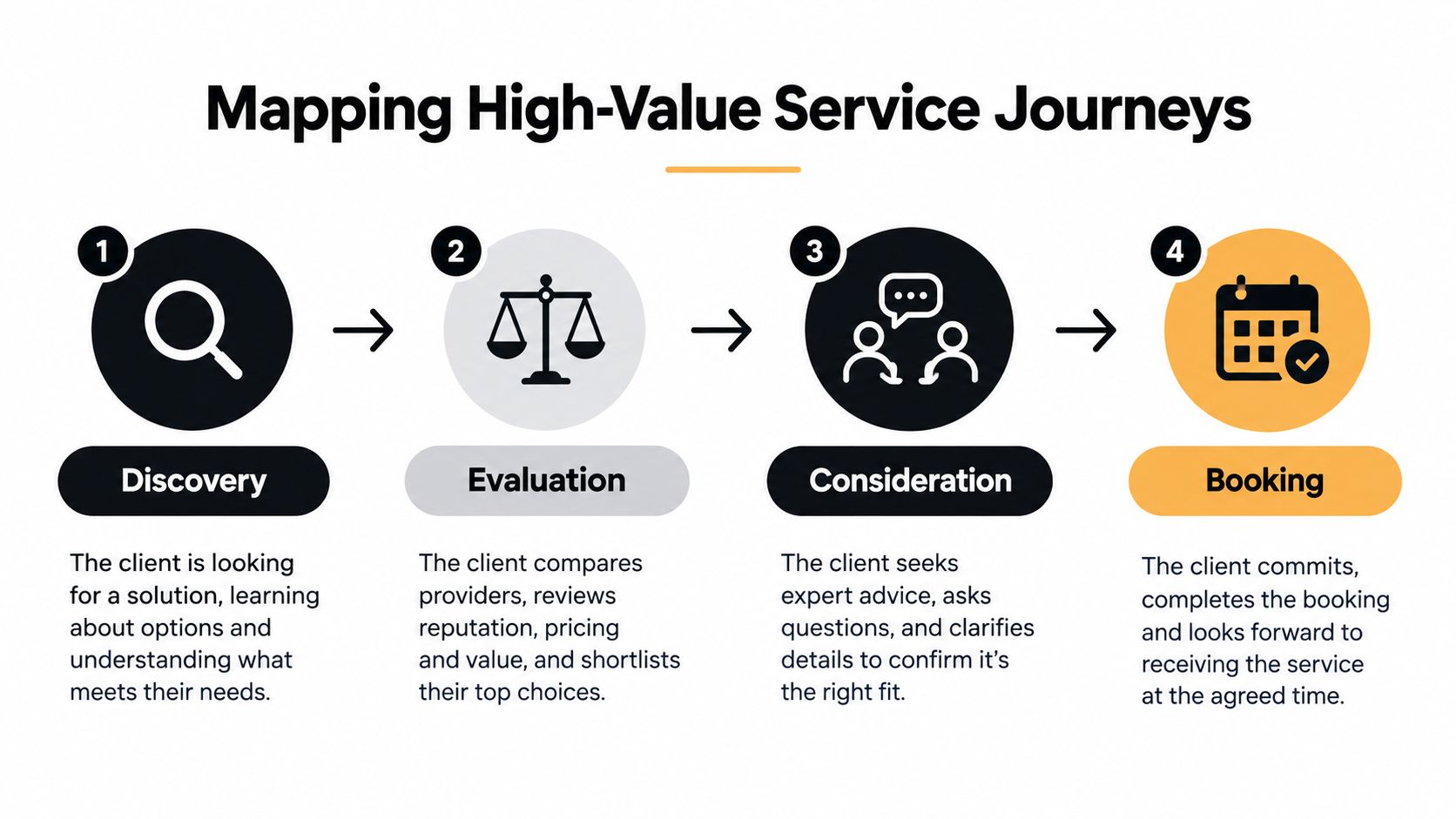
I map the journey in four stages:
- Discovery: The customer searches for a category, product, location, or urgent solution. The landing page must confirm relevance quickly.
- Evaluation: The customer compares services, prices, delivery terms, reviews, qualifications, and availability.
- Consideration: The customer checks practical details, asks a question, reviews the process, or decides whether the business feels safe.
- Booking or purchase: The customer completes the action with as few unnecessary decisions as possible.
At a 360–430 pixel viewport, prototype the primary path first. Place the main conversion action within the first screenful, then test whether someone can complete it with one thumb. A phone number should be a tel link, not decorative text. A quote form should request only what the team needs to respond properly. A booking calendar should show available times clearly and recover gracefully when a selected slot disappears.
Build service pages around decisions
A useful service page answers the questions that appear in a buyer's head:
- Is this for my situation? State the service outcome and the customer type.
- Do you operate in my area? Include Melbourne suburbs, delivery regions, or clinic details.
- Can I trust you? Use relevant proof, not a wall of generic testimonials.
- What happens after I enquire? Explain response times qualitatively, the next step, and what the customer should prepare.
- What should I do now? Use one clear primary action.
Don't make every service page identical. A high-value commercial service may need a qualification form and case evidence. An urgent trade service may need a prominent call button and availability message. A product-led brand may need a purchase path supported by delivery, returns, and review information.
I also test the failure states before approving the visual design. What does the visitor see if a required field is blank? Does keyboard focus remain visible? Can the person return to an earlier step without losing information? Does the mobile layout work when the browser text is enlarged? These details reveal whether the page was designed for a real customer or only for a screenshot.
The desktop version comes later. Once the mobile task flow is frictionless, expand the layout for wider screens without adding distractions. Use analytics events for each meaningful step, including tap-to-call, form start, form error, form completion, booking start, booking completion, and checkout completion.
The important measure isn't page views alone. Track task completion rate, click-to-call rate, qualified-lead rate, booking completion, and abandonment by form field. A page can attract traffic and still fail commercially if visitors can't complete the action that matters.
Choosing the Right Technical Foundation
WordPress and Shopify aren't interchangeable choices, even when both can produce a professional website. The right platform depends on what the business sells, how much content it needs to manage, which integrations matter, and who will maintain the site after launch.
A Melbourne professional-services firm with detailed service pages, location content, resource guides, and bespoke enquiry workflows will often benefit from WordPress development. A product brand with catalogue management, payments, fulfilment, inventory, and repeat purchasing will usually be better served by Shopify development. Hybrid businesses need a more careful assessment.
WordPress for structured service content
Custom WordPress design works well when content architecture is a commercial advantage. A WordPress development company can create reusable templates for services, locations, FAQs, case studies, team profiles, and resources without forcing every page into the same visual mould.
The Gutenberg editor becomes much more useful when a developer builds custom blocks around the business's actual content model. Instead of giving an administrator dozens of unrelated formatting controls, custom blocks can expose fields for service outcomes, proof points, pricing notes, locations, process stages, FAQs, and calls to action. That improves editorial consistency while retaining flexibility.
For businesses researching a WordPress developer in Melbourne, the key question isn't whether WordPress can be customised. It can. Ask how the proposed WordPress website developer will control plugin quality, page speed, editor usability, backups, security updates, redirects, and analytics after launch. A custom build that nobody can maintain becomes an operational liability.
A WordPress developer in Sydney, Brisbane, or another Australian market may use the same platform, but the commercial requirements still come first. Location pages should be useful rather than copied variations, and local SEO should connect service relevance with genuine service coverage.
Shopify for ecommerce and hybrid operations
Shopify design is strongest when the store is the core commercial system. Shopify handles products, variants, checkout, payments, orders, and inventory through an ecosystem designed for retail operations. That reduces the need to assemble a separate collection of plugins for fundamental commerce functions.
Shopify development becomes more powerful when the store needs custom workflows. A Shopify developer can use the Shopify API to connect products, customer information, fulfilment, bookings, subscriptions, or external systems. A Shopify API integration should have a defined business purpose. Connecting systems just because an API is available adds maintenance without improving the customer journey.
A brand that sells equipment and installation may need product pages with a booking route. A wellness retailer may sell products while offering consultations. A Shopify developer API project can support those relationships, but the store should still make the next action obvious on mobile.
| Feature | WordPress Development | Shopify Development |
|---|---|---|
| Primary strength | Flexible service content, publishing, and custom information architecture | Product catalogue, payments, orders, inventory, and ecommerce operations |
| Custom content | Custom post types and Gutenberg blocks provide broad control | Theme sections and app extensions support structured store content |
| Bookings | Wide choice of plugins and custom integrations, with maintenance responsibility | Usually handled through apps or external booking systems connected to the store |
| API work | Connects CRM, forms, calendars, analytics, and business systems | Shopify API can connect products, orders, customers, fulfilment, and custom apps |
| Maintenance | Updates, plugins, hosting, security, and performance require active management | Platform infrastructure is managed, but themes, apps, feeds, and integrations still need attention |
| Best fit | Content-rich service businesses and organisations needing publishing flexibility | Ecommerce-first brands and hybrids where product operations drive revenue |
For businesses looking for Shopify development partners, the evaluation should include more than visual design. Ask how the team will structure product data, manage redirects, test checkout events, handle feed accuracy, and document third-party integrations. A cheap Shopify design that leaves product information inconsistent across Shopping, marketplaces, and the store can create more work than it saves.
Building Accessible and Reliable Conversion Paths
Accessibility is often treated as a compliance task completed after the design is approved. For service businesses, that sequence is backwards. If a visitor can't understand a form label, reach a booking control with a keyboard, or recover from an error, the business has built an unreliable sales path.
Australian guidance identifies WCAG 2.2 Level AA as the relevant benchmark for covered web resources, with practical requirements that include keyboard operation, labelled buttons and fields, alternative text, captions, sufficient colour contrast, scalable text, and usable forms. The Australian digital accessibility guidance provides a useful reference point for teams defining acceptance criteria.
Audit the full path, not just the homepage
A homepage may pass a basic visual check while the booking tool fails keyboard navigation. A service page may have strong contrast while the form error message is announced nowhere for a screen-reader user. A redesign may look cleaner while removing the visible focus state that showed keyboard users where they were.
Test the actual journey from landing page to completed action:
- Navigation: Can a visitor reach the service page, menu, search, and contact route without a mouse?
- Controls: Do buttons describe their purpose, and are tap targets large enough to use accurately?
- Forms: Does every field have a persistent, descriptive label rather than placeholder-only guidance?
- Errors: Does the form identify the problem in text and explain how to fix it?
- Calendars: Can users select a date and time with keyboard, screen reader, voice control, and enlarged text?
- Embedded tools: Do maps, sliders, PDFs, payment widgets, and booking systems preserve the same level of access?
- Alternatives: Is there an equivalent phone or email route when a third-party calendar creates a barrier?
The last point matters. “Call us if you need help” isn't equivalent if the phone number is difficult to find, only appears during office hours, or doesn't provide the same practical route to service. An alternative should be visible, usable, and supported by the business process.
Accessibility improves operational quality
A service form that exposes clear labels and useful errors helps everyone, including people completing it on a small screen or in a noisy environment. A booking flow that confirms the selected service, location, date, and time reduces avoidable calls. Descriptive buttons help search engines and customers understand the page structure.
I include accessibility in the same acceptance process as speed, responsive rendering, and analytics. The team should test real iOS and Android devices, keyboard navigation, enlarged text, screen-reader announcements, and form recovery. Third-party software needs review before procurement, not after a launch date has been announced.
A visually minimal redesign can still exclude people if its labels, focus states, error messages, or booking controls are inaccessible.
The commercial measure is conversion reliability. Track completed enquiries, qualified leads, booking completion, and abandonment at each step. Don't assume that a low form submission rate is a copy problem when the form may be difficult to operate. An accessible service business website design gives more customers a fair chance to understand the offer and complete the action.
Implementing Server-Side Tracking and Call Attribution
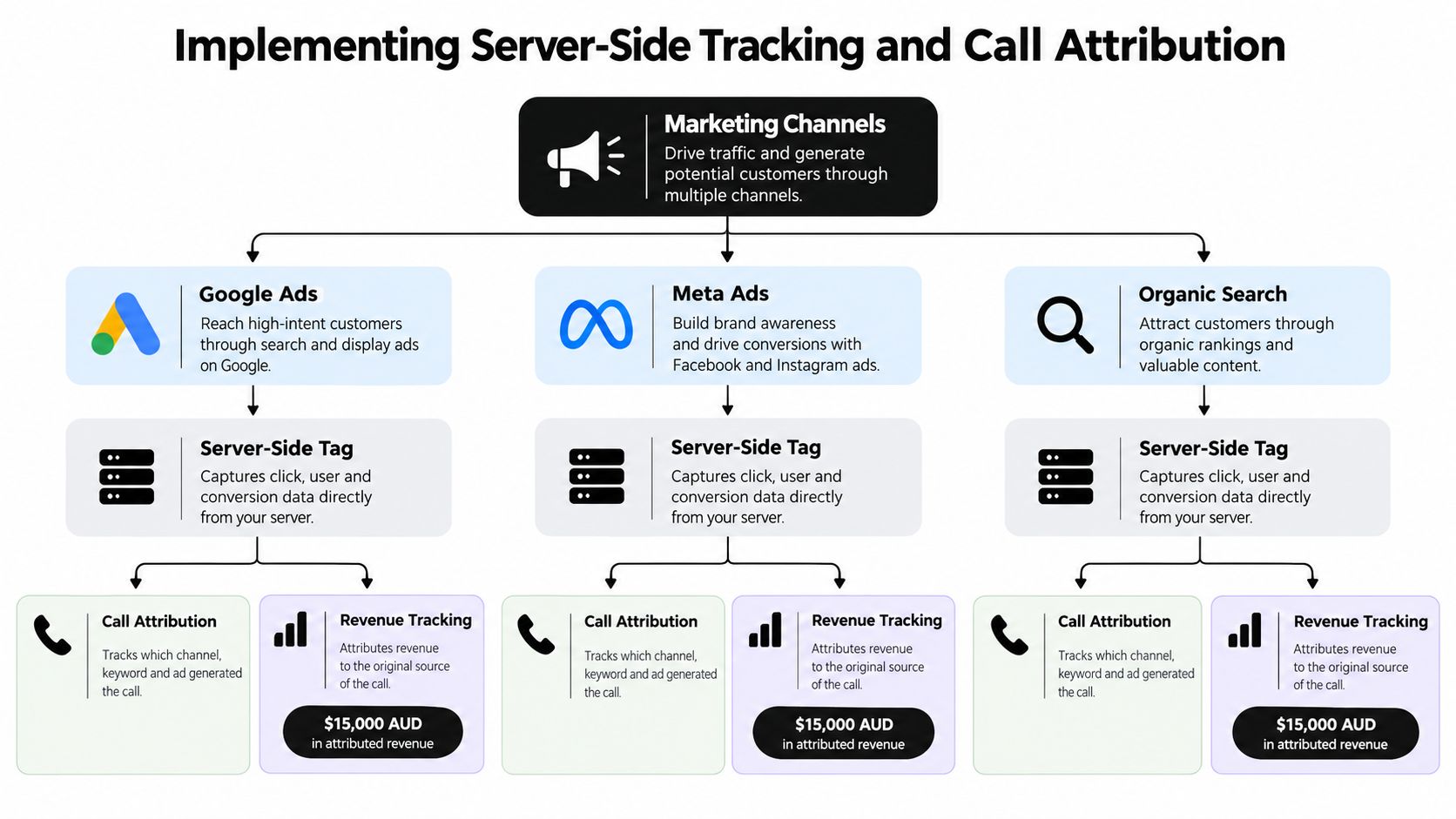
A website can't be judged by appearance alone. If the business invests in Google Ads, Meta Ads, local SEO, email, or organic search, it needs to know which channels generate profitable enquiries and sales. That requires a measurement system designed around business events, not a collection of disconnected scripts.
I start by defining the conversion for each primary page. For an ecommerce product page, it may be purchase or add-to-cart quality. For a service page, it may be a qualified form submission, booked consultation, or phone call. Then I document the event name, trigger, data required, consent condition, destination, and deduplication rule.
Build a clean GTM foundation
A well-organised Google Tag Manager container separates tags, triggers, variables, consent controls, and testing records. That structure is easier to audit than scripts scattered across a Shopify theme, WordPress plugins, booking software, and custom code.
The implementation process is straightforward, but it needs discipline:
- Create a measurement plan: Record page views, form starts, form errors, submissions, calls, bookings, purchases, and revenue events.
- Set consent controls: Ensure advertising and analytics tags behave according to the site's consent approach.
- Use descriptive naming: A future administrator should understand what
GA4 - Service Form - Successdoes without opening every configuration. - Test in preview mode: Check event order, values, page location, device behaviour, and duplicate firing.
- Validate the destination: Confirm that Google Analytics, Google Ads, and Meta receive the intended event.
- Document the container: Record the owner, purpose, trigger, parameters, and last test result.
The OAIC material on Australian tracking practices emphasises understanding what pixels collect, explaining that collection clearly, minimising data collection, and conducting appropriate due diligence. The Australian guidance on first-party data and consent also highlights the relevance of the Australian Privacy Principles to collection, notification, use and disclosure, direct marketing, and cross-border disclosure.
Add Meta Conversions API carefully
Meta Conversions API sends selected events from a server-side environment rather than relying only on browser Pixel activity. The point isn't to send everything. The point is to create a controlled, consent-aware event stream that can be reconciled with browser events.
A sound Conversions API installation documents:
- Event definitions: For example, lead, schedule, view content, add to cart, and purchase.
- Event IDs: Browser and server events use matching identifiers so Meta can deduplicate them.
- Data minimisation: Only send information necessary for the event and permitted by the privacy approach.
- Consent behaviour: Tags and server events should respect the site's consent controls.
- Testing records: Keep evidence that events fire once, contain the right values, and reach the intended account.
Consider a Shopify API or WordPress integration that requires careful ownership. A plugin may send events automatically, while GTM sends another version and a server-side gateway sends a third. Duplicate leads inflate reporting and teach ad platforms the wrong lesson.
Attribute calls, not just forms
Service businesses often receive their most valuable leads by phone. A call tracking platform such as CallRail or GoHighLevel can assign different tracking numbers to campaigns, landing pages, or service categories. Use dynamic number insertion carefully so organic and paid visitors see the correct number without damaging the primary business identity.
Call attribution should capture the campaign source, keyword or ad group where possible, landing page, call duration, answered status, and qualified outcome. A missed call isn't a successful conversion. A long call isn't automatically a sale. The sales team needs a simple process for marking outcomes consistently.
For teams deciding between single-touch and multi-touch attribution models, the choice should reflect the buying cycle. A single-touch model can be useful for a short, direct path. A multi-touch model may better represent an ecommerce customer who discovers a product through social content, returns through Shopping, and purchases after an email reminder. Neither model repairs poor event naming or inconsistent CRM records.
Scaling with Paid Media and Post-Launch Optimisation
A new website isn't a finished marketing asset. It's the destination for traffic from Google Ads, Meta Ads, organic search, email, marketplaces, and social campaigns. If the landing page and the campaign promise don't match, the business pays for the gap.
Australian digital advertising investment reached $16.4 billion in 2024, an 11.1% year-on-year increase, and paid search accounted for approximately $6.9 billion, according to the Australian digital marketing market figures. The same source reported that 65% of Australian small and medium businesses used paid search advertising. These figures establish paid search as a mainstream channel, not a specialist experiment, but they don't tell an individual business what to spend.
Set budgets from economics
The question “How much does it cost to start Google Ads?” has no responsible universal answer. Start with gross margin, average order value, conversion rate, customer acquisition cost, repeat purchase value, and the lead-to-sale rate. A service business should also account for job value and capacity. A campaign that produces cheap enquiries can still be poor if the team can't serve them or if the leads aren't qualified.
For ecommerce brands, Shopping campaigns need accurate product titles, prices, availability, images, delivery information, and landing pages. Australia Post reported that Australians spent $82.6 billion online in 2025, a 14% year-on-year increase, while 9.8 million Australian households shopped online and 41% shopped online at least fortnightly, according to the Australia Post ecommerce report. Marketplace competition matters too. Marketplaces generated $18.9 billion in Australian consumer spending in 2025, up 13% year on year, according to Australia Post's ecommerce reporting.
That environment makes a visually attractive Shopify store insufficient. Product feeds, reviews, fulfilment details, structured information, paid search, and conversion testing need to work together.
Choose the right campaign structure
A beginner's guide to Google Shopping Ads should start with the feed, not the bid. Fix product data, product categorisation, landing-page relevance, shipping information, and tracking before increasing spend. If Google Shopping Ads aren't spending budget, inspect eligibility, feed errors, product approvals, bids, targeting, budget constraints, search demand, and conversion configuration rather than assuming the creative is weak.
For dropshipping, Google Shopping Ads require extra care. Delivery expectations, product quality, returns, stock accuracy, and landing-page trust carry more weight when the buyer can't see a local warehouse or established retail presence. A low product price doesn't compensate for unclear fulfilment or an unreliable checkout.
PMAX versus Google Shopping Ads is a strategic decision, not a label preference. Standard Shopping can offer more direct control over product groups and search terms, while Performance Max can distribute across a wider Google inventory mix. Campaign priority in Google Ads should reflect product margin, stock, geography, brand demand, and the level of control the team needs. Avoid changing several campaign settings at once because you won't know which change affected results.
Make Meta creative testing systematic
A Facebook Ads agency should not treat creative testing as a sequence of random images. Start with a clear hypothesis, such as a product demonstration being more persuasive than a static catalogue image, or a customer problem being more relevant than a feature list. Test one meaningful variable at a time where possible, then judge the outcome using qualified traffic, add-to-cart quality, purchases, enquiries, or booked appointments.
For local businesses, Meta Ads can support demand creation and retargeting, while Google Ads captures more immediate intent. Instagram Shop and Facebook Shop can reduce the distance between discovery and product consideration, but catalogue accuracy and product-page quality still determine whether attention becomes revenue.
A “mastering Facebook Ads” mindset includes patience. Don't quit too early because an ad needs enough meaningful data to evaluate, but don't protect a weak campaign indefinitely either. Define the decision rule before launch, review creative fatigue, inspect lead quality, and separate raw submissions from genuine commercial opportunities.
Use automation to protect missed demand
A custom number through Twilio can support a practical response system for businesses that lose enquiries outside office hours. The setup can include 24-hour call answering, automated qualification, and appointment booking into a business calendar or Calendly. The system doesn't get sick or tired, and it can give callers a consistent next step when the team is serving a customer, driving, or closed for the evening.
That matters for tradies, hairdressers, beauty therapists, dentists, restaurants, and doctors. A missed call can represent a job, appointment, booking, or sale that never returns. A Twilio workflow can route urgent calls, capture the caller's details, answer common questions, and book an available slot. It should still provide a clear escalation route for sensitive or complex situations, particularly in healthcare.
Ongoing optimisation should follow a controlled sequence:
- Offer: Clarify the service, product, or outcome.
- Message: Test headline and ad-to-page alignment.
- Action: Compare call, quote, booking, and checkout paths.
- Trust: Improve proof, privacy microcopy, delivery information, and reassurance.
- Performance: Reduce image weight, unnecessary scripts, and third-party friction.
- Measurement: Reconcile analytics, ad platforms, CRM records, calls, and revenue.
Marketing your business requires consistency. The website, Google Ads, Meta Ads, local SEO, Google Business Profile, email follow-up, creative production, and sales response need to reinforce one another. A Melbourne SEO agency may improve local visibility, while a paid media team creates immediate demand, but neither can compensate for a broken booking flow or unreturned phone calls.
Alpha Omega Digital provides WordPress and Shopify development, UX and conversion work, Google Ads, Meta Ads, analytics implementation, and ongoing optimisation from Melbourne for businesses across Sydney, Brisbane, Newcastle, Perth, Adelaide, Darwin, and Hobart. If you're a business with a paid ads budget of at least 3k a month, I'd love to offer you a low risk deal, get a month of paid ads management FREE. Apply now through the contact page. Visit Alpha Omega Digital to discuss a service website, ecommerce build, tracking setup, or paid growth plan.
Alpha Omega Digital
Read more insights from our team on web design, paid ads, and growth strategy.