If you're looking at your current site and thinking, “It looks fine, but it doesn't really bring in enquiries or sales”, that's the right instinct. A lot of Melbourne small businesses already have a website. The problem isn't having one. The problem is having one that acts like a brochure when it should act like a sales tool.
That matters more in Melbourne than many owners realise. Australia had 2,656,469 small businesses in June 2025, representing 97.3% of all businesses, and about 69% of Australia's 2.5 million small businesses were located in greater capital city areas according to ASBFEO small business data. Greater Melbourne also had one of the country's largest concentrations of small businesses, while being the only major capital area in that dataset to record a 1.8% annual decline to 30 June 2023 in small-business numbers. In plain English, you're competing in a dense market where weak websites get ignored fast.
I've seen the same pattern across ecommerce brands, tradies, clinics, and local retailers. Owners spend money on design, then leave out tracking, local SEO, structured data, call handling, or offer clarity. The site goes live, looks polished, and still underperforms. That's usually not a traffic problem first. It's a conversion problem.
Why Melbourne Small Businesses Need a Conversion First Website
A lot of small business website design Melbourne projects go wrong before the homepage mock-up even starts. The brief is often centred on colours, inspiration sites, and “making it modern”. Very little gets said about how someone becomes a lead, a caller, a booked appointment, or a completed purchase.

Pretty sites lose to clear sites
For Melbourne operators, crowded categories are normal. Cafes, beauty clinics, electrical services, home services, local ecommerce, niche retail. In those markets, buyers don't reward design awards. They reward speed, clarity, trust, and convenience.
Treasury's Australian Small Business Key Statistics and Analysis report found that 62% of SMEs had a website, another 7% intended to get one within 12 months, and 72% of SMEs with websites said having a website improved the effectiveness of their business. That old benchmark still matters because it shows the website stopped being optional a long time ago. The businesses that win now are the ones that make the site do real work.
Practical rule: If a visitor can't tell what you sell, who it's for, why they should trust you, and what to do next within a few seconds, the design isn't finished.
That's why I push a conversion-first build. On service sites, that means strong contact paths, suburb targeting, persuasive service pages, proper form tracking, call tracking, and mobile layouts that make calling easy. On ecommerce, it means collection logic, product page structure, social proof, feed readiness, and clean tracking before ad spend starts.
A website should support paid and organic growth together
The best websites don't split SEO, paid ads, and UX into separate conversations. They connect them. A page built for Google Ads should still load fast, explain the offer quickly, and help your SEO footprint. A local SEO page should still convert when someone lands on it from a map result or a branded search.
If you want a good external resource on the thinking behind that, the Keyword Kick conversion playbook is worth reading because it focuses on turning traffic into action, not just increasing visits.
What works in practice is usually less glamorous than people expect:
- Fast first impressions with clear headings and obvious next steps
- Trust assets like testimonials, reviews, policies, delivery info, or proof of work
- Platform choices that fit the business model instead of fighting it
- Tracking from day one so Google Ads, Meta ads, and GA4 can measure outcomes
If you're choosing between WordPress development and Shopify development, that decision should come from how the site needs to sell, not what platform someone happens to prefer.
Choosing Between WordPress and Shopify for Your Melbourne Business
The platform question gets overcomplicated. Most Melbourne businesses don't need a philosophical debate about CMS architecture. They need to know which stack will be easier to run, easier to market, and less painful to scale.
Where WordPress wins
I still recommend WordPress for a lot of service businesses and content-heavy sites. If you need flexible page structures, custom landing pages, suburb pages, blog content, and lead funnels, WordPress development Melbourne work often gives you more control.
It's especially strong when you want:
- Custom Gutenberg blocks instead of page-builder sprawl
- Lead generation layouts built around calls, forms, FAQs, and service detail
- Local SEO structure with suburb pages, service hubs, and schema support
- Content flexibility for businesses publishing guides, case studies, and location pages
For owners searching for a WordPress developer Melbourne or broader WordPress developers Melbourne, the important question isn't “can they build WordPress?” Most can. The better question is whether they can build a WordPress website developer workflow that avoids plugin bloat, keeps templates consistent, and makes updates simple for your team.
Where Shopify wins
If your main job is selling products, Shopify is usually the cleaner choice. It removes a lot of technical overhead and gives ecommerce teams fewer ways to break things. I prefer it for catalogue-based stores, stores running frequent promotions, and brands that need a fast path to market.
Shopify is a good fit when you need:
- Faster ecommerce deployment
- Built-in selling mechanics for products, variants, shipping, and checkout
- Cleaner ad integration for Meta, Google Merchant Centre, and standard ecommerce tracking
- A better base for operational simplicity
Shopify also gives developers a practical route for custom work. Shopify's official developer docs state that Shopify CLI can generate a new app extension and import metafield and metaobject definitions. That's useful when a basic theme edit won't cut it and you need custom Shopify apps, Shopify API work, or structured content elements your team can manage without editing code every week.
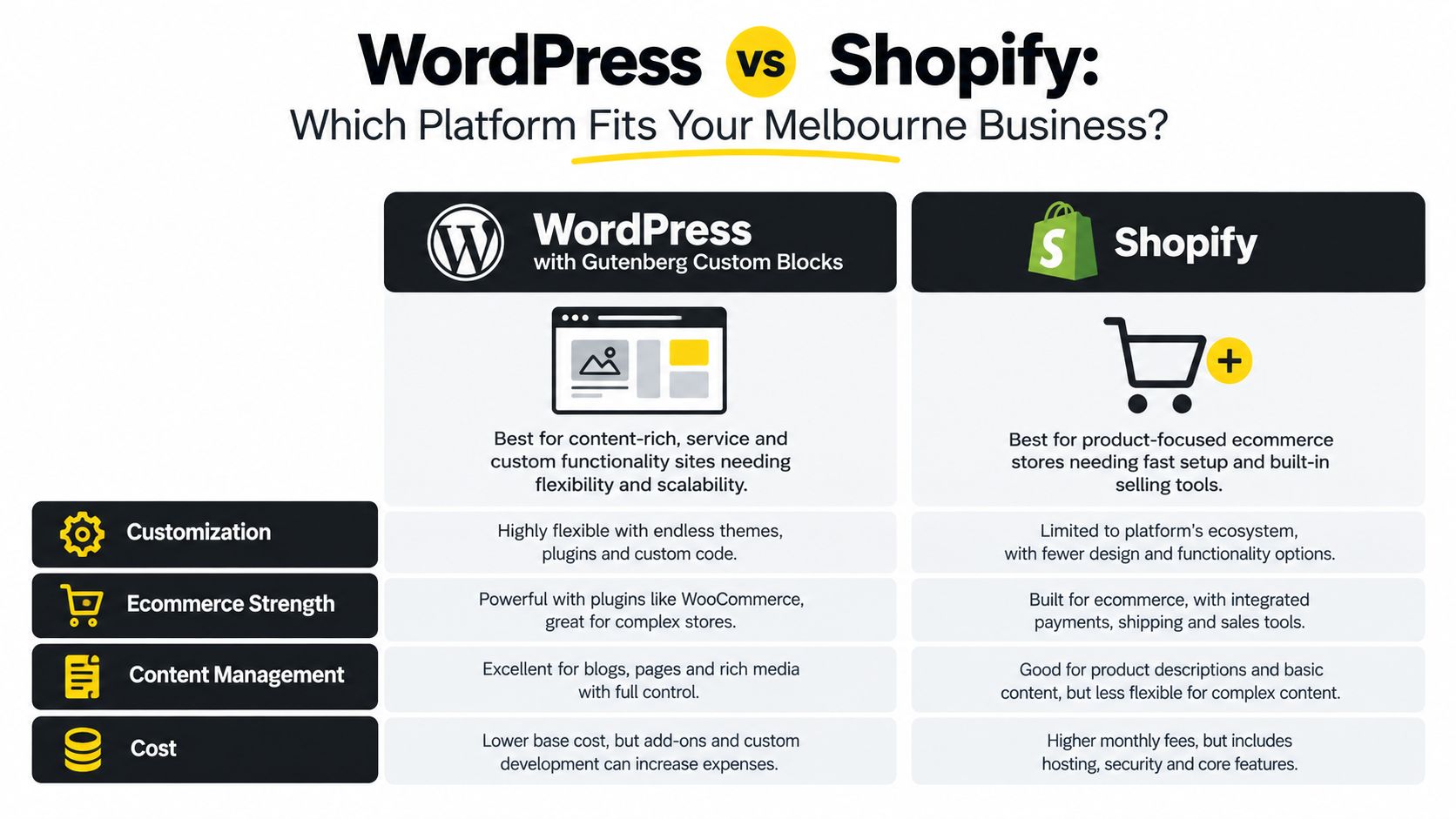
Here's the quick comparison I use with clients:
| Criteria | WordPress Best For | Shopify Best For |
|---|---|---|
| Content depth | Service businesses, publishers, SEO-heavy sites | Stores with lighter editorial needs |
| Ecommerce strength | WooCommerce builds with custom control | Product-led stores needing native selling tools |
| Customisation | Custom Gutenberg, bespoke templates, flexible architecture | Theme customisation plus app-based workflows |
| Admin simplicity | Teams comfortable with CMS flexibility | Teams wanting a cleaner ecommerce backend |
A short walkthrough helps if you're weighing the trade-offs visually:
My rule of thumb
If you're a service business first, WordPress usually gives you better control over SEO, content, and lead-gen design. If you're an ecommerce brand first, Shopify usually gets you moving faster with fewer technical decisions.
Don't choose a platform because someone says it's the industry standard. Choose the one your team can actually manage after launch.
That's also where businesses should be realistic about support. If you know you'll need custom blocks in Gutenberg, feed support, GTM events, landing pages, and ongoing campaign testing, it helps to work with a digital marketing agency Melbourne businesses use for both build and growth, not just handover.
How to Plan and Brief Your Website to Avoid Costly Rework
Most website blowouts come from fuzzy scope. Not bad intentions. Not bad design. Just fuzzy scope.
Owners often say they need “a new website”, but what they really need is one of three things. A better lead engine, a cleaner ecommerce store, or a website that supports paid traffic without leaking conversions. If you don't identify that early, the project gets expensive because every revision is really a strategy rewrite.
What a useful brief actually includes
A good brief doesn't need to be fancy. It needs to remove ambiguity.
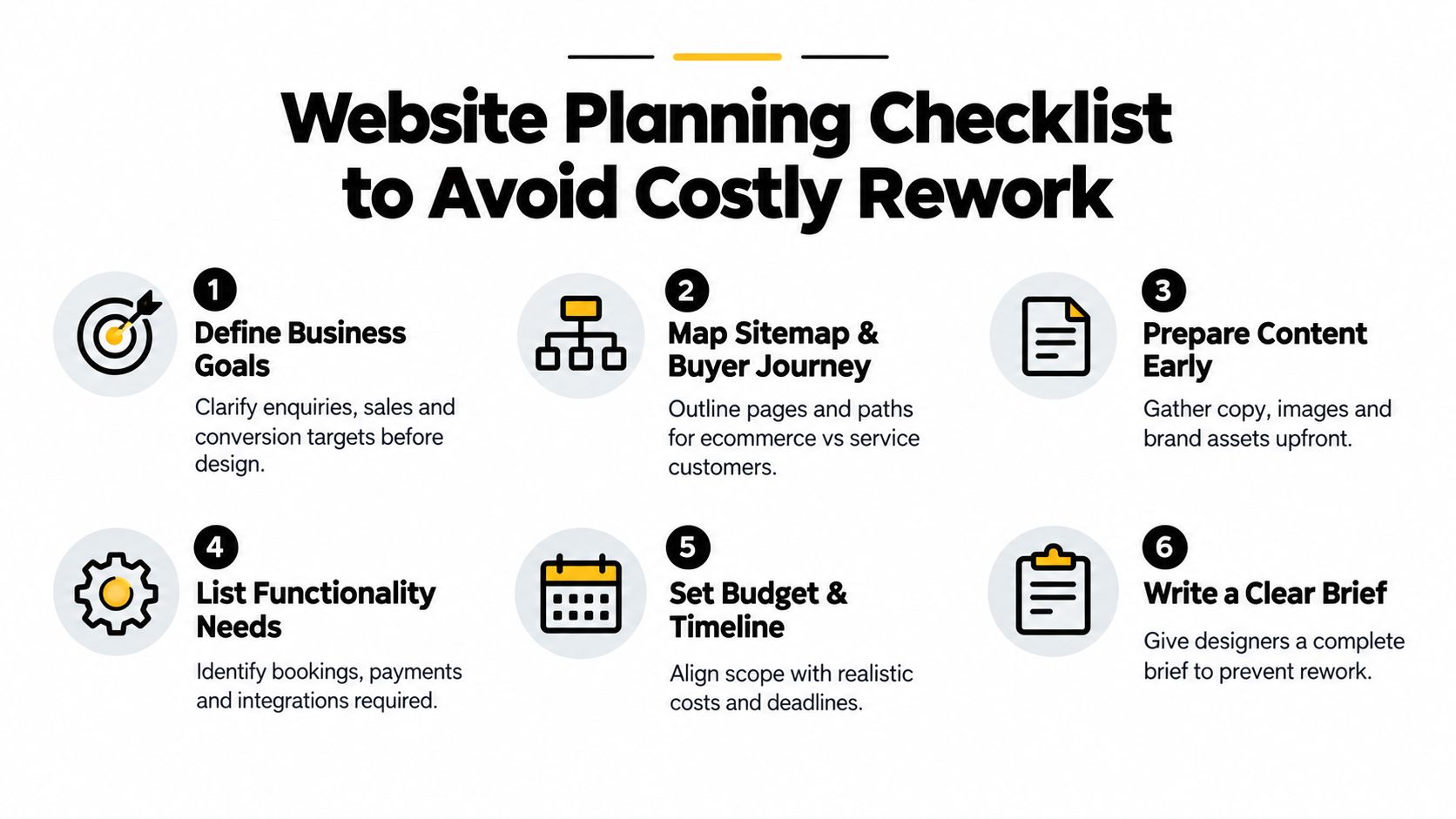
At minimum, lock down these points before design starts:
Primary goal
Are you driving purchases, quote requests, bookings, phone calls, or showroom visits?Buyer journey
What should a first-time visitor do on the first visit? Browse products, request a measure and quote, book a consult, or call now?Core pages
List the pages you know you need. Home, About, Service pages, Collection pages, Product templates, FAQs, Contact, Shipping, Returns, Reviews, and location pages if relevant.Functionality
Be explicit. GTM, GA4, Meta Pixel, Conversions API, CRM forms, call tracking, booking integrations, merchant feeds, Instagram Shop, Facebook Shop, reviews, email popups, custom calculators, trade quote forms.Content ownership
Who writes the copy? Who supplies images? Who approves product data? Timelines usually stall.
Questions that save money later
I ask planning questions that many design-only shops skip:
- Are ads part of the launch plan? If yes, landing pages and tracking need to be built into scope.
- Will local SEO matter? If yes, page structure and suburb targeting matter early.
- Will the business run Google Shopping? If yes, product taxonomy, feed hygiene, and policy content need attention.
- Will sales or reception rely on calls? If yes, call tracking and call handling should be part of the build, not an afterthought.
A vague brief creates expensive creativity. A sharp brief creates useful design.
What tends to push costs up
Not every extra feature is a bad idea. But every extra feature changes build time, QA, and reporting complexity.
Common scope multipliers include:
- Custom integrations with CRMs, booking systems, or stock platforms
- Custom blocks in Gutenberg rather than using off-the-shelf layouts
- Advanced Shopify development using Shopify CLI, app extensions, or bespoke theme logic
- Tracking requirements across Google Ads, Meta ads, GA4, and offline lead workflows
- Multiple audience paths such as retail, wholesale, and trade accounts on one store
The businesses that move fastest don't always have smaller websites. They usually make decisions earlier. They know the offer, they know the key pages, and they don't ask the design process to invent the whole marketing strategy from scratch.
Building for Speed, Trust and Local SEO That Actually Converts
A Brunswick electrician pays for Google Ads, gets the click, and loses the lead before the page finishes loading. A Collingwood ecommerce brand spends months on a polished redesign, then finds out purchases are not tracking properly and suburb searches barely surface the site. I see versions of that problem all the time. The site looked good, but it was never built as a conversion engine.
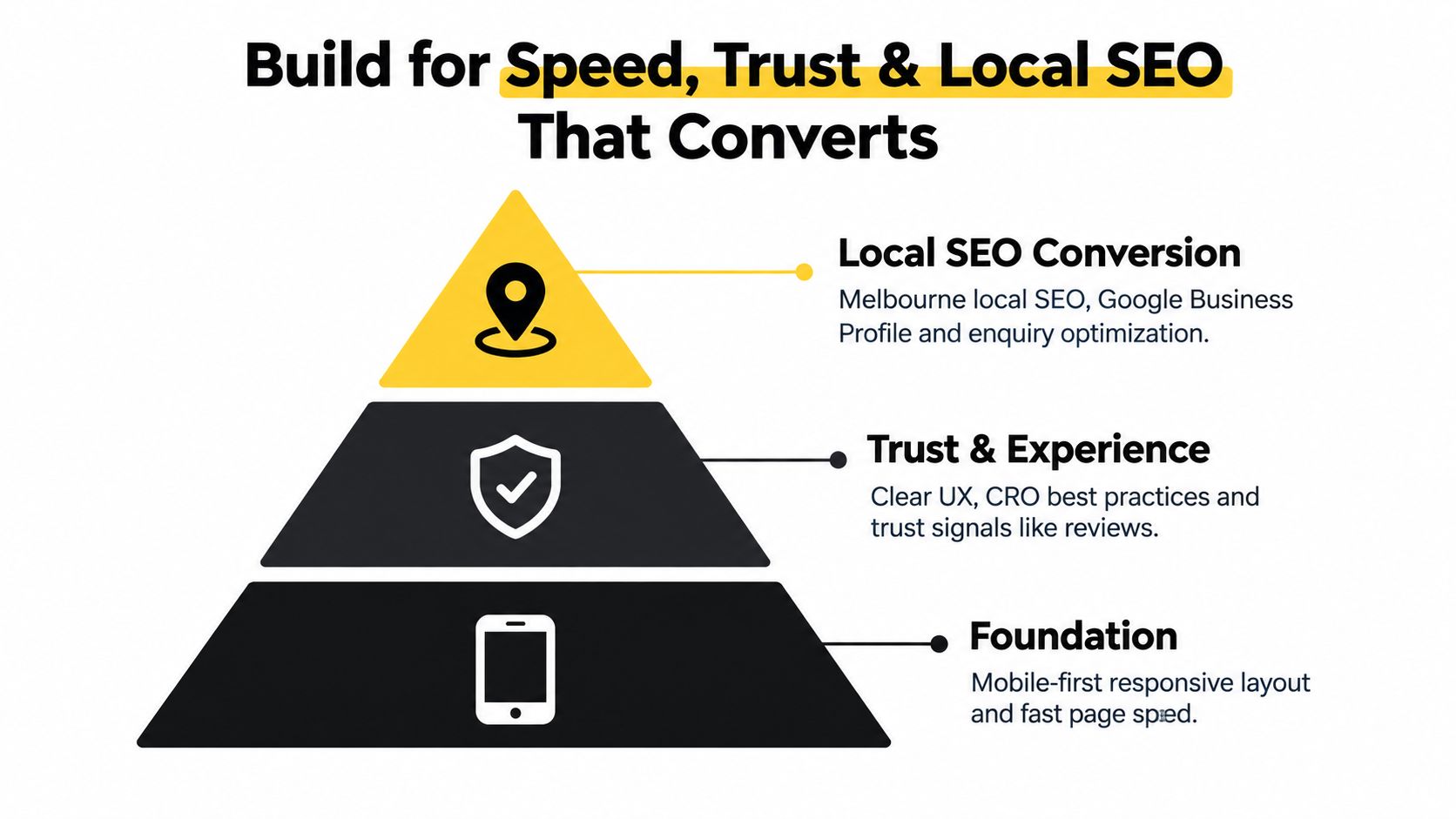
Speed, trust, and local SEO do not sit outside conversion. They shape whether paid traffic turns into calls, bookings, and sales, and whether Melbourne buyers feel confident enough to act.
Independent Australian research reported by the National Retail Association digital statistics page found only 13% of Australian small business websites include testimonials, only 30% passed a speed test, and 64% of SME owners either don't understand SEO or don't know how it drives results. That matches what turns up in audits. The common issue is not ugly design. It is weak proof, slow delivery, and pages that do little to support real search intent or ad traffic.
Speed affects rankings, ad efficiency and enquiries
A slow site wastes money twice. It loses impatient visitors, and it lowers the value of every paid click you bought to get them there.
The most useful Australian benchmark I've seen came from Odin Digital's research on Australian small business websites. Analysts there found only 30.7% of Australian small business websites passed all five baseline AI-readability checks. Melbourne had the highest rate of structured data gaps in that dataset, with a 31.3% no-structured-data rate. The same research found 66.4% of sites took more than 1 second to return the first byte, with a median TTFB of 1.5 seconds, and 28.2% above 3 seconds.
Those numbers show up in campaign results. If a landing page drags, Google Ads traffic bounces harder. If product or service pages rely on heavy scripts, mobile users feel it first. If key content is buried behind front-end effects, search engines and AI overviews get a thinner version of the page than the user sees.
On WordPress, that usually means trimming plugins, using lighter blocks, serving WebP images, and choosing hosting that can handle traffic spikes. On Shopify, it often means being stricter about app bloat, theme customisations, and oversized media. Every platform has trade-offs. The principle stays the same. Fast pages give your offer a chance.
What should be in place before launch
For small business website design Melbourne projects, I want these foundations live before the site goes public:
- Server-rendered, crawlable pages so core content can be indexed and read properly
- Structured data for the business, products, services, reviews, or FAQs where relevant
- Clean sitemap and indexation rules so the right pages are discoverable and low-value pages stay out of the way
- Useful 404 and redirect handling so old URLs and broken links do not waste traffic
- Lean mobile templates with clear calls to action, click-to-call, or direct add-to-cart paths
- Page layouts that support tracking so form starts, calls, purchases, and key clicks can be measured cleanly in GTM, GA4 and ad platforms
That last point matters more than many businesses expect. If a page is hard to measure, it is hard to improve.
Trust is built in the details
Trust usually drops long before a prospect reads your full sales copy. It drops when the site feels vague, the business looks hard to contact, the reviews are hidden, or the process is unclear.
The trust layer is practical:
| Trust element | Why it helps |
|---|---|
| Testimonials and reviews | Gives first-time buyers proof that others had a good result |
| Clear service, shipping, returns, or warranty information | Answers objections before they become drop-offs |
| Team, vehicle, premises, or project imagery | Makes the business feel real and local |
| Licences, certifications, payment options, or security cues | Reduces hesitation at enquiry or checkout |
| Suburb, service area, or pickup details | Confirms the business fits the buyer's location and intent |
For tradies, trust often comes from simple proof. Real job photos. Clear service suburbs. A phone number that is easy to tap. For ecommerce, it is often fulfilment clarity, returns, delivery times, and checkout confidence. Different businesses need different proof, but every site needs enough of it near the point of action.
Local SEO should match how Melbourne buyers actually search
Local SEO works best when the page structure reflects buyer intent, not just keyword variations. A plumber page targeting “emergency plumber Richmond” needs a different angle from a category page targeting “outdoor furniture Melbourne.” One solves an urgent local problem. The other supports product comparison, delivery questions, and suburb-based logistics.
That changes how I build sites. Service businesses often need strong service pages plus carefully chosen location pages, not dozens of thin suburb pages. Ecommerce brands with local demand often need collection pages, shipping and pickup content, store or showroom details, and metadata that lines up with how people search in Melbourne.
Consistency matters too. Your Google Business Profile, landing pages, and core business information should match. Categories, address details, service descriptions, and contact points need to tell the same story. If the website says one thing and your profile says another, conversion rates usually suffer before rankings do.
One practical note. If you want outside support beyond pure design, Alpha Omega Digital's web design in Melbourne is one example of a local service that combines site builds with growth planning. That approach is often more useful than treating the website, tracking, and marketing as separate jobs.
Connecting Your Site to Google Ads Meta Ads and Automations
A website launch isn't the finish line. It's the point where measurement has to become reliable. If you can't trust tracking, you can't judge Google Ads, Meta ads, SEO, or landing pages properly.
Start with clean measurement
Google's own shopping automation guidance states that conversion measurement can be set up by linking Google Analytics to Google Ads or by setting up website conversion tracking directly, including through Google Tag Manager or a conversion tag. In practice, I prefer a setup that gives the business flexibility: GTM for deployment control, GA4 for behavioural visibility, and native ad platform tracking where it matters.
For most builds, I want these foundations in place:
- Google Tag Manager containers installed correctly
- GA4 events mapped to meaningful actions such as purchases, add to carts, lead submissions, calls, and bookings
- Google Ads conversion tracking for primary lead or sales actions
- Meta Pixel plus Conversions API installation so browser-side loss doesn't wipe out visibility
- Enhanced Conversions where the setup and privacy handling are appropriate
Google Ads documentation says Enhanced Conversions for Web can improve measurement accuracy by supplementing existing conversion tags with first-party data, including details such as email address, name, home address, and phone number. For ecommerce and lead gen alike, that gives you a more resilient attribution setup when browser-based tracking misses part of the journey.
Google Shopping and campaign structure
A lot of beginners ask about PMAX vs Google Shopping ads, or why Google Shopping ads aren't spending budget. Usually the issue isn't one magic setting. It's a mix of feed quality, product demand, campaign structure, bid strategy, and conversion signal quality.
If you're running Standard Shopping, Google Ads supports Low, Medium, and High campaign priority levels, configured in the campaign priority settings for Standard Shopping. That matters when you use overlapping campaigns to separate branded inventory, promos, or margin-based product groups.
For a beginner's guide to Google Shopping ads, here's the short version:
- Use Standard Shopping when you want more explicit control over product grouping and campaign priority
- Use PMAX carefully when you have strong assets, trustworthy conversion data, and enough confidence in feed quality
- Don't judge too early if you've just launched. New campaigns need clean inputs before you blame the channel
For teams trying to benchmark expectations, the 2026 Google Ads ROI benchmarks are a useful read because they help frame what questions to ask before scaling budget.
Don't diagnose ad performance from clicks alone. Check the feed, the landing page, the tracking, and the offer before changing bids.
Meta ads, creative testing, and service business automations
Meta ads usually break because the creative angle is weak or the tracking setup is incomplete. For ecommerce, I like a simple testing process. Test different hooks, test product demos against UGC-style explanations, and keep landing pages tightly matched to ad promise. For service businesses, creative often works better when it answers objections directly and shows the job, the result, and the booking path clearly.
For tradies and other call-heavy categories, I also like to connect ad traffic to call tracking and follow-up automation. A custom number through Twilio can route calls, log outcomes, and support a setup that provides 24 hour call answering, never gets sick or tired, and can book appointments into your calendar or Calendly. For plumbers, electricians, hairdressers, beauty therapists, dentists, restaurants, and doctors, that sort of workflow helps capture leads that would otherwise go cold after hours.
The same principle applies whether you're running PPC for tradies, Google Ads for contact form submissions, a Facebook ads agency workflow, or local ecommerce campaigns. Consistency beats random bursts. Marketing your business works when the website, the offer, the tracking, and the follow-up all agree with each other.
Selecting the Right Melbourne Agency and Launching with Confidence
Choosing a marketing agency Melbourne businesses can trust comes down to fit, not pitch quality. You want a team that understands the business model, the platform, and the traffic sources you'll rely on after launch.
What to look for in an agency
I'd ask these questions before signing anything:
- Do they build for conversion, not just design? Ask how they handle forms, calls, product page UX, and checkout or enquiry flow.
- Can they work across WordPress and Shopify? That matters if your platform choice is still open or your needs may change.
- Do they understand paid media setup? A site built without GTM, GA4, conversion tracking, or Conversions API thinking often creates expensive cleanup later.
- Can they support local SEO? If you're competing suburb by suburb, the structure of the site matters.
- What happens after launch? Ask about support, reporting, edits, testing, and whether they can help with Google Ads or Meta ads once the site is live.
Launch with a QA mindset
Before launch, I like a practical checklist more than a glossy sign-off deck.
Use something close to this:
- Check conversion paths by testing forms, checkout, phone links, booking tools, and automated replies
- Check crawlability with sitemap review, robots review, and a non-JavaScript crawl pass
- Check trust pages such as shipping, returns, privacy, service areas, and testimonials
- Check ad readiness by verifying GTM events, GA4, Meta events, and Google Ads conversions
- Check local alignment by matching site details with Google Business Profile information
The launch should feel boring. If launch day feels chaotic, the prep work wasn't finished.
For businesses that need a seo agency Melbourne, a digital marketing agency Melbourne, or a combined build and paid media partner, the strongest agencies usually talk plainly about trade-offs. They won't promise instant dominance. They'll tell you what platform fits, what needs custom development, where budget will go first, and which channels deserve patience.
If you're an ecommerce brand, ask about Shopify design, Shopify development, Shopify API work, Instagram Shop and Facebook Shop setup, Google Shopping ads for dropshipping, and how they measure success in Meta ads. If you're a service business, ask about Google Ads for service based businesses, local SEO, Google My Business, GTM, GA4, Conversions API installation for Meta, and the best call tracking softwares for PPC call campaigns such as CallRail or Go High Level. Those questions reveal whether the agency understands the work beyond a homepage mock-up.
If you're ready to turn your site into a proper conversion engine, Alpha Omega Digital builds WordPress and Shopify websites around tracking, paid media readiness, local SEO, and real buyer intent. If your business has a paid ads budget of at least 3k a month, there's a low-risk offer worth considering: get a month of paid ads management free and apply through the contact page.
Alpha Omega Digital
Read more insights from our team on web design, paid ads, and growth strategy.