You're comparing WordPress quotes, and the portfolios all look polished. One proposal includes a theme, another promises custom development, and neither makes it particularly clear whether customers will be able to find products, complete checkout or send an enquiry without getting stuck.
If you're searching for “web designer WordPress”, the useful question isn't who can make your website look better. It's who can build something your customers can use and your business can maintain. I'd judge that decision on the buying journey, technical quality and ongoing responsibilities before choosing a colour palette.
What a WordPress Web Designer Actually Does
Consider a Melbourne retailer receiving a beautiful new website, only to discover its wholesale enquiry form doesn't send messages anywhere. That's a hypothetical example, but it exposes an important distinction: approving the appearance of a website isn't the same as accepting a working business tool.
A WordPress web designer plans how the website looks and how people move through it. A WordPress developer builds the templates, functionality and integrations that make those plans work. A generalist graphic designer might supply excellent static mock-ups without implementing anything inside WordPress.
Think of an architect and a builder. Their responsibilities overlap, but a drawing doesn't establish whether the plumbing works. Likewise, a product-page design doesn't establish whether stock information, payment processing and order notifications work.
Know what the proposal actually includes
A useful WordPress design engagement should identify its deliverables, rather than promise a complete website.
- Visual design: Typography, colour, spacing, imagery and reusable interface styles.
- Website structure: Navigation, page hierarchy and layouts for products, categories and content.
- WordPress implementation: Theme configuration, block-based layouts or a separately scoped development handover.
- Responsive testing: Checks that customers can use menus, forms and purchasing controls on different screen sizes.
- Launch support: Agreed testing, deployment responsibilities and a process for reporting defects.
Copywriting, photography, product-data migration, custom integrations and ongoing maintenance may be separate services. That's reasonable, provided the exclusions are visible before you sign.
A credible platform still needs a competent build
WordPress is a substantial platform, not an obscure technical gamble. W3Techs reports that it powers 58.3% of websites with an identifiable content-management system and 39.6% of all websites measured, supporting its position as an established foundation for Australian projects.
Popularity isn't a quality guarantee, though. Your designer still needs to make appropriate decisions about hosting, plugins, accessibility and content.
Buying advice: Ask who is responsible for each working outcome, not just who supplies the design files.
When reviewing a WordPress development service, look for that division of responsibility. You should know who fixes an integration problem without having to mediate between suppliers.
Planning UX and Conversion Goals Before Design Starts
Start with the action that matters commercially. For an ecommerce store, that's usually a completed order, although wholesale enquiries, repeat purchases or appointment bookings may also matter. Don't treat every button click as equally valuable.
I'd map the buying journey before reviewing homepage concepts: where the visitor arrives, what they need to understand, what might stop them and what confirms success.
Design around the customer's task
Consider a service page with its contact form below several promotional banners. The owner wants enquiries, but the layout asks visitors to consume unrelated content first. An ecommerce equivalent is a product page where delivery information is difficult to find and decorative content separates the product options from the purchase button.
The practical response is to agree on content priority before styling:
- Purchase decisions: Put product details, variants, availability and delivery information where customers need them.
- Enquiry decisions: Explain what happens after submission and ask only for information needed to respond.
- Reading decisions: Make headings, labels and body copy legible on a phone.
For teams refining font hierarchy and implementation, this guide to improve typography in web design is a useful companion resource. Typography belongs in usability discussions, not just brand presentations.
Make mobile performance an acceptance criterion
Core Web Vitals thresholds for mobile WordPress sites
| Metric | Good threshold | What it affects |
|---|---|---|
| Largest Contentful Paint | No more than 2,500 ms | How quickly the main content appears |
| Interaction to Next Paint | No more than 200 ms | Responsiveness after a tap or click |
| Cumulative Layout Shift | No more than 0.10 | Whether content moves unexpectedly |
Heavy page-builder assets, overlapping plugins and third-party marketing scripts can contribute to poor results. Ask the developer to identify what loads on each template, defer non-critical scripts, compress images and reserve image dimensions.
The same Australian analysis uses the 75th percentile over a rolling 28-day period, rather than a single desktop test, as its field-measurement framework. For a new website without sufficient real-user data, agree on pre-launch laboratory testing and a post-launch field review. Don't accept a desktop screenshot as proof that mobile customers have a usable checkout.
Custom Development Versus Off-the-Shelf Themes
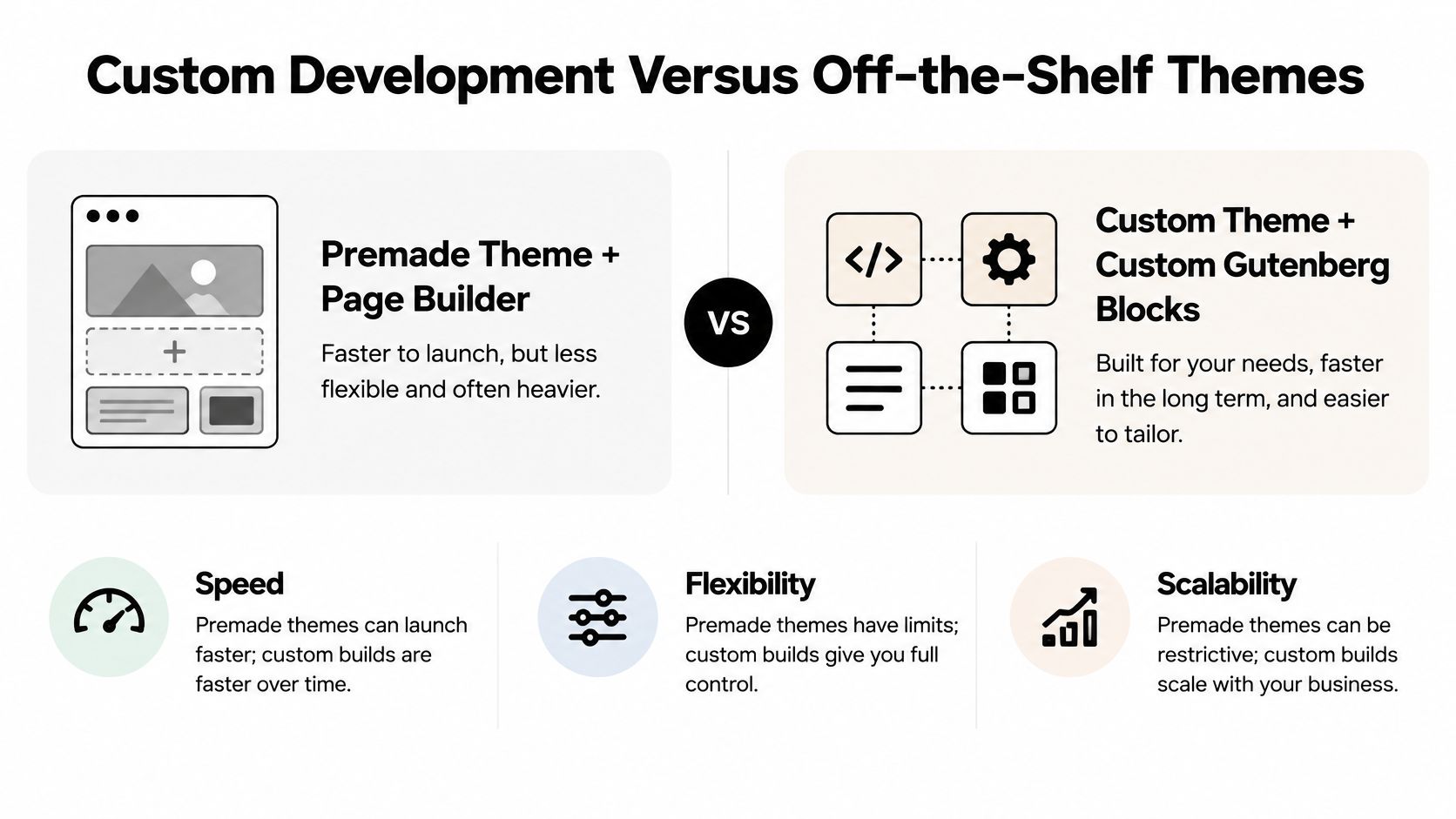
A premade theme isn't automatically a shortcut you'll regret, and custom development isn't automatically superior. The right choice depends on how closely the available tools match your business and who will maintain them.
This comparison is a starting point, not a promise that either approach will perform well without careful implementation.
Compare the cost of changing things
A premade theme with a page builder can suit a straightforward store whose layouts fit established patterns. It can also give an internal marketing team useful editing freedom. The compromise appears when the team needs workarounds to escape the theme's assumptions.
A custom theme with custom Gutenberg blocks can provide more deliberate control. For example, a retailer might need a repeatable product-comparison layout with tightly controlled fields, rather than a blank canvas that staff must rebuild each time.
| Decision | Premade theme and page builder | Custom theme and Gutenberg blocks |
|---|---|---|
| Initial implementation | Can reduce setup work when requirements fit | Requires dedicated design and development |
| Editing | Broad visual controls | Purpose-built controls for agreed content |
| Performance | Depends on assets and configuration | Depends on code quality and implementation |
| Future changes | May encounter theme constraints | May require developer involvement |
| Maintenance | Theme, builder and plugin dependencies | Custom-code ownership and dependency management |
Custom blocks earn their place when they make a repeated task safer or clearer. A booking module, service card or comparison layout should have defined content fields, sensible defaults and an editing experience staff can understand.
Avoid buying features nobody owns
Each additional plugin introduces another dependency to review and update. Before adding one, ask whether an existing tool already provides the function, whether the feature is commercially necessary and who will maintain it.
The same discipline applies when comparing WordPress with Shopify development in Melbourne. Choose around catalogue requirements, content flexibility, integrations and operational capacity, not a developer's preferred platform.
Choose the simplest implementation that supports the business model and can be maintained by the team you actually have.
I'd favour a well-configured existing theme for familiar requirements and constrained resources. I'd consider custom development when repeatable workflows, unusual layouts or integration requirements justify the additional responsibility.
Scoping Your Project and Writing a Clear Brief
Two quotes aren't comparable if one assumes you'll supply finished product data and the other includes migration and content preparation. A clear brief makes those assumptions visible before they become variations.
Write the brief around outcomes and responsibilities, rather than a list of websites you like. Reference sites help explain visual preferences, but they don't define what your store needs to do.
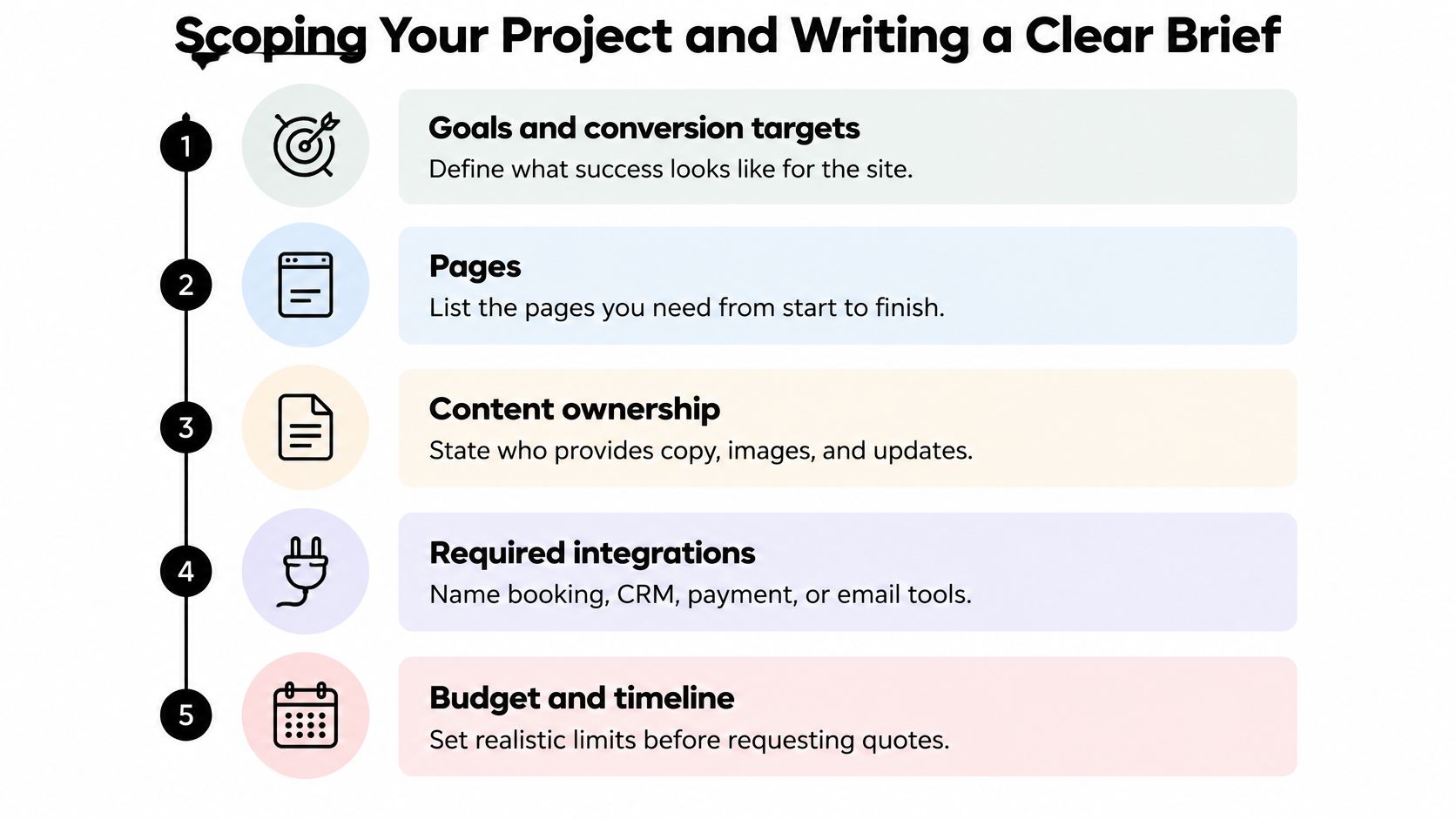
Use this checklist as the starting point for your enquiry.
Put decisions in a practical order
- Goals and conversion targets: Explain what customers should accomplish and what currently gets in their way.
- Pages and templates: Distinguish individual pages from reusable product, category, article and landing-page layouts.
- Content ownership: Name who supplies copy, images, product specifications and approvals.
- Integrations: List payment providers, CRM, booking tools, email systems, Google Tag Manager and Google Analytics.
- Operational responsibilities: Specify hosting, account ownership, training, support and deployment.
- Budget and timing: State constraints and dependencies, including content readiness and internal approval.
For tracking, request an event specification rather than asking for analytics alone. A completed order, successful contact-form submission and phone enquiry need different implementation and validation.
Include the work required to keep trading
Security and customer experience aren't separate purchasing decisions. PayPal's 2025 Ecommerce Index found that 58% of Australian SMBs identified safety and security as their leading ecommerce priority, compared with 44% in 2024.
Your scope should therefore explain how updates reach production. Request a staging environment, payment and tracking checks, a rollback procedure and named responsibility for approving changes.
Define backup recovery expectations in business terms. How much recent order information could you tolerate losing, and how quickly would the store need to return? The supplier should translate those requirements into an appropriate recovery arrangement.
Scope test: If a custom feature fails during trading, someone should already know who investigates, how it is disabled and how the store recovers.
A feature that your team can't support may be a poor purchase even if customers might enjoy it. Ask whether it should be built, supplied through a maintained plugin or removed from scope.
Accessibility and Privacy Checks Before Launch
Accessibility shouldn't depend on whether someone remembers to install a scanning plugin before launch. It needs to influence component design, content entry and functional testing.
An Edith Cowan University study auditing 160 Australian Web Awards entries found that very few met the accessibility-compliance level their organisations had selected. Awareness of guidelines wasn't a reliable substitute for demonstrating that people could use the websites.
Ask for evidence of usable interfaces
Set WCAG Level AA as the relevant project target, with the applicable criteria agreed during scoping. Automated scans are useful, but your designer should also demonstrate customer tasks manually.
- Keyboard navigation: Reach menus, filters, form controls and checkout without a mouse.
- Visible focus: See which interactive element is selected.
- Structure and semantics: Review headings, landmarks and native controls.
- Forms and errors: Check labels, instructions and meaningful validation messages.
- Colour contrast: Verify text and interface states, not just brand swatches.
- Assistive technology: Test relevant tasks using VoiceOver or NVDA.
Native HTML controls should be preferred where appropriate. ARIA can support an interface when necessary, but it shouldn't be used to disguise a visually styled element that lacks basic keyboard behaviour.
Track defects by severity and resolve them in staging. A checkout blocker deserves a different response from a minor presentation inconsistency.
Review data collection before installing tags
Privacy work requires similar discipline. Forms, Meta Pixel, Google tags, remarketing tools and CRM integrations should each have an identified purpose, data owner and review decision.
Australian website compliance guidance explains that the Privacy Act generally applies above AUD 3 million annual turnover, with exceptions including private health providers and businesses trading in personal information; it also discusses the OAIC's November 2024 tracking-pixel guidance and the serious-invasion-of-privacy tort commencing 10 June 2025. Don't assume a small-business exemption settles every privacy question.
Ask your designer to document what information leaves the website, which vendors receive it, whether offshore processing is involved and what notices or consent mechanisms require review. Obtain qualified legal advice where applicability is unclear.
For health-related appointments or sensitive enquiries, challenge whether the website needs to collect detailed information at all. Data minimisation is a design decision, not merely wording for a privacy policy.
How to Choose a Web Designer in Melbourne
A portfolio is useful evidence of visual capability. It's less useful for understanding how the supplier handles difficult integrations, handover or an interrupted checkout.
Use a discovery meeting to examine their decisions. Ask for a walkthrough of relevant WordPress or ecommerce work, including the editing experience behind the finished pages.
Make room to review the work together rather than judging screenshots alone.

Compare the working relationship
A freelancer may offer direct communication and lower overheads, but ask about availability and backup support. A larger agency may provide broader specialist coverage, although coordination and approval processes can be more involved. A boutique team sits between those models, with its own capacity constraints.
Whichever model you choose, check:
- Relevant delivery: Working WordPress and ecommerce examples, not just static concepts.
- Ownership: Clear control of code, content, domains, hosting and advertising accounts.
- Process: Documented discovery, approval, testing and launch responsibilities.
- Support: Defined response arrangements, exclusions and handover documentation.
- Measurement: Evidence that the supplier can validate conversions, not merely install tags.
For businesses comparing a digital marketing agency Melbourne shortlist, Alpha Omega Digital is one option combining WordPress and Shopify development, UX/UI design and conversion strategy with Google Ads and paid social. Its process covers discovery and strategy, onboarding, launch, optimisation and scaling.
That combined approach should still be judged against a freelancer or another agency using the same requirements. A Melbourne WordPress development team should explain its technical choices plainly, regardless of whether it also manages advertising.
The following video provides additional context for your supplier review.
Connect the build to commercial measurement
The ABS recorded seasonally adjusted Australian online retail sales of $4,703.8 million in June 2025, up 3.9% from May and 13.0% from June 2024. That scale supports taking ecommerce infrastructure seriously, but it doesn't predict your store's results.
Ask how the team validates purchases across advertising systems. For example, Meta requires matching event_name and identical event_id values for browser and server versions of the same event so duplicate events can be recognised.
A supplier offering Conversions API installation should demonstrate that validation. More reported purchases aren't an improvement if they're duplicates.
Your Next Steps From Enquiry to Launch
Shortlist three designers and send each the same scope. Request a discovery session, then compare how they interpret the problem rather than how quickly they produce a price.
Give them enough context to challenge your assumptions. If your brief asks for an elaborate product selector, a capable supplier should ask what customers struggle to choose and whether simpler content would solve it.
Compare proposals before committing
Create a comparison sheet with scope, exclusions, timeline dependencies, integration responsibilities, ownership and support terms. Ask suppliers to clarify anything that appears in only one proposal.
- Before design: Agree on templates, conversion goals and acceptance criteria.
- During design: Review realistic content and difficult states, including unavailable products and validation errors.
- During development: Confirm integrations and staff editing workflows.
- Before launch: Complete staging tests and record unresolved issues.
- At handover: Receive access, documentation, training and a named support contact.
Don't treat approval as a single final moment. Separate visual approval from functional acceptance so a good-looking page doesn't accidentally sign off unfinished behaviour.
Plan the launch as an operational change
Nominate who can approve deployment and who will be available to check the live store. Confirm the rollback decision, communications process and how customer-facing issues will be reported.
If you're replacing an existing website, include redirects, content migration and tracking continuity in the deployment plan. Keep a record of what changed so subsequent troubleshooting doesn't depend on memory.
Paid advertising should follow the store's readiness. There's little value in accelerating traffic while essential purchasing tasks remain untested.
I'd also separate the launch backlog from the wish list. Fix anything that prevents trading or valid measurement, then prioritise improvements using customer evidence rather than whichever new feature feels most exciting.
A useful enquiry includes your current website, platform, principal commercial goal, integration list, content readiness and budget constraints. That gives the team enough information to discuss a realistic path instead of offering a vague package.
Alpha Omega Digital offers WordPress and Shopify design, development and paid advertising from Melbourne, serving Sydney, Brisbane, Newcastle, Perth, Adelaide, Darwin and Hobart. If you're a business with a paid ads budget of at least $3,000 a month, I'd love to offer you a low-risk way to test the working relationship: a month of paid ads management free. Visit Alpha Omega Digital to explore the services, then apply through the contact page with your website and project goals.
Alpha Omega Digital
Read more insights from our team on web design, paid ads, and growth strategy.