You're probably here because one of two things has happened.
Either you've run Google Ads before and felt like you lit money on fire, or you haven't started yet and you're trying to work out whether Google Ads for small business is worth it in Australia.
I work with Melbourne businesses that sell online and businesses that rely on leads, especially eCommerce brands, tradies, and service operators. I've seen the same pattern over and over. The businesses that win aren't the ones with the biggest account. They're the ones with the cleanest setup, the clearest offer, and the discipline to optimise instead of guessing.
For Australian small businesses, Google matters because that's still where people go when they want to buy, compare, book, or call. In Australia, Google Search held a 94% share of general search queries in 2020 according to the ACCC, which is why search visibility remains such a practical channel for demand capture for local businesses and online stores alike, as noted in this overview of Google Ads for small business.
Why Most Small Business Google Ads Campaigns Fail
Most failed campaigns don't fail because Google Ads “doesn't work”. They fail because the account was built backwards.
I've had business owners come to me after months of frustration. They had clicks. They had impressions. Sometimes they even had a decent-looking dashboard. What they didn't have was a system that tied spend to actual business outcomes. No proper conversion tracking. No clear campaign goal. No negative keyword discipline. No landing page built for action.
The usual failure pattern
This is what I see most often:
- They start with keywords, not strategy. They jump straight into targeting terms without deciding whether the campaign is meant to drive purchases, phone calls, booked jobs, or quote requests.
- They track the wrong thing. I've seen accounts optimised for page views, time on site, or generic “engagement” when the business required leads or sales.
- They trust default settings. Smart features can help, but a small business account with weak data usually gets worse when left on autopilot.
- They spread budget too thin. Too many campaigns, too many locations, too many services, not enough signal.
- They never fix search waste. If you ignore search term reports and negative keywords, Google will happily spend money on rubbish traffic.
Practical rule: If you can't tell me exactly what counts as a profitable conversion, you're not ready to scale your ads.
What we do differently
When we take over an account, we usually don't start by rewriting ads. We start by checking the plumbing.
We look at tracking, call handling, attribution, location targeting, landing page intent, and search terms. That's boring work to a lot of people. It's also the work that stops wasted spend.
One Melbourne service business came to us convinced the platform was too competitive. The issue was simpler. Their campaign mixed brand traffic, broad service terms, and irrelevant search queries into one account, then counted every form interaction as success. Once we cleaned up the structure, narrowed the targeting, and tracked only meaningful conversions, the account finally had a shot at making sense.
Why small business owners get stuck
Google Ads is easy to launch and hard to run well.
That's why so many DIY campaigns feel promising at the start. The platform makes setup look simple. But simple setup and profitable management are not the same thing. If you're a trades business, a Shopify store, or a local operator in Melbourne, you need an account structure that matches how people buy from you.
A campaign doesn't improve because you check it every day. It improves because you feed it clean data, remove junk traffic, and send clicks to pages built to convert.
Building Your Google Ads Game Plan Before You Spend a Dollar
If you don't know what a win looks like, Google Ads turns into a donation.
The first job is deciding what you want the account to produce. Not “more traffic”. Not “more visibility”. Real outcomes. For a Shopify store, that's usually purchases. For a tradie, it's often qualified calls or contact form submissions. For a local service business, it may be appointment requests.
Start with one core objective
Most small businesses make this harder than it needs to be. Pick the primary action that makes you money and build around that.
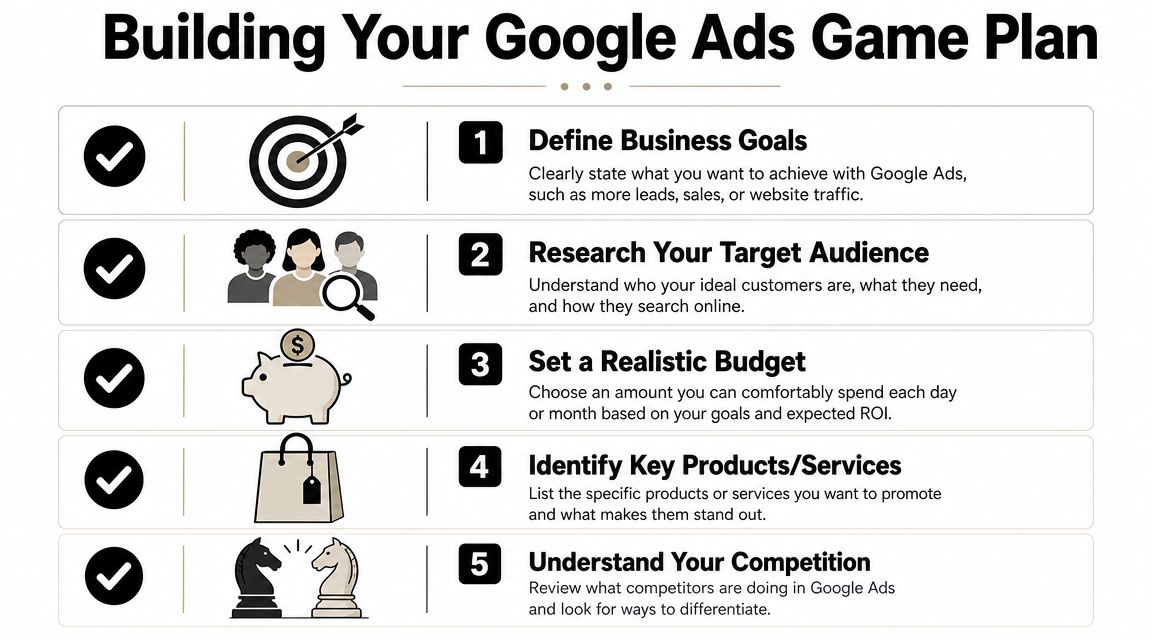
A simple way to define the objective:
| Business type | Best primary goal | What to avoid |
|---|---|---|
| Shopify eCommerce | Purchase | Sending paid traffic to generic collection pages with no clear offer |
| Tradies | Phone call or quote request | Optimising for clicks only |
| Local clinics or service businesses | Booking or qualified lead | Counting every enquiry equally |
Budget decisions should come from margin, not hope
A lot of owners ask how much it costs to start Google Ads. The better question is whether your margins and customer value support paid acquisition.
Google's own small business guidance leaves a real gap here. For small Australian businesses on limited budget, success depends on local lead quality and service margins, not generic platform benefits, and a stronger decision framework should compare search intent and average customer value by area, as discussed in Google's small business marketing guidance.
That lines up with what we see in Melbourne. A business with strong margins, fast follow-up, and a clear service area can often make Google Ads work on a tighter budget than a business with weak margins and messy sales handling.
If you only have enough budget to collect random clicks, hold off. If you have enough budget to test one focused offer properly, start there.
Narrow beats broad at the start
I'd rather see a small business dominate one offer, one area, and one conversion action than launch a bloated account with five campaigns and no clear learning path.
Use this checklist before you spend anything:
Pick the offer
Choose the product, service, or category you most want to sell. Don't advertise everything at once.Define the geography
If you serve Melbourne's south-east, target that. Don't run statewide because it feels bigger.Choose your conversion event
One primary action first. That could be a purchase, a call, or a lead form.Match budget to sales reality
You need enough room to gather signal and enough operational capacity to handle the demand.Check whether the website can carry paid traffic
If the site is slow, confusing, or hard to use on mobile, fix that before scaling.
Google Ads is one channel, not the whole growth plan
Paid search works best when it sits inside a broader system. A strong brand, decent local SEO, better pages, and clear positioning all help paid ads convert.
If you want a broader view on getting traffic from multiple channels, this guide to effective strategies for website promotion is worth reading alongside your Google Ads planning. It helps frame paid traffic as part of a larger acquisition mix, not the entire answer.
I also look at Google Ads in context with Meta, email, SEO, and site development. If you're running both search and paid social, your messaging needs to match. That's one reason businesses often pair search with support from a Facebook & Meta ads agency, especially when they want demand capture and remarketing working together instead of in silos.
The Non-Negotiable Setup for Accurate Measurement
Many small business accounts commonly struggle here.
Not with the ads. Not with the keyword list. With measurement.
If tracking is wrong, every optimisation decision after that is shaky. You can't scale what you can't verify, and you definitely can't trust automated bidding if you're feeding it bad signals.
What must be connected first
I want four things in place before I take performance discussions seriously.
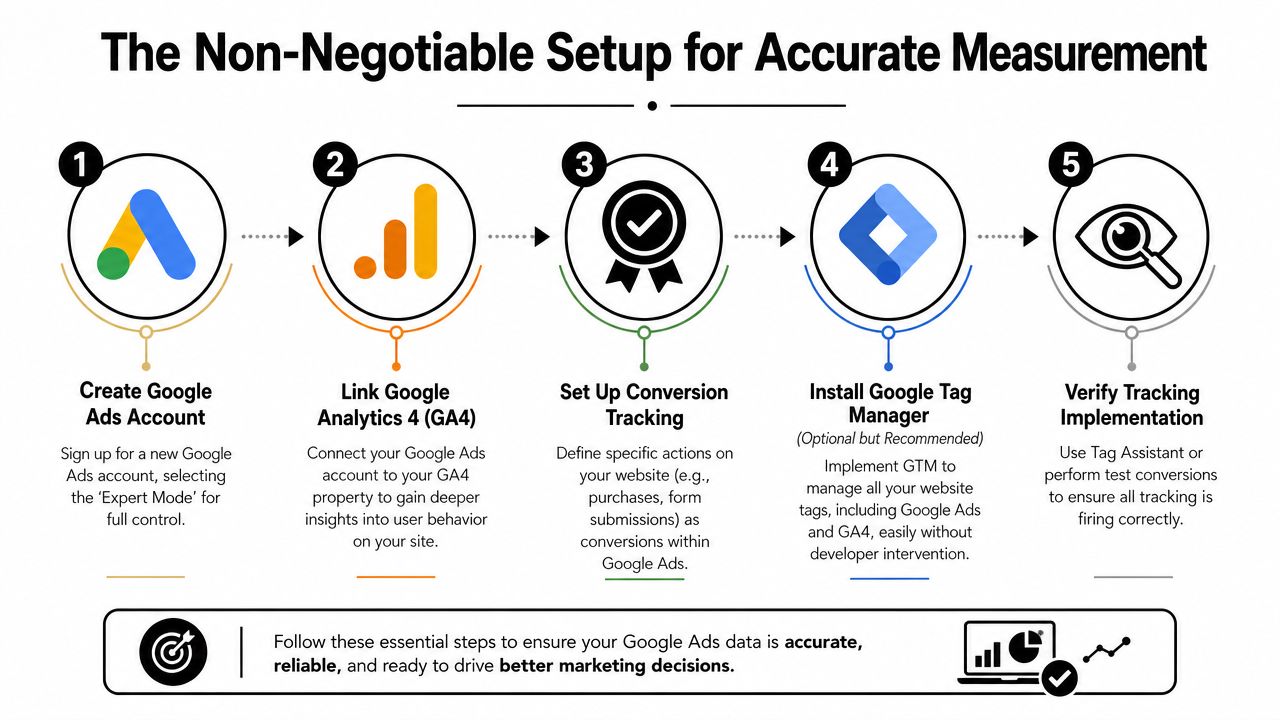
- Google Ads account setup in Expert Mode so the account isn't boxed into oversimplified defaults.
- GA4 linked correctly so we can see behaviour beyond the ad click.
- Google Tag Manager installed so tracking is manageable without editing site files every time.
- Real conversion actions configured inside Google Ads, not vanity metrics.
For stores, that usually means purchase tracking. For lead generation, it means form submissions, qualified calls, and sometimes booked appointments.
eCommerce tracking and lead tracking are different jobs
A Shopify store and a tradie website should not be measured the same way.
For eCommerce, I care about whether the purchase event is firing cleanly, whether values are passing through correctly, and whether the checkout journey lines up with the campaign structure. If you're running Shopping or Performance Max, bad product data and broken purchase tracking will cripple optimisation.
For lead gen on WordPress, the setup is different. I want confirmation that the form submit event only fires on a real success state, not on button clicks or page loads. If there's a phone number on the page, I want call tracking, because for many service businesses the phone is still the main conversion path.
This is why web build quality matters. A clean site from experienced WordPress developers Melbourne or a properly configured Shopify theme gives you far fewer tracking headaches than a patchwork site full of old plugins and broken scripts.
Bad tracking doesn't just distort reporting. It trains Google's automation on the wrong behaviour.
The offline conversion problem is real
A lot of Australian small business content skips the hardest part. Leads don't always convert online.
That's a serious gap. For Australian small businesses, especially service firms in Melbourne, proving ROI is often difficult because conversions happen offline by phone, and better call tracking plus offline conversion imports are becoming more important as campaigns get more AI-driven, as covered in this local Google Ads measurement discussion.
That's not theory. It's everyday reality for plumbers, electricians, clinics, salons, and other operators where the sale happens after the click.
To help visualise what a solid setup looks like, this walkthrough is useful:
How we handle calls for service businesses
If you rely on phone leads, I don't treat calls as a side metric. I treat them as a core conversion path.
We often set up a custom number through Twilio so calls can be tracked properly and handled more intelligently. That setup can support after-hours answering, appointment booking into a calendar or Calendly flow, and more consistent response handling when the owner or admin team can't get to the phone. For tradies, hairdressers, beauty clinics, dentists, restaurants, and medical practices, that matters because missed calls usually mean lost revenue.
A straightforward call setup should answer these questions:
| Question | Why it matters |
|---|---|
| Did the ad generate the call? | Without attribution, you're guessing |
| Was the call answered? | Missed-call rates reveal operational problems |
| Was it a real prospect? | Spam and low-intent calls distort the account |
| Did the call turn into a booking? | This is what tells you if the campaign is profitable |
If you run phone-heavy campaigns, specialised tools like CallRail and GoHighLevel can help, and Twilio-based setups give more flexibility if you need custom workflows.
We use similar thinking when managing service campaigns such as this work around Google Ads for plumbers. The platform setup only matters if the lead handling process behind it is solid.
My rule on measurement
Don't launch with half-finished tracking.
Wait until you can verify form submissions, purchases, and calls. Test them. Record them. Match them against real enquiries in your CRM, inbox, or booking system. Only then do the campaign metrics mean anything.
Choosing the Right Campaign for Your Business Goal
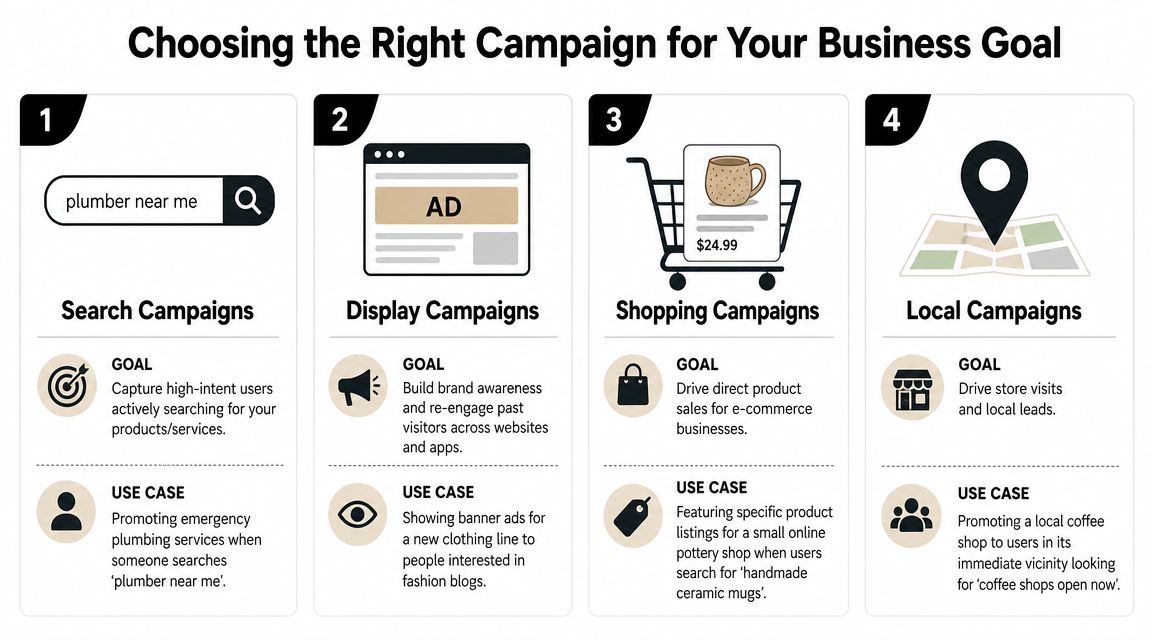
Different campaign types do different jobs. Treating them as interchangeable is a fast way to waste budget.
For small business owners, I keep the decision simple. Use Search when intent is obvious. Use Shopping when products are the offer. Use Performance Max when your tracking is already reliable and your creative assets are organised. Use local-focused options when proximity matters more than catalogue depth.
Search is still the workhorse for lead generation
If you're a tradie, a clinic, or a service business, Search usually gets my first vote.
Why? Because the person is telling you what they want. If someone searches for a service with location intent or urgent purchase intent, that's cleaner than interruptive advertising. Search is also easier to control when you need to focus spend around a few profitable services.
This is where campaign structure matters. A practical method for small Australian businesses is to keep ad groups tight with 5 to 7 related keywords, use exact match for high-converting expensive terms, phrase match for mid-funnel queries, and broad match only when negative keywords are strong, as outlined in this Google Ads ROI guide for small business.
Shopping is for products, not vague catalogue exposure
If you run an online store, Shopping is usually the cleanest entry point because it matches products to search demand.
That doesn't mean you should dump your entire catalogue into one generic campaign and hope for the best. Product feed quality, titles, images, pricing consistency, and campaign segmentation all matter. If your best-selling categories have stronger margins, they should get more attention. If some products rarely convert, don't let them consume the same budget as proven lines.
Performance Max can work, but only after the basics are right
I'm not anti-PMax. I'm anti-premature PMax.
For eCommerce brands, PMax can become useful when purchase tracking is accurate, your product feed is healthy, and you already know which products and audiences perform. Without that foundation, it becomes too easy to lose visibility into what's driving results.
For smaller stores, I usually prefer more control first. Learn from Search and Shopping. Understand the search terms. Fix feed issues. Then test broader automation.
A simple campaign choice table
| Business situation | Campaign type I'd start with | Why |
|---|---|---|
| Emergency or quote-driven service business | Search | Strong intent and tighter control |
| Shopify store with clear products | Shopping | Product-first search demand |
| Local business needing nearby visibility | Local-focused campaign setup | Better fit for geographic intent |
| Established eCommerce account with clean data | Performance Max plus controlled testing | Good for expansion once signal quality is strong |
Use the campaign type that matches how the customer buys, not the one Google is pushing hardest in the interface.
If you want outside help structuring that mix, a specialist Google Ads agency can build the account around the business model instead of forcing every business into the same campaign template.
Creating Ads and Landing Pages That Actually Convert
A click means nothing if the page doesn't close the job.
I've seen plenty of decent ads send traffic to pages that had no chance of converting. Weak headline. Generic copy. No trust signals. Slow mobile load. Three competing calls to action. Then the business owner blames the traffic.
Ads should match the search, not your internal jargon
Write ads the way customers think, not the way your brochure sounds.
If someone searches for a product-specific or service-specific term, reflect that intent in the ad. The headline should confirm relevance. The description should reduce friction. The offer should be obvious.
A simple ad logic I use:
- Headline one should mirror the search intent.
- Headline two should add the commercial reason to click.
- Headline three can reinforce trust, speed, range, or location.
- Descriptions should answer the customer's next question, not repeat the headline.
For lead gen, clarity beats cleverness. For eCommerce, specifics beat fluff.
The landing page does the heavy lifting
Once the click lands, the page needs to continue the same conversation.
Your landing page should do five things quickly:
Confirm relevance
The headline must match the ad and the search intent.Explain the offer
Tell people what you sell, who it's for, and why they should care.Build trust
Use reviews, guarantees, product details, service area clarity, or brand proof.Reduce friction
Make forms short. Make buttons obvious. Keep mobile navigation simple.Push one next step
One page, one main action.
A landing page shouldn't make people think. It should make the next step feel easy.
Why web development affects ad performance
A lot of businesses underestimate the connection between paid ads and site build quality.
If your theme is bloated, your forms are unreliable, or your CMS setup makes tracking fragile, your ad account will always underperform. That's why good development work isn't separate from performance marketing. It directly affects cost, tracking reliability, and conversion rate.
For WordPress sites, custom page builds, lean templates, and cleaner event tracking make a huge difference. That's part of why businesses often work with a WordPress developer when they're serious about lead generation.
For Shopify, it's the same story. Collection structure, product templates, app bloat, and checkout journey all influence how well Shopping and search traffic converts. If your store needs theme work, UX cleanup, or custom functionality, experienced Shopify developers in Melbourne are often the difference between “traffic” and sales.
What I'd fix first on a weak page
| Problem | What I'd change |
|---|---|
| Generic headline | Rewrite it around the specific product or service |
| Too many calls to action | Strip it back to one primary action |
| No trust elements | Add reviews, service area, delivery details, or proof |
| Long forms | Ask less, qualify later |
| Slow mobile experience | Reduce clutter and simplify layout |
Good ads get attention. Good pages turn attention into revenue. You need both.
Your 90-Day Routine for Optimisation and Growth
The first few months decide whether the account becomes a profitable system or an expensive mess.
Most small businesses either change too much too early or leave everything untouched for too long. Both are bad. The right approach is steady optimisation with enough patience to let the account learn.
A practical benchmark is to allow 6 to 12 weeks of testing before judging results, while putting roughly 80% of spend into the core campaign and 20% into experiments on new keywords, ads, or audiences, based on these Google Ads optimisation best practices. The same guidance also recommends tracking one main conversion first, using negative keywords like “jobs”, and scheduling ads around peak business hours.
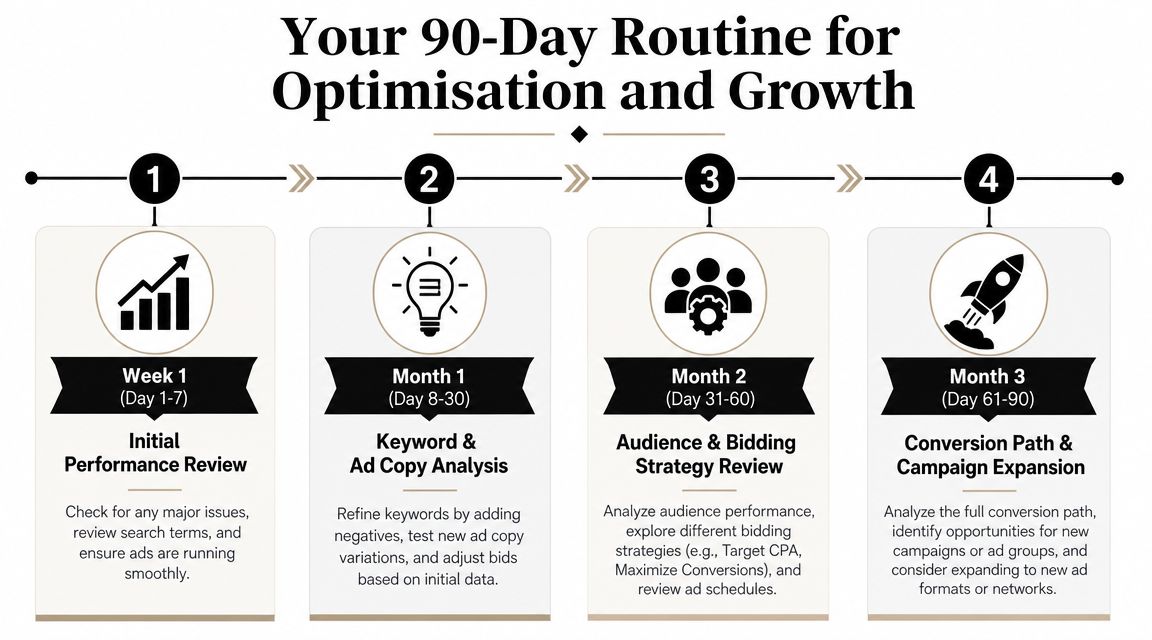
The first month
The first month is about control, not scale.
Watch the account closely. Check search terms. Check whether conversions are firing. Check whether calls are being answered. Make sure budget is reaching the right campaign, not leaking into low-intent traffic.
My month-one routine usually includes:
- Search term pruning so irrelevant queries don't keep slipping through.
- Ad copy checks to confirm the message matches the traffic.
- Landing page review based on real session behaviour and lead quality.
- Location review so weak suburbs or service areas don't chew budget.
- Basic schedule adjustments if leads are coming through when nobody can respond.
The second month
By now, the account should have enough signal to tell you patterns.
This is when I start pressing harder into what's working. Winning search terms may deserve their own ad groups. High-intent products may need their own campaign treatment. Weak assets or audiences get cut faster.
A good second-month review asks:
| Question | Why I care |
|---|---|
| Which searches are producing the best lead quality? | Clicks alone don't matter |
| Which pages convert best? | Some pages kill paid traffic |
| Which times or locations waste spend? | Efficiency improves fast with tighter targeting |
| Is the follow-up process strong enough? | Marketing can't fix poor lead handling |
Don't optimise for platform metrics alone. Optimise for sales outcomes, booked jobs, and profitable orders.
The third month
The third month is where careful expansion starts to make sense.
If the core campaign is stable, test new ad variations, adjacent keywords, remarketing audiences, or additional campaign types. This is also the point where stronger segmentation can pay off. Separate top products from average ones. Separate emergency service intent from general quote intent. Separate branded traffic from non-branded traffic so the account tells the truth.
Common mistakes I'd avoid
Judging performance too early
Small businesses often panic before enough data exists.Changing bidding, copy, targeting, and landing pages all at once
Then nobody knows what caused the result.Ignoring lead quality
A cheap lead that never closes is still expensive.Treating experiments like the main campaign
Protect the core. Test on the side.Stopping because the first run wasn't perfect
We see this in Google Ads and in paid social. It's one reason clients who also work with a Facebook ads agency do better when they commit to a proper testing window instead of chasing instant wins.
The loop that actually works
The process is simple.
Measure what matters.
Cut obvious waste.
Strengthen what's producing profit.
Repeat without overreacting.
That discipline matters more than clever tactics.
If you want help from Alpha Omega Digital, here's the straightforward offer. If you're a business with a paid ads budget of at least 3k a month, I'd love to offer you a low risk deal, get a month of paid ads management FREE. Apply through the contact page. We're a digital marketing agency Melbourne businesses work with across paid ads, WordPress, Shopify, and tracking setup, and we also support clients in Sydney, Brisbane, Newcastle, Perth, Adelaide, Darwin and Hobart.
[email protected]
Read more insights from our team on web design, paid ads, and growth strategy.