You can be doing everything right in marketing and still lose money because the site underneath it can't cope. I've seen that happen with Melbourne ecommerce brands running Google Shopping, Meta ads, email pushes, influencer drops, and seasonal offers. Traffic lands, product pages hesitate, the cart stutters, and checkout feels fragile. The ad account looks healthy. Revenue does not.
That gap matters more than most business owners realise. A fast campaign with a slow website is a bad system. If you're hiring a marketing agency Melbourne businesses trust, or you're looking for a digital marketing agency Melbourne brand owners can lean on for both ads and website performance, this is the part that often gets skipped. People talk about creatives, offers, feeds, audiences, PMAX, Google Shopping, Meta ads creative testing process, local SEO, Google My Business, GTM and Google Analytics, and Conversions API installation for Meta. They don't spend enough time on the machine serving the pages.
For ecommerce businesses on WordPress, WooCommerce, Shopify, and hybrid stacks that rely on the Shopify API, EC2 in AWS is often where the conversation turns from generic hosting to a proper growth setup. It's not glamorous. It is profitable when it's done well.
When a Great Ad Campaign Breaks Your Website
A Melbourne retailer spends weeks getting a sale ready. New creative is approved, Google Shopping is dialled in, email goes out at 9 am, and traffic finally starts coming through at the volume everyone wanted. By 9:20, product pages are dragging, add-to-cart takes too long, and the team starts asking whether the ad campaign is the problem.
I've seen that exact sequence with ecommerce clients here. The campaign usually did its job. The hosting stack just wasn't built for a busy day.
Cheap hosting fails at the worst moment
Small businesses often start on low-cost hosting for sensible reasons. It keeps risk down, gets the site live quickly, and avoids overbuilding before demand is proven. That decision can be fine for a while. Then a promotion, PR mention, influencer post, or paid traffic spike puts the server under pressure, and the weak point shows up in public.
The first signs are rarely dramatic. Pages load a bit slower. The cart hesitates. Search becomes inconsistent. Admin tasks that were already annoying turn painful during the one week your team needs them to be fast.
That's where ad spend starts leaking.
A paid click has a real cost attached to it, especially in competitive ecommerce categories around Melbourne and Australia more broadly. If the landing page stalls, you're wasting intent you already paid to get. For service businesses, it's the same problem in a different form. The quote form hangs, the booking tool lags, or call tracking fails to fire properly on mobile.
Practical rule: if performance drops when traffic rises, the website setup is holding back the marketing.
What this looks like on WordPress and Shopify
On WordPress and WooCommerce, the pattern is usually easy to recognise once you've worked on enough of these builds. Plugin count grows, theme logic gets heavier, tracking scripts pile up, and database queries take longer than they should. On paper, the site still “works”. In practice, product filtering feels slow, cart updates drag, and the admin becomes hard to use during busy periods.
That has direct business consequences. Staff take longer to update products. Campaign landing pages become harder to publish quickly. Sale-day troubleshooting shifts from marketing decisions to server triage.
Shopify businesses hit a different version of the same problem. Shopify handles the core storefront well, but plenty of growing brands still rely on extra infrastructure for private apps, feed processing, server-side tracking, image jobs, ERP syncs, search tooling, middleware, and custom integrations. Those jobs need computing power somewhere. We often use EC2 for that layer because it gives us more control over how those workloads are isolated and scaled.
If you're comparing options, this AWS EC2 instance types guide is a useful reference for understanding why one setup handles traffic spikes better than another.
Marketing problems that are really infrastructure problems
Business owners often tell us, “Google Ads traffic isn't converting,” or “Meta clicks look poor.” Sometimes the targeting does need work. Sometimes the offer is off. But I've found a lot of underperforming campaigns have a technical cause sitting underneath the media.
Common signs include:
- Traffic arrives but on-site actions stay weak: sessions increase, but add-to-cart, form starts, and bookings don't rise in proportion.
- Performance changes during campaigns: the site feels fine on ordinary days, then slows down during promotions, email sends, and paid spikes.
- Tracking becomes unreliable under load: GTM, GA4, Meta events, and enhanced conversions become inconsistent when pages and scripts compete for server resources.
That muddies decision-making across the whole funnel. You can't judge ad creative properly if one landing page loads in two seconds and another struggles at the exact moment traffic picks up. You can't trust a checkout drop-off report if the infrastructure itself is causing friction.
Service businesses get hit too
This isn't only an ecommerce issue.
A Melbourne clinic running Google Ads for bookings, a local tradie relying on mobile lead forms, or a professional services firm pushing lead-gen traffic from search all have the same exposure. If the page is slow or the form breaks under load, qualified prospects disappear before the business gets a chance to speak to them.
For lead generation, infrastructure problems usually show up as:
- slow landing pages on mobile
- forms that submit inconsistently
- booking tools timing out
- call tracking or event tracking missing conversions
- page speed dropping during branded or local search spikes
Clients often think they have a media problem because the ad platform reports clicks but enquiries stay flat. Sometimes they have a website delivery problem.
The mistake small businesses keep making
The mistake isn't laziness. It's separation.
Marketing sits with one provider. Development sits with another. Hosting sits with whoever originally launched the site. Nobody owns the full path from click to conversion, so performance issues get passed around until a campaign underperforms badly enough that everyone pays attention.
I prefer to treat infrastructure as part of conversion rate work, not as a separate IT decision. If we're sending paid traffic to a landing page, the server environment matters. If we're improving ROAS, page delivery matters. If we're trying to get more booked calls from local search, uptime and form reliability matter.
A website is part of the sales system. It has to behave like one.
Real growth creates technical pressure
The pressure usually builds in predictable ways:
| Business pressure | What the owner sees | What's often happening underneath |
|---|---|---|
| Larger catalogue or service content footprint | Admin and page edits slow down | Database queries and cache demands increase |
| More apps, scripts, and integrations | Random frontend issues and slower pages | Extra requests, heavier scripts, and processing overhead |
| Paid media spikes | Higher bounce rate and cart abandonment | Server resources run short during peak demand |
| More tracking requirements | Conversion data becomes inconsistent | Tags and scripts compete for load order and execution |
| Custom features | Updates feel fragile | The original hosting setup wasn't designed for tailored development |
That's usually the point where owners stop asking whether hosting is “good enough” and start asking what setup supports growth without wasting ad spend. That's the right question.
What Is Amazon EC2 in Plain English
A Melbourne business owner usually asks a simpler question than AWS does. They want to know whether their site will stay fast when a campaign lands, whether the setup can handle growth, and whether they are paying for the right level of infrastructure. EC2 is one answer to that problem.
Amazon EC2 is a cloud server you rent and configure to suit the job. You choose the computing power, memory, storage, operating system, and security settings. Instead of accepting a generic hosting package, you get a machine that can be set up around the way the business runs.
For a growing ecommerce or lead generation site, that matters. We use EC2 when a client has outgrown off-the-shelf hosting, needs more control over performance, or wants a cleaner setup for custom development, staging, integrations, and campaign traffic.
The easiest way to understand where EC2 fits
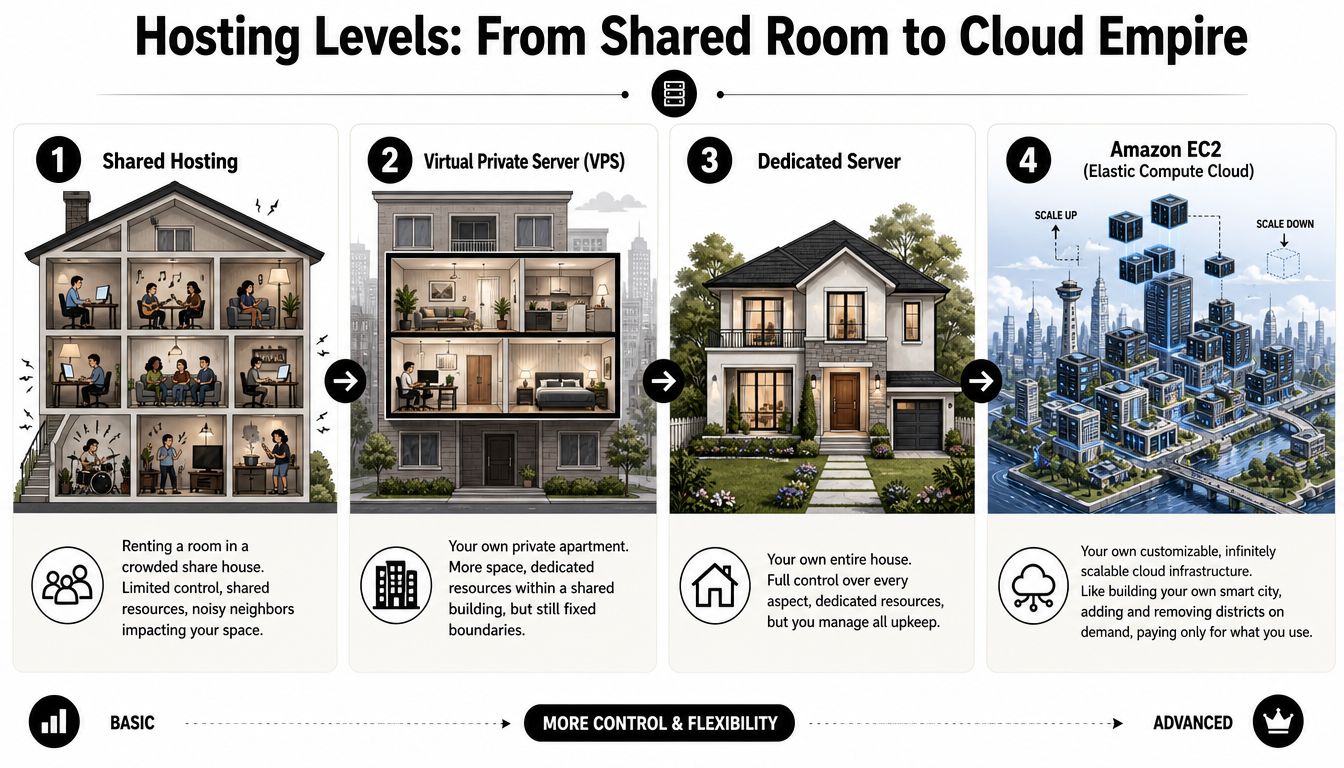
Businesses usually encounter four broad hosting options as they grow.
- Shared hosting: low-cost and easy to start with, but resources are split across many sites.
- VPS: more isolated than shared hosting, with moderate control and moderate limits.
- Dedicated server: one full machine, with strong control but less flexibility than cloud setups.
- EC2 in AWS: cloud infrastructure that can be configured in much more detail and adjusted as needs change.
I've found that small business owners do not need every AWS term explained upfront. They need to know what changes in practice. EC2 gives developers and agencies more room to tune the environment, separate workloads properly, and avoid the restrictions that often come with budget hosting plans.
The EC2 terms that actually matter
A few terms come up repeatedly, and they are worth understanding because they affect cost, speed, and maintenance.
Instance types
An instance is the virtual server itself. The instance type is the size and profile of that server. Some are suited to general website workloads. Others are better for heavier database activity, background processing, or memory-intensive applications.
The practical question is simple. Does the machine match the work? A brochure site, a WooCommerce store, a WordPress staging environment, and a custom app that connects Shopify data to ad reporting do not need the same setup. For a closer technical breakdown, this AWS EC2 instance types guide explains the different families clearly.
AMIs
An AMI, or Amazon Machine Image, is the base template used to launch a server. It can include the operating system and a prepared software stack.
That saves time and reduces inconsistency. If we are setting up a repeatable environment for client deployments, an AMI helps us start from a known baseline instead of rebuilding the stack manually each time.
EBS
EBS is the persistent storage attached to the instance. It holds the operating system, site files, and application data.
That sounds technical, but the business value is straightforward. Storage can be managed separately from the server itself, which makes upgrades, maintenance, and recovery much cleaner than the all-in-one setups many businesses start with.
Why the Melbourne region matters
For Australian businesses, AWS region choice affects more than a settings screen. It influences latency, data location, and resilience planning.
AWS launched the AWS Asia Pacific (Melbourne) Region on January 24, 2023, giving Australian businesses another local region with three Availability Zones, as noted in James Bromberger's overview of the Melbourne launch. For Melbourne businesses, that can mean faster response times for local users and more options around keeping systems and data in Australia.
The AWS Asia Pacific (Sydney) Region remains a major part of many Australian setups and has been available since 2012, as covered in the AWS Sydney Region announcement archive. One practical detail catches teams regularly. Sydney is usually enabled by default on new accounts. Melbourne often needs to be enabled manually.
What that control looks like for a business
“More control” only matters if it changes outcomes. In agency work, it usually shows up in a few practical ways.
- Custom WordPress or WooCommerce environments: better suited to custom themes, cleaner plugin stacks, and stores that need room to grow
- Supporting infrastructure around Shopify: useful for custom apps, middleware, stock sync tools, feed processing, and private backend workflows
- Separate staging and production environments: safer testing, cleaner releases, and fewer surprises during updates
- Performance tuning: more freedom to allocate resources properly instead of accepting one-size-fits-all hosting defaults
For Melbourne ecommerce brands, that can directly affect ad efficiency. If Google Ads is sending paid traffic to a landing page or product collection and the infrastructure buckles under the load, ROAS drops fast. For service businesses, the same principle applies to lead generation. Slow quote forms, unreliable booking flows, and unstable landing pages cost enquiries.
What EC2 does not solve on its own
EC2 gives you a better foundation. It does not fix poor development decisions, bloated plugins, messy tracking, or a weak deployment process.
That trade-off matters. Basic hosting is easier to buy and easier to ignore. EC2 gives you more freedom, but it also needs proper setup, monitoring, updates, and cost control. For the right business, that extra work is worth it because the infrastructure supports marketing performance instead of getting in its way.
Why Your Ecommerce Store Needs More Than Basic Hosting
A Melbourne store can spend heavily on Google Ads in the morning, see traffic climb by lunch, and start losing sales by mid-afternoon because the site slows under load. I've seen that pattern more than once. The campaign looks healthy in the ad account, but the website becomes the bottleneck.
That is usually the point where basic hosting stops being a cheap option and starts becoming an expensive one.
Ecommerce puts pressure on every weak point
An ecommerce site carries more moving parts than a standard business website. Product images are heavier. Filtering and search need to respond quickly. Cart sessions need to persist properly. Reviews, upsells, tracking scripts, stock feeds, apps, and checkout steps all compete for resources at the same time.
That pressure shows up fast when a campaign works.
In Australia, online retail is competitive and crowded. Store Leads' Shopify market report shows how active the local market is, which matters for one reason. Customers have options, and they will not wait around for a slow category page or a cart that hangs on mobile.
Basic hosting is built for simpler workloads
Entry-level hosting works for low-traffic brochure sites, early-stage businesses, and sites with predictable usage. It struggles when a store has bursts of traffic, lots of dynamic content, or operational logic running in the background.
For ecommerce, those bursts are normal. They happen during:
- Google Shopping campaigns
- Meta retargeting spikes
- Email sends
- EOFY promotions, Black Friday, and product launches
- Influencer mentions
- Organic traffic jumps after a page starts ranking
The problem is not just speed. It is consistency. A site that feels acceptable on a quiet weekday can start timing out, slowing down, or behaving unpredictably once paid traffic lands in volume.
For a business owner, that means ad spend keeps going out while conversion rate drops.
Slow pages lower the value of your marketing
From an agency perspective, hosting is part of marketing performance. We treat it that way because poor infrastructure shows up in commercial metrics, not just technical reports.
A slow landing page can reduce the value of a paid click. A laggy collection page can hurt Shopping performance because users bounce before they browse. A delayed cart can ruin the return from a strong email campaign. Lead generation businesses feel the same problem when quote forms, booking pages, or call tracking pages drag on mobile.
The pattern is simple. Better traffic does not rescue a weak site. It exposes it.
That is why businesses often spend too much time adjusting bids, creatives, and audiences before fixing the page experience that sits underneath all of it.
For teams planning a larger WooCommerce build, IMADO's guide to building scalable WordPress e-commerce is a useful reference on how architecture choices affect growth once traffic, catalogue size, and feature demands increase.
WordPress and Shopify hit hosting limits in different ways
The ceiling looks different depending on the platform.
WordPress and WooCommerce
WordPress gives businesses a lot of control, which is exactly why it can become heavy if the environment is poorly set up. We often see issues caused by bloated themes, overlapping plugins, slow database queries, and admin areas that become painful for staff updating products or publishing content.
The business cost is easy to miss. If product updates are slow, merchandising slips. If the backend is frustrating, content gets delayed. If every plugin update feels risky, the site becomes harder to improve.
A better hosting setup gives WordPress and WooCommerce room to run properly. It also gives developers more control over caching, staging, database tuning, and deployment practices.
Shopify and the systems around it
Shopify handles core storefront hosting well, but many growing brands rely on tools outside the storefront itself. That includes custom apps, middleware, stock sync jobs, server-side tracking, feed generation, and API-driven workflows.
Those supporting systems still need stable infrastructure.
We run into this with Melbourne ecommerce brands that start with a standard Shopify setup, then add layers for marketing, fulfilment, reporting, and custom functionality. The storefront may stay on Shopify, but the business still needs cloud infrastructure for the parts that make the operation work cleanly.
Weak hosting distorts channel performance
A lot of owners judge channel performance in separate silos. Ads are one line item. SEO is another. Email is another. In practice, all of them rely on the same website experience.
Here's how weak hosting affects the commercial side:
| Marketing input | What you invest | What weak hosting changes |
|---|---|---|
| Google Ads | Media spend and landing page testing | Clicks cost the same, but fewer sessions convert |
| Meta ads | Creative production and audience testing | Mobile users drop before the offer lands |
| SEO | Content, technical work, and links | Rankings can improve while revenue lags |
| Email marketing | List growth and campaign planning | Traffic spikes hit the site at its weakest moment |
| Social commerce | Product discovery and brand trust | Slow browsing damages confidence quickly |
For Melbourne service businesses, the same logic applies to lead generation. If someone taps through from a search ad and the contact page drags, the campaign underperforms. If a location page loads slowly on mobile, local intent goes elsewhere.
Infrastructure affects revenue quality. That is the core issue.
This video is a useful prompt if you're thinking about performance and hosting from a practical angle rather than a purely technical one.
Stores that usually outgrow basic hosting first
Some businesses can stay on simple hosting for quite a while. Others hit the limit early. The ones that usually need more control tend to have one or more of these traits:
- Custom design and functionality requirements
- Traffic coming from multiple channels at once
- Large catalogues or heavier product pages
- External systems such as ERP, CRM, APIs, or advanced tracking
- A marketing team actively pushing growth through paid media, SEO, and email
If the website is directly responsible for turning ad spend into sales or leads, hosting is part of the growth system. It is not just a technical utility sitting in the background.
EC2 Power Plays for WordPress and Shopify Development
We usually introduce EC2 at the point where a business has already outgrown the simple version of its website stack. The site still works, but every new campaign, plugin, integration, or content push adds more friction. For Melbourne ecommerce brands and service businesses, that friction shows up in missed sales, weaker lead flow, and paid traffic that costs more to convert.
EC2 helps because it gives developers control over the environment, not just the codebase. That matters for WordPress and Shopify work alike. In both cases, the hard part is rarely the theme alone. It is the mix of performance, deployments, integrations, tracking, and day-to-day reliability.
WordPress gets better when the environment fits the build
WordPress performs well when the build and hosting setup suit each other.
I have seen this play out many times. A business invests properly in design, custom blocks, WooCommerce setup, and content production, then puts the whole thing on generic hosting that slows the admin area and makes updates feel risky. The result is a site that looks polished on launch day but becomes harder to run every month after that.
The WordPress setups that hold up best usually include:
- Lean theme development
- Custom Gutenberg blocks
- Structured content models
- WooCommerce performance work
- Disciplined plugin selection
- Reliable staging and deployment workflows
A good WordPress team cares about the environment as much as the code. If the backend is slow, content teams hesitate to publish. If previewing pages takes too long, approvals drag out. If updates feel unsafe, simple maintenance gets postponed until it becomes a bigger job.
On EC2, the hosting setup can be configured around the build instead of forcing the build into a one-size-fits-all plan.
Where EC2 helps WordPress most
Business owners usually notice the difference in a few specific places.
Faster backend experience
Backend speed matters if staff are inside WordPress every week. That includes publishing service pages, updating landing pages for Google Ads, loading new products, or refining local SEO content.
Gutenberg is a good example. Custom blocks can make editing cleaner and more consistent, but the editor still needs server resources that respond quickly. If the admin area lags, the CMS becomes annoying to use and the team publishes less often.
Cleaner separation between live and test environments
EC2 makes it easier to keep production, staging, and development separate. We use that setup for clients who need regular changes but cannot afford surprises on the live site. Updates, design changes, and plugin testing happen in the right place before they touch revenue-producing pages.
More predictable plugin and theme behaviour
WordPress problems are often blamed on plugins in general. Usually the issue is a combination of too many plugins, poor hosting, and no clear process for testing changes. A purpose-built EC2 setup gives developers more room to handle that complexity properly and reduce the random slowdowns common on crowded shared hosting.
Shopify development often needs infrastructure outside Shopify
Shopify covers the storefront hosting well. That part is straightforward. What catches business owners off guard is everything around the storefront that still needs compute, storage, scheduled jobs, or a secure application layer.
For larger Shopify builds, external infrastructure often supports:
- Custom middleware
- Private admin tools
- Shopify API integrations
- Inventory and fulfilment sync
- Server-side tracking and data enrichment
- Headless frontends or campaign microsites
- Custom Shopify apps built with Shopify CLI
We see this with growing Melbourne brands running paid social, Google Ads, email, and marketplace activity at the same time. The storefront may stay inside Shopify, but the business logic around product feeds, attribution, custom apps, and operations often needs its own environment. That is where EC2 starts to make commercial sense, not just technical sense.
Good Shopify development includes the services that keep the storefront, marketing stack, and operations layer working together.
Shopify API work needs stable infrastructure
API-based Shopify workflows create a different kind of pressure than theme work.
Common examples include:
- Product sync jobs
- Order and customer data workflows
- Feed generation for Google Shopping
- Meta catalogue improvements
- Custom bundle logic
- App automation
- Marketing attribution support
If those jobs run on a weak low-cost server, they fail unnoticed, queue up, or return inconsistent data. Then the symptoms appear somewhere else. Products do not update correctly. Feeds break. Tracking gaps appear in ad platforms. Campaign decisions get made on messy data.
EC2 gives those supporting services a cleaner home with clearer resource allocation and better deployment control. That matters for teams connecting Shopify to GTM, GA4, Meta, CRMs, fulfilment platforms, and reporting tools.
Hosting tiers and the point where growth breaks them
This is the pattern we tend to see in client accounts.
| Business Stage | Typical Hosting | Why It Breaks | Professional Solution (EC2) |
|---|---|---|---|
| Early validation | Shared hosting or stock theme setup | Fine at low complexity, but struggles when traffic and features increase | Small, well-configured EC2 setup with room for controlled growth |
| Growing ecommerce brand | Basic VPS or overloaded managed plan | App sprawl, heavy media, tracking load, and campaign bursts create instability | Purpose-built EC2 environment matched to actual workload |
| Content-led store with SEO and paid media | Generic “managed” WordPress hosting | Backend slows, staging gets clumsy, plugin conflicts become expensive | EC2 with separated environments and custom performance tuning |
| Advanced Shopify brand | Shopify storefront plus ad hoc external tools | API jobs, custom logic, and tracking services become fragmented | EC2 for middleware, private apps, and integration services |
| Multi-channel business | Mixed platforms and disconnected vendors | No single performance owner, slow fixes, fragile releases | EC2-based architecture managed as one coordinated system |
A small business does not need this on day one. A business spending serious money on traffic often does.
What works and what doesn't
The difference usually comes down to discipline.
What tends to work well:
- Custom WordPress builds with lean themes
- Purpose-built Gutenberg blocks instead of page-builder overload
- Shopify extensions with clear responsibilities
- External services hosted properly instead of scattered across random tools
- Testing environments that closely match production
What usually creates expensive problems:
- Too many plugins solving the same job
- Cheap hosting sold as “unlimited”
- Custom code placed on underpowered infrastructure
- Tracking scripts added without reviewing page performance
- No clear owner for site stability and release management
I would treat developer labels carefully here. Some teams mainly install tools. Others design and maintain the whole operating environment around the website. That difference becomes obvious when a promotion lands, a feed fails, or a content team needs to move quickly without breaking anything.
For WordPress and Shopify projects tied to lead generation or ecommerce growth, EC2 earns its place when reliability, speed, and control directly affect revenue.
Connecting Cloud Power to Your Marketing Funnel
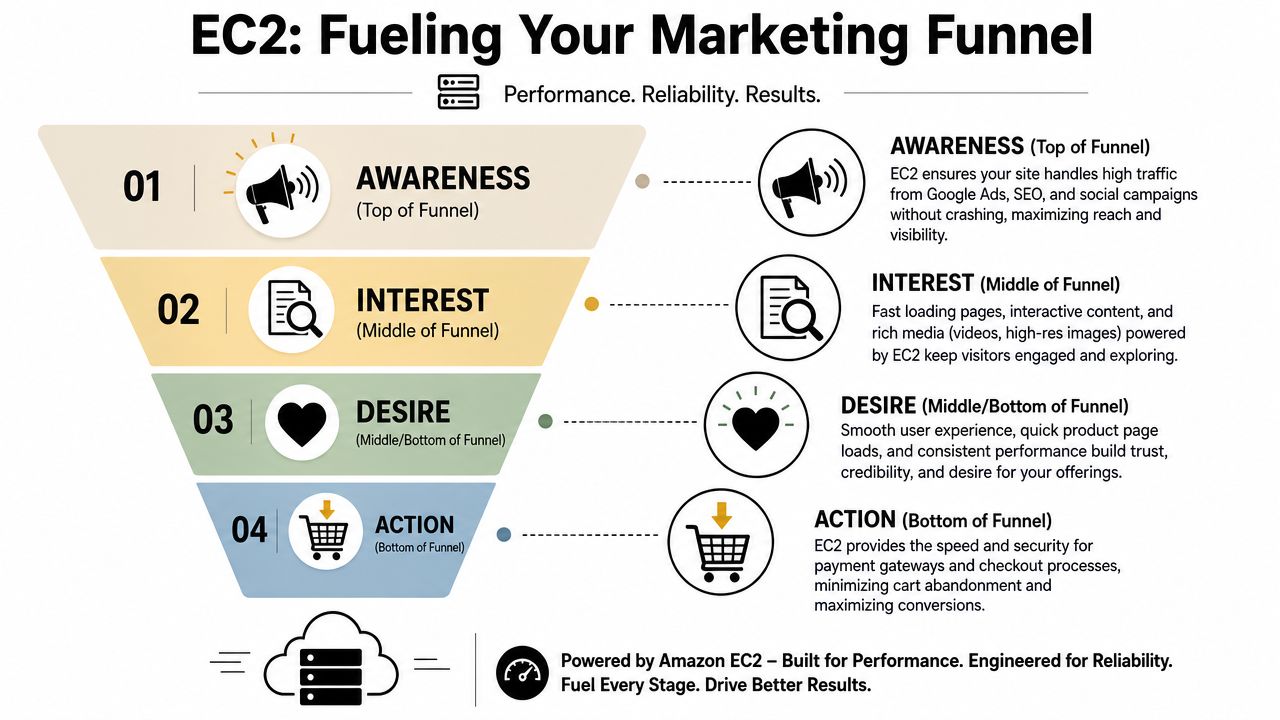
A fast website helps everywhere, but its true value appears when you trace the effect through the funnel. Better infrastructure changes what happens at the click, during the visit, at attribution, and after the conversion.
That's why I don't separate hosting from marketing anymore. If a campaign depends on the website to capture revenue or leads, then EC2 performance is part of the marketing system.
Better infrastructure improves paid traffic quality after the click
At the top of the funnel, the job is simple. Don't waste the visit.
Google Ads, SEO, paid social, email, influencer traffic, and marketplace clicks all push users onto pages that need to load, render, and respond without hesitation. If the stack can't hold up, the media buying side gets blamed for a performance issue it didn't create.
That has practical consequences for teams running:
- Google ads
- Facebook ads agency campaigns
- Mastering Facebook ads programs
- How to measure success Facebook ads reporting
- Facebook ads don't quit too early testing cycles
- Marketing your business equals consistency execution
A lot of what owners call “bad traffic” is really a bad landing experience.
The middle of the funnel depends on responsive pages
The middle of the funnel is where intent gets either strengthened or lost. People compare product pages, check trust signals, read descriptions, browse collections, and decide whether to continue.
In infrastructure terms, image weight, app load, server response, and database performance start affecting buyer confidence. A quick site feels organised. A clunky site feels risky.
That's one reason GTM and Google Analytics setups need to live inside a well-performing environment. If the site hesitates while firing scripts, rendering content, and loading product assets, both user experience and measurement quality suffer.
Server-side tracking needs stable infrastructure
The growth of server-side tracking has changed what many agencies and brands need from hosting. For Meta in particular, setting up Meta Conversion API and Conversions API installation for Meta often means using server-side components to improve event reliability.
A stable EC2 setup is helpful here because it can host the services that process and forward events more reliably than a patchwork setup spread across underpowered tools. That becomes important when businesses want cleaner attribution across Meta ads, Google Ads, Shopify, and analytics platforms.
The same logic applies to setting up Google Tag Manager containers in a more reliable way. A business that relies on event quality for optimisation should care about the infrastructure carrying those events.
If attribution matters to the business, the server is part of the measurement strategy, not just the hosting bill.
Database placement affects ecommerce outcomes
Latency inside your stack matters, especially when the website and database talk constantly during high-intent user actions.
According to AWS networking performance guidance, in the AWS Australia South East region, every 10ms increase in EC2-to-database latency can reduce page load speed by 0.8% and lead to a 3.2% drop in ROAS for Shopify stores, which is why correct placement and configuration matter so much for ecommerce workloads, as discussed in the AWS global network performance monitoring article.
That's one of the clearest links between infrastructure and marketing return. If page load quality weakens because the application stack is arranged poorly, ad efficiency can drop even when audience targeting and creative are sound.
Google Ads benefits from better landing performance
Google Ads success is never just about keyword selection or bidding. Landing page experience shapes how useful the click becomes once the user arrives.
That's relevant across a wide range of campaign types:
- Beginners guide to Google Shopping ads
- Google Shopping ads for dropshipping
- Campaign priority in Google Ads
- PMAX vs Google Shopping ads
- Google ads for service based businesses
- Google ads for contact form submissions
- What budget to spend on Google Ads
- How much does it cost to start Google Ads
- Google Shopping ads not spending budget
If you're spending money to get in front of motivated searchers, you want the site to convert the intent you bought, not interrupt it.
Lead generation also gets stronger
Service businesses don't escape this. If anything, they can be more vulnerable because a missed lead often can't be recovered.
For businesses running PPC for tradies, local campaigns, or inbound lead generation, fast infrastructure supports:
- Call tracking
- Form submissions
- Booking flows
- Landing page performance
- After-hours lead capture
One setup I like for service businesses is a custom tracking number provisioned through Twilio. That allows each campaign or traffic source to use a dedicated number, which makes call attribution clearer. It also opens the door to more advanced lead handling.
A good implementation can support features like:
- 24 hour call answering
- A system that never gets sick or tired
- Booking appointments into your calendar or Calendly
- Reducing lost opportunities for tradies, hairdressers, beauty therapists, dentists, restaurants, and doctors
That isn't only a telephony choice. It works best when the website, tracking, call handling, and campaign infrastructure all talk to each other reliably.
Funnel alignment beats channel silos
A digital marketing agency Melbourne businesses work with can either be strategic or shallow. A shallow agency manages ads in isolation. A strategic one understands that ads, site performance, tracking, feeds, phone systems, landing pages, and post-click UX all sit in the same funnel.
For ecommerce brands, the same applies to:
- Instagram Shop and Facebook Shop
- Shopify API integrations
- Google Merchant Centre feed handling
- Server-side event delivery
- Product page and collection page speed
- Cross-channel attribution consistency
When those pieces are aligned, campaigns become easier to improve because the business isn't constantly guessing whether weak results came from targeting, offer, page experience, or broken event flow.
That's the hidden strength of EC2 in AWS for marketers. It doesn't just host a site. It gives the technical team a stronger base for the systems that make paid media, measurement, and conversion work properly.
EC2 vs The Simpler Alternatives
A Melbourne business does not need EC2 just because AWS is popular. I've found the better question is simpler. Will basic hosting still hold up once the site, ads, tracking, and integrations start pulling in different directions?
For some businesses, the answer is yes. A brochure site, a light service website, or an early-stage store with modest traffic can do perfectly well on a simpler stack. In those cases, extra control is not automatically a win. It can just mean more admin, more room for mistakes, and a higher support burden.
Where the simpler options make sense
AWS gives businesses a few easier paths before they need full EC2 control.
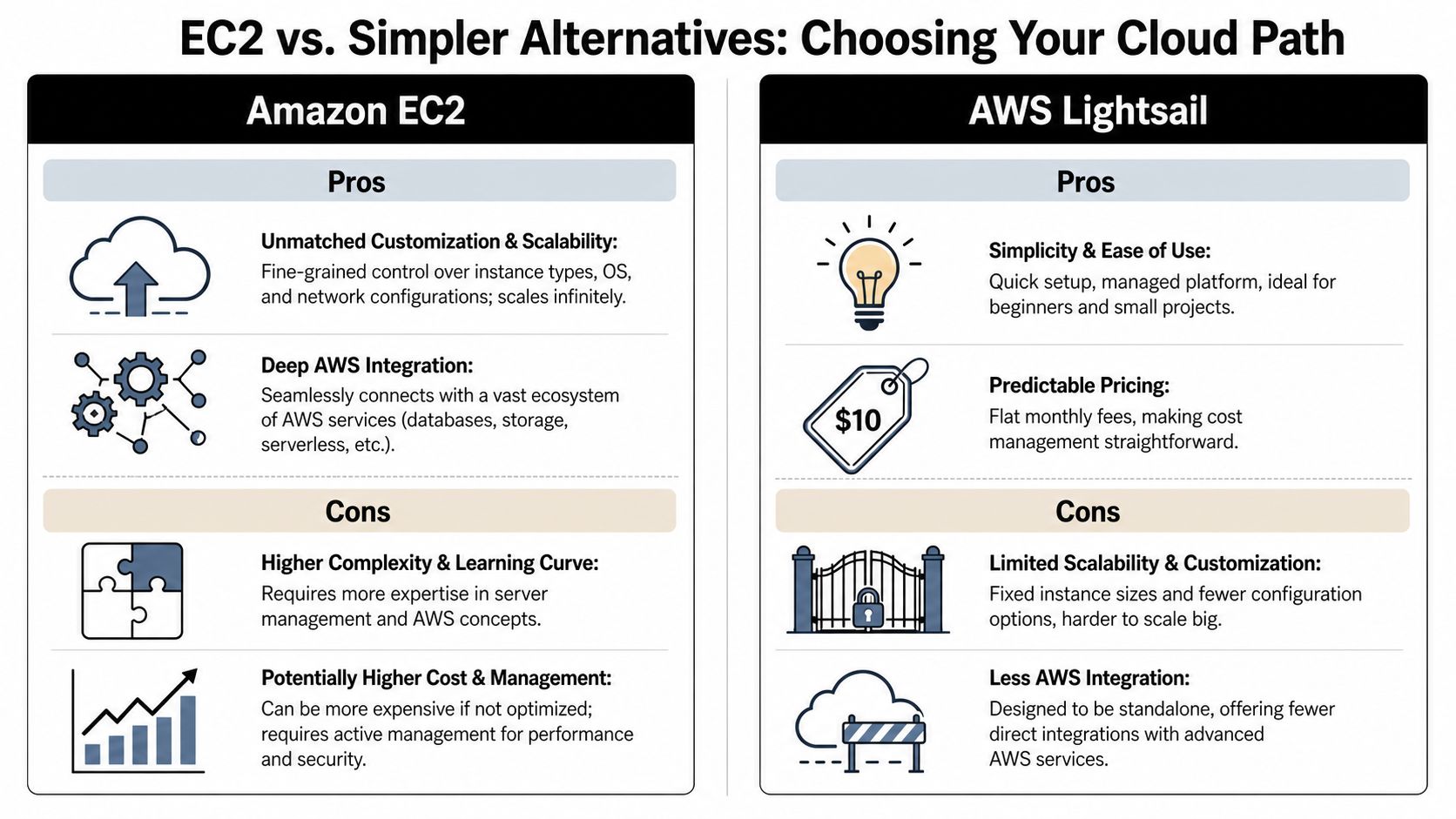
Lightsail
Lightsail suits smaller websites, test projects, and businesses that want cleaner pricing than shared hosting without taking on the full complexity of EC2.
It usually appeals because it offers:
- Simple setup
- Predictable monthly pricing
- An easier learning curve
- A practical starting point for small workloads
The trade-off is less room to customise the environment as the business grows. That is fine early on. It becomes frustrating once developers need tighter control over performance, caching, background jobs, or deployment.
Elastic Beanstalk
Elastic Beanstalk works well for teams that want AWS infrastructure with some of the environment management abstracted away. It can reduce manual deployment effort and help standardise application releases.
I still treat it cautiously for marketing-heavy sites. Once a business wants very specific tuning, custom server behaviour, or tighter control over how the stack is configured, Beanstalk can feel restrictive.
Lambda and serverless tools
Serverless tools are useful for isolated functions, automation, and event-driven tasks. We use them for specific jobs, not as a substitute for a full ecommerce or content stack.
A WordPress site with custom plugins, landing pages, and ongoing campaign traffic usually needs predictable application behaviour. Lambda is not the first tool I'd choose for that.
Where EC2 starts to make business sense
EC2 earns its keep when the website is no longer just a website. It becomes part of the sales system.
That usually happens when one or more of these are true:
- The business relies on custom WordPress development
- Shopify needs supporting services, middleware, or app logic outside the standard theme setup
- Tracking depends on stable server-side components
- Paid traffic exposes slow hosting and checkout friction
- The team needs proper staging, deployment, and permission control
- Other AWS services need to connect cleanly to the site environment
For Melbourne ecommerce brands, this is often the turning point. Google Ads starts working, traffic rises, and the weak point stops being creative or targeting. It becomes hosting, plugin conflicts, database strain, or a site that slows down right when conversions should be climbing.
For service businesses, the pattern is similar. A campaign drives enquiries, but the site lags, forms fail, or CRM handoffs become unreliable. Cheap hosting looks affordable until lead quality drops and follow-up gets messy.
For a practical business-level comparison of cloud decisions, Wistec's piece on understanding AWS and Azure for your business is helpful because it frames cloud choices around operational fit rather than treating every business as an enterprise IT department.
Choose based on operational pressure, not hype
Cloud buying mistakes usually happen when businesses choose based on branding or simplicity alone. The better filter is operational pressure.
Ask:
- How custom is the site today?
- How much traffic hits during campaigns or promotions?
- How many tools rely on the website working properly?
- How expensive is an outage, slowdown, or tracking failure?
- Does the team have technical support to manage a more flexible stack?
Those answers usually make the choice clearer than any feature checklist.
A practical comparison
Here's the short version I'd give a client deciding between common options.
| Option | Best for | Weak spot |
|---|---|---|
| Shared hosting | Very small, low-risk sites | Limited isolation, limited control, poor fit once traffic or plugin complexity rises |
| Managed VPS | Businesses stepping up from shared hosting | Can become restrictive for heavier custom builds and scaling workloads |
| AWS Lightsail | Small projects that want AWS without much setup overhead | Less flexibility and scaling headroom than EC2 |
| Elastic Beanstalk | Teams that want AWS with deployment help | Less direct control for custom tuning and stack decisions |
| EC2 in AWS | Custom ecommerce builds, integrations, campaign-driven sites | Needs stronger technical management and clearer ownership |
What I'd recommend in practice
I would not put every small business on EC2. If the site is simple, traffic is steady, and the marketing setup is basic, a lighter option is often the smarter call.
The recommendation changes fast when a business is:
- Running aggressive ecommerce campaigns
- Building custom WordPress workflows
- Using Shopify with external services or app logic
- Relying on dependable GA4, GTM, or server-side event handling
- Launching multiple landing pages tied to paid traffic
- Combining SEO, paid media, and conversion tracking on the same site
At that point, simpler hosting often stops being simpler. It starts creating workarounds, support tickets, and performance issues that drag down results.
That is why agencies like mine often prefer EC2 for growth-focused clients. Once a business keeps adding landing pages, feeds, scripts, custom code, CRM connections, and campaign traffic, more control usually saves time and protects revenue. For Melbourne brands chasing stronger ROAS or more reliable lead flow, that trade-off is often worth making.
Managing EC2 Costs and Security in Australia
The two objections I hear most are predictable. One is cost. The other is security. Both are fair. Both also become easier to handle when the environment is planned properly.
EC2 can become expensive when it's unmanaged, oversized, or left running inefficiently. It can also be secure and stable when the basics are treated seriously instead of as an afterthought.
Cost problems usually come from poor setup, not EC2 itself
The Australian context matters here. Pricing and optimisation decisions don't always map neatly from US-focused advice.
According to the verified AU market data, 68% of Melbourne SMBs overpay for EC2 by not leveraging RI flexibility, and Australian businesses can pay 15–20% higher per-vCPU costs, which is why local optimisation matters instead of blindly copying overseas advice, as referenced in the AWS EC2 question discussion.
That doesn't mean EC2 is necessarily overpriced. It means the cost model punishes guesswork.
The cost habits that usually work
I prefer straightforward cost controls over clever billing tricks. The basics tend to do most of the work.
Match the machine to the workload
Too many businesses rent more compute than they need because they're afraid of underpowering the site. Others do the opposite and choose the smallest option possible, then wonder why performance suffers.
A better approach is to size the instance based on the actual workload, then review usage regularly.
Use commitment tools carefully
Reserved Instances and Savings Plans can make sense when the workload is steady enough. The key is understanding what flexibility you still have and where commitment reduces waste without boxing the business in.
For Australian businesses, generic cloud content often falls short. Local pricing, account setup, and growth patterns need a more grounded view.
Separate “always on” from “occasionally needed”
Not every workload needs to run at the same level all the time. Production needs reliability. Development and staging environments often don't need the same footprint around the clock.
Watch for hidden sprawl
The biggest bill creep usually comes from supporting pieces no one reviewed recently. Old environments. Extra storage. Forgotten snapshots. Temporary tools that became permanent.
Security starts with network boundaries
A lot of business owners think cloud security is mysterious. In reality, it's simpler. You start by deciding what should be public, what should be private, and who should have access.
In AWS, the VPC is your private network boundary. Think of it as the property line around your cloud environment. Inside that boundary, you decide what sits where.
Security Groups act like tightly controlled access rules around the instance. They determine what traffic is allowed in and out. If they're configured well, they reduce unnecessary exposure. If they're messy, they create avoidable risk.
The security basics I wouldn't skip
There are advanced layers you can add later, but the fundamentals should be in place from day one.
- Use IAM roles properly: avoid relying on root-level credentials for normal operations.
- Restrict access intentionally: only open what the business and application need.
- Separate environments: production shouldn't be treated like a testing playground.
- Keep software current: delayed patching creates risk and operational instability.
- Monitor for anomalies: performance issues and security issues often show up as unusual behaviour before they become obvious problems.
Monitoring matters more than most businesses think
A secure environment also needs visibility. If the server is running hot, if memory is getting tight, or if processes are behaving oddly, the team should know before customers start feeling it.
For EC2 workloads in the Australian region, default monitoring often isn't enough. The verified data notes that supplementing default CloudWatch metrics by installing the CloudWatch Agent can provide 1-minute granularity for metrics like memory usage and process-level detail, and can reduce mean time to detect degradation by up to 80% compared with default monitoring, according to New Relic's EC2 performance discussion.
That's highly relevant for ecommerce. Default metrics may not show the exact issue behind a slowdown in time. More detailed monitoring helps teams catch memory pressure, process bottlenecks, and transient spikes before they become visible to customers.
Security and performance monitoring belong together. A business can't protect what it can't see clearly.
Australian businesses should think locally
For businesses serving Melbourne, Sydney, Brisbane, Perth, Adelaide, Darwin, Hobart, and regional markets, region choice also affects security and compliance conversations. Some businesses need data to stay within Australian jurisdiction. Others need stronger resilience planning without pushing data offshore unnecessarily.
That's one reason the availability of both Sydney and Melbourne matters in practice. It gives businesses more local choice when designing around compliance, latency, and resilience.
A simple owner-level checklist
If you're a business owner reviewing an EC2 setup, I'd ask these questions:
| Question | Why it matters |
|---|---|
| Is the instance size based on actual usage? | Prevents both overspending and underperformance |
| Are commitment options being used sensibly? | Avoids wasting money on always-on workloads |
| Is production separated from staging? | Reduces accidental risk |
| Are access permissions limited properly? | Shrinks the security surface |
| Is monitoring detailed enough to catch memory and process issues? | Helps the team fix problems before customers notice |
| Is the setup designed with Australian jurisdiction and latency in mind? | Supports compliance and local performance |
If a provider can't answer those clearly, the environment probably needs work. EC2 isn't cheap when it's neglected. It becomes far more sensible when someone is actively managing cost, capacity, and security together.
Your Next Step with a Melbourne-Based Partner
A lot of Melbourne business owners reach this point after the same pattern. Google Ads starts working, traffic lifts, enquiries or orders should be rising, and the site becomes the weak point instead of the sales asset.
That is usually the core EC2 conversation.
From my side, EC2 only matters if it helps the business make more from the traffic it is already paying for. For a Shopify store, that might mean handling sale-day spikes without slow collection pages or broken app logic. For a WordPress lead generation site, it might mean faster landing pages, cleaner form handling, and fewer tracking gaps between the click and the booked call. Better infrastructure is not the goal on its own. Better revenue efficiency is.
What a practical setup looks like
For clients in ecommerce and service businesses, we usually want these parts working together:
- A stable hosting environment that matches actual traffic and workload
- Clean WordPress development or Shopify development
- Accurate GTM and Google Analytics setup
- Meta Conversion API or server-side tracking where it makes sense
- Landing pages built for paid traffic, not just general browsing
- Reporting the owner can rely on before making budget decisions
That matters whether the business is running WooCommerce, adding custom Shopify features, building Gutenberg blocks, using the Shopify API, or trying to improve local visibility alongside paid acquisition.
Infrastructure affects marketing results
I have found that small businesses often split website work and marketing work between different providers, then get stuck when performance drops. The developer blames the campaigns. The media buyer blames the site. The owner gets a rising ad bill and no clear answer.
A better setup gives one team visibility across the full path from click to conversion.
That includes page speed, server behaviour, tracking accuracy, feed health, CRM handoff, and the practical issues that affect ROAS and lead quality. If product pages slow down during campaign peaks, conversion rates slip. If forms break or events fire poorly, ad platforms optimise against bad data. Those are not edge cases. We see them regularly with growing Shopify and WordPress sites.
When outside help usually makes sense
It is usually time to bring in a partner who understands both infrastructure and acquisition if you are seeing any of these:
- Traffic is improving but revenue is flat
- The WordPress admin feels heavy or unstable
- The Shopify build needs more custom logic than apps can handle cleanly
- Tracking reports no longer match what the business is seeing
- Paid ads, SEO, email, and website changes are all being managed in separate silos
- No one owns the full customer path from ad click to sale or enquiry
That gap costs money quickly.
Why local context still matters
Working with a Melbourne-based team helps when the customers, ad spend, and trading conditions are Australian. We set these systems up with local businesses that care about practical things. Faster pages for paid traffic in Victoria and NSW. Reliable checkout or lead flow during promotions. Clear reporting that helps an owner decide whether to increase spend, pause a campaign, or fix the site first.
It also helps to work with a team that understands how these channels connect in actual situations:
- WordPress development
- WordPress design
- Shopify development
- Shopify design
- Google Ads
- Meta ads
- GTM and Google Analytics
- Meta Conversion API setup
- Instagram Shop and Facebook Shop
- PPC for tradies
- Call tracking tools for PPC campaigns such as CallRail and Go High Level
- Local SEO
- Google My Business
For a lot of businesses, those decisions are tied together whether anyone is managing them together or not.
The practical conclusion
By the time a business is juggling plugins, apps, feeds, booking flows, API jobs, tracking layers, and paid traffic, it is already running a serious digital operation. EC2 is often a sensible option at that point, not because it sounds advanced, but because the business has outgrown one-size-fits-all hosting.
If you need help with WordPress development, WordPress design, Shopify development, Shopify design, Google Ads, Meta ads, local SEO, Google My Business, tracking implementation, or a stronger website foundation for growth, it helps to work with a web design Melbourne partner that understands both the technical side and the commercial side.