If you're staring at an AWS estimate, or worse, your first live invoice, you're probably having the same reaction I see from a lot of business owners in Melbourne. The pricing page looked manageable. The bill didn't.
That's especially true when you're running a business site, a WooCommerce build, or custom services around Shopify. A simple hosting decision can affect page speed, checkout performance, reporting, and how much margin you keep after ad spend. For an ecommerce brand already juggling Shopify design, WordPress development, Google Ads, Meta ads creative testing, GTM and Google Analytics, and server-side tracking like Meta Conversion API, infrastructure costs can become one more leak in the bucket.
For a marketing agency Melbourne business owner or an ecommerce operator working with a digital marketing agency Melbourne team, understanding AWS EC2 pricing matters because EC2 often sits underneath the tools doing the work. It might host a WordPress website, power a custom API, run background jobs for a Shopify app, or support integrations tied to Google Shopping feeds, campaign tracking, or custom reporting.
That First AWS Bill Is Always a Shock
A common story goes like this. A business launches a new site, traffic starts coming in, everyone's happy, then the AWS bill lands and nobody recognises half the line items.
I've seen that with WordPress design projects, Shopify development retainers, and custom backend jobs where the owner thought they were paying for “one server”. In AWS terms, that server is only part of the picture. AWS pricing EC2 is the starting point, not the whole bill.
Why people get caught out
It is common to first see the hourly rate and assume that's the cost. That's understandable. AWS presents EC2 as a virtual machine, and the hourly figure feels like the obvious number to focus on.
But real production hosting includes extra pieces. Storage, traffic leaving the server, monitoring, and public network access all sit around the instance itself. For a WordPress website developer or Shopify developer managing a live store, those extras matter because ecommerce sites are rarely “just sitting there”. They're serving images, processing plugin requests, syncing apps, handling feed updates, and logging events from paid traffic.
Practical rule: If you only budget for the instance itself, your forecast is probably incomplete.
What EC2 usually means for small business sites
For most small and mid-sized businesses, EC2 is the compute layer. It's the machine running your application, your web server, your queue worker, or your custom integration.
That's why getting the EC2 side right matters early. If the setup is sloppy, you don't just pay more. You also get a site that's harder to scale when your Facebook ads agency starts pushing traffic, your Google Ads campaign ramps up, or your local SEO and Google Business Profile work finally starts generating more visits.
For ecommerce operators, cloud spend needs to be treated like ad spend. It should be deliberate, measured, and tied to the workload. The cheapest-looking setup often isn't the most cost-effective one.
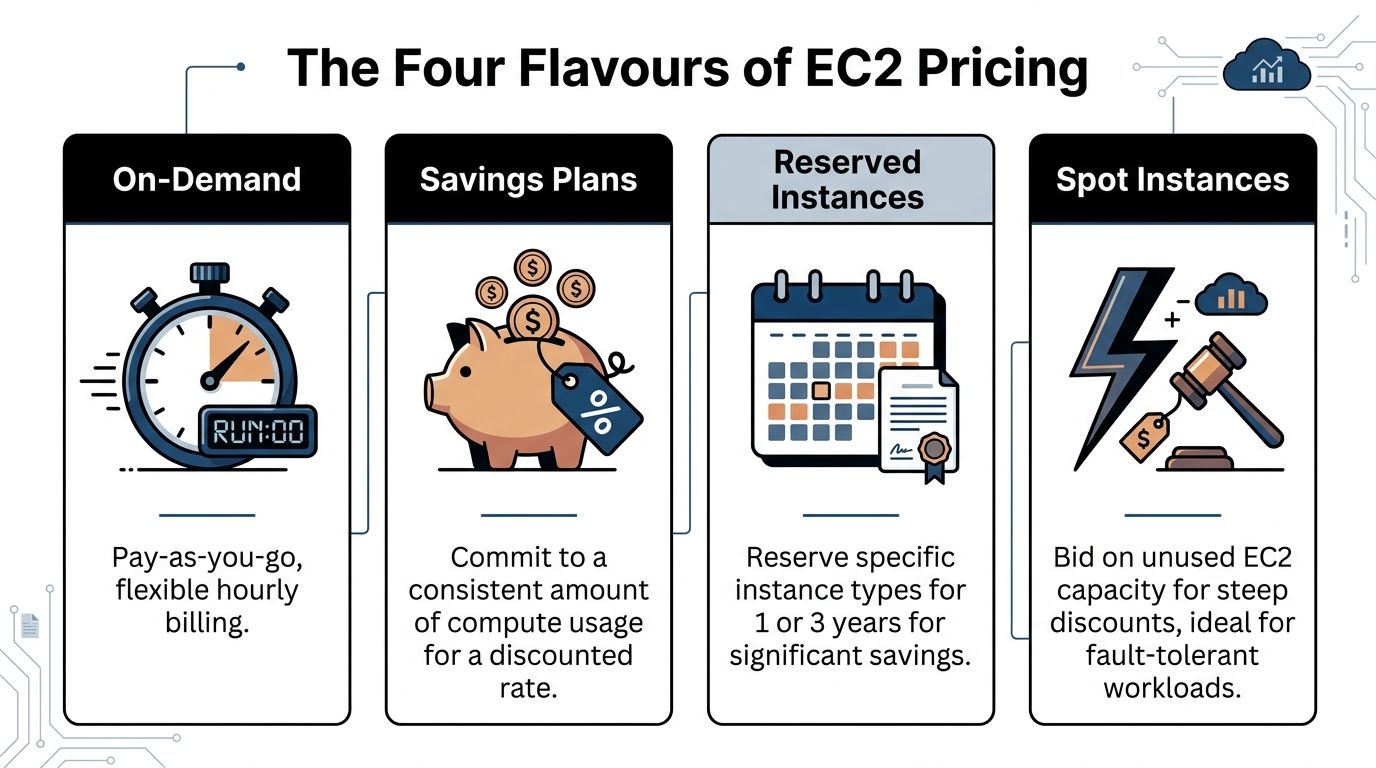
The Four Flavours of EC2 Pricing
A Melbourne retailer running a WordPress site or a custom Shopify integration usually does not need every EC2 pricing option AWS offers. They need the one that matches how the workload behaves, how stable demand is, and how much billing risk the business can tolerate.
That is the practical way to look at EC2 pricing. You are choosing between flexibility, commitment, and interruption risk.
On-Demand
On-Demand is the default option. You start an instance, leave it running for as long as you need, and pay at the standard rate without a long commitment.
We use this for new builds, short campaigns, staging servers, and workloads that are still changing week to week. If a Sydney ecommerce brand has not yet settled on plugin choices, traffic levels, or server size, On-Demand avoids locking in the wrong setup too early.
The trade-off is simple. It gives you maximum flexibility at the highest routine cost.
Savings Plans
Savings Plans suit workloads that run steadily over time. Instead of paying full On-Demand rates forever, you commit to a baseline level of usage for a longer term and get a lower rate in return.
For many Australian small businesses, this is the pricing model that starts to make sense once a site has been live long enough to show a clear pattern. A WordPress site with consistent traffic, or a Shopify-connected app server that runs every day, often fits here. In our agency work, this is usually the first place we look after the environment has stabilised and the monthly usage is no longer guesswork.
You give up some flexibility, but not as much as many clients fear.
Reserved Instances
Reserved Instances also reward commitment, but they are a tighter fit for infrastructure that is unlikely to change much. If the instance family, region, and usage pattern are well understood, Reserved Instances can reduce costs on long-lived environments.
In practice, we recommend more caution here for smaller businesses. A fast-growing store can outgrow its original server shape, and a business that starts in Sydney may later add services in another region for customers overseas. Reserved pricing can still work, but only if the technical setup is already mature enough that change is less likely.
This option suits certainty.
Spot Instances
Spot Instances are the cheapest way to run EC2, but they come with an obvious catch. AWS can reclaim that capacity with little notice.
That makes Spot a poor choice for a main storefront, checkout-related process, or anything customer-facing that must stay online. It can be very useful for background jobs, data processing, image generation, reporting, test runners, and other work that can stop and restart cleanly. We have used Spot for non-critical tasks where the savings justified the operational hassle. We do not use it for the primary server behind a live ecommerce site.
Cheap compute is only cheap if the interruption does not create a bigger business cost.
What we usually choose in practice
For Australian businesses, the decision is less about AWS terminology and more about cash flow, predictability, and how painful downtime would be.
- New site or uncertain workload: On-Demand
- Stable production environment: Savings Plans
- Highly predictable long-term setup: Reserved Instances
- Interruptible background jobs: Spot Instances
If you want a commercial way to frame that choice, Nexist's insights on costs are useful. They map well to conversations we have with clients. Which parts of your hosting bill should stay flexible, and which parts are steady enough to commit to.
Decoding the Hidden Costs on Your Bill
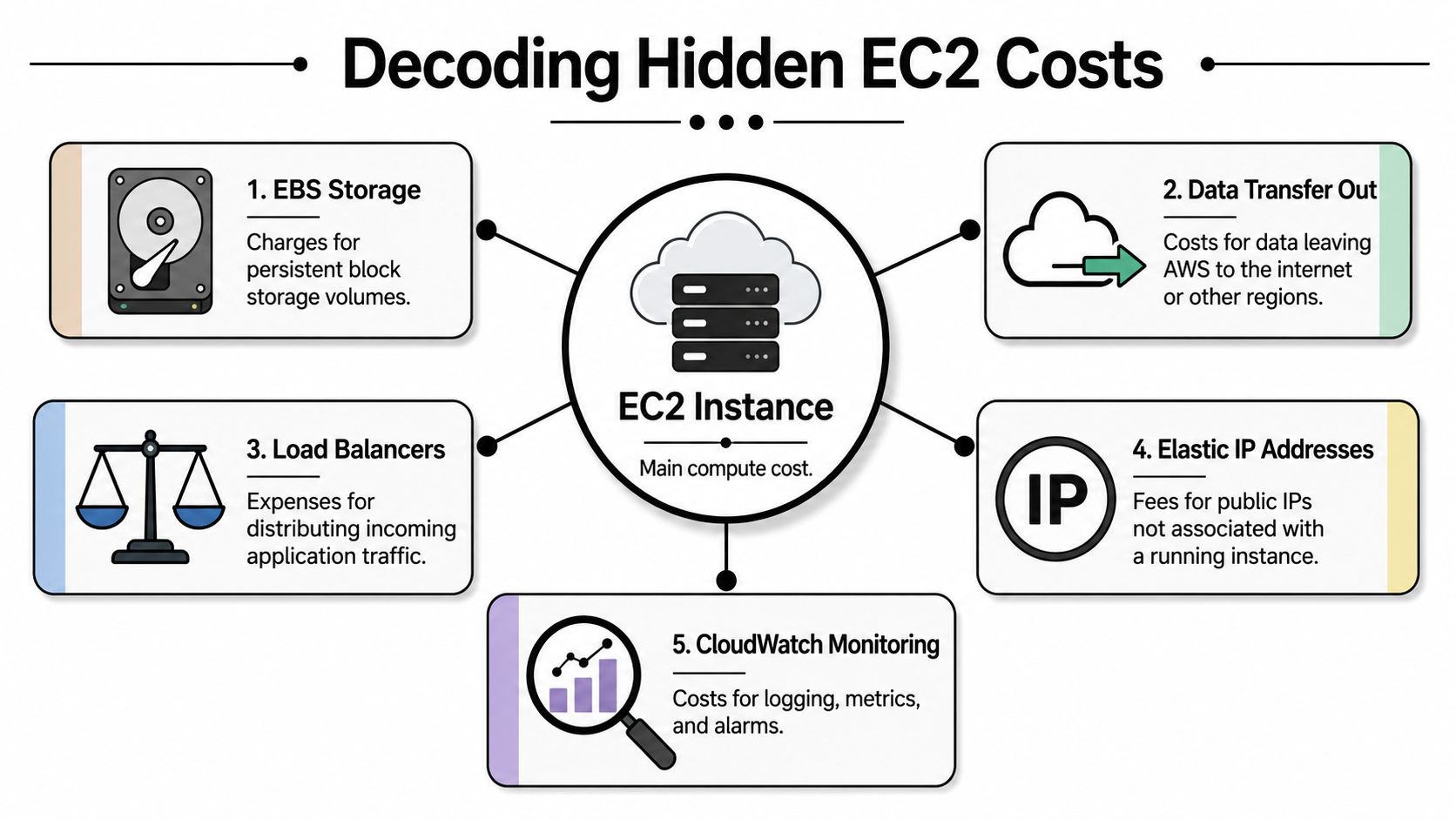
A lot of small business owners in Melbourne and Sydney look at the EC2 hourly rate, do the maths, and assume that is the hosting cost. Then the first full bill arrives and the extra line items are where the actual surprise sits.
For a WordPress site, that usually means storage, backups, traffic, and a few forgotten resources left running. For a Shopify-connected setup, it is often API jobs, feeds, tracking scripts, media delivery, or staging environments that keep ticking over in the background. The server is only one part of the bill.
Data transfer catches people first
Traffic out of AWS costs money. That includes images, CSS, JavaScript, product photos, downloads, and any response your server sends back to the browser.
In practice, this matters more in Australia because Sydney pricing is already higher than the cheapest US regions, and network-heavy sites feel that uplift faster. A content-heavy WordPress site with large banners or an ecommerce setup with lots of product imagery can burn through bandwidth without looking busy in the usual sense. You do not need massive traffic for this to show up on the bill.
We see this regularly on builds where design decisions increase page weight but nobody budgets for delivery costs. Big homepage videos, uncompressed PNGs, and plugin-heavy themes all push up transfer. If the site also talks to services in another AWS region, those charges stack up in the background.
One small line item repeated across every visit is still a big bill by month end.
Here's a useful explainer before you start tuning spend:
Public IPv4 fees are now part of the baseline
AWS now charges separately for public IPv4 addresses, so a basic EC2 setup can cost more than it first appears. For Australian businesses running production, staging, and test environments, that extra fixed charge shows up fast even before storage and traffic are counted.
This catches agencies too. A client might only care about the live site, but the bill often includes a staging server, a temporary migration box, and an old test instance that still has a public IP attached. None of those look dramatic on their own. Together, they turn into waste.
Storage, snapshots, and logs add up
EC2 is tied to EBS storage, and storage rarely stays tidy by accident. Old snapshots, unattached volumes, duplicated environments, and oversized media libraries are common reasons a bill grows over time.
Logging and monitoring can do the same thing. They help when something breaks, but they also need retention limits and a clear purpose. I have seen small ecommerce stores pay for months of logs nobody ever reviewed.
For a practical approach to trimming that waste without creating performance problems, IT Cloud Global on cloud optimization is a solid reference.
The expensive part is usually the architecture around the server
By the time we review an AWS account for a local business, the issue is rarely just “EC2 is expensive”. It is usually a collection of choices. Serving large assets directly from the instance, keeping everything in Sydney when some workloads could sit elsewhere, retaining every backup forever, or leaving non-production systems running full-time.
That matters for Australian operators because the regional uplift means sloppy architecture costs more here than it would in a cheaper US region. If you are running a WordPress marketing site or a custom service around a Shopify store, cost control comes from design decisions as much as instance selection.
AWS can be a good fit. It just does not reward set-and-forget hosting.
How Your Location Impacts Your AWS Bill
A Melbourne business owner sees the Sydney price, compares it with a cheaper US region, and asks the obvious question. Why pay more for the same server?

The short answer is that the server is only part of the decision. For Australian businesses, region choice affects speed, customer experience, support expectations, and sometimes compliance. It also changes the baseline cost before traffic, storage growth, and backup habits have even had a chance to push the bill higher.
Sydney costs more than cheaper US regions
If you compare Sydney with a low-cost US region such as N. Virginia, the hourly EC2 rate is usually higher in Sydney. Finout's AWS pricing overview gives a clear example using a t3.medium, with Sydney priced above Virginia for the same general class of instance.
That gap does not look dramatic on day one. Over a full month, it is enough to matter for a small business running production, staging, backups, and a few supporting services.
We see this a lot with Australian ecommerce brands. They budget for one instance, then end up paying the Sydney premium across the whole environment.
Cheap on paper can be expensive in practice
For an Australian audience, hosting in the US often saves money on the EC2 line item and loses value everywhere else that matters.
A WordPress site hosted offshore can feel slightly slower across page loads, admin logins, checkout plugins, and API calls. A Shopify setup with custom middleware can feel it even more if it relies on frequent requests between systems. The difference is not always dramatic in a speed report, but it shows up in day-to-day use. Staff notice it in the admin. Customers notice it when pages feel less responsive under campaign traffic.
That is the trade-off. Lower hourly compute cost versus a weaker experience for people in Melbourne, Sydney, Brisbane, or Perth.
Regional pricing changes the real cost model
A lot of AWS advice is written for US operators. Australian businesses inherit that advice, then wonder why their bill feels off.
The local premium is not only about the instance price. It affects the economics of the whole setup because every extra design mistake starts from a more expensive base. If a site serves large images directly from EC2, keeps oversized environments running, or stores too much in attached volumes, Sydney makes those choices hurt faster.
For Australian stores, I usually frame region choice as a business decision, not a technical purity test.
Why local is often the safer default
If your customers are mostly in Australia, local hosting is often the cleaner commercial choice. You get lower latency for the people who use the site, fewer awkward questions about where data lives, and a setup that is easier to explain to stakeholders.
There are exceptions. If the workload is internal, non-urgent, heavily batch-based, or aimed at a US audience, a US region can make sense. We sometimes recommend that for background jobs, dev environments, or systems that do not sit in the customer path.
For a customer-facing Australian website, though, I would start with Sydney and justify moving away from it, not the other way around.
The better question is not “which region is cheapest?” It is “which region gives this business the best result once performance, operations, and total monthly cost are all counted?”
Worked Examples A WordPress Blog and a Shopify Site
Theory only helps if you can turn it into a practical estimate. For most small businesses, I frame EC2 costs around the workload itself.
A WordPress brochure or content site has very different behaviour from a Shopify setup that relies on custom backend services, Shopify API calls, or middleware that supports feeds, reporting, or conversion tracking.
Example one, a WordPress site for a local business
Let's say you've got a WordPress website running for a service business. It's not a giant publishing operation. It has a handful of landing pages, some blog content, contact forms, tracking scripts for Google Ads, GTM, Google Analytics, and maybe server-side tagging support.
For that kind of project, I'd usually focus first on keeping the stack simple, stable, and easy to monitor. The wrong move is overbuilding it from day one.
A sensible estimate includes:
- Compute: a modest instance for the web application
- Storage: enough attached volume for WordPress core, uploads, and backups
- Traffic: variable, depending on page assets and campaign activity
- Network access: public exposure if required
- Monitoring and housekeeping: basic oversight so costs don't drift
That's often enough for a straightforward WordPress development or WordPress design build.
Example two, a Shopify store with custom backend logic
Now compare that to a growing ecommerce brand on Shopify. The storefront itself may be hosted by Shopify, but businesses often still need EC2 for supporting services.
That can include custom Shopify API middleware, product sync jobs, feed generation for Google Shopping ads, inventory processing, event forwarding for Meta Conversion API, or app logic built as part of custom Shopify development.
This workload tends to be more bursty. It may sit idle for part of the day, then become busy during promotions, catalogue updates, or ad-driven traffic spikes.
Here's a simple planning table you can use as a discussion starter with your developer or agency:
| Cost Component | WordPress Blog (t4g.small) | Shopify Backend (t4g.medium) |
|---|---|---|
| Compute | Lower baseline workload | Higher baseline workload |
| Storage | Media library, plugin files, backups | App data, logs, queued jobs, integration files |
| Data transfer | Depends on page assets and traffic | Depends on API activity and external responses |
| Public network access | Often required | Often required |
| Monitoring | Basic uptime and usage checks | More active monitoring for jobs and failures |
The right way to read these examples
The point isn't that one platform is cheap and the other is expensive. The point is that AWS pricing EC2 should follow the operational shape of the workload.
A WordPress web developer building custom blocks in Gutenberg may need one kind of environment. A Shopify developer API project supporting custom apps, Shopify CLI workflows, or backend event processing may need another.
That's also why project cost and hosting cost need to be separated. In Melbourne, agencies typically charge AUD 90 to AUD 140 per hour for Shopify development, with basic store projects ranging from AUD 2,500 to AUD 6,000 and more professional stores with branding and app integrations between AUD 6,000 and AUD 15,000, according to Abbacus Technologies on Shopify developer costs in Australia. Hosting is a separate operational expense after that build work is complete.
For broader ecommerce budgeting, Codiant's overview of ecommerce development costs in Australia notes fully custom platforms typically start from AUD 40,000 and can go to AUD 120,000+, while Shopify or BigCommerce setups are usually much lower. That difference is exactly why many brands keep the storefront simple and put only selected custom functions on EC2.
Our Agency's Playbook for EC2 Cost Optimisation
The usual pattern is simple. A Melbourne or Sydney business launches on AWS, traffic is quiet most days, then a campaign, sale, or seasonal spike hits. To stay safe, the server gets sized for the busy day and left that way for the other 29 days of the month.
That habit is where a lot of EC2 waste starts.
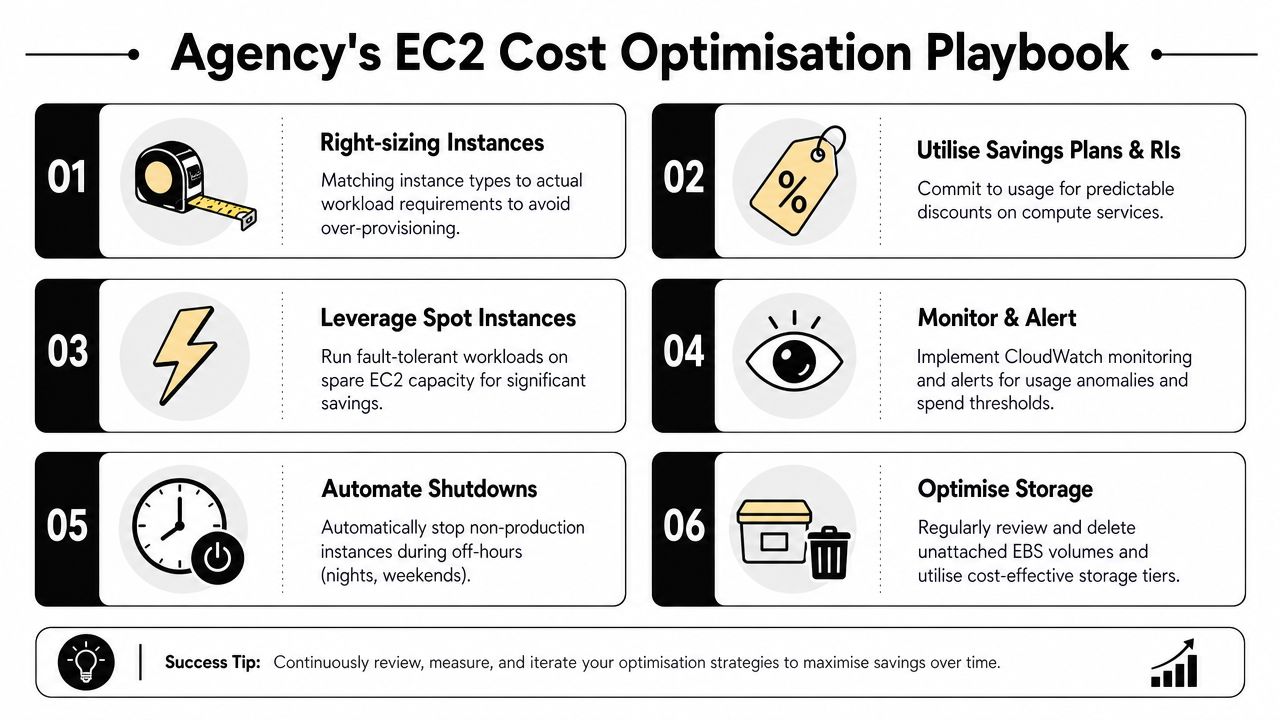
We rarely fix AWS bills with one dramatic change. We usually fix them by cleaning up five or six ordinary decisions that were never reviewed after launch.
Start with utilisation, then choose the pricing model
A lot of owners approve a bigger instance because downtime feels expensive. Fair call. Lost sales cost more than a slightly higher hosting bill.
But oversized EC2 instances become a quiet monthly tax. We check CPU, memory, disk activity, and traffic patterns first, then resize around the actual workload. For a stable WordPress site, that often means stepping down to a smaller instance and putting the savings into better caching, image handling, or monitoring. For a background app supporting Shopify orders, webhooks, or inventory sync, it can mean separating scheduled jobs from the main app so you are not paying production rates for work that can run more cheaply.
Once the usage pattern is clear, the pricing choice gets easier. Steady workloads suit Savings Plans. Short-term projects, uncertain traffic, or new builds are safer on On-Demand until the pattern settles. Spot can work well for retryable jobs, imports, reporting, or queue workers, but I would not put a live checkout flow or primary WordPress server on it.
The checklist we use most often
- Right-size first: Pick the instance for normal operating load, with sensible headroom, not pure worst-case fear.
- Commit only after the workload proves itself: Savings Plans are useful once the app is stable and usage is consistent.
- Use Spot where interruption is acceptable: Batch jobs, media processing, and non-urgent workers are better fits than customer-facing services.
- Turn off non-production environments: Dev, QA, and staging stacks often run overnight for no good reason.
- Clean up storage and snapshots: Old EBS volumes, snapshots, and unattached resources add cost without helping the business.
- Reduce avoidable server load: Heavy plugins, poor cron setups, and oversized media push you into larger instances sooner than necessary.
Australian businesses need tighter cost discipline
This matters more for local businesses than many overseas AWS guides admit. Australian hosting decisions are shaped by local customer latency, local support expectations, and the higher pricing that often comes with running in Sydney rather than a cheaper US region.
For a small ecommerce store, that creates a real trade-off. Hosting closer to Australian customers usually improves responsiveness, but it can also lift the monthly bill. We handle that by stripping out waste before cutting performance. In practice, that means improving cache hit rates, moving static assets behind a CDN, reducing unnecessary background jobs, and keeping staging environments on a leash. Paying more for the right region is easier to justify when the rest of the stack is disciplined.
Agency note: The goal is not cheap infrastructure. The goal is infrastructure you can defend line by line on the invoice.
Performance tuning often cuts EC2 spend faster than instance shopping
A surprising number of EC2 cost problems are application problems. We see it all the time with bloated WordPress themes, plugin stacks that fire constant admin-ajax requests, oversized image libraries, and custom jobs that run too often.
If you want practical ideas on the server-side performance side, actionable server optimization techniques from Divimode are useful because they tie technical tuning to lower hosting overhead.
That matters for common Australian workloads. A content-heavy WordPress site might stay on a smaller instance if the theme is cleaned up and page caching is working properly. A Shopify brand with a custom app on EC2 might avoid scaling up if webhook handling, queue processing, and database calls are kept efficient. Better engineering lowers the pressure to solve every performance issue with a bigger server.
Making AWS Work for Your Business
AWS is powerful, but it doesn't explain itself well. That's the main issue.
If you're running a business site, an ecommerce store, or custom services around WordPress development and Shopify development, the practical way to think about AWS pricing EC2 is simple. Pick the right pricing model for the workload. Budget for the hidden extras. Choose the region based on your customers, not a generic US example. Revisit the setup before waste becomes normal.
For Australian businesses, that regional lens matters more than many guides admit. A Melbourne brand selling to Australians doesn't make hosting decisions the same way a US SaaS company does. The customer location, the traffic profile, and the importance of site responsiveness all affect what “good value” looks like.
That same thinking carries across your wider stack. If you're investing in WordPress design, Shopify design, custom blocks in Gutenberg, Shopify API work, Google Ads for contact form submissions, campaign priority in Google Ads, PMAX vs Google Shopping ads testing, Local SEO, Google My Business optimisation, Instagram Shop and Facebook Shop setup, or Meta Conversion API installation, infrastructure should support the marketing outcome instead of dragging it down.
I'd also separate build costs from run costs. A business might pay a WordPress development company or Shopify developer to launch the site, then still need an ongoing hosting and optimisation plan. That's normal. The mistake is treating AWS as “set and forget”.
If your stack includes GTM and Google Analytics, Meta server-side tracking, custom Shopify apps using Shopify CLI, or backend processing for feeds and ad platforms, regular review becomes even more important. A small architecture choice can shape your monthly cost for a long time.
If you're working with Alpha Omega Digital, or you're looking for a team that understands both growth and implementation, there's a practical advantage in having web, tracking, and paid media under one roof. We help businesses with WordPress developer services, Shopify developers in Melbourne, web design in Melbourne, ecommerce marketing support, Google Ads management, Google Ads for plumbers, Facebook and Meta ads management, the best Facebook ads agency services, Facebook ads for electricians, and WordPress developers in Melbourne. We also support businesses across Sydney, Brisbane, Newcastle, Perth, Adelaide, Darwin and Hobart. If you're a business with a paid ads budget of at least 3k a month, I'd love to offer you a low risk deal, get a month of paid ads management FREE. Apply now through the contact page.