You've sent the appeal email, the campaign is getting clicks, and someone on the team asks why donations haven't followed. You open the website on your phone, struggle to find the donation form, and discover that an invalid postcode wipes the fields you've already completed.
That's the kind of problem I'd investigate before recommending a rebrand. Charity website design should make giving, finding help and checking your credibility straightforward, then give your team enough evidence to see where those journeys fail.
Why Australian Charities Can No Longer Treat the Website as a Brochure
Consider a hypothetical charity with a compelling appeal but an awkward payment experience. The fundraising team sees email engagement, the board sees a polished homepage, and nobody can explain where prospective donors stop. A brochure-style website offers little help because it was commissioned to describe the organisation, not support its operations.
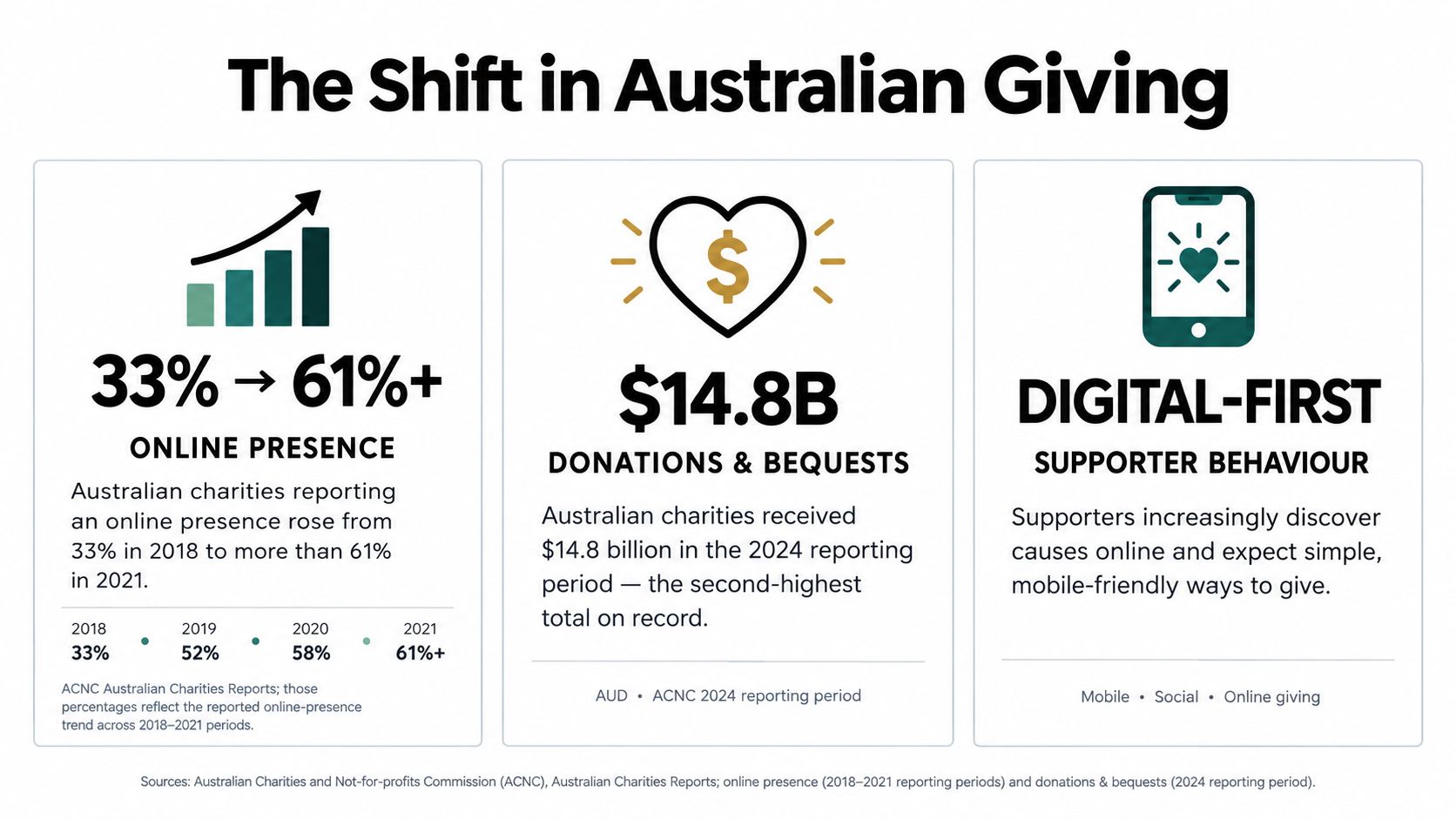
Australia's historical figures put that distinction into perspective. Charity online presence increased from 34% in the 2017 reporting period to approximately 52% in the following period, then exceeded 58% in 2020; donations reached $10.5 billion in 2017 and $12.7 billion in 2020, according to the ACNC reporting referenced in its Australian Charities Report.
The shift is easier to understand when online engagement and fundraising are considered together.
Define the operational responsibility
For smaller organisations, donation usability deserves particular attention. A Productivity Commission submission on philanthropy reports donations representing around 7% of charity revenue overall, but approximately 28% to 38% for charities with annual revenue up to $1 million.
I'd translate those stakes into responsibilities before discussing colours:
- Fundraising: Help supporters complete gifts and understand what happens afterwards.
- Service delivery: Let people establish eligibility and request assistance without navigating fundraising material.
- Participation: Explain volunteer roles, commitments and application requirements.
- Accountability: Give journalists, regulators and cautious supporters a clear route to governance and financial information.
Practical rule: Commission the website around completed tasks, not a list of pages.
There's a genuine trade-off here. Fundraisers may want the donation appeal everywhere, while service staff need visitors to find urgent assistance. Resolve that through page purpose and navigation, rather than allowing the loudest stakeholder to control every screen.
Before approving a redesign, write down the revenue, trust and service outcomes the website must support. Assign an owner to each outcome so the project doesn't finish with a launch announcement and nobody responsible for results.
Discovery, Information Architecture and Donor-Journey Mapping
I'd start discovery with the people answering donor emails, processing gifts and handling service enquiries. They can identify confusing terminology, missing information and recurring questions that a branding workshop might overlook.
Ask them to demonstrate actual tasks using anonymised examples. Where does someone check eligibility? What happens when a supporter wants to change a recurring gift? Which questions require staff intervention because the answer isn't available online?
Produce usable discovery artefacts
Document the answers in a shared requirements register. Include the visitor need, content owner, required integration and acceptance test for each requirement. CEFCore's practical requirements gathering for CEFs is an additional resource to consider when organising requirements work, rather than relying on scattered meeting notes.
The essential outputs should be concrete:
- Audience map: Separate donors, returning supporters, volunteers, service seekers and institutional visitors.
- Journey sketches: Record the entry point, question, desired action and likely obstacle.
- Sitemap: Organise content around visitor language rather than internal department names.
- Content inventory: Mark material to retain, rewrite, combine, archive or create.
A first-time donor might need an impact story and financial context before giving. A returning donor may want immediate access to the form. A person seeking assistance shouldn't have to interpret either journey.
| Visitor need | Useful destination | Content priority |
|---|---|---|
| Understand the cause | Impact and program pages | Who benefits and what the charity does |
| Give support | Donation page | Gift purpose and payment clarity |
| Request help | Service information | Eligibility and next steps |
| Verify the organisation | Governance area | Identity, oversight and reporting |
Avoid making every program a top-level menu item. Use a program index when necessary, with descriptive labels and meaningful grouping.
Content ownership matters just as much as the sitemap. A service page with outdated eligibility criteria can create operational problems even when its design is excellent. Give each important page an accountable editor and a review trigger, such as a program change or funding announcement.
Designing the Donation Funnel as a Measurable Journey
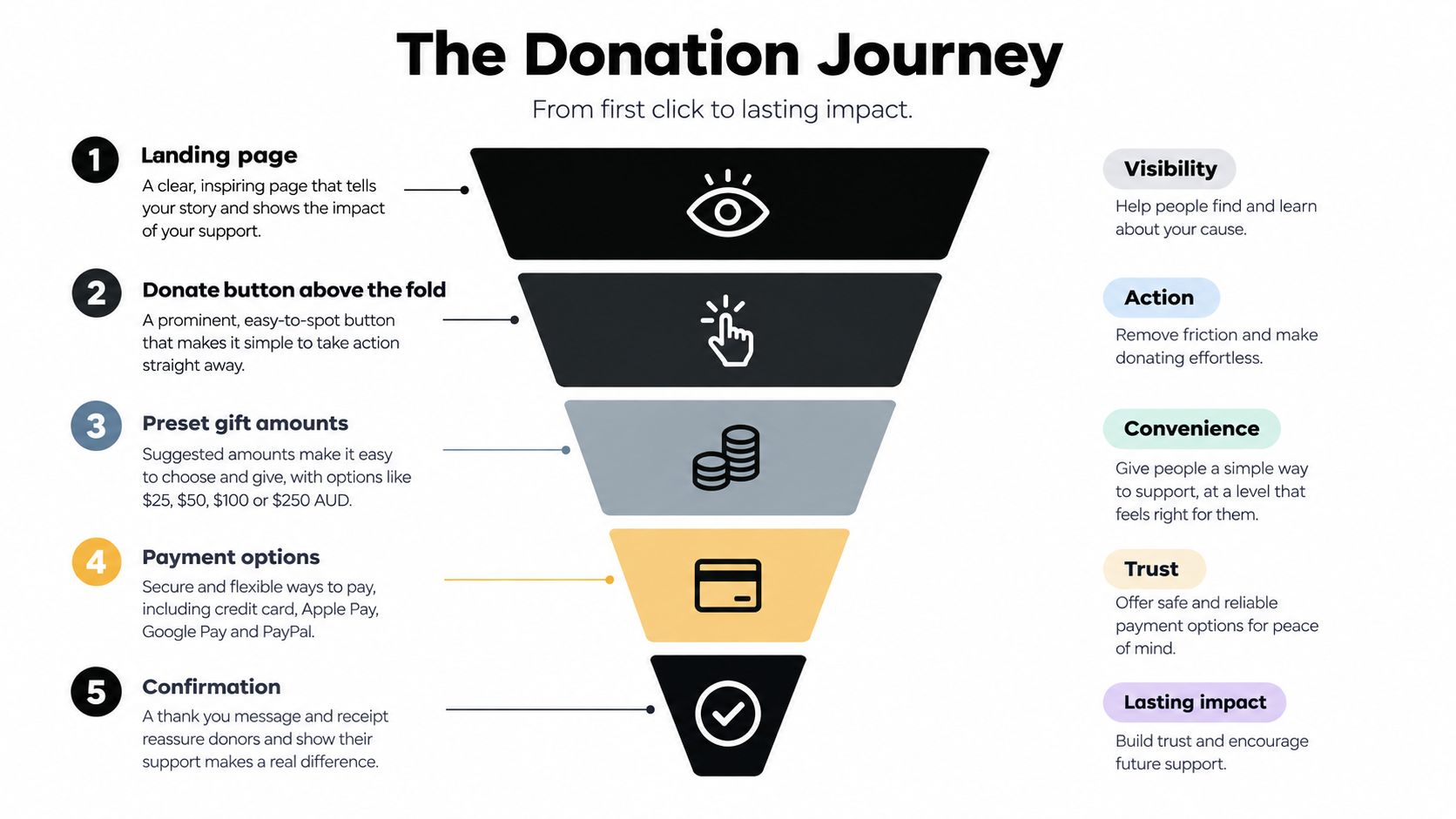
A donate button isn't a fundraising strategy. I treat the donation journey as a sequence of decisions, with a clear purpose and observable outcome at each stage.
The basic flow should remain understandable before extra fundraising features are added.
Match the page to donor intent
An urgent appeal should lead with the specific need and a focused giving action. An evergreen donation page can provide broader context and explain ongoing support. Don't send both audiences to an unfocused page simply because it's convenient to maintain.
Put the primary donation action above the fold without obscuring essential information. Offer understandable preset amounts alongside a custom amount, and don't imply that a gift funds a precise outcome unless the charity can substantiate that claim.
For mobile forms, use persistent labels, appropriate input types and error messages beside the relevant field. Keep optional questions out of the payment path unless there's a defensible reason to collect them.
A shorter form isn't automatically better. A form that removes necessary explanations can leave donors less confident about paying.
Instrument decisions rather than button clicks
Track landing-page views, amount selection, form starts, payment errors and successful completion. Separate mobile and desktop reporting, then distinguish urgent appeals from routine giving.
Australian benchmark research reports average conversion rates of 31% for appeal donation pages and 26% for general donation pages, with stronger examples reaching 80% and 41%, respectively; it also reports 51% of nonprofit website visitors using mobile devices, as summarised in this nonprofit digital marketing benchmark guidance. Treat these as directional references, not targets that every charity should expect to achieve.
The payment result should determine completion, not a click on the submit button. Confirmation must explain whether the gift succeeded, how the receipt will arrive and where supporters can manage ongoing giving.
For additional viewing alongside the practical implementation work:
Keep recurring-gift prompts transparent. Explain frequency before authorisation, and don't disguise a recurring commitment as a standard donation.
Accessibility as Service Delivery, Not a Final Checklist
A charity website can look welcoming while preventing someone from requesting help. If the service directory can't be understood with assistive technology, or a payment widget traps keyboard focus, visual polish doesn't solve the underlying problem.
The ACNC's corporate plan commitment to inclusive and accessible online services reinforces why accessibility belongs in service planning, not just design review.
Make accessibility an acceptance criterion
Use WCAG Level AA as the relevant Australian-facing benchmark, consistent with Australian accessibility policy guidance. A conformance claim needs evidence beyond an automated score.
Build acceptance checks around tasks:
- Semantic structure: Use meaningful headings, landmarks, labels and accessible control names.
- Keyboard operation: Complete navigation, amount selection, validation and payment without a mouse.
- Perceivable feedback: Check contrast, visible focus, text alternatives, captions and understandable errors.
- Responsive behaviour: Test zoom and reflow without hiding actions or creating unusable layouts.
- Human testing: Combine automated checks with screen-reader, keyboard and mobile assistive-technology testing.
For a service-seeker journey, start at the homepage, locate a suitable program, check eligibility and submit an enquiry. For a donor journey, include an intentional mistake so the tester must recover from an error.
That recovery matters. A form may appear accessible until an error message is displayed somewhere a screen-reader user doesn't encounter.
Budget priority: Fix barriers that prevent task completion before spending on decorative interactions.
For a small charity, I'd prioritise shared navigation, donation forms, assistance forms and essential program information. Those components affect consequential tasks and can provide reusable fixes across the site.
Include third-party systems in the scope. An accessible WordPress template doesn't establish that an embedded donation form is accessible. Record the barrier, identify who controls the component and agree on a remedy or alternative route before launch.
CMS, Payments, Tagging and the Measurement Stack
I'd choose the platform after understanding the charity's operating model. A content-heavy organisation and a merchandise-led social enterprise don't necessarily need the same foundation.
WordPress development is worth considering when editorial flexibility and program information dominate. Shopify development belongs in the comparison when managing products and retail operations is a substantial requirement. Neither decision should rest on a homepage mock-up alone.
Choose for maintainability
| Decision | Practical consideration |
|---|---|
| WordPress design | Can staff publish consistent content without breaking layouts? |
| Custom Gutenberg blocks | Is the component reusable enough to justify ongoing maintenance? |
| Shopify design | Does the retail experience support the organisation's wider purpose? |
| Shopify API integration | Who maintains failures, permissions and data reconciliation? |
| Payment provider | Can it support the required giving arrangements and reporting? |
A custom Gutenberg impact-story block can give editors useful structure without unrestricted layout controls. Conversely, custom Shopify apps built using Shopify CLI need a maintenance owner, not merely a successful demonstration.
Compare payment providers on the complete operating cost: transaction charges, recurring-gift management, refunds, settlement reporting and support. Ask how payment information is handled, and avoid collecting details the website doesn't need.
Keep measurement understandable
Set up Google Tag Manager containers with clear ownership and publishing permissions. In Google Analytics, distinguish donation completion from newsletter subscriptions, volunteer enquiries and contact form submissions.
- Document events: Define what triggers each event and what it means.
- Exclude sensitive data: Keep names, contact details and service-enquiry contents out of analytics payloads.
- Test environments: Prevent development activity from contaminating live reporting.
- Reconcile outcomes: Compare reported completions with confirmed payment records.
For Meta Conversions API installation, plan browser and server tracking together. Meta's Conversions API guidance recommends sharing relevant events alongside the Meta Pixel, monitoring coverage and matching browser and server events to reduce duplicate reporting, with customer information shared only where permitted.
I wouldn't pass sensitive service-seeker activity into advertising systems because the integration makes it possible. Measurement should answer an operational question without creating unnecessary privacy exposure.
Storytelling, Trust Signals and SEO for Australian Supporters
An impact story should help someone understand the work, not just feel something about it. Explain the need, the charity's response, the evidence available and the limits of what can reasonably be claimed.
Use consented photography and approved personal accounts. Where identification could create harm, choose an alternative presentation rather than treating a more emotional story as automatically better.
Make credibility verifiable
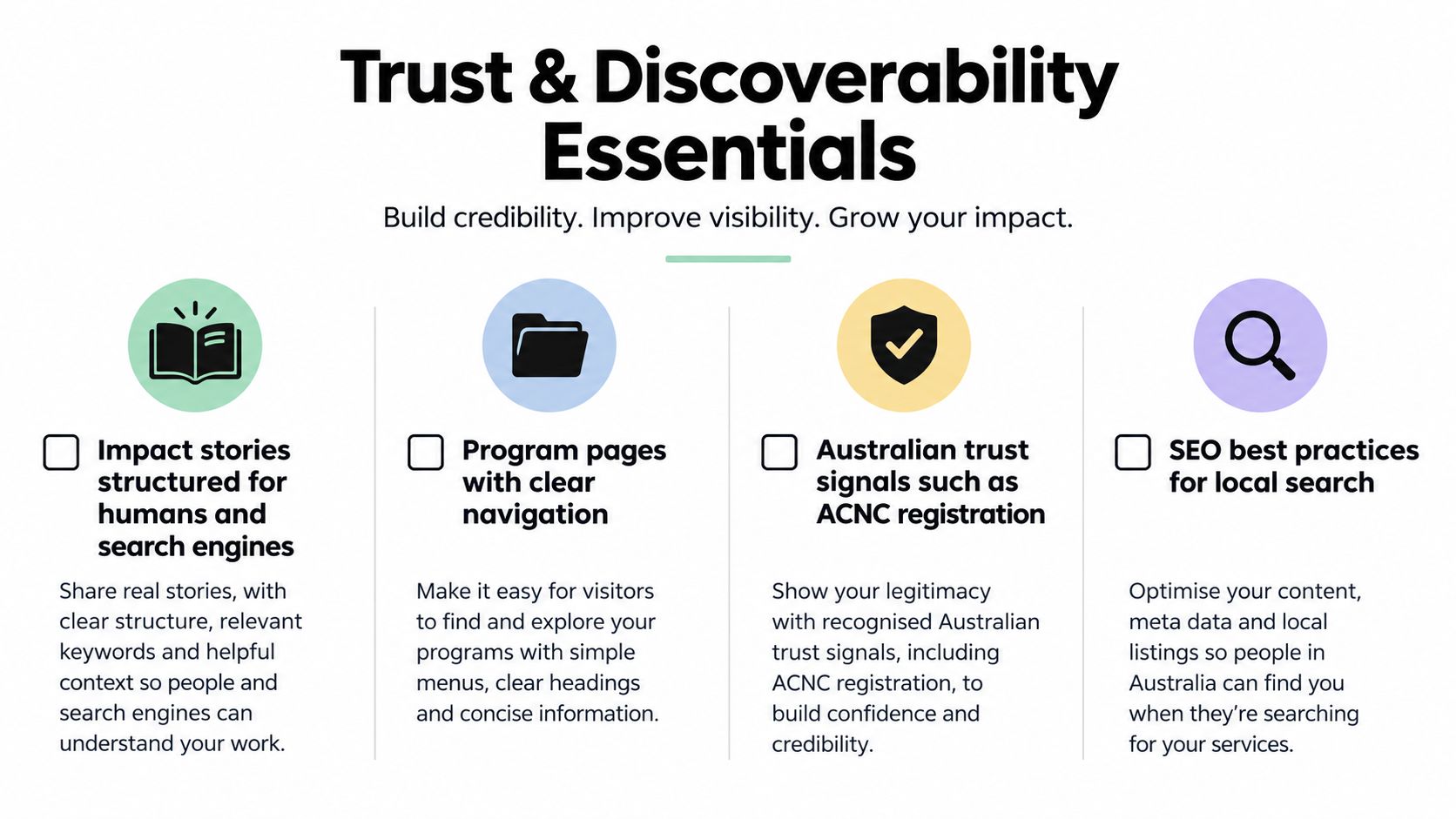
The ACNC reports that its Charity Register was searched more than 2 million times in 2025 and contains information on approximately 64,000 Australian charities, demonstrating the use of regulator-backed verification in its review of support for the charity sector.
Give visitors the information they need to perform that check:
- Identity: Display the correct legal name and applicable registration details.
- Governance: Make leadership, oversight and current reporting easy to locate.
- Fund purpose: Explain how donations are allocated without unsupported guarantees.
- Privacy and payments: Describe relevant handling practices in plain English.
The content and verification requirements belong together.
Match search content to genuine needs
For local SEO, build useful service-area information rather than duplicating pages with suburb names swapped. Maintain accurate Google Business Profile information, formerly Google My Business, where appropriate, and ensure organisation structured data matches visible website details.
Write content briefs around questions donors and service seekers ask. A program page needs eligibility, delivery area and contact information; an impact page needs evidence and context.
If you're comparing a digital marketing agency Melbourne provider, ask how they connect search landing pages to completed visitor tasks. Keyword positions alone won't explain whether someone obtained help or completed a gift.
Measure story-to-donation progression and successful service enquiries, while recognising that analytics can indicate association rather than prove causation. Don't treat reading governance information as abandonment just because the visitor didn't donate immediately.
Launch, Testing and the First 90 Days of Optimisation
Launch should begin a managed review period, not end the project. I'd agree on responsibilities, reporting definitions and payment reconciliation before directing campaign traffic to the new website.
A working dashboard is useful only when the team knows which decisions it supports.

Establish the baseline before experimenting
Use the opening month to check the implementation and identify failures. Don't interpret unreliable event data as donor behaviour.
- Before launch: Test representative browsers, assistive technology, payment outcomes, receipts and failed submissions.
- Initial review: Reconcile analytics with payment records and investigate device-specific problems.
- Operational check: Confirm staff receive enquiries and can resolve donor support requests.
The middle month is a sensible period for controlled tests, provided traffic supports useful interpretation. Choose a variable with a clear hypothesis, such as impact copy, form length, preset amounts or recurring-gift placement.
| Observation | Sensible response |
|---|---|
| Mobile payment errors | Investigate implementation before changing copy |
| Many form starts but few completions | Examine field-level friction and payment failures |
| Confusion after giving | Improve confirmation and receipt communication |
| Insufficient test traffic | Use moderated task testing rather than claiming a winner |
Consolidate and hand over
Use the final month to retain supported improvements, remove failed experiments and document the system. Record event definitions, integration owners, publishing permissions and escalation contacts.
A charity selling merchandise can borrow useful checkout practices from ecommerce, but donation intent and service access still need separate evaluation. Don't optimise every visitor towards a purchase-style outcome.
The practical finish line is a team that can explain what works, identify what's broken and maintain the website without depending on undocumented agency knowledge.
Alpha Omega Digital is a Melbourne-based agency offering WordPress and Shopify development, donation-journey design and paid advertising support for organisations across Australia. If you're a business with a paid ads budget of at least $3,000 a month, I'd love to offer you a low-risk deal: get a month of paid ads management FREE. Have a charity website or ecommerce project in mind? Apply through the contact page and tell us where visitors are getting stuck.
[email protected]
Read more insights from our team on web design, paid ads, and growth strategy.