
It's 11pm, your phone is on silent, and somewhere across Melbourne a pipe has just burst under a kitchen sink. The homeowner isn't scrolling social media or waiting for a referral. She's typing emergency plumber near me into Google and calling the first business that answers. If that business isn't you, the job is gone before you've even seen the missed call.
That's the situation most plumbers I speak to are facing. Word of mouth still fills part of the week, but it doesn't do so predictably, and it rarely delivers the higher value jobs on demand. You need a channel you can turn up when the diary is thin and turn down when you're booked out, and you need to know whether it's making money or just making noise.
Why Plumbers Should Look at Google Ads First
I'd start with Google Ads for plumbers when you can answer the phone during the hours you advertise and you can tell which calls became paid work. If either of those is missing, fix that first. Ads won't fix a phone that goes to voicemail.
The case for search is simple. The search happens at the moment of need, not weeks before it. A burst pipe, a blocked drain backing up, or no hot water on a winter morning creates a buyer who wants a plumber now, in their suburb, with a licence number they can check.
You're not alone in testing this. The ServiceTitan Australian Tradies Report found 29% of Australian tradies reported using Google Ads in 2025, from a survey of 1,025 tradespeople. That figure includes plumbers but isn't plumber specific, so treat it as a trade wide signal, not a plumbing benchmark.
What Google Ads Does Not Do
Google charges you for the click, not the job. That distinction matters more than most account setups acknowledge.
Your result depends on suburb coverage, how quickly someone picks up, whether your page works on a phone in a flooded laundry, and whether you can separate a booked job from a price shopper. A plumber in Richmond chasing emergency work and a plumber in Geelong chasing renovations are buying different auctions, different intent, and different margins.
If you can't trace a click to a call, and a call to an invoice, you're buying traffic and hoping.
Three questions decide whether this works for you. How do you split emergency work from planned work, what budget can your margins support, and how do you judge success by cost per booked job instead of cost per click? Get those right and Google Ads becomes a controllable lead source. Get them wrong and it's an expensive way to keep Google busy.
Separating Emergency Calls From Planned Work
Emergency and planned plumbing work behave like two different products. I wouldn't run them in one campaign, on one landing page, with one follow up process. They need separate campaigns, separate pages, and separate response targets.
An emergency caller searching burst pipe repair or blocked drain same day will hire whoever answers first and sounds competent. She isn't comparing three quotes. She's standing in water. A homeowner researching a hot water system replacement or a bathroom re-pipe is doing the opposite. He'll read reviews, compare pricing ranges, check your licence, and shortlist over several days before he books a site visit.
Routing Emergency and Planned Plumbing Work
| Job type | Search intent | Landing asset | Response target |
|---|---|---|---|
| Emergency (burst pipe, blocked drain, no hot water) | Call now, same day | Click-to-call page with staffed phones | Answer within minutes, text back if missed |
| Hot water system replacement | Compare quotes over several days | Quote request page with pricing ranges and proof | Callback within one business day |
| Bathroom renovation or re-pipe | Research and shortlist over weeks | Project page with gallery, licence and reviews | Site visit booked within two business days |
| Maintenance and servicing | Book a convenient time | Booking form with service area check | Confirm booking the same day |
Match your example search terms to that intent. Emergency plumber Melbourne and hot water repair near me belong with staffed phones and a click-to-call button above everything else. Hot water system replacement cost and bathroom renovation plumber belong with a quote form, pricing guidance, photos of finished work, and proof that you're licensed and insured.
Build Two Response Systems, Not One
For emergencies, speed is the product. Your page should load fast on mobile, show the phone number in the header, name the suburbs you cover, and make calling the obvious next step. Your team, or your after hours cover, needs to answer within minutes and text back immediately if a call is missed.
Where you can't staff phones around the clock, look at options like voice AI for home service businesses as part of a wider answering setup, alongside tools we often configure such as a custom number through Twilio. A setup like that can provide 24 hour call answering, never gets sick or tired, and can book appointments into your calendar or Calendly. For tradies, that can save thousands in lost business from calls that would otherwise hit voicemail at 9pm, and the same logic applies to hairdressers, beauty therapists, dentists, restaurants, and doctors who lose bookings after hours.
Planned work needs a different rhythm. Send the quote quickly, then follow up over the next seven to fourteen days with a short sequence. A text on day one, an email with similar project photos on day three, and a call on day seven will recover jobs that a single callback misses. Don't judge a renovation campaign after 48 hours. The buyer hasn't finished deciding.
Practical rule: Pay for an immediate call when the job is urgent and you can answer. Capture and nurture the lead when the job is planned and the buyer needs proof before they commit.
Check the split is working with two separate measures. Emergency campaigns should show call volume, answer rate, and time to answer within the hour. Planned campaigns should show quote requests this week and booked jobs over the following weeks. If emergency ads are producing form fills and planned ads are producing rushed calls nobody follows up, your routing is backwards.
Keep one campaign per job family from day one. It lets you move budget toward the work you want, pause a weak job type without killing the account, and write ad copy that matches what the searcher typed.
Setting a Budget Your Margins Can Support
Start with what a click costs, then work backwards from margin. Most plumbers do it in reverse. They pick a round monthly number, launch, and discover three weeks later that the maths never worked.
In 2025, 21Webs reported Australian plumbing Google Ads clicks at approximately $18 to $37 each, depending on city and service. That's not cheap traffic. At those prices you don't get many clicks for a small budget, and you get far fewer enquiries.
Monthly Budget, Clicks and Enquiries at Australian Plumbing CPCs
| Monthly budget | Clicks at A$37 | Enquiries at A$18 | Enquiries at A$37 |
|---|---|---|---|
| $1,000 | about 27 | about 7 | about 3 |
| $2,000 | about 54 | about 14 | about 7 |
| $3,000 | about 81 | about 21 | about 10 |
The enquiry figures use a 12.3% click-to-enquiry rate as a planning assumption. At $18 a click, that puts cost per enquiry at about $146. At $37 a click, it's about $301. Same budget, same conversion rate, very different outcome depending on your suburb and service mix.
A Worked Example Using Margin
Say you're a Melbourne plumber with an average booked job margin of $300 after materials and labour. You test an assumption that one in three enquiries becomes a booked job. That's a figure to test in your own account, not a benchmark to rely on.
- At $146 per enquiry: Three enquiries cost about $438 to produce one booked job. That already exceeds a $300 margin.
- At $301 per enquiry: Three enquiries cost about $903 for one booked job. You'd lose money on every job at that margin.
- If the job is a hot water replacement: The margin is usually higher, so the same enquiry cost may work even at the top end.
- If the job is a small repair: You may need a much higher close rate, cheaper clicks, or repeat work to justify the spend.
That's why cost per enquiry is the wrong target. The number to hold against margin is cost per booked job. A campaign with a higher cost per lead can be the better campaign if those leads book at a higher rate, carry a higher invoice value, or turn into repeat maintenance work.
Don't ask, what budget should I spend on Google Ads? Ask, what's the maximum I can pay for a booked job of this type and still make money?
I'd set a starting budget you can sustain for at least 60 days of testing without flinching. A week of data tells you almost nothing in a local account with limited clicks. Cap each campaign separately so emergency work can't consume the whole account on a busy Monday, and leave enough daily budget for evening searches. A daily cap reached by lunchtime may miss the after work calls that convert best for planned jobs.
Only raise budget after cost per booked job sits under margin for two consecutive review periods. Bids can't guarantee position or volume, and raising spend on a losing campaign just loses money faster. If a job family can't clear margin at realistic click prices, tighten the suburbs, improve the page and phone handling, or stop buying that job type and put the money into the work that pays.
How to Set Up Your First Plumbing Campaign
Before you build anything, decide whether Local Services Ads suit your trade. They're a separate Google product from standard Search campaigns and can track leads and whether they convert to bookings. Compare control, screening requirements, and how enquiries are delivered before you commit budget to either format.
The sequence below is visualised here so you can see the order of work before you start clicking around in the account.
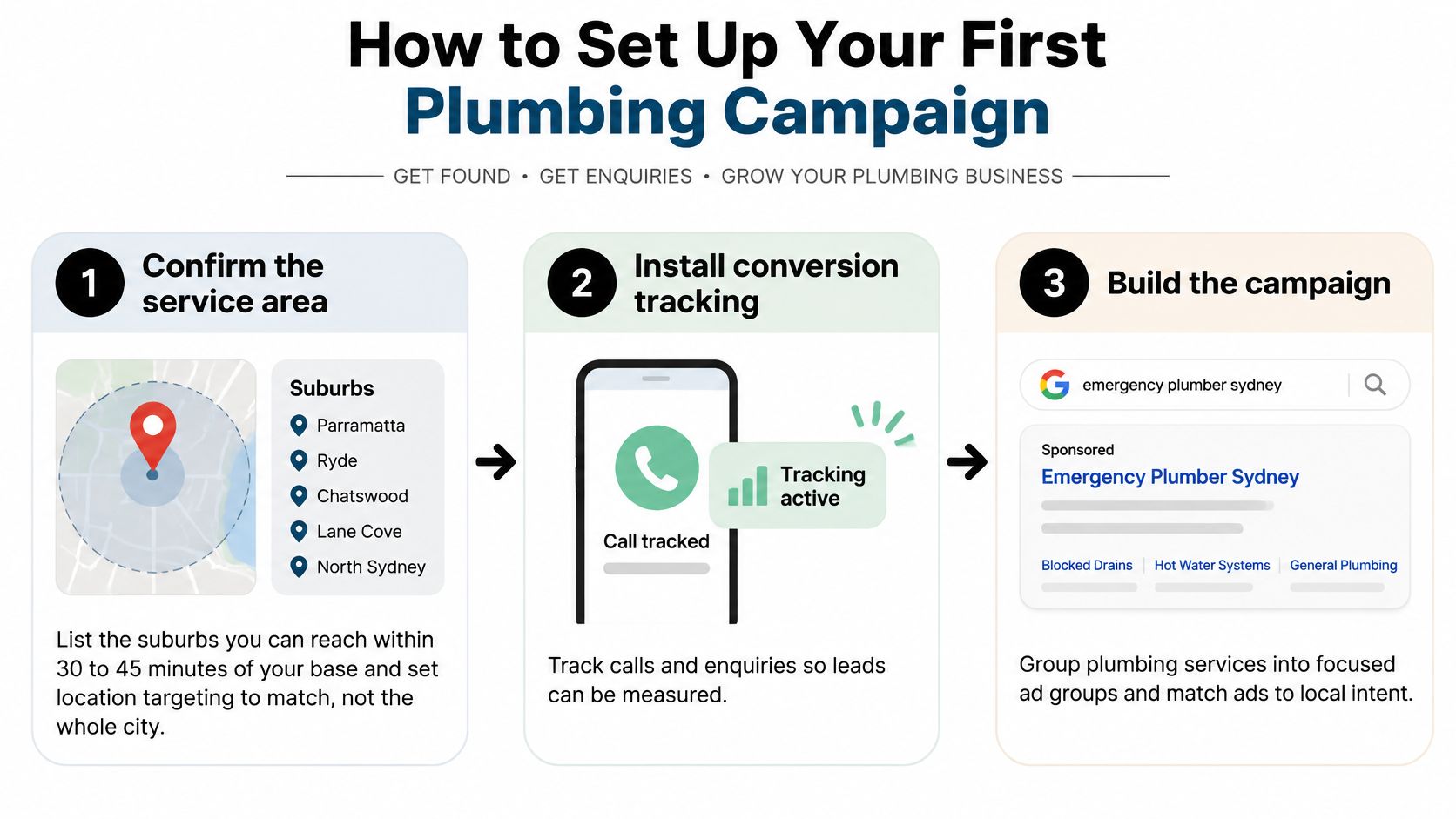
The Eight Setup Steps
Confirm your service area. List the suburbs you can reach within 30 to 45 minutes of your base and set location targeting to match. Advertising across the whole city fills your phone with jobs you'll decline or lose money travelling to.
Install conversion tracking first. Track calls and form fills through Google Tag Manager and Google Analytics, test every event, and exclude calls under 60 seconds or not tagged as booked from your primary conversions. If you need a structured walkthrough of account structure, a practical setup guide for PPC teams is a useful reference to check your build against. Launching without tracking means you'll optimise toward clicks because that's all you can see.
Build one campaign per job family. Emergency, hot water, renovations, and maintenance each get their own budget. That structure lets you protect profitable work when another campaign underperforms.
Choose tight keyword themes. Start with phrase and exact match around service plus suburb intent. Add a negative keyword list on day one with terms like DIY, course, training, jobs, and salary. Missing negatives is the fastest way to pay for job seekers and learners.
Write ads that name the service and suburb. Add a call asset, show your trading hours, and mention licensing or after hours cover only if it's true. Generic copy that could belong to any plumber in Australia wastes the click you just paid for.
Set an ad schedule you can staff. Restrict location to people in or regularly in your service area, and run ads only when someone can answer or call back quickly. Running 24 hours when nobody answers after 6pm sends emergency callers to voicemail and to your competitor.
Point each ad group at a matching landing page. Never send a blocked drain search to your homepage and hope the visitor finds the right service. The page headline, suburb list, proof, and call button should match the search.
Launch with a budget you can sustain for 30 days. Review the search terms report at day 14, add negatives, and check which suburbs and devices produced real enquiries. Don't rebuild the account every three days because early data looks noisy.
Tools That Make Tracking Usable
For PPC call campaigns, tools like CallRail and Go High Level help you record calls, see the keyword and ad group behind each call, and tag outcomes. We also set up custom Twilio numbers where a business needs routing, missed call text back, and calendar booking built around how they really work.
The common slip is treating setup as finished at launch. Set up GTM containers cleanly, name your conversions by job type, and test a call from your own phone before spend starts. If the test call doesn't appear where you expect it, pause and fix it. Data you miss in week one can't be recovered in week four.
As a digital marketing agency Melbourne businesses hire for trades and ecommerce, we see the same pattern across service accounts. This is PPC for tradies done properly. Tight geography, honest scheduling, and booked job tracking beat a larger budget with loose targeting every time.
Landing Pages and Call Handling That Turn Clicks Into Jobs
A plumber can pay for a relevant click, then lose the job because the mobile page hides the phone number or nobody answers. Treat the page and call handling as part of the campaign, not as afterthoughts.
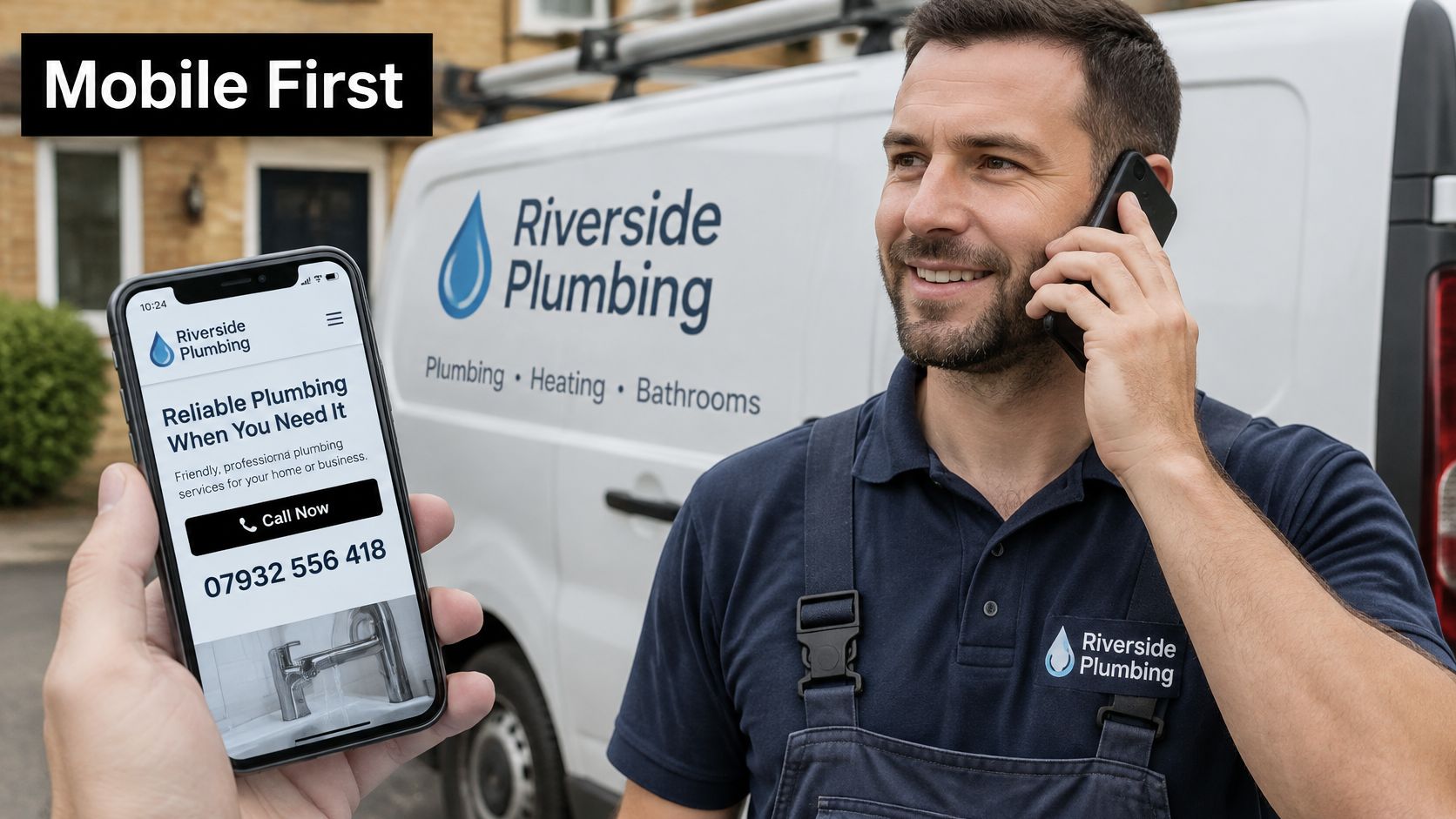
What the Mobile Page Must Do
- Put the call action near the top: Make it easy to call without scrolling, and make business phone numbers tappable wherever they appear. Visitors should not have to copy and paste a number.
- Keep contact details visible: Show the phone number and trading hours in the header, and keep the number accessible as visitors scroll.
- Keep the page quick to load: Compress images, remove heavy sliders, and check the page on a mobile connection rather than relying only on office Wi-Fi.
- Confirm service areas early: Name the suburbs you cover near the top. A visitor should know you service their area before reading your company history.
- Put proof by the call button: Place licence details, reviews, and photos of completed work near the action, rather than making visitors search an About page.
- Offer a short form for planned work: Ask for the essentials: name, phone, suburb, and job type. Longer forms add friction for someone requesting a quote.
On WordPress, a fast theme, simple page blocks, and a sticky mobile call bar can make the contact action easier to reach. A polished design that loads slowly works against that goal. For plumbing leads, make the phone route clear; use a form as a backup for planned quote work.
The video below shows how the page experience and call handling connect, including for after-hours enquiries.
Answer Like the Job Depends on It
During advertised hours, answer promptly and make clear what happens next. If you miss a call, send a short text with your business name and a callback expectation. After hours, use voicemail that sets a clear expectation or an answering service that can book the job. A message that nobody checks until morning may cost you an urgent job.
For example, a plumber running emergency ads until 10pm may miss a 9pm call, return it at 7am, and find the burst pipe has already been fixed. An answering service, a missed-call text, or a faster callback process can keep the conversation alive while the need is urgent. The right choice depends on whether the cost of covering calls after hours is supported by the work those calls can book.
Measuring Cost per Booked Job, Not Just Clicks
A cheap lead can be a bad result. A low cost per call that produces low margin repairs, missed calls, or customers outside your service area costs more than it looks. I'd rather pay more for a hot water replacement enquiry inside your core suburbs than buy cheap calls you don't want.
The infographic below sums up the four traps I check first when an account looks cheap on the surface but weak in the bank account.
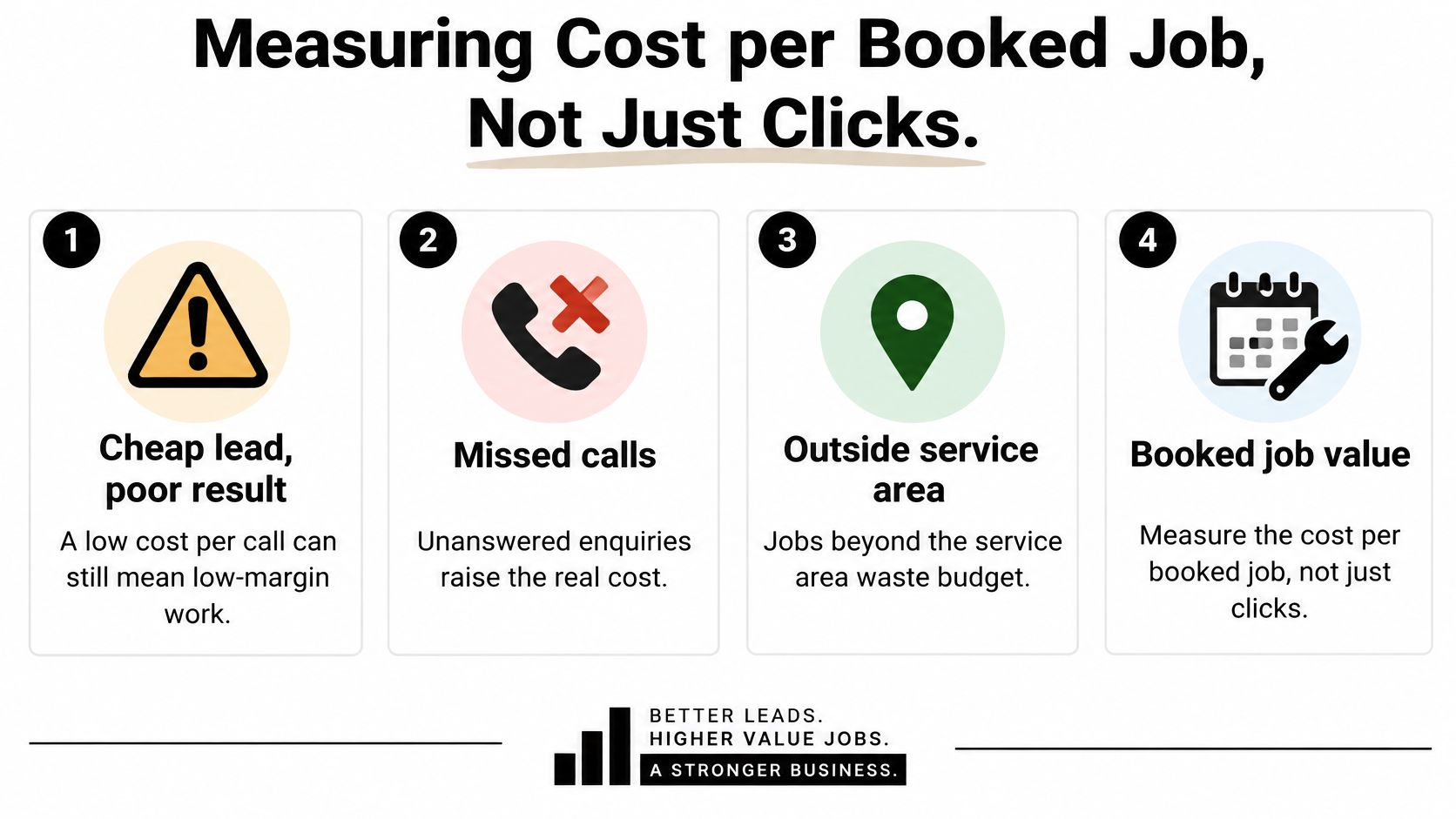
Build the Measurement Chain
Define a qualified call as a call lasting at least 60 seconds or tagged as booked. Import only those qualified calls into Google Ads as your primary conversion. Then pass booked jobs and invoice values back from your CRM or job management system, tagged by job type and suburb.
That chain changes your decisions. You stop asking which keyword got the cheapest call and start asking which keyword produced booked work at a margin. Google Ads for service based businesses only works long term when the bidding system learns from revenue signals, not from every short phone call and form submission.
For Google Ads for contact form submissions, apply the same discipline. A form fill isn't a job. Tag whether it was contacted, quoted, booked, and invoiced, then feed the booked outcome back where you can.
Your Weekly Review Checklist
- Cost per qualified call: Ad spend divided by calls that meet your duration or booking rule.
- Cost per booked job: Ad spend divided by jobs booked from those enquiries.
- Booked job rate: Booked jobs divided by qualified enquiries, split by emergency and planned work.
- Average revenue per job: Invoice value by job type, not blended across everything.
- Gross margin after materials and labour: The figure your ad spend has to clear.
- Impression share lost to budget or rank: A signal to investigate, not an automatic reason to spend more.
Use the search terms report every week. Add negatives for DIY, employment, and irrelevant services. Look at which suburbs produce booked work rather than just calls, and tighten or expand location targeting based on booked jobs, not click volume.
Diagnosis order: When cost per booked job exceeds margin, tighten keywords and search terms first, pause the weakest job type second, and only then change bids or budget.
Automated bidding needs enough conversion history to learn. A new account with a handful of qualified calls a week shouldn't be judged as if it has stable data. Wait for consistent volume, keep your qualification rules steady, and resist changing the conversion definition mid test. Consistency in measurement is what marketing your business with paid search requires.
Confirm Your Budget Before You Launch
Before launch, write down four decisions: the monthly amount you can sustain, the suburbs you can serve profitably, how you'll separate emergency calls from planned quote work, and how you'll track booked jobs and invoice value. A budget only makes sense alongside the work it needs to generate and the margin each job can support.
Set expectations around outcomes, too. No agency can guarantee rankings, enquiries, cost per acquisition, or return on ad spend in a live auction. Review performance against booked jobs and gross profit over an agreed period, and keep advertising spend separate from management fees unless agreed otherwise.
Working With Alpha Omega Digital
Alpha Omega Digital is a Melbourne-based digital marketing agency helping Australian businesses grow. Its services include Google Ads management for plumbers, alongside WordPress and Shopify development. For a plumbing campaign, the useful starting point is whether the budget, service area, and target jobs fit the business's margins.
Alpha Omega Digital offers a free 45-minute strategy session to review your site and show what it would fix. Use the session to discuss your campaign priorities and whether your site supports the work you want to book. You can book through the contact page.
Bring your monthly budget and the maximum cost per booked job your margins can support. That gives the discussion a practical focus: which work to advertise, what the campaign needs to measure, and whether the proposed test is affordable.
If you want Google Ads judged by booked jobs and gross profit, talk to Alpha Omega Digital about campaign management, call tracking, and landing pages. Bring your service area, target jobs, and monthly budget so the first test can focus on work your business wants to win.
Alpha Omega Digital
Read more insights from our team on web design, paid ads, and growth strategy.

