You launch a campaign, check back a few hours later, and the spend column is still sitting on zero. Or worse, it spends a trickle, then stops. I've seen this constantly with Shopify stores, WordPress lead gen sites, and local service businesses that come to us after burning time inside Google Ads with no clear answer.
Most of the time, Google Ads not spending isn't one mysterious problem. It's a chain of smaller issues. A budget that looks fine on paper but is too tight for the bid strategy. Targeting that's so narrow the campaign can barely enter auctions. Conversion tracking that's feeding rubbish into smart bidding. Or a campaign trying to squeeze more spend out of a market that just doesn't have more demand.
I'm going to walk through this the same way I'd do it if you were sitting across from me in Melbourne with your laptop open. Start with the easy checks. Then move into bidding, targeting, compliance, tracking, and finally the strategic stuff most guides ignore.
That Sinking Feeling When Your Google Ads Budget Gathers Dust
A lot of clients come to me at the same point. The campaign is approved. Billing looks fine. The ads are there. But nothing's happening. No clicks. No impressions worth talking about. No sales. No enquiries. Just silence.
That silence makes people assume Google is broken. Usually it isn't.
In Australia, search is crowded. The Australian Bureau of Statistics reported that 95.9% of people aged 16–64 used the internet daily or almost daily in 2023–24, which creates a very active online environment, but also a competitive one where tight settings can choke delivery fast, as noted in Google Ads help on budget and serving limits. I see this all the time with Melbourne businesses targeting tiny locations, limited devices, narrow ad schedules, and modest budgets, then wondering why the account won't spend.
What this usually looks like in real accounts
For ecommerce, it's often a Shopify store with a neat-looking campaign structure but a product feed that's fighting against low visibility, weak bidding signals, or over-filtered inventory. For service businesses, it's usually a search campaign trying to reach only a sliver of the market, sometimes with postcode targeting so tight the campaign barely qualifies for auctions.
The frustrating part is that the campaign can look “live” while being functionally invisible.
My view: if a campaign isn't spending, I don't start by rewriting ads. I start by checking whether the campaign has any real chance to enter enough auctions in the first place.
The mistake I see most
People jump straight to optimisation before they've confirmed basic delivery conditions. They tweak headlines, swap match types, add audiences, and change landing pages when the actual issue is simpler. The campaign was boxed in from day one.
If you're dealing with Google Ads not spending, assume nothing. Check the obvious first. Then check the mechanics underneath it.
Your 10-Minute Diagnostic Checklist Before You Panic
It's 9:12am. You open Google Ads, the campaign says “eligible,” and spend is still flat. I've seen this with Melbourne tradies, clinics, and Shopify brands launching into a crowded market, then losing half a day chasing the wrong problem.
Start with the easy checks. Get the account serving first. Leave the heavier diagnosis for later.
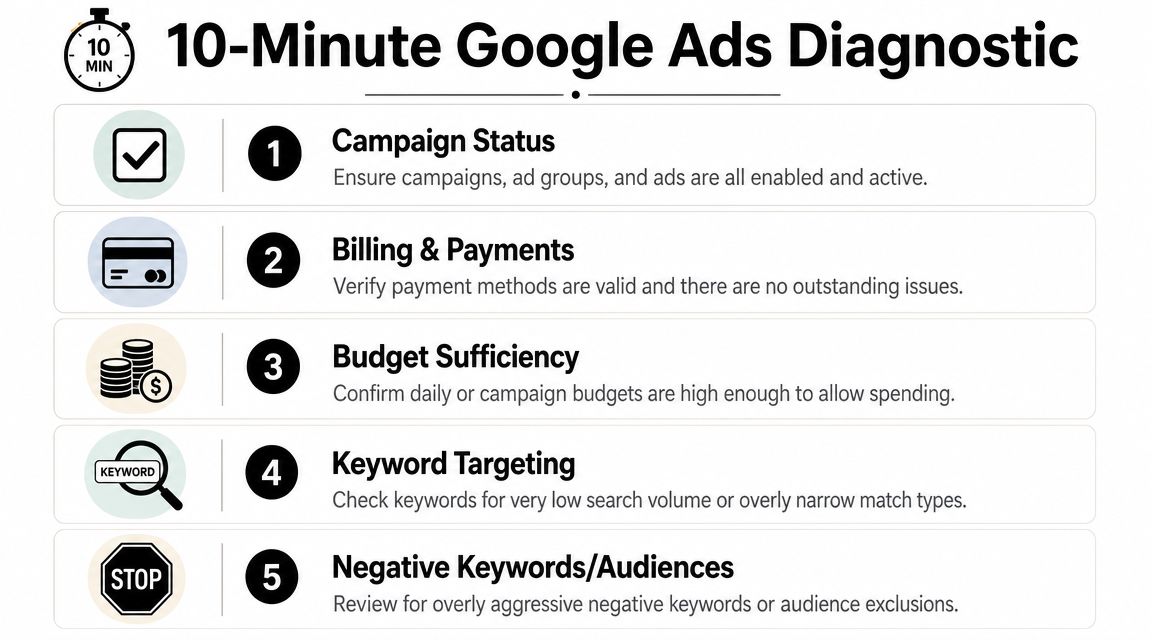
Check the obvious blockers first
I always begin at account level because these issues are fast to confirm and fast to fix.
- Campaign, ad group, and ad status: Make sure everything that should be live is enabled. I still find paused ads, removed assets, and draft settings in active accounts more often than clients expect.
- Billing: Check for card failures, payment holds, or account-level billing alerts. If billing is broken, nothing else matters.
- Dates: Confirm the campaign hasn't expired and didn't start later than planned.
- Approvals: Look for disapproved ads, limited approvals, and Merchant Center issues if you run Shopping or Performance Max.
- Location setup: Confirm you are targeting the right areas and not excluding them by mistake. In Australia, tight postcode targeting can choke delivery fast, especially outside the biggest metro pockets.
A lot of “Google Ads not spending” cases die right here. Good. That's what you want.
Use diagnostics before you start changing settings
Open Ad Preview and Diagnosis and check whether the campaign can enter auctions. I don't trust surface-level status labels on their own. “Eligible” only tells you the campaign is allowed to run. It does not mean it has enough reach, enough rank, or enough clean data to spend.
Then scan the campaign for the common self-inflicted restrictions:
Keyword status
Low search volume keywords, ultra-tight exact match, and tiny keyword lists are common blockers for service businesses.Negatives and exclusions
I've seen accounts block their own best traffic with aggressive negatives, audience exclusions, and location exclusions.Ad schedule and device settings
If you only run on desktop, during business hours, in a narrow service area, expect patchy delivery.Feed or CMS issues
Shopify stores should check product availability, feed sync, and Merchant Center warnings. WordPress sites should check whether form plugins, thank-you pages, and call tracking still work after theme or plugin updates.Conversion setup
Bad conversion data can suppress Smart Bidding long before people realise it. If the account is optimising toward duplicate purchases, soft page views, or broken lead events, the algorithm starts making poor decisions.
That last point gets missed all the time. For lead gen accounts, I want quality signals, not junk form fills. Orbit AI's perspective on bad leads lines up with what we see in service businesses. If weak leads are being counted as wins, bidding gets distorted and spend often becomes erratic.
My actual 10-minute order of operations
This is the sequence I use in live accounts:
| Check | What I'm looking for | What I do if it's wrong |
|---|---|---|
| Status | Paused, removed, limited, expired | Enable the right assets and fix date issues |
| Billing | Payment failures or holds | Fix billing first, then confirm impressions return |
| Diagnostics | Auction eligibility problems | Use the tool to identify the specific blocker |
| Targeting | Tiny locations, heavy exclusions, narrow schedule | Open settings up enough to gather real demand |
| Keywords or feed | Low volume terms, feed errors, unavailable products | Add broader coverage or fix feed quality |
| Conversion tracking | Broken tags, duplicate events, low-quality goals | Clean up tracking before trusting Smart Bidding |
What I recommend for Australian accounts
If you sell into a saturated metro market like Melbourne or Sydney, don't confuse low spend with a technical fault every time. Sometimes the campaign is technically fine but too constrained to compete. I see this a lot with new ecommerce brands on Shopify and local service businesses trying to target a tiny radius with strict schedules.
My rule is simple. Fix the easy blockers first. Then widen anything that is artificially restricting demand. Only after that do we judge budget, bidding, or ad rank.
Solving Budget, Bidding, and Ad Rank Mysteries
Google doesn't spend your budget just because you gave it one. That's the first thing I tell clients. Your daily budget is a cap, not a promise.

If your bids are too weak, your quality signals are poor, or your targeting is too restrictive, the campaign won't enter enough auctions to spend properly. That's why two accounts with the same budget can behave completely differently.
Your budget might be unrealistic for your bid strategy
This is one of the most common causes of Google Ads not spending, especially in smart bidding campaigns. A practical benchmark is to keep daily budget at least 3–5× target CPA, and if Search Impression Share is below 20%, that's a strong signal that bids, budget, or quality score are blocking delivery, based on this troubleshooting benchmark.
If your target CPA is tight and your daily budget is cramped, you've boxed the algorithm in. It can't explore enough auctions to learn.
Manual bidding versus smart bidding
I don't treat these as religious choices. I use what fits the account.
| Situation | What I usually prefer |
|---|---|
| New account with weak or messy conversion data | Simpler bidding, often with more control |
| Account with clean conversion tracking and decent signal quality | Smart bidding can work well |
| Shopping campaign with unclear feed quality | More visibility first, then automation later |
| Lead gen campaign with inconsistent tracking | Fix data before tightening targets |
A lot of ecommerce brands jump into Maximise Conversions or target-based bidding too early. Then they assume the strategy failed, when the underlying issue was poor inputs.
Ad Rank is the hidden gatekeeper
You can have money available and still fail to show. Google Ads is still an auction. If your ad isn't competitive enough, you won't enter often enough to spend.
That's why I look at things like:
- Search Impression Share
- Bid strategy restrictions
- Landing page relevance
- Ad strength and keyword alignment
- Asset quality
If you're getting impressions but not enough of them, I want to know whether the account is being priced out, filtered out, or ignored because the ad and landing page aren't strong enough.
A related issue is lead quality. I'd rather have a campaign that spends carefully on relevant intent than one that spends freely on junk. That's why I think Orbit AI's perspective on bad leads is useful. Poor lead filtering can make a campaign look active while the business still feels like Google Ads isn't working.
Here's a useful walkthrough on the budget side of the problem:
What I change first
I don't make six bid changes at once. I usually test in this order:
- Loosen impossible targets: If target CPA or target ROAS is choking delivery, relax it.
- Raise the budget to something workable: Smart bidding needs room.
- Review query coverage: If the campaign can't access enough relevant searches, the budget won't matter.
- Improve ad and landing page alignment: Better relevance helps Ad Rank.
- Watch impression share before forcing spend: Low visibility often tells the story faster than the spend column.
A campaign with a healthy budget and poor Ad Rank still won't spend. Fixing the auction position matters more than throwing in more money blindly.
For product-led accounts, I see this a lot in Shopping. Merchant Centre feed quality, product titles, pricing competitiveness, and campaign structure all shape whether Google gives your products enough exposure.
If you need hands-on help with that kind of setup, a Google Ads agency can manage Search, Shopping, and Performance Max, but the important part is the method. Budget second. Auction access first.
Is Your Targeting Strangling Your Campaign
You open the campaign, see it's enabled, approvals look fine, and the budget is sitting there untouched. Then you check the settings and find the actual problem. The campaign has been boxed into a corner so tightly that Google barely has any chance to enter the auction.
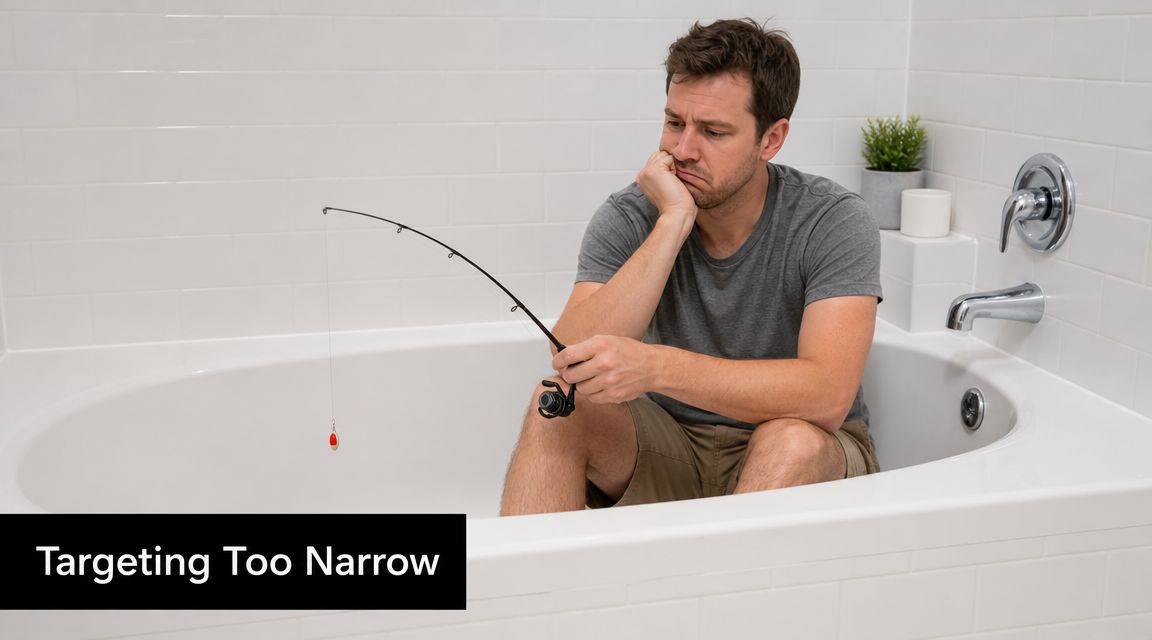
I see this all the time in Australian accounts. A business targets one suburb, one age range, one device type, weekdays only, then adds audience restrictions on top. In Melbourne or Sydney, saturation makes that even worse because you're already competing in a crowded auction. In smaller regional areas, the problem flips. There just isn't enough search volume to support that level of precision.
Check the easy settings first
Before I touch bids or rebuild campaign structure, I look for targeting limits that kill reach fast:
Location targeting set too tight
If you only target a handful of postcodes or a single suburb, don't expect consistent delivery. For service businesses, I usually widen to the full serviceable area first. For ecommerce, I often start with all of Australia unless freight costs or fulfilment rules say otherwise.Audience targeting used as a filter instead of observation
This is a common mistake. Advertisers stack in-market audiences, affinity segments, demographics, and exclusions, then wonder why impressions disappear. In Search, I want observation in most cases before I start restricting who can see the ad.Ad scheduling cut down too early
Restricting ads to office hours sounds sensible, but it often blocks real demand. Plenty of people research after hours, especially for trades, health, legal, and high-consideration services. Let the campaign run wider, then cut dead hours after you have enough conversion data.Device exclusions based on opinion
Excluding mobile for a Shopify store is usually a bad call. Excluding tablets or desktop for lead gen without proof is just guessing. I keep devices open until performance clearly tells us otherwise.Keyword matching that's too narrow
Exact match and tiny keyword lists choke campaigns all the time. If your WordPress or Shopify store is already in a niche category, you need enough query coverage to give Google room to work.
The Australian market changes how tight you can go
This part gets missed.
In the US, some advertisers can target narrowly and still find scale because the volume is huge. In Australia, a tight setup runs out of runway much faster. That's true in local service campaigns and in ecommerce categories with heavy competition. If your product is seasonal, premium-priced, or in a saturated vertical like fashion, furniture, skincare, or supplements, aggressive targeting makes an under-spending problem show up even faster.
I'd rather let the campaign reach enough people first, then trim waste with search terms, exclusions, and actual performance data.
A common ecommerce example
A Shopify homewares store wants more sales nationwide. The owner targets only metro areas, restricts age brackets, limits ad hours, and runs a tiny exact-match keyword set. Then they ask why spend is stuck.
That account doesn't need another tweak. It needs air.
For WordPress lead gen sites, I see a similar issue with local campaigns. The business targets a narrow radius, excludes mobile traffic, schedules ads only during reception hours, and sends users to a slow contact page. Even if the campaign gets some impressions, poor conversion data then feeds back into bidding and makes delivery worse. Smart bidding cannot scale if the tracking is patchy and the campaign is barely entering auctions in the first place.
Targeting should reduce wasted clicks. It should not cut off demand before Google even has a chance to find it.
How I set campaigns up instead
I start broad enough to learn, then tighten based on what the account proves.
| Setting | Weak starting point | Better starting point |
|---|---|---|
| Location | Tiny postcode cluster | Full serviceable region or Australia-wide if fulfilment allows |
| Audiences | Restricted targeting from day one | Observation first where possible |
| Schedule | Short ad windows | Broader coverage until conversion patterns are clear |
| Devices | Early exclusions | Keep all devices live until results justify cuts |
| Keywords | Small exact-only list | Relevant mix with enough coverage to find demand |
If you run a Shopify store, also check feed-driven campaigns against your real market reach. I've seen stores blame Performance Max or Shopping when the actual issue was limited product visibility caused by narrow location settings and weak product data. If you run WordPress, look closely at forms, call tracking, and thank-you pages. Bad tracking makes good traffic look useless, and that pushes people to tighten targeting even more. That spiral kills spend.
For brands that want broader growth support beyond paid traffic, an ecommerce marketing agency can tie paid search, creative, site experience, and CRM together. But the rule stays the same. Open up targeting enough to get clean data first. Then refine.
Navigating Policy Approvals and Landing Page Experience
Google doesn't care how good your offer is if the ad or landing page breaks the rules. I've seen perfectly sensible campaigns stall because of one policy problem, one missing compliance detail, or one landing page that creates too much friction.
A lot of advertisers only look at the ad status. That's not enough. Google checks the destination too.
What usually goes wrong
For ecommerce stores, common issues include exaggerated claims, unclear pricing, restricted product language, or product pages that don't match the promise in the ad. For service businesses, it's often vague claims, messy contact flows, or pages that feel unfinished.
Then there's the technical stuff people ignore:
- Broken or confusing landing pages
- Missing trust signals
- Weak mobile usability
- Poor privacy or contact information visibility
- Mismatch between keyword, ad, and page content
Those issues don't always trigger a hard disapproval. Sometimes they just drag down delivery because the campaign isn't competitive enough in the auction.
Eligible limited is still a problem
If your ads are marked as eligible but limited, don't shrug and move on. Limited delivery means something is holding the campaign back. It could be policy sensitivity, low Ad Rank, or a weak destination experience.
I always check the actual landing page from a customer's perspective.
Does the page match the ad?
If the ad says one thing and the page opens with something else, relevance drops.Is the page easy to use on mobile?
Most businesses lose conversions here before they realise it.Is there enough trust to complete the action?
Reviews, clear policies, product details, shipping info, and contact details matter.
Website quality directly affects ad performance
Web development and paid ads overlap more than people think. A sloppy build can absolutely hurt campaign delivery.
If your product pages are hard to use, your forms break, or your checkout is clunky, Google gets weaker signals. Users bounce. Conversion rates suffer. Smart bidding gets worse data.
That's why I treat build quality as part of media buying. A fast store, clean templates, proper tracking hooks, and stable page structure matter whether you're on Shopify or WordPress.
For businesses fixing that side of the stack, a specialist Shopify developers in Melbourne team can help on product templates and performance, while a skilled WordPress developer is useful when lead gen pages, forms, or Gutenberg blocks need proper technical work. The same goes for conversion-focused web design Melbourne work when the page itself is dragging down results.
Google Ads doesn't stop at the ad. It judges the entire click path.
My rule for policy and page checks
If a campaign isn't spending and the settings look fine, I manually inspect the ad, the keyword intent, and the landing page together. Not separately. Together.
That's how you catch the quiet mismatches that the dashboard won't spell out clearly.
The Critical Role of Conversion Tracking Data
If you're using smart bidding without clean conversion tracking, you're asking Google to optimise blind. That's one of the biggest reasons I see Google Ads not spending properly in newer accounts and messy legacy setups.
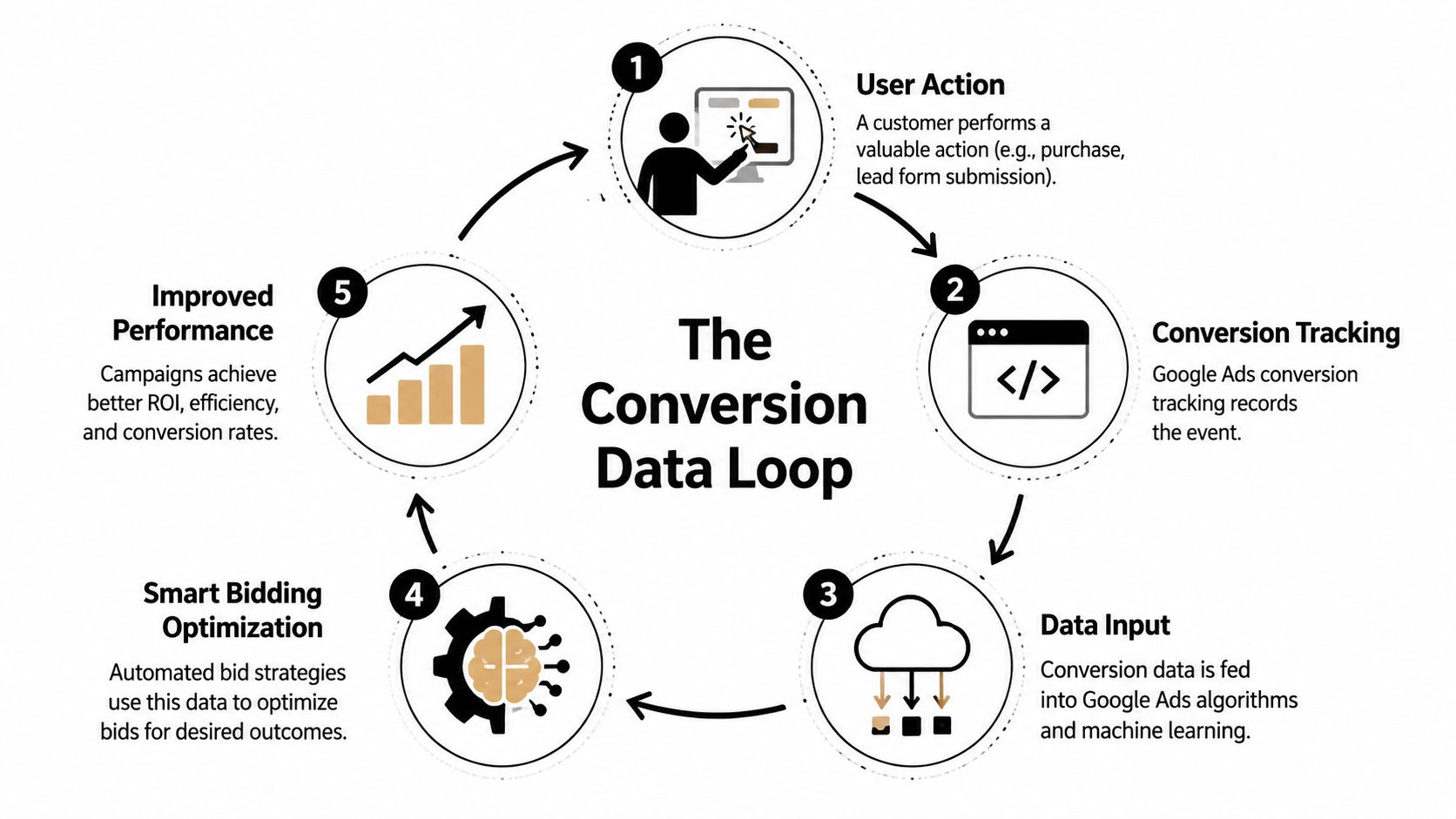
Google explicitly warns that automated bidding depends on conversion tracking and that restrictive targets can cap delivery. That becomes even more painful in high-cost Australian sectors where low conversion volume can leave campaigns stuck in learning and unable to spend reliably, as discussed in this analysis of why Google isn't spending budget.
Smart bidding needs signal quality, not just signal volume
A lot of accounts technically have conversion tracking. That doesn't mean the tracking is useful.
I've seen accounts optimise for:
- page views
- scroll depth
- button clicks that don't lead anywhere
- duplicate purchase events
- form submissions that never fire consistently
- imported goals from GA4 that don't reflect real business outcomes
That kind of setup poisons the learning process. Google starts bidding toward noise.
What clean tracking should look like
For ecommerce, I want real purchase data, transaction values, and stable event firing. For lead gen, I want meaningful form submissions, calls, and ideally some visibility into lead quality later in the funnel.
That usually means a proper setup through Google Tag Manager, GA4, and the ad platform itself. If you're running a WordPress site, your form plugin and thank-you flow need to be checked. If you're on Shopify, the purchase event chain needs to be verified after theme changes, app installs, and checkout modifications.
Here's the practical loop I care about:
| Step | What must happen |
|---|---|
| User acts | A shopper buys or a lead submits |
| Tracking fires | The event records cleanly |
| Google receives it | The platform gets the right signal |
| Bidding learns | Smart bidding adjusts toward better users |
| Performance improves | The campaign spends with more confidence |
Call tracking matters more than most businesses think
For service businesses, a lot of value comes through phone calls, not just forms. If those calls aren't tracked, Google gets an incomplete picture of what's working.
That's why I often recommend reviewing tools in a serious best call tracking software comparison before locking in your stack. If calls drive sales, they belong in your measurement plan.
If half your conversions happen on the phone and Google only sees form fills, your bidding strategy is learning from half the story.
My approach for low-data accounts
When an account has poor volume or unreliable events, I usually avoid aggressive targets too early. I'd rather:
- Fix tracking first
- Simplify primary conversions
- Use broader bidding while data stabilises
- Separate micro-conversions from true business outcomes
- Review event quality after site updates or app installs
This same principle applies across channels. When we handle Meta accounts and set up Conversions API, the goal isn't just reporting accuracy. It's better optimisation input. Paid media platforms spend more confidently when the feedback loop is clean.
The same goes for businesses that rely on contact forms. If your form fires inconsistently, or spam is mixed in with real leads, the algorithm doesn't know what success looks like.
Advanced Scenarios and When to Call for Help
You've fixed the obvious stuff. Tracking is cleaner. Targeting is broader. Ads are approved. Budget is available. And the campaign still spends like it's half asleep.
That's the point where I stop hunting for account settings and start questioning the commercial reality behind the account.
A lot of Google Ads accounts in Australia hit a ceiling that business owners do not expect. I see it in smaller metro pockets, regional towns, and niche service areas all the time. If your campaign already captures most of the available local demand, raising bids will not magically create more searches. Before you force more spend, check whether you're already close to maxing out impression share and whether your offer has saturated the market, as explained in this discussion of unspent budget and market limits.
When setup is no longer the main issue
These are the scenarios where I shift from troubleshooting to strategy:
Local demand is capped
If you already dominate the searches that matter, there may be no more volume to buy in that area.Your campaign type is fighting the account
I've seen Standard Shopping campaigns underperform because the feed is messy, product groups are too blunt, or the account should have been split by margin, brand, or product type. I've also seen Performance Max stall because the goals, assets, and feed quality are all pulling in different directions.Your CMS or store setup is causing hidden friction
On Shopify, this is often poor feed enrichment, app conflicts, or duplicate tracking events. On WordPress, it's commonly slow templates, broken form tracking, plugin conflicts, or landing pages that look fine to you but create a poor mobile experience.Lead handling is the main bottleneck
For tradies, clinics, salons, and other service businesses, weak follow-up gets blamed on Google Ads constantly. I've seen solid campaigns look “unprofitable” because calls were missed or web leads sat untouched for half a day.Creative has gone stale
This matters most in Performance Max, display, video, and remarketing. If the account has weak asset coverage, Google has less to work with when it tries to expand.
The back end can choke a healthy campaign
I've seen good lead gen accounts look broken because the business was slow to answer the phone, quoted inconsistently, or made it too hard for people to book.
For appointment-driven businesses, the ad click is only the start. A plumber who misses calls after hours, a dental clinic with a clunky booking flow, or a beauty salon that replies the next day will all blame the campaign first. In reality, the conversion path is leaking after the click.
That is also why data quality matters so much in these advanced cases. If Shopify duplicates purchases or WordPress forms fire junk conversions, smart bidding learns from rubbish inputs. Then you get the worst mix possible. Low spend, poor lead quality, and no clear signal telling Google who to find more of.
When I would restructure the account
I do not rebuild accounts for the sake of it. Rebuilds take time, reset learning, and create fresh variables. But there are cases where patching the old setup is a waste of money.
| Scenario | Likely action |
|---|---|
| High impression share with low room to grow | Accept the market cap or expand geography, offer, or keyword coverage |
| Shopping under-spending with weak feed segmentation | Rebuild campaign structure and clean up the product feed |
| Performance Max spending poorly | Audit goals, audience signals, feed quality, assets, and brand exclusions |
| Lead gen with junk enquiries | Tighten qualification, import better offline outcomes, and remove noisy conversions |
| Good clicks, weak close rate | Fix follow-up speed, call handling, and sales process before scaling |
If asset volume is the bottleneck, tools like ShortGenius AI ad creative tool can help you produce more variations faster. Use that to support testing, not to paper over a bad offer or messy account structure.
There is a point where more tweaking becomes expensive procrastination. If the account is boxed in by market size, poor conversion quality, weak feed inputs, or a broken sales process, the answer is strategic change.
If you've worked through the advanced issues and the account still will not move, get a second opinion. We offer a free, no-obligation strategy call for businesses spending over $3k a month on ads. That gives you a clear view on whether the problem is bidding, market saturation, tracking quality, Shopify or WordPress setup, or the handoff after the lead comes in.
Alpha Omega Digital
Read more insights from our team on web design, paid ads, and growth strategy.