A Melbourne business owner once showed me a site they'd spent good money on and asked why it wasn't producing leads. The answer was blunt. It looked polished, but nothing on it made the next step obvious, nothing was tracked properly, and the build wasn't connected to the ad strategy driving traffic.
That's the gap most businesses run into when they try to work out how to build a high converting website. They treat design, development, analytics, and paid ads as separate jobs. We don't. As a marketing agency Melbourne businesses hire for both websites and growth, we build the full system so the site can convert the traffic you pay for.
The Foundation A High-Converting Website Is Built On
A website is not a brochure. It's a sales asset, a lead generation asset, or a customer acquisition asset. If you don't define that job before design starts, you usually end up with pages that look fine in a portfolio and underperform in practice.
In our agency, we start with the same question every time. What exactly is the conversion? For an eCommerce brand, that might be a completed purchase. For a service business, it might be a qualified form enquiry, a phone call, or a booked consultation. If that isn't clear at the start, every later decision gets weaker.
The Australian context matters here. 96.2% of Australians aged 16 to 64 used the internet in the 2022 to 2023 financial year, and 89.1% accessed it daily, which means your site needs to work for people who compare options quickly and move between devices often, as noted in this Australian web usage summary. That's why we design for immediate clarity, not for long explanations buried halfway down a page.
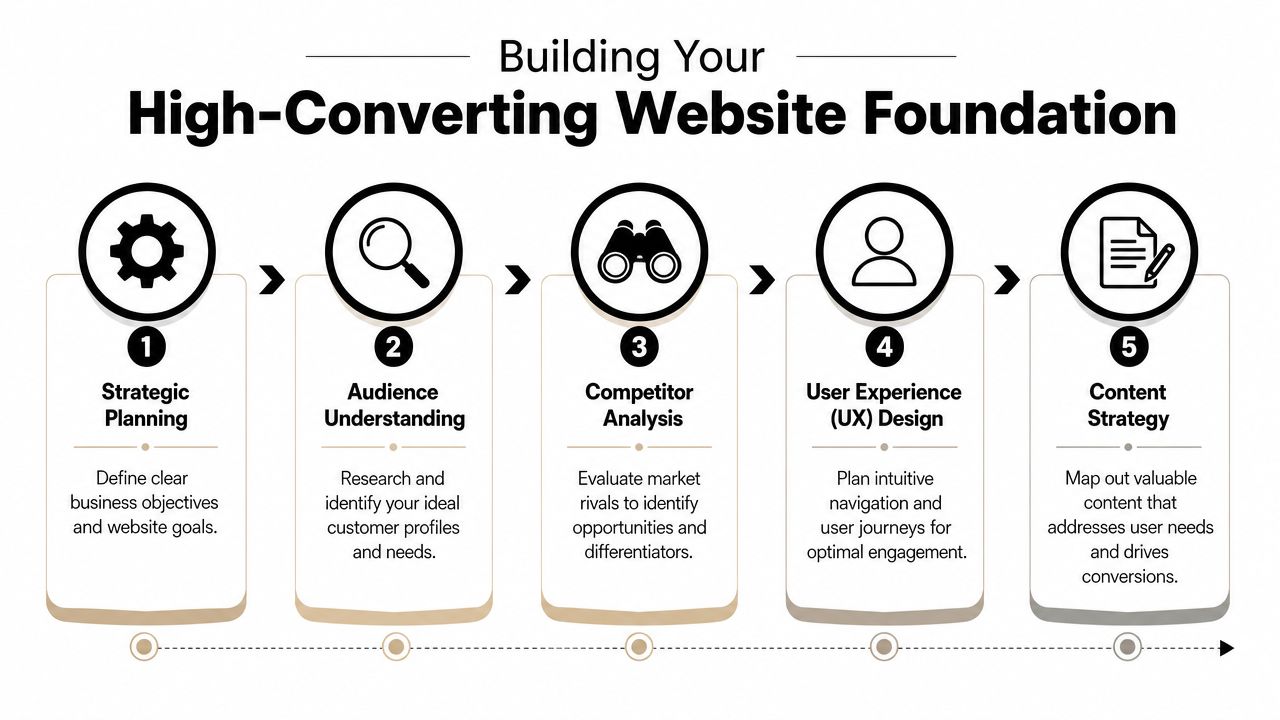
Start with the conversion goal
A lot of weak projects begin with, “We need a new website.” That's not a strategy. It's a task.
We map the primary conversion first, then the secondary one. For example:
- eCommerce stores usually need a clean path to product discovery, cart, and checkout.
- Service businesses often need one dominant call to action such as request a quote, book a call, or call now.
- Hybrid businesses need to separate buyer journeys so visitors don't get sent into the wrong funnel.
When people ask me what works, this is usually the first answer. The sites that convert well are decisive. They don't ask users to choose from six competing actions in the hero section.
Practical rule: if every button is important, none of them is.
Research the audience you actually sell to
Most businesses describe their audience too broadly. “Homeowners.” “Small businesses.” “People interested in quality.” None of that helps with page structure or ad message match.
We look at real inputs:
- Sales call notes so we can hear objections in the customer's own language.
- Search intent from Google Ads and SEO keyword patterns.
- Competitor positioning to spot what everyone else is saying.
- Existing analytics if the current site has enough clean data to use.
That work shapes the copy. It also shapes the user journey. If buyers need reassurance, we move trust signals earlier. If they need pricing confidence, we don't hide commercial information behind vague language.
Build the information architecture before the visuals
The initial structural work determines whether projects become easy or painful later. We wireframe the structure before worrying about colour palettes and animation.
A high-converting structure usually needs:
- A clear homepage role that routes people properly
- Dedicated landing pages for ad traffic
- Service or collection pages built around intent, not internal business jargon
- A friction-light contact or checkout path
- Trust pages such as reviews, FAQs, shipping, returns, or process pages where relevant
Here's a simple way we think about information architecture:
| Page type | Its real job |
|---|---|
| Homepage | Clarify who you help and direct visitors fast |
| Service or collection page | Match commercial intent and answer buying questions |
| Landing page | Remove distractions and drive one action |
| Contact or checkout page | Minimise friction at decision time |
Plan the journey, not just the page
Good conversion design is about sequence. The visitor lands, understands, trusts, and acts. That sounds simple, but a lot of websites break that chain.
What doesn't work well:
- Generic headlines that could belong to any business
- Navigation bloat with too many menu items
- Sliders and carousels that hide the core message
- Hero sections with no obvious next step
- Design-first copy that sounds impressive but doesn't sell
What usually works better:
- One clear promise above the fold
- One primary CTA repeated consistently
- Trust signals early such as reviews, recognisable clients, delivery info, or process reassurance
- Logical content order based on buying questions, not internal departments
That foundation work is unglamorous, but it's the reason some sites convert and others just sit there.
Choosing Your Tech Stack WordPress vs Shopify
Once the strategy is right, the next decision is platform. For most businesses we work with, the realistic choice is WordPress with WooCommerce or Shopify. Both can convert well. Both can also become a mess if the wrong business ends up on the wrong platform.
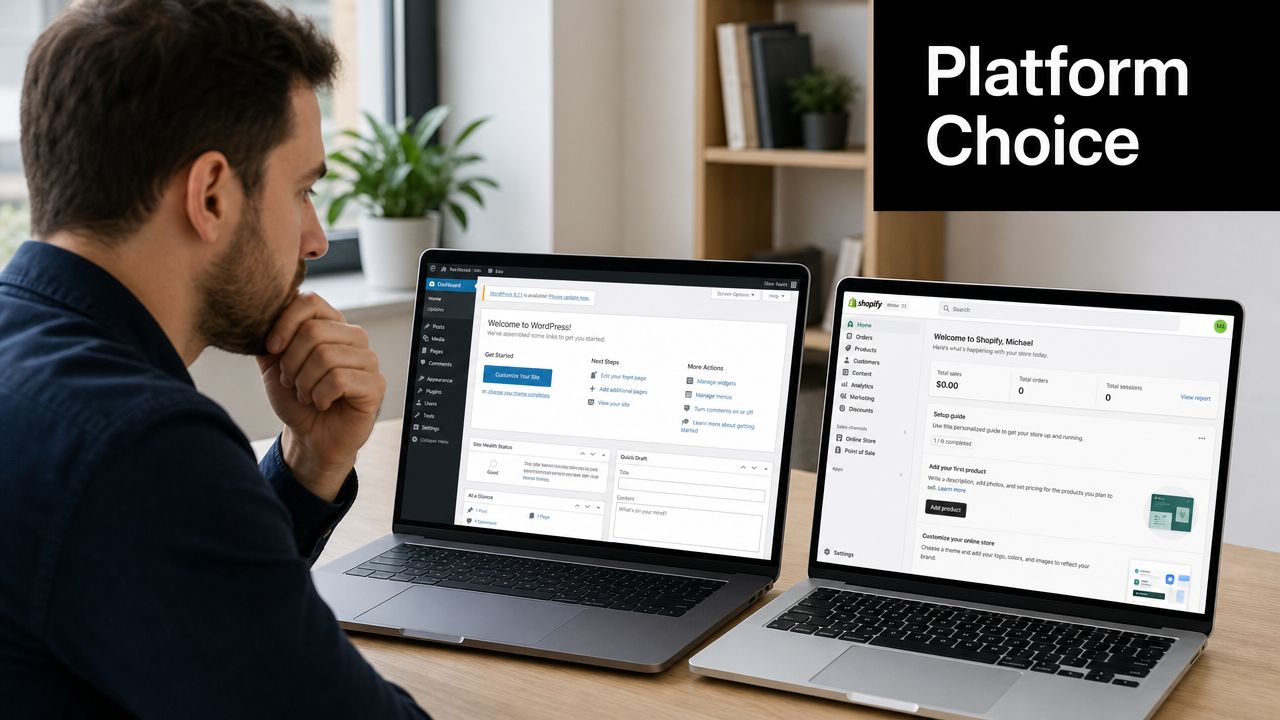
Australia is already a mature online buying market. Australia Post reported that online shopping generated about 9% of total retail spend in 2023 and that 9.3 million households shopped online, as summarised in this landing page statistics article. That's why platform choice is a commercial decision, not a purely technical one. Your stack affects speed, checkout flow, merchandising, and your ability to iterate.
When WordPress makes more sense
We use WordPress when a business needs flexibility in content structure, deeper customisation, or a site where content and lead generation matter as much as commerce. That's common for service businesses, content-heavy brands, and stores with unusual requirements.
WordPress is strong when you need:
- Custom page structures for SEO and landing pages
- Advanced content publishing
- Tighter control over templates and fields
- WooCommerce flexibility for custom product logic
- Custom Gutenberg blocks so the marketing team can build pages without breaking design consistency
That last point matters. A proper Gutenberg setup gives clients reusable conversion-focused components instead of a giant page builder free-for-all. We often create custom blocks for testimonials, comparison rows, FAQ accordions, feature grids, promo banners, and offer sections. It keeps editing simple and the front end clean.
If you need a team that handles that side properly, our work as a WordPress development company is built around custom builds rather than bloated installs.
When Shopify is the better option
Shopify is usually the cleaner choice for pure eCommerce businesses that want a stable platform, an efficient admin, and fewer moving parts. If your team needs to manage products, orders, discounts, and content without dealing with plugin conflicts, Shopify often wins.
It's a strong fit when you need:
- Fast product management
- Reliable checkout
- App ecosystem support
- Clear catalogue management
- A store-first setup with less maintenance overhead
We also use Shopify when a business wants speed in both senses of the word. Speed to launch, and speed in user flow. For many catalogues, that simplicity is a conversion advantage.
For brands needing custom functionality, we go beyond theme edits. We use the Shopify developer API and build bespoke features with Shopify CLI when the brief calls for it. That can mean internal workflow tools, custom app behaviour, or integrations that don't exist off the shelf.
A practical comparison
| Decision factor | WordPress | Shopify |
|---|---|---|
| Content flexibility | Strong | Good |
| Store management simplicity | Moderate | Strong |
| Custom layout control | Strong | Good |
| Checkout stability | Good | Strong |
| Plugin or app sprawl risk | Higher if unmanaged | Lower, but still possible |
If the business model is content-led with commerce attached, WordPress often gives you more room. If the business model is store-led and operational simplicity matters, Shopify is usually the cleaner call.
A lot of people ask me whether one platform converts better than the other. That's the wrong question. The critical question is whether the platform supports the buyer journey without friction.
Build quality matters more than platform loyalty
I've seen fast, profitable WordPress builds. I've also seen WordPress sites crushed by bad plugin choices, poor hosting, and page builder clutter. Same with Shopify. A clean Shopify store can perform brilliantly. A Shopify store overloaded with apps, scripts, popups, and visual gimmicks can slow to a crawl.
That's why platform choice needs to match how the business will operate after launch.
A few things we look at before choosing:
- How often the team will update pages
- How technical the owner or marketer is
- Whether the catalogue is simple or complex
- Whether SEO landing pages are a major acquisition channel
- Whether custom app logic will be needed later
This walkthrough is useful if you want to see one side of that build process in action:
Don't choose based on what's fashionable
A business owner doesn't need the most hyped platform. They need one their team can use properly six months from now.
For WordPress builds, that might mean a proper custom theme, lightweight plugins, structured fields, and scalable templates from an experienced web design Melbourne team. For Shopify, it might mean a customised theme setup, app restraint, and sensible use of APIs from developers who understand eCommerce operations, like our Shopify developers in Melbourne.
Either way, the platform should support growth. It shouldn't become the bottleneck.
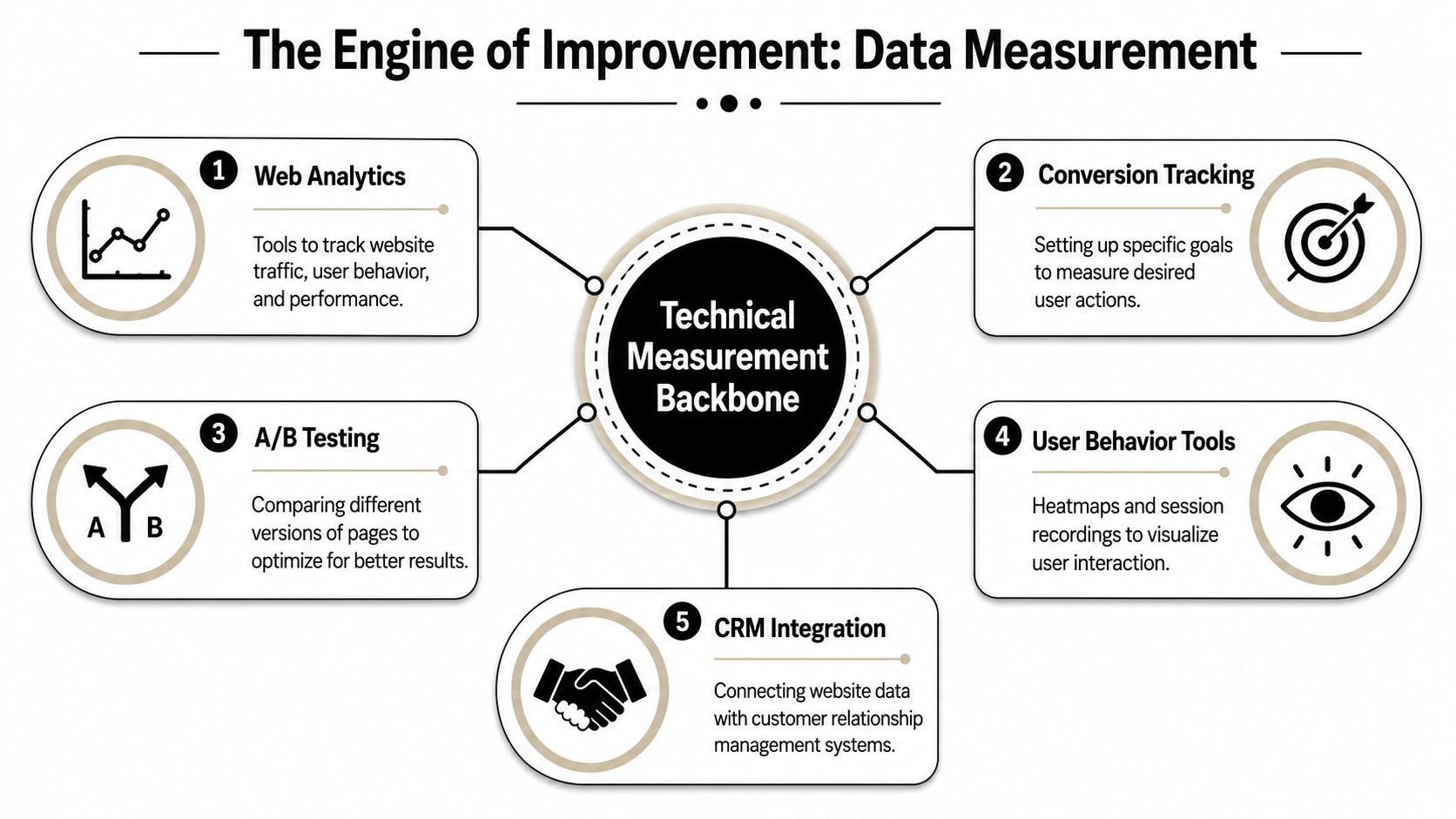
Setting Up Your Technical Backbone for Measurement
A website without measurement is guesswork with nicer visuals. You can't improve what you can't see, and you definitely can't scale paid traffic profitably if the tracking is messy.
Many projects falter here. The site goes live, forms work, purchases come through, and everyone assumes the setup is fine. Then the business starts running Google Ads or Meta ads and realises nobody trusts the numbers.
Start with Google Tag Manager and GA4
We almost always begin with Google Tag Manager because it gives us one place to manage tracking scripts, events, and platform tags without hard-coding every small change. It keeps the site cleaner and makes future changes faster.
Then we connect Google Analytics 4 and define conversion events properly. Not vanity actions. Actual business outcomes.
For example:
- Lead gen sites should track form submissions, phone clicks, booked calls, and qualified lead events where possible.
- eCommerce sites should track product views, add-to-cart events, checkout behaviour, and purchases.
- Multi-location businesses may need location-specific actions so ad reporting reflects what matters by suburb or service area.
The biggest mistake here is tracking too much junk. Scroll depth and generic button clicks can be useful for diagnosis, but they're not a replacement for meaningful conversions.
Add server-side thinking with Meta Conversions API
For businesses running paid social, browser-only tracking leaves gaps. That's why we treat Meta Conversions API as part of the standard stack, not an optional add-on.
When we install Conversions API for Meta, we're trying to improve signal quality so campaign optimisation has cleaner event data to work with. The exact setup differs by platform. Shopify can be straightforward. WordPress setups vary more depending on plugins, custom checkout flows, and event requirements.
If you need implementation support on the ads side, Alpha Omega Digital's Meta ads services cover Conversions API setup as part of paid social infrastructure.
Bad tracking creates false confidence. Good tracking usually starts with fewer events, cleaner naming, and testing every important action before launch.
Performance is part of measurement too
Tracking setup and site speed are closely connected. If scripts are heavy, pages get slower. If pages get slower, users drop before key events even happen.
For Australian websites, Google's thresholds for Core Web Vitals remain a useful benchmark. A page should aim for LCP at or below 2.5 seconds, INP at or below 200 milliseconds, and CLS at or below 0.1, based on Google's Core Web Vitals guidance summarised here. In practice, that means we keep hero images lean, defer unnecessary JavaScript, and stop elements from jumping around on mobile.
Here's the simpler way to understand:
| Technical area | What we watch for |
|---|---|
| Tag setup | Duplicate tags, broken triggers, messy event names |
| Analytics | Primary conversions mapped to real business outcomes |
| Meta tracking | Browser and server-side event consistency |
| Speed | Heavy scripts, oversized media, layout shift |
Use behaviour tools to diagnose friction
Analytics tells you what happened. Behaviour tools help explain why.
For that part of the process, a practical resource is Stamina's guide to heat maps, which gives a clear overview of how teams use click maps, scroll maps, and user behaviour analysis to spot friction. We use that kind of view to find where people stop, miss a CTA, or get distracted by elements the business thought were helpful.
A few examples of what heatmaps and session recordings often uncover:
- Users clicking non-clickable design elements
- Important trust signals placed too low
- Mobile visitors abandoning before key form fields
- Repeated rage clicks on slow or broken UI elements
That's often more useful than another design opinion meeting.
Call tracking matters for service businesses
If phone leads matter, call tracking needs to be part of the conversion setup. Otherwise the reporting is incomplete from day one.
For service businesses, we often connect PPC campaigns with call tracking through tools like CallRail and custom Twilio number setups. That can support smart routing, source attribution, and always-on call handling workflows. In some setups, the number can answer calls around the clock, route enquiries, and even book appointments into a calendar or Calendly flow.
That's particularly useful for tradies, dentists, hairdressers, beauty clinics, restaurants, and medical practices where missed calls often mean missed revenue. A good site doesn't just collect forms. It makes sure demand is captured when people are ready to act.
Driving High-Intent Traffic with Paid Ads
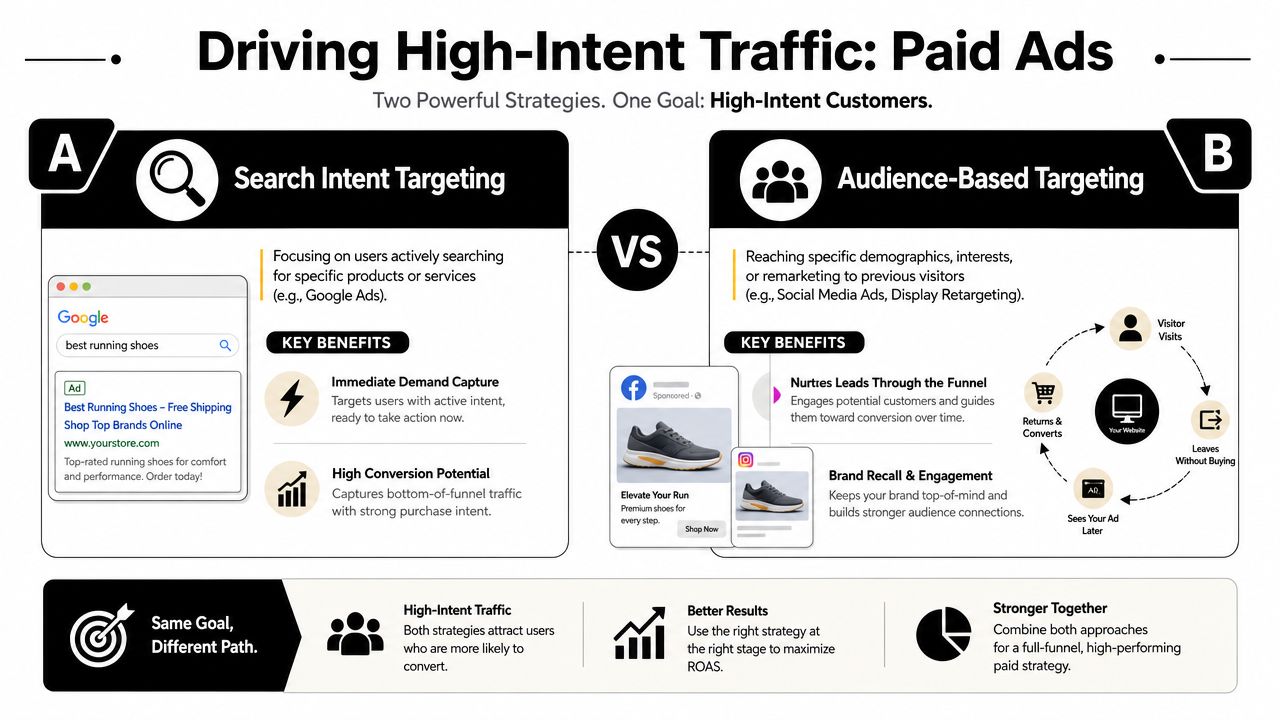
A well-built website still needs the right traffic. Not random clicks. Not broad traffic that looks good in a report and does nothing for revenue. High-intent traffic.
Effective alignment between the website's construction and media strategy is essential. If the website is built for one type of visitor and your campaigns attract another, conversion suffers even if the creative and targeting look fine on paper.
Google Ads captures existing demand
For high-intent buyers, Google Ads is usually the first channel I look at because search behaviour tells you what someone wants right now. A person searching for a product, a service, or a location-based solution is already partway down the buying path.
For service businesses, we structure campaigns around commercial intent and conversion action. That means the landing page should match the keyword cluster and give the user one clear path forward. If the goal is contact form submissions, we strip away distractions. If the goal is phone calls, we make the call action unavoidable on mobile.
This is especially relevant for trades and local services. Campaigns for emergency or urgent services don't need cleverness. They need speed, clarity, trust, and call tracking. That's the backbone of our work in areas like Google Ads for plumbers.
Google Shopping and PMax need different handling
For eCommerce, the common debate is PMax vs Google Shopping ads. I don't treat that as a religion. It depends on product data quality, margin profile, budget, catalogue structure, and how much control the brand needs.
A practical way to view it:
- Standard Shopping can suit stores that want tighter query control and clearer segmentation.
- Performance Max can work well when the account has enough clean data, strong creative assets, and sensible feed quality.
- Campaign priority and feed structure matter when products overlap, seasonal logic changes, or budget needs to be steered carefully.
- Dropshipping stores usually need extra scrutiny because weak product pages and thin trust signals get exposed very quickly when traffic scales.
If Google Shopping ads aren't spending budget, the fix is rarely “increase budget and hope”. It's usually a combination of feed quality, campaign structure, product eligibility, query matching, and landing page competitiveness.
Meta ads create demand and support remarketing
Meta is a different job. Google captures demand that already exists. Meta helps create demand, warm audiences, and recover visitors who didn't convert the first time.
Our Meta ads creative testing process is built around message angles, hooks, formats, and offer framing. We don't assume the prettiest creative wins. Sometimes the plainest ad with the clearest value proposition beats the polished one because it's easier to understand.
That's why I tell clients not to quit too early on paid social. Not because every campaign magically improves with time, but because creative testing needs enough clean learning to identify what message resonates.
A strong setup usually includes:
- Prospecting campaigns with distinct audience and message angles
- Remarketing to product viewers or engaged visitors
- Creative testing cycles for hooks, offers, and formats
- Landing pages matched to campaign intent
For businesses looking for that side of the stack, a Facebook Ads agency should be talking as much about landing page alignment and tracking quality as media buying.
Search traffic is usually the easiest to convert. Social traffic often needs more work from the landing page. Treating them the same is one of the fastest ways to waste budget.
Paid traffic makes website friction obvious
When you pay for every click, the site has to earn the traffic. Weak pages get exposed immediately.
That's why Australian cart behaviour matters. The average cart abandonment rate is 70.19%, according to this Australian conversion write-up citing Baymard. So if you're sending paid traffic to an eCommerce store, checkout friction should be one of the first things you fix.
In practical terms, that means:
- Reduce unnecessary form fields
- Show total cost early
- Keep trust signals visible during checkout
- Avoid forced account creation where possible
- Make shipping and returns easy to find before commitment
For social commerce and catalogue-led brands, we also pay attention to platform adjacency. If a brand uses Instagram Shop or Facebook Shop, the website still has to carry the final trust burden when someone clicks through. The handoff matters.
Paid ads work best when the website was built for them
A digital marketing agency Melbourne businesses trust should be different from a generic web shop. The landing page, tracking setup, feed quality, event structure, and ad strategy can't be treated like separate departments that barely speak to each other.
If the site owner asks me where to start, the answer is usually simple. Build pages around actual intent. Then buy traffic that matches that intent. Then use data to tighten the loop.
The Growth Engine Conversion Rate Optimisation
Most websites don't fail because they launch badly. They fail because nobody improves them after launch.
That's why I see conversion rate optimisation as the growth engine, not a nice extra. Once the site is live and the traffic is running, you finally get real buyer behaviour instead of opinions from internal stakeholders. That's when the proper work starts.
Treat launch as version one
A site launch gives you a baseline. It does not give you a finished answer.
We use post-launch data to form testable hypotheses. Not random design tweaks. Specific questions tied to buyer behaviour. Maybe the CTA is too weak above the fold. Maybe the form asks for too much too soon. Maybe the product page spends too much space on visuals and not enough on reassurance.
Good CRO work usually focuses on things like:
- Headline clarity
- Offer framing
- CTA wording and placement
- Form friction
- Trust signal placement
- Mobile layout decisions
Mobile conversion deserves its own strategy
One of the most overlooked issues in Australian website performance is the gap between responsive design and actual mobile conversion design. The better way to frame it is as a speed-and-friction problem, especially for brands buying traffic, as argued in this article on Australian landing page opportunities.
I agree with that. A lot of businesses still treat mobile like a compressed desktop site. That's not enough.
On mobile, simpler often wins:
- Less visual clutter
- Shorter above-the-fold decision paths
- Fewer scripts and third-party widgets
- More obvious sticky actions
- Sharper hierarchy around the core CTA
A page can be responsive and still be bad at converting on mobile.
Test what matters, not what's easy to change
Some teams waste months testing button colours because it feels safe. Meanwhile the offer is unclear, the headline is vague, and the checkout flow is clunky.
The best CRO work is usually closer to sales strategy than graphic design. You're testing message, trust, sequencing, and friction. That can include simpler hero sections, shorter forms, tighter collection page copy, cleaner product templates, or stronger post-click continuity from ads.
For eCommerce brands, we also connect CRO with retention. Email and SMS automations, cart recovery flows, browse abandonment, and post-purchase sequences all support the conversion system. The website gets the action started. Automation helps turn one sale into repeat revenue or one enquiry into a booked job.
If you want consistent growth, treat the website like a living asset. Review it, test it, and keep removing friction.
Let's Build Your High-Converting Website Together
I've seen the same pattern play out across service businesses and eCommerce brands. They invest in a redesign, traffic goes up, and enquiries barely move because the site, tracking, and ad account were never built to work as one system.
A high-converting website comes from getting the full stack right. Platform choice affects what you can customise. Development quality affects speed and stability. Tracking affects what you can measure and improve. Paid traffic affects whether the right people land on the right pages at the right time.
That's the work we do as a marketing agency Melbourne businesses hire when they want performance tied back to real commercial outcomes. We build WordPress and Shopify sites, configure measurement properly, and run Google Ads and Meta ads against pages designed to convert. If you need a skilled WordPress developer who understands both build quality and campaign performance, that sits squarely inside our process.
We also keep the commercial side practical. If your business is already spending at least 3k a month on paid ads, we can assess whether a free first month of management makes sense as a low-risk way to test fit.
If you need a website that supports lead generation or online sales properly, Alpha Omega Digital builds WordPress and Shopify sites for Australian businesses and connects them to paid media, tracking, and ongoing conversion improvement. The agency is based in Melbourne and works with clients across Sydney, Brisbane, Newcastle, Perth, Adelaide, Darwin and Hobart.
[email protected]
Read more insights from our team on web design, paid ads, and growth strategy.