Your website is probably getting some traffic already. The problem is that too much of that traffic disappears without calling, buying, booking, or filling in a form.
I see this all the time as a marketing agency Melbourne businesses bring in after they've spent money on a redesign, SEO, Google Ads, or Meta Ads and still don't have a reliable lead flow. The site looks polished. The branding is clean. The owner says, “We're getting visits, but not enough enquiries.” That's usually a systems problem, not a traffic problem alone.
If you want to know how to generate leads from website traffic, stop thinking in isolated tactics. Your WordPress build, Shopify design, Google Tag Manager setup, Meta Conversions API, landing pages, Google Ads, Facebook ads, and follow-up process all have to work together. That's how we build lead systems for ecommerce brands, tradies, clinics, and service businesses across Melbourne and the rest of Australia.
Your Starting Point Auditing Your Website's Lead Performance
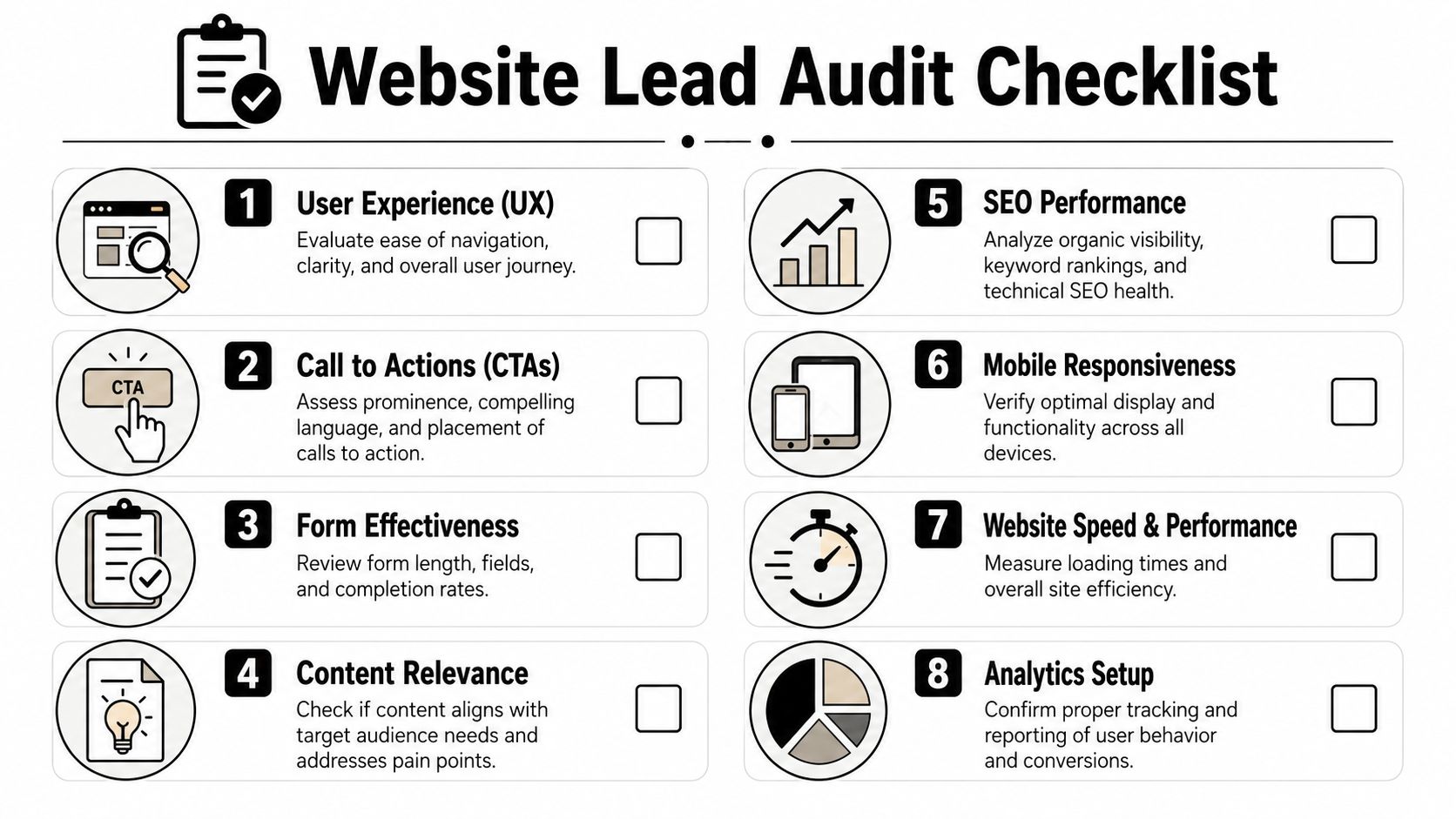
A lead generation strategy starts with an audit. Not a fluffy “looks good to me” review. A proper inspection of where users land, what they do, what they ignore, and where they drop off.
In Australia, online discovery is already standard behaviour. The Australian Communications and Media Authority reported that in 2023–24, 98% of households had internet access and 89% of Australians aged 16+ used the internet daily, which is why website-led lead generation is foundational rather than optional for local businesses targeting connected buyers through their site experience and enquiry flow via GrowthList.
What we check first in GA4
When we take over a WordPress or Shopify project, I open Google Analytics 4 before I open a design file. I want to know:
- Which landing pages attract real intent. Your homepage often gets too much credit. Service pages, collection pages, location pages, and blog posts usually tell a more useful story.
- Where users drop off. If a high-intent page gets traffic but no form submissions or calls, something is broken in the message, layout, offer, or tracking.
- Which traffic source produces action. Organic search, Google Ads, direct, email, and Meta traffic behave differently. Don't treat them like they're the same visitor.
- Whether your conversion events are trustworthy. If form submissions, phone clicks, add-to-carts, bookings, and purchases aren't firing properly, you're making decisions with dirty data.
I'm less interested in vanity metrics than most agencies. A page with lots of views but no commercial action isn't automatically useful. Sometimes it's just a leak with nice graphs attached.
Practical rule: if a page gets qualified traffic and still doesn't create movement toward an enquiry or sale, it needs to be rewritten, redesigned, or removed from the path.
The leaks we find most often
The common problems aren't complicated. They're just expensive when left alone.
| Audit area | What usually goes wrong | What we do |
|---|---|---|
| Tracking | GA4 events are duplicated, missing, or firing on page load | Clean up event naming in GA4 and rebuild triggers in GTM |
| Forms | Forms ask for too much, break on mobile, or submit without confirmation tracking | Shorten fields, test devices, fire proper submit events |
| Calls to action | Buttons are vague or buried below the fold | Rewrite CTA copy and repeat it where intent is strongest |
| Page intent | One page tries to rank, educate, sell, and qualify all at once | Split pages by intent and tighten the message |
| Traffic quality | Campaigns send broad traffic to generic pages | Match ads and keywords to dedicated landing pages |
Why GTM matters more than most people realise
If Google Tag Manager is messy, everything downstream gets worse. I've seen WordPress sites with old GA tags hardcoded in the theme, new tags inside GTM, plugin-based event tracking, and a Meta Pixel layered on top. That setup creates duplicate conversions and wrecks campaign optimisation.
On Shopify, the issue is different. Tracking is often partially installed through apps, partially in theme code, and partially inside ad platform integrations. It works just enough to fool the owner, then fails when they try to scale.
We usually fix that by setting up one clear measurement plan:
- Define the core conversions such as lead form submit, phone click, booked appointment, add to cart, checkout start, and purchase.
- Implement through GTM where appropriate so event logic is visible and maintainable.
- Test every event manually across desktop and mobile.
- Push clean data into GA4 and ad platforms so optimisation has a chance.
What a good audit should give you
A proper audit should leave you with a shortlist, not a headache.
You should know which pages deserve more traffic, which pages need rebuilding, whether your forms are hurting completion, and whether your attribution is believable. If you don't have that clarity, don't spend more on ads yet.
That first pass usually tells us whether the fastest win is better WordPress development, a cleaner Shopify template, a dedicated landing page, stronger offer design, or a tracking rebuild. Most businesses need some combination of all five.
Building a Conversion-First Website Experience
A beautiful website that doesn't convert is just an expensive brochure. I don't care how smooth the animations are if nobody clicks, enquires, or buys.
Contrary to much generic web design advice, good design isn't about decoration. Good design removes hesitation. It tells the visitor what this business does, who it helps, why they should trust it, and what to do next.

Existing guides often miss that websites underperform on load speed and mobile experience, making low-traffic lead gen even harder because every visit must work harder to convert. That matters even more when Australian search demand is concentrated on Google, which held about 93.3% of desktop search in Australia in late 2025, making a fast, mobile-friendly site essential for capturing that traffic according to Join Valley.
What conversion-first design looks like on WordPress
On WordPress, we build for flexibility, but not at the expense of speed or clarity. A lot of bloated themes promise easy drag-and-drop control and then leave the business with slow pages, inconsistent layouts, and weak messaging structure.
I prefer custom or tightly controlled builds. If we're using Gutenberg, we'll often create custom blocks so the team can edit content without breaking layout hierarchy. That matters when you want reusable sections like:
- Proof blocks with testimonials, trust badges, and concise proof points
- Service comparison blocks that help buyers choose the right option
- FAQ accordions that reduce friction before the form
- Sticky CTA blocks on mobile for calls and quote requests
If you need a closer look at how we approach this in practice, our work as a web design Melbourne provider sits heavily on conversion paths, content structure, and mobile usability rather than visual fluff.
Most small business websites don't need more pages first. They need fewer distractions on the pages that already attract buying intent.
What conversion-first design looks like on Shopify
Shopify has a different job. The path is shorter, but it still needs discipline.
For ecommerce brands, weak lead generation often shows up before the sale. Email capture is poor. product pages don't build enough confidence. collection filtering is clunky. the cart experience creates doubt. If a store owner asks why returning users don't come back, I look at the pre-purchase trust journey before I look at ad creative.
We've rebuilt Shopify sites where the fix had nothing to do with a flashy theme. The gains came from:
- tightening product page information
- adding shipping and returns reassurance near the add-to-cart button
- improving collection page logic
- making the mobile sticky cart and buy buttons more obvious
- reducing pop-up chaos that interrupts the session
That's as much Shopify design as it is strategy.
The layout rules we keep coming back to
Whether it's WordPress or Shopify, the same principles hold.
Clear visual hierarchy
The visitor should know the priority within seconds. Headline first. Core offer second. Trust signal third. CTA next. If everything shouts, nothing gets heard.
One page, one main job
A service page should sell the service. A landing page should convert the campaign click. A collection page should help users browse and buy. Don't mix too many jobs together.
Mobile first, not mobile tolerated
A desktop design shrunk onto a phone isn't mobile optimisation. Buttons need thumb-friendly spacing. Forms need to be short. Important proof needs to appear early. Menus need to stay simple.
Trust before form friction
People don't want to “submit an enquiry” into a black hole. Tell them what happens next. Show them proof. Remove uncertainty.
Where businesses usually go wrong
Here's the blunt version.
- They lead with themselves instead of the buyer's problem.
- They bury the CTA under generic copy.
- They overload the header with too many navigation choices.
- They rely on sliders and animations that distract from action.
- They use templates built for broad appeal instead of buyer intent.
When people ask me how to generate leads from website traffic without immediately increasing spend, this is often the answer. Improve the page structure so the traffic you already have stops leaking out.
Creating Irresistible Offers and High-Converting Landing Pages
Most businesses don't have a traffic problem first. They have an offer problem.
People rarely hand over their details because a button says “Contact Us”. They convert when the next step feels relevant, low-friction, and worth it. That's why I push hard on offer design before we build any serious landing page.
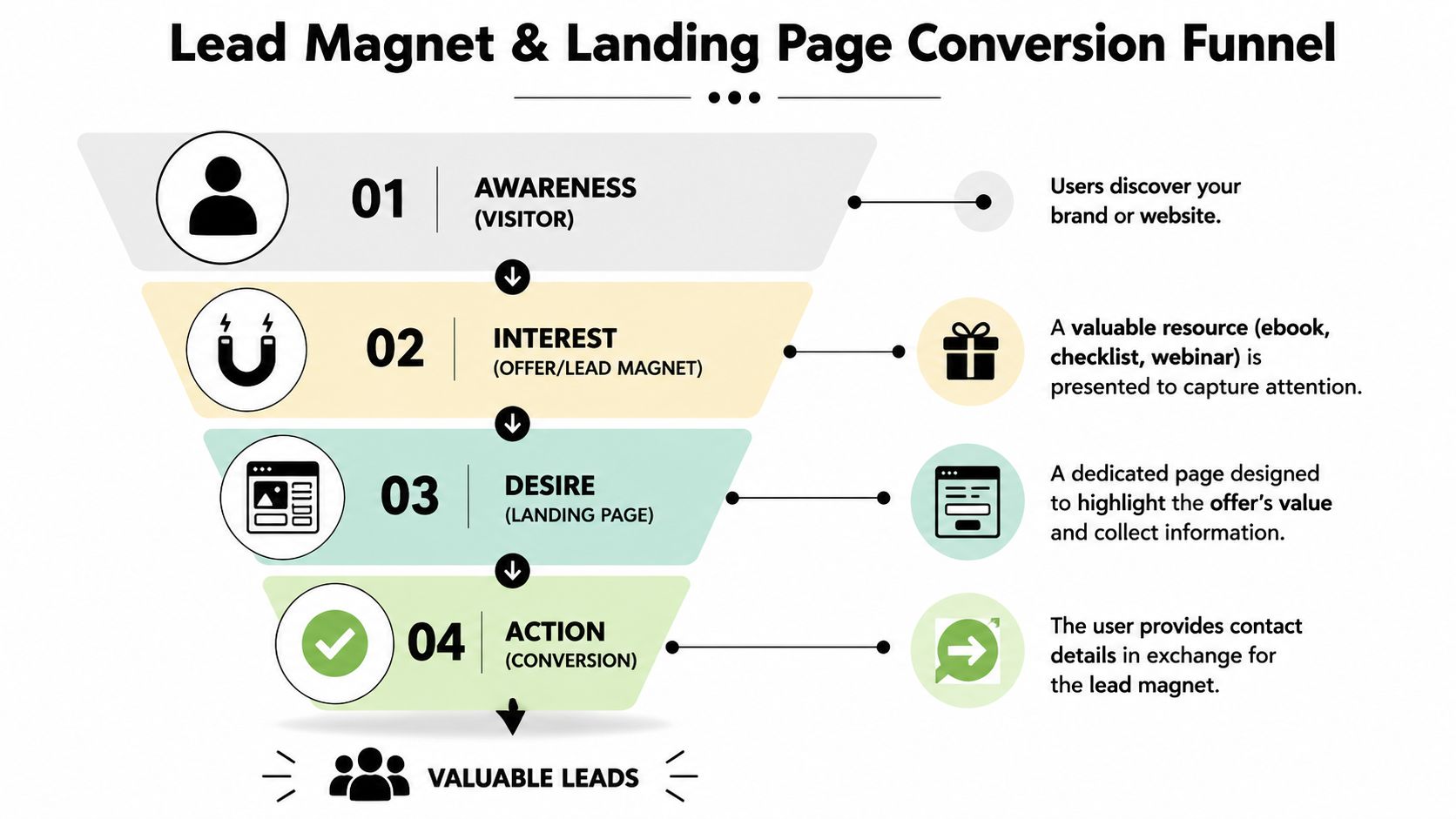
On a Shopify project, the offer might be simple. A first-order incentive, a bundle guide, a shade matching quiz, a back-in-stock alert, or a product comparison tool. On a WordPress service site, the offer is usually more trust-based. Think pricing guides, scope checklists, quote request pages, sample timelines, or a “what happens next” explainer.
The principle is straightforward. Match the offer to the stage of intent.
Two real-world offer patterns we use
Shopify example
For an ecommerce brand, a homepage pop-up offering a discount is the lazy default. Sometimes it works, but it often attracts low-intent bargain hunters.
A better angle is often tied to shopping confidence. We've used lead captures around product fit, bundle recommendations, and restock notifications because they align with buying behaviour. The user gets help making a decision. The brand gets first-party data and a way to remarket.
WordPress service example
For a tradie, clinic, or specialist service business, “Book a consultation” can be too big an ask if the user is still uncertain. A better first step is often a pricing explainer, a service area page with a focused CTA, or a scoped quote form that doesn't feel like homework.
That's where landing pages matter. You can't ask paid traffic to land on a generic homepage and somehow become a qualified lead by magic.
My rule on landing pages: one audience, one problem, one promise, one action.
The most technically defensible lead-generation workflow is to run a single-intent landing page that maps one offer to one CTA, keeps forms to the minimum viable fields, and uses trust signals to reduce friction. The main technical pitfall is over-collecting data too early, and the other major failure mode is having multiple competing CTAs on the same page as outlined by Sharp Wilkinson.
What goes on a landing page that converts
I don't start with fancy design. I start with sequence.
Headline that matches the click
If the ad or keyword promised a quote, sample, guide, or specific service, the page has to confirm that immediately.Short supporting copy
Explain the benefit fast. Not your life story. Not a wall of jargon.Relevant proof
Testimonials, concise case references, trust badges, review snippets, or process clarity. Enough to reduce anxiety.Simple form
Usually name and email at minimum, sometimes phone if it makes sense for the offer and sales process.What happens next
This is the bit too many businesses skip. Tell people whether they'll get a call, an email, a booking link, or the resource instantly.
For WordPress builds, we often use Gravity Forms, Fluent Forms, or custom-coded form handling depending on the project. If you need a practical walkthrough on secure WordPress form creation, that guide is worth reading before you throw another plugin on your site.
A short walkthrough helps here:
The landing page mistakes I keep seeing
| Mistake | Why it hurts |
|---|---|
| Sending ad clicks to the homepage | Too many choices, weak message match |
| Asking for too much information | Users hesitate and abandon |
| Using multiple CTAs on the same page | Dilutes attention |
| Hiding social proof | Increases uncertainty |
| Writing generic headlines | Breaks relevance and trust |
If you want to know how to generate leads from website traffic consistently, get serious about offers. Better traffic helps. Better pages help. But a weak offer kills both.
Driving Targeted Traffic with Paid Advertising Funnels
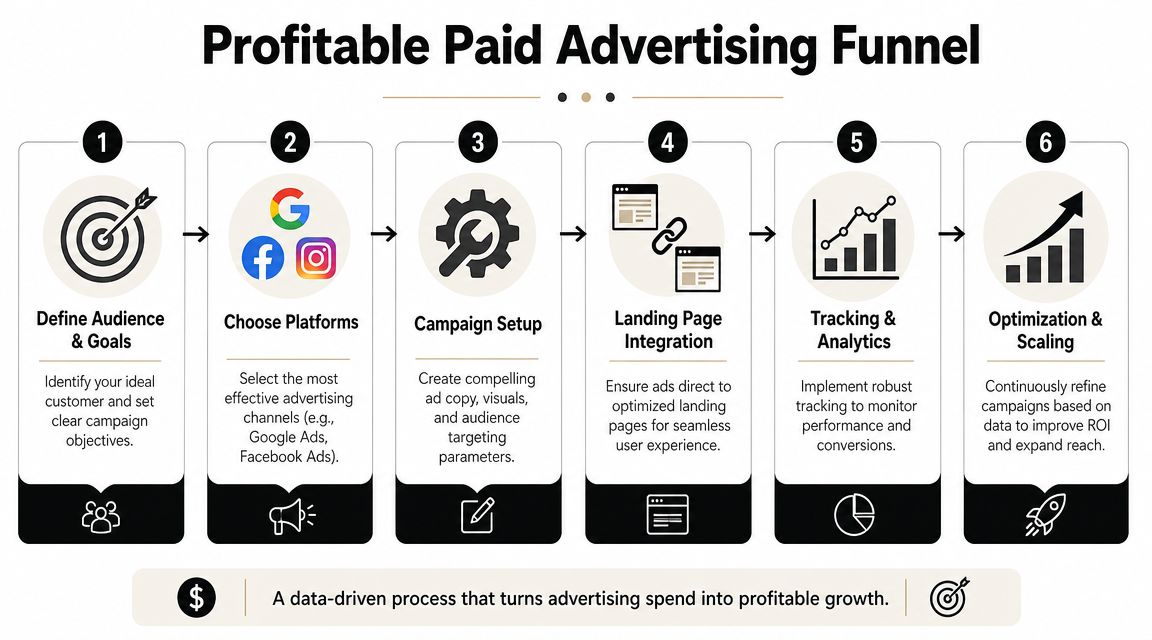
Once the site and landing pages are in shape, paid traffic becomes far more useful. Before that, paid ads just help you waste money faster.
At this stage, most businesses either get traction or get burnt. They launch campaigns too broadly, pick the wrong objective, send traffic to the wrong page, and then conclude that Google Ads or Facebook ads “don't work for their industry”. Usually the platform isn't the issue. The funnel is.
Australians spent about AUD 4.7 billion on search advertising and about AUD 2.4 billion on display advertising in 2022–23, which tells you how aggressively businesses are competing for buyer attention at the moment when potential buyers are seeking solutions summarised by Warmly.
Google Ads for high-intent lead capture
For service businesses, Google Ads is often the cleanest place to start because users are already telling you what they want. Someone searching for a local service or solution is much closer to action than someone passively scrolling a social feed.
We structure campaigns around intent clusters, not random keyword lists. That usually means:
- Core service terms linked to dedicated service pages
- Problem-aware searches linked to solution pages
- Location modifiers linked to local landing pages
- Brand and competitor layers where relevant
If you run a trade business, the campaign and landing page pairing matters more than clever ad copy. We've written in more detail about this on our page for Google Ads for plumbers, but the principle applies across electricians, builders, clinics, and other local service categories too.
PMAX vs standard Shopping for ecommerce
On Shopify stores, one of the most common questions I get is whether to run Performance Max or standard Google Shopping ads.
My answer is annoying but accurate. It depends on how much control you need and how mature the account is.
| Campaign type | Where it helps | Where it can frustrate |
|---|---|---|
| PMAX | Broad reach, feed + creative + automation in one setup | Less visibility, less control, messy with weak data |
| Standard Shopping | Stronger product-level control and cleaner query insight | More manual work, slower learning in some accounts |
If the product feed is messy, the tracking is shaky, and the creative assets are weak, PMAX can become a black box. In that situation, I often prefer a more controlled setup first. Once the account has solid data and segmentation, PMAX can become more useful.
For brands looking at build quality before ad scale, our Shopify developers Melbourne work often starts with feed readiness, collection architecture, and product page conversion basics before campaign expansion.
Meta Ads need a testing discipline
Meta can generate excellent lead flow and ecommerce demand, but only if you respect creative testing. Most businesses don't. They launch one or two ads, panic after a short run, and switch everything too early.
We test different hooks, formats, opening frames, offer angles, and landing page pairings. Not random tweaks. Controlled changes.
That applies whether you're promoting a service lead magnet, an Instagram Shop collection, a Facebook Shop product set, or a direct response offer. If you need a specialist service rather than a generic social shop setup, our page on a Facebook Meta Ads agency shows the type of execution work involved.
A paid ads account can't rescue a confused offer or a weak landing page. It can only send more people to the same friction.
Where local SEO still matters
Paid traffic works faster. Local SEO compounds longer.
For service businesses in Melbourne, Sydney, Brisbane, or regional areas, your Google Business Profile, service pages, suburb pages, review collection, and on-site location relevance still affect enquiry volume. I don't treat local SEO and paid ads as separate silos. Paid search reveals converting terms quickly. SEO turns those terms into owned visibility over time.
That's especially important for buyers using long-tail, high-intent searches. Those phrases are less glamorous than broad industry terms, but they convert better because the user already knows what they want.
Budget questions I answer bluntly
People always ask what budget to spend on Google Ads. The honest answer is that your budget needs to buy enough data to produce a decision. Too little spend leaves you guessing. Too much spend on a weak funnel just buys faster disappointment.
I'd rather see a business start with a tight campaign set, clean tracking, and a serious landing page than spread a modest budget across search, display, YouTube, PMAX, remarketing, and Meta all at once. Focus beats noise.
Automating Your Lead Tracking and Follow-Up System
A lead isn't money. It's an opportunity. The money comes from what happens next.
This is the part most businesses neglect because it feels technical. It's also where a lot of wasted ad spend hides. If your tracking is patchy, your CRM isn't connected, your sales team responds slowly, or your missed calls go nowhere, your lead generation system is incomplete.
Tracking that survives modern ad platform noise
For both WordPress and Shopify projects, we care a lot about Meta Conversions API, server-side signal quality, and clean event mapping. Browser-only tracking has become less reliable, especially when users block scripts, reject cookies, or jump across devices.
That doesn't mean you need a bloated martech stack. It means your setup should pass useful events back to the platforms you're paying. On Shopify, that often involves combining native integrations with careful event checks. On WordPress, it depends on your form stack, checkout setup, CRM, and how your GTM container is structured.
I want these events to be dependable:
- Lead submission
- Qualified call click
- Booked appointment
- Add to cart and checkout milestones
- Purchase
- Offline outcomes where possible
If that chain is broken, campaign optimisation drifts. Then business owners make bad decisions off bad data.
Lead scoring and follow-up matter more than extra leads
A more advanced AU lead-generation system combines paid acquisition, lead scoring, and real-time nurture automation so website traffic is qualified before sales handoff. Salesforce recommends that approach, while also warning that optimising for lead volume instead of lead quality distorts performance decisions in its lead generation guide.
That matches what we see on the ground. A campaign producing lots of cheap form fills can look healthy and still be commercially useless if those leads never answer the phone, never book, or never match the target customer.
So we look at the handoff. Not just the form count.
Basic automation every business should have
- Immediate confirmation by email or on-page message so the user knows the enquiry worked
- Internal notification to the team with the source, page, and form details
- CRM tagging so leads from Google Ads, SEO, and Meta don't get mixed together
- Short response workflows that contact high-intent leads while they still remember you
What we do for phone-based businesses
For tradies, clinics, restaurants, hairdressers, dentists, and other businesses where calls matter, a missed call is often a missed sale. That's why I rate call tracking and automated answering much more highly than most agencies do.
We've set up Twilio-based custom numbers that route calls, log attribution, and support automated answering flows. Done properly, that setup can:
- answer enquiries outside normal hours
- handle repetitive first questions
- route urgent requests
- book into a calendar or Calendly
- create records for follow-up instead of letting calls vanish
That's not about replacing staff with a gimmick. It's about stopping good leads from slipping through because somebody was on another call, on-site, at lunch, or closed for the day.
The fastest-growing leak in many lead gen systems isn't ad spend. It's slow or inconsistent follow-up after the lead arrives.
The stack has to fit the business
Not every business needs the same setup. A Shopify brand might need Klaviyo flows, Meta CAPI, GA4 ecommerce events, and feed diagnostics. A service business on WordPress might need GTM, form event tracking, call tracking, CRM routing, and local landing page attribution.
One practical option for businesses that need integrated web, ads, and automation support is Alpha Omega Digital, which works across WordPress, Shopify, paid media, and lead capture systems. That matters when you don't want your developer, ad manager, and tracking setup all pulling in different directions.
Putting It All Together Your Next Steps
The businesses that generate leads consistently from their website usually aren't doing one clever trick. They're doing the basics properly, in the right order, without gaps between them.
That means the website is built for conversion, not just appearance. The tracking is reliable. The offers are strong. The landing pages are focused. The traffic is targeted. The follow-up is fast. If one part fails, the whole system weakens.
The order I'd fix this in
If I were looking at your business right now, I'd take this sequence.
Audit the current site and tracking
Find the leaks before spending more.Tighten the core pages
Homepage, service pages, collection pages, product pages, and forms.Build one serious landing page
Not five average ones. One properly aligned page tied to one offer.Launch paid traffic with discipline
Search for intent. Meta for creative testing and remarketing. Keep the structure clean.Automate the response layer
Forms, calls, CRM updates, and booking flows should happen without manual chaos.
What this looks like for ecommerce versus service businesses
For ecommerce, I care about product discovery, email capture, feed health, page trust, cart flow, and post-click tracking. The website has to help the sale happen, but it also has to create recoverable demand when the user isn't ready yet.
For service businesses, I care more about message clarity, local relevance, trust, click-to-call behaviour, quote forms, and how fast someone gets contacted after an enquiry. Different sales motion. Same principle. Remove friction.
Consistency beats random bursts
The worst pattern I see is stop-start marketing. Businesses run ads for a short period, make site changes without measurement, switch agencies, pause campaigns, then restart from scratch. That creates noise, not insight.
Consistency doesn't mean stubbornness. It means keeping a stable measurement framework and improving one part of the system at a time. That's how you learn what drives qualified leads.
If you're searching for a digital marketing agency Melbourne businesses use for integrated growth work, don't judge on ad screenshots alone. Ask how they handle page structure, event tracking, CRM handoff, Meta CAPI, GTM, call tracking, Shopify development, WordPress development, and offer design. If they can't connect those pieces, they're only solving part of the problem.
Lead generation from a website isn't mysterious. It's operational. Once you treat it that way, results get much more predictable.
If you've got a project in mind, or you're a business with a paid ads budget of at least 3k a month, I'd be happy to offer a low-risk deal through Alpha Omega Digital. Get a month of paid ads management FREE and apply through the contact page.
[email protected]
Read more insights from our team on web design, paid ads, and growth strategy.