You're probably in one of two situations right now. Your Shopify store is live, looks decent, and sales feel patchy. Or you're about to hire a Shopify web development agency and you're trying to avoid spending money twice, once on the build and again fixing the wrong build.
I've had this conversation with plenty of Melbourne eCommerce owners. They've already paid for a theme setup, added apps, connected payment gateways, and maybe launched Google Ads or Meta ads. Then the friction begins. Slow product pages. Tracking that doesn't line up. A checkout that leaks intent. A store that technically works but doesn't support the way the business grows.
That's where most agencies stop too early. They launch the site, hand over the keys, and leave the owner to work out Google Shopping, PMAX, Meta creative testing, GTM, Google Analytics, and post-launch optimisation alone. If you're searching for a marketing agency Melbourne brands can rely on, or a digital marketing agency Melbourne businesses use when they need both build and growth under one roof, that gap matters a lot.
Beyond the Build Why Your Shopify Store Isn't Growing
Your store goes live. The branding looks sharp, the theme works, products are loaded, and ads start spending within days. Then the true test begins. Traffic arrives, add-to-carts happen, but revenue stays inconsistent and ROAS never settles where it should.
In our experience reviewing underperforming Shopify stores for Melbourne eCommerce brands, a common pattern emerges a few months after launch. The site is functional, but it was never built to support the full lifecycle of growth. Paid traffic exposes weak page structure, messy tracking, slow load times, poor merchandising logic, and gaps between what the ads promise and what the store delivers.
A polished storefront can still be commercially weak.
A good-looking store can still waste ad spend
“High-converting build” gets used too loosely in Shopify projects. A store can look modern and still struggle to turn paid clicks into profitable orders. We've seen brands with strong creative, solid products, and healthy traffic volumes held back by small technical decisions that add friction at every stage of the funnel.
The usual problems are practical:
- The theme looks fine but sells poorly on mobile. Key information sits too low on the page, collection filtering is awkward, and product pages answer questions in the wrong order.
- Tracking is unreliable. Meta events duplicate or miss purchases, Google Ads reports don't line up with Shopify, and channel decisions get made on partial data.
- Apps are covering build shortcuts. Extra apps patch missing functions, but they also add scripts, slow down templates, and create maintenance issues later.
- Marketing requirements were not considered during development. Product feeds, landing page intent, campaign attribution, and retargeting audiences were treated as someone else's problem.
We've found that stores rarely stall because they lack features. They stall because the site structure, conversion flow, analytics, and acquisition strategy were set up as separate jobs.
The handover model creates expensive gaps
A handover-only build often looks cheaper on the proposal. The extra cost shows up after launch, when the owner needs to hire new people to fix feed issues, rebuild tracking, improve landing pages, and make paid ads work harder.
Most agencies stop too early at that point. They deliver the site, then leave growth performance to the client or a separate marketing team. That split creates friction fast, because the build decisions directly affect campaign efficiency. We see it in product taxonomy, page speed, variant handling, promo logic, and event tracking all the time.
Store owners usually end up sourcing separate support for:
- Google Ads setup and optimisation, including Shopping feeds, PMAX structure, branded search, and remarketing
- Meta implementation, including pixel events, Conversions API, audience quality, and creative testing feedback loops
- Analytics, including GTM, GA4, event validation, and attribution checks
- Search visibility, including collection architecture, metadata, schema support, and content structure
- Operational fixes, including integrations, inventory sync, and custom functionality
If you want to improve your Shopify store build, the build has to be judged against post-launch performance, not just design approval.
What growth-ready actually looks like
A store that supports growth does more than load properly and match the brand guide. It gives paid traffic a better chance to convert profitably, gives the team reliable data, and gives the business room to scale without rebuilding the whole setup six months later.
When we assess a Shopify store, we look at the areas below first:
| Area | What to look for |
|---|---|
| User journey | Clear collection paths, strong mobile UX, fewer dead ends |
| Product pages | Trust signals, shipping clarity, buying objection handling |
| Data layer | Clean event tracking and reliable attribution setup |
| Paid traffic fit | Landing pages and product structures suited to Google Ads and Meta |
| Scalability | Room for app integrations, custom logic, and future expansion |
That lifecycle view matters. A strong Shopify partner should care about what happens after launch just as much as the build itself, because true return comes from the combination of site performance and channel performance.
What a Shopify Web Development Agency Really Is
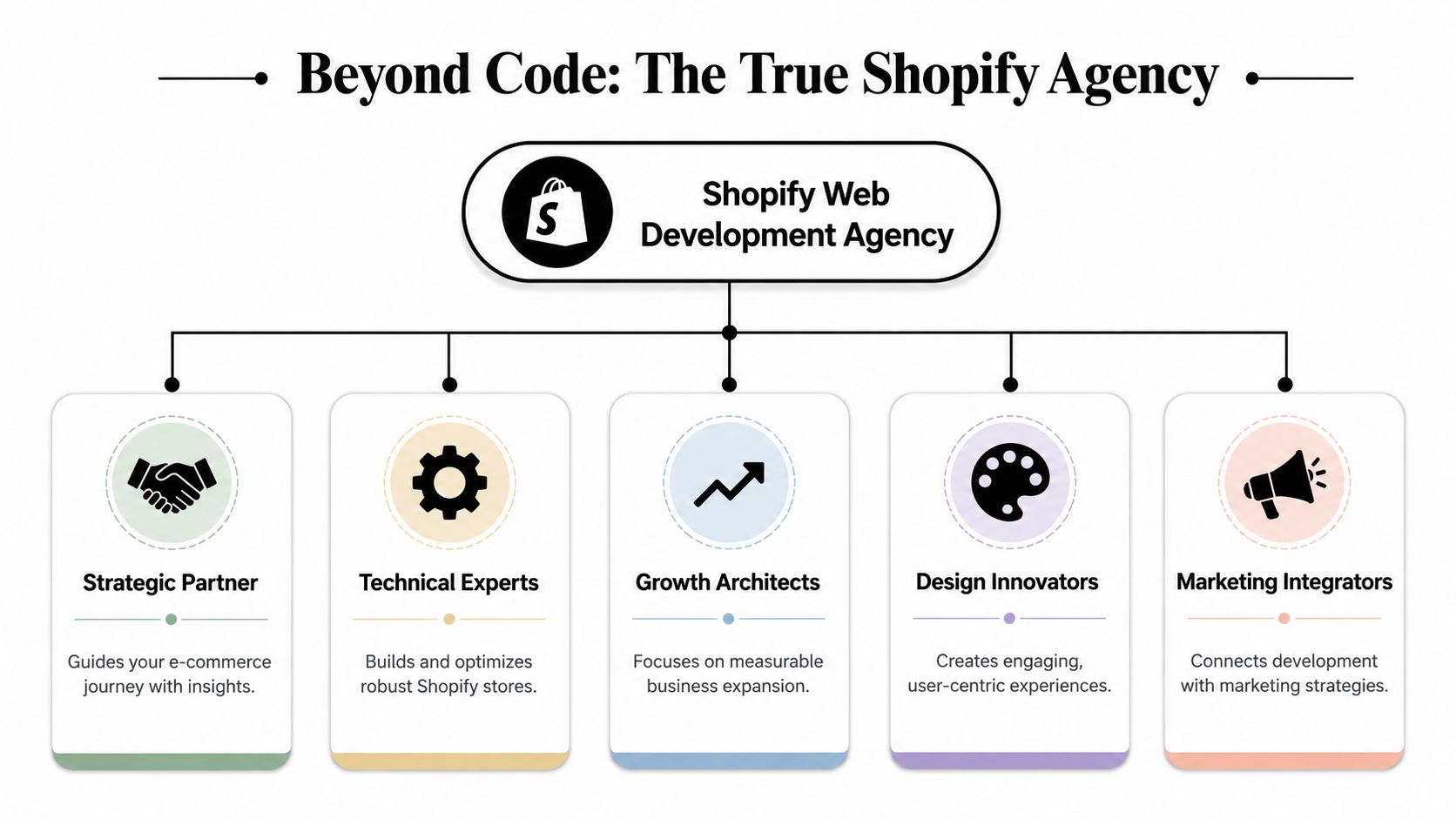
A real Shopify web development agency isn't just a team of developers who know Liquid, theme files, and app installs. It's a commercial partner that connects design, development, analytics, and acquisition.
For most store owners, that distinction only becomes obvious after they've worked with the wrong kind of provider.
The job is bigger than coding
A Shopify partner should be able to answer questions like:
- What are customers doing before they buy. Not just what pages exist, but what sequence reduces friction.
- What should be custom and what should stay native. Custom code can help, but too much of it can turn maintenance into a headache.
- How will marketing channels use this site. Google Shopping, branded search, Meta remarketing, Instagram Shop and Facebook Shop all rely on clean structure and reliable data.
- What happens after launch. If nobody owns testing, iteration, and reporting, growth stalls fast.
According to Shopify Australia's small business statistics, key online challenges include managing website development and maintenance, and paying for marketing costs. That's exactly why separating build from growth usually creates friction for smaller and mid-sized businesses.
What we expect a capable agency to cover
When I assess whether an agency is useful for an eCommerce brand, I look for five capabilities.
Strategy
They should understand margins, average order patterns, catalogue complexity, and which traffic channels matter most.Design
Shopify design should support conversion, not just aesthetics. Good design reduces uncertainty and shortens the path to purchase.Development
This includes theme customisation, Shopify API work, app integrations, performance fixes, and where needed, custom app development.Measurement
GTM, Google Analytics, Meta event mapping, feed readiness, and reporting can't be an afterthought.Growth support
Paid traffic, creative testing, email capture, and post-launch optimisation need to connect back to the build.
Practical rule: If an agency can't explain how development decisions affect ad performance, it's only solving part of the problem.
For store owners comparing providers, it also helps to see how other teams think about build quality. If you want a second perspective on how to improve your Shopify store build, that guide is worth reading because it frames development around outcomes rather than just deliverables.
The difference clients actually feel
The practical difference is simple. A basic provider delivers pages. A proper partner delivers a storefront that's easier to market, easier to measure, and easier to improve.
That same thinking applies outside Shopify too. If a business needs content flexibility, service pages, and stronger editorial control, WordPress development and WordPress design may be the better fit. We've found that platform choice should follow the business model, not the agency's favourite stack.
Core Services That Fuel eCommerce Growth
Clients often assume that hiring a Shopify web development agency is for one thing. In reality, the useful work sits across several layers. The code matters, but the commercial effect of the code matters more.
Shopify development that supports selling
A proper Shopify development process starts with the buying journey. Before touching code, we want to know how shoppers browse collections, how they compare products, where they hesitate, and what information they need before checkout.
That leads into practical work such as:
- Theme customisation for layout, speed, merchandising, and mobile behaviour
- Shopify design refinement so the store reflects the brand without hurting usability
- App reviews to remove overlap and reduce front-end bloat
- Shopify API integrations for stock systems, fulfilment tools, CRM platforms, or bespoke workflows
- Custom functionality when off-the-shelf apps create more compromise than value
If a store has unique operating needs, we may build custom Shopify apps using Shopify CLI. That's often a cleaner route than stacking multiple apps to simulate one business process.
The technical details that affect revenue
There are a few areas clients rarely ask about at the start, but they make a major difference later.
| Service area | Why it matters |
|---|---|
| Site speed work | Paid traffic performs better when landing pages load quickly and cleanly |
| Product data structure | Cleaner data improves feeds, filtering, and shopping experience |
| Checkout refinement | Better checkout flow reduces friction at the highest intent stage |
| Tracking setup | Reliable attribution helps Google Ads and Meta optimisation work properly |
| Integration planning | Prevents operational bottlenecks once order volume grows |
For checkout thinking specifically, I like practical resources that go beyond generic CRO talk. Suby's guide to optimizing checkouts is useful because it focuses on the friction points that usually matter most.
WordPress still matters for many eCommerce businesses
Not every commercial website should be pure Shopify. A lot of brands need a content engine alongside the store, or they run a hybrid model where lead generation, education, and long-form SEO pages matter just as much as direct product sales.
That's where strong WordPress development and WordPress design still play an important role.
We regularly work on:
- Building custom blocks in Gutenberg so teams can create landing pages without relying on a developer every time
- WordPress website developer tasks tied to performance, UX, and design systems
- Custom templates for category pages, service pages, blog hubs, and campaign landing pages
- WordPress development company style support without the overhead of bloated enterprise processes
A content-heavy brand might use WordPress as the front-end content environment and Shopify for commerce. Another might keep Shopify central and use a tightly scoped WordPress section only where editorial flexibility is needed.
The right platform decision usually comes from the revenue model, not from loyalty to Shopify or WordPress.
Marketing integration from day one
For eCommerce brands, development and traffic planning need to happen together. That means thinking early about:
- Google Shopping feed quality
- PMAX vs Google Shopping ads strategy
- Meta catalogues
- Instagram Shop and Facebook Shop
- Setting up Google Tag Manager containers
- Conversions API installation for Meta
- Local SEO and Google Business Profile support where store locations matter
That's one reason buyers often search terms like shopify developers melbourne, shopify development partners, wordpress developer melbourne, or seo agency melbourne. They're not just shopping for coding. They're trying to solve growth.
Unlocking Your Potential with Shopify Plus
A common scenario looks like this. The brand is spending more on traffic, orders are climbing, and the store still feels harder to run each month. The team is juggling apps to handle wholesale pricing, international settings, checkout edge cases, and backend workflows that should have been solved at the platform level.
That is usually the point where Shopify Plus becomes a serious commercial option.
When Plus makes commercial sense
We do not suggest Shopify Plus because it sounds more advanced. We suggest it when a business is hitting operational limits that are slowing revenue, margin, or marketing performance.
In practice, that tends to happen in a few clear situations:
- Checkout has become a growth lever and even small improvements to the purchase flow can justify the investment
- B2B is becoming a real revenue channel and the business needs structured account management, pricing logic, or wholesale workflows
- Multiple markets are adding complexity across currency, localisation, shipping rules, and reporting
- Core systems need tighter integration with ERP, fulfilment, customer data, or internal operations
The trade-off matters. Plus costs more, and not every store needs it. A brand doing modest volume with a simple catalogue can often get more return from better merchandising, stronger creative, or cleaner ad account structure. But once workarounds start piling up, staying on a lower plan can become the more expensive decision.
What good implementation actually changes
Shopify Plus does not fix weak product-market fit, poor offer strategy, or inefficient media buying. It does give a growing retailer more control over the parts of the business that often break first under scale.
That usually means:
- More control over checkout experiences
- Better integration options through APIs
- B2B and wholesale setups that are easier to manage
- Automation through Shopify Flow
- Stronger support for multi-market selling
The result is usually less manual handling, fewer app conflicts, and a store architecture that can support growth without needing constant patch jobs.
We have found this matters most for brands already investing in paid acquisition. If a store is driving serious spend through Google Ads or Meta, even small conversion improvements and cleaner backend operations can change the economics fast. That is the part many agencies miss. The build is only one stage. The critical test is whether the platform supports stronger ROAS after launch.
For businesses assessing whether Plus fits their stage, this walkthrough gives a useful baseline:
Where Plus beats patchwork fixes
A lot of businesses try to recreate enterprise capability on a standard Shopify plan with extra apps and custom workarounds. It can work for a while. Then the stack becomes harder to maintain, reporting gets messy, and every new requirement takes longer than it should.
A cleaner Plus setup usually changes that.
| Challenge | Patchwork approach | Shopify Plus approach |
|---|---|---|
| Checkout limitations | App-heavy workarounds | Greater checkout flexibility |
| Wholesale needs | Separate systems or manual handling | Unified B2B capability |
| Operational scale | Fragile integrations | Better structured platform architecture |
I recommend looking at Plus as an infrastructure decision, not a badge upgrade. If the business is already spending to acquire customers and fulfil orders at scale, reducing friction across checkout, operations, and retention often has more financial impact than another round of short-term fixes.
Agency vs Freelancer vs In House The Right Choice
Once the store starts growing, every business owner reaches the same fork in the road. Do you hire a freelance Shopify developer, try to build capability in house, or work with an agency?
There isn't one universal answer. There is a right answer for the stage of business you're in.
Comparing Your Shopify Team Options
| Factor | Freelancer | In-House Team | Agency |
|---|---|---|---|
| Breadth of skills | Usually strongest in one area | Depends on hires you can afford | Access to design, dev, ads, analytics, SEO |
| Availability | Can be limited by workload | Dedicated to your business | Shared team with broader coverage |
| Strategic input | Often task-based | Strong if leadership is experienced | Usually strongest when growth and execution are linked |
| Speed of execution | Good for focused tasks | Good once team is established | Good when process is organised |
| Scalability | Harder if needs expand | Expensive to scale across disciplines | Easier to add support as needs change |
| Cost structure | Lower upfront for small jobs | Highest overhead | Mid-range, broader capability |
When a freelancer makes sense
Freelancers are useful when the scope is narrow and well defined.
Examples:
- A theme bug needs fixing
- A Shopify API connection needs adjustment
- A landing page needs minor development work
- You need a Shopify developer for a specific technical task
The downside is that many freelancers aren't set up to own the broader commercial context. They may not handle UX, analytics, Google Ads tracking, or CRO thinking. That's not a flaw. It's just a different model.
When in-house is justified
In-house can be the right move when eCommerce has become large enough to support dedicated specialists. If you've got frequent campaigns, internal merchandising teams, substantial catalogue demands, and constant development needs, internal capability becomes valuable.
But there's a catch. You rarely need just one person.
You often need:
- A designer
- A developer
- A paid media operator
- An analytics lead
- Someone who can tie the work together
That's expensive, and recruiting people with enough cross-functional understanding is harder than most owners expect.
Hiring in house gives you control. It doesn't automatically give you process, channel alignment, or depth across every technical area.
Why many SMBs land on the agency model
For small and mid-sized eCommerce businesses, the agency route is often the most practical mix of range and flexibility. You get specialists without building a department from scratch.
That matters when your needs span:
- Shopify development and Shopify design
- WordPress developers Melbourne support for content or hybrid sites
- Google Ads and Google Shopping
- Meta ads creative testing process
- GTM and Google Analytics
- SEO and local SEO
- Call tracking and automation tools
Used well, an agency should feel like an external digital team. Not just a supplier taking tickets.
I'd also add that if you're comparing providers in this space, look for the ones that can support both build and acquisition. That's where a lot of pure dev shops fall short.
Budgeting for Success Shopify Costs and Marketing Spend
A common pattern goes like this. The store launches on time, the design looks good, ads go live, and then performance stalls because the budget only covered the build. Tracking is patchy, feeds need work, landing pages are thin, and paid traffic starts exposing problems that should have been fixed before launch.
That is why budgeting for Shopify should be tied to growth from day one, not treated as a one-off website expense.
What Shopify development costs in Australia
Shopify project pricing varies widely, and broad market benchmarks are often too vague to help with a real buying decision. What matters more is the level of work behind the quote.
In practice, we see three broad budget tiers with Melbourne eCommerce brands:
Theme setup and light customisation
Usually suited to smaller catalogues, straightforward product structures, and brands that can work within an existing theme framework.Custom-designed growth build
Better suited to brands that need stronger merchandising, cleaner information architecture, app integration, better content structure, and a site that can support paid acquisition properly.Advanced build with operational complexity
This usually involves ERP or CRM integration, custom functionality, subscription logic, B2B elements, multi-market requirements, or Shopify Plus.
The key question is not "What does a Shopify store cost?" It is "What does this business need the store to do over the next 12 to 24 months?"
We have found that clients get better value when they scope for the next stage of growth, not just the launch checklist. Underbuilding often leads to rework within months.
What changes the final budget
Two stores can sell the same number of products and still have very different build costs. The difference usually comes down to operational complexity and marketing readiness.
Key cost drivers include:
Catalogue complexity
More variants, filtering logic, bundled offers, and collection rules increase setup time and QA.Design depth
A heavily customised storefront takes more strategy, design, development, and device testing than adapting a proven theme well.Systems integration
ERP, CRM, fulfilment platforms, subscriptions, reviews, loyalty tools, and custom app behaviour all add implementation time.Tracking and feed setup
GTM, GA4, Meta events, consent settings, and product feed quality affect how well campaigns can optimise after launch.Content structure
Collection content, FAQ templates, blog architecture, landing pages, and on-site search planning all influence both scope and performance.Migration risk
Moving from WooCommerce, Magento, or a custom platform often brings redirect mapping, data cleanup, and historical SEO considerations.
Cheap quotes often leave out the work that protects performance later.
Build budget and marketing budget should be planned together
We rarely recommend spending the full budget on development and hoping traffic can be figured out later. A well-built store without acquisition support will struggle to produce useful learning quickly. A heavy media spend on a weak store burns cash just as fast.
The stronger approach is to plan the site and the launch media together.
For eCommerce brands, that usually means accounting for:
- Google Ads across branded search, non-brand search, Shopping, Performance Max, and remarketing
- Meta ads for prospecting, retargeting, and dynamic product campaigns
- Creative production and testing
- Feed management
- Analytics validation
- Landing page iteration after launch
We build with that reality in mind. The store is only one part of the system. If the product feed is poor, event tracking is inaccurate, or collection pages are not structured for ad traffic, ROAS suffers even if the design work is solid.
Cheap development usually shows up later as higher acquisition costs, weaker tracking, and slower optimisation.
Budget for the full lifecycle
I recommend splitting the investment into three separate budget lines so there is no confusion about what is being bought and what happens after go-live.
| Budget layer | What it covers |
|---|---|
| Build | Design, development, integrations, migration, tracking foundation |
| Launch support | QA, feed setup, analytics validation, event testing |
| Growth | Google Ads, Meta ads, CRO, reporting, iteration |
This structure helps clients make better decisions. It also makes agency accountability clearer. You can judge the build on build quality, and judge the growth work on revenue, efficiency, and ROAS.
It also prevents a mistake we still see too often. Brands hire a Shopify web development agency to deliver the site, then need a second partner to fix the feeds, rebuild the tracking, and manage paid media. A joined-up approach is usually cheaper and faster.
For some businesses, the right budget decision is not a larger Shopify build. It is choosing a simpler setup because the current sales model does not justify added platform complexity. Good advice sometimes means reducing scope, protecting cash flow, and investing more into the channels that will generate demand.
Our Process From Discovery to Measurable Growth
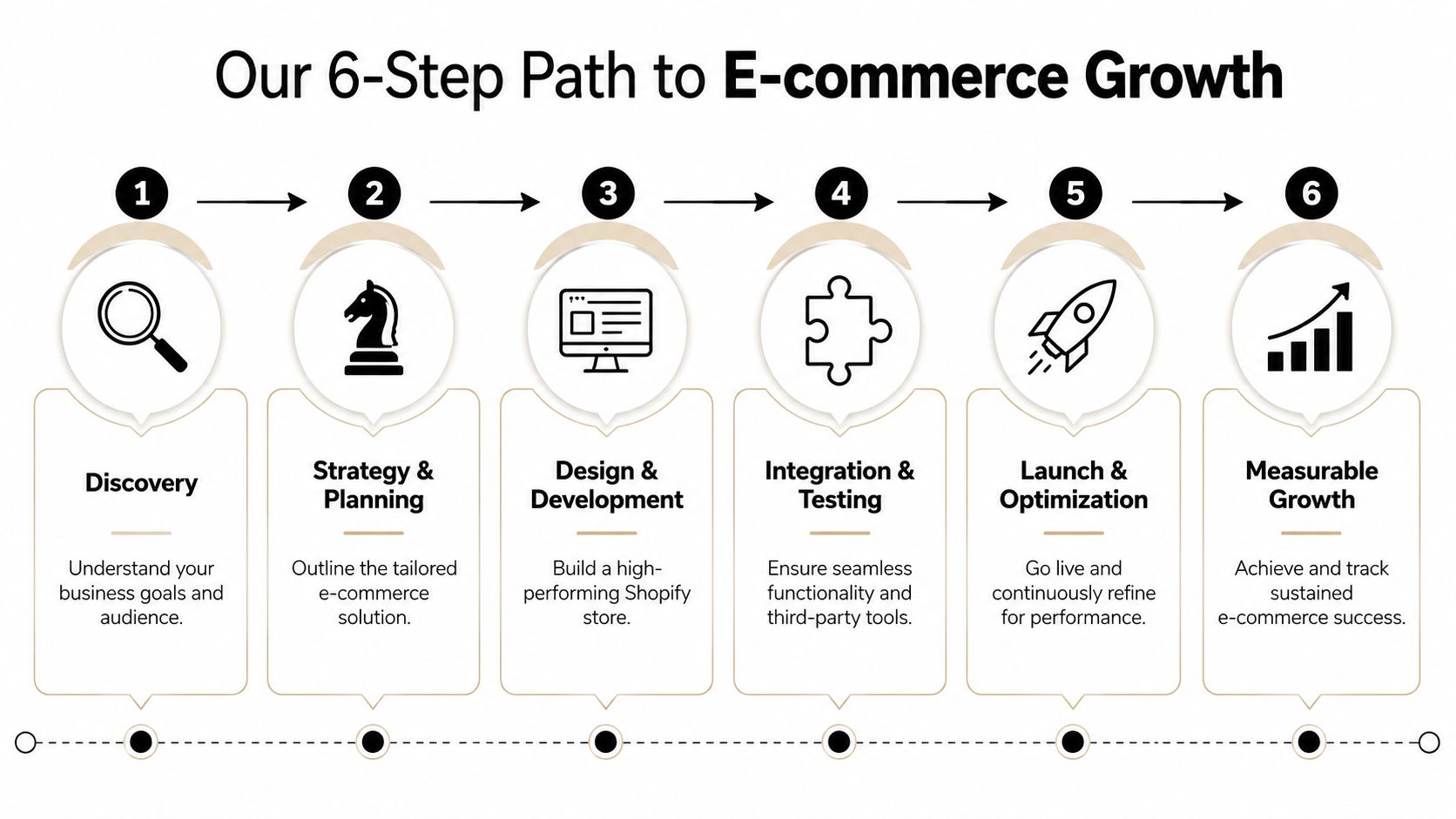
A Shopify project usually looks straightforward at the start. Then practical constraints show up. Product data is messy, apps overlap, reporting is unreliable, and the store has to support both conversion and day-to-day operations. Our process is built to deal with those issues early, not after launch when fixes are slower and more expensive.
Discovery and strategy
We start by mapping the commercial model before we touch design. That means understanding what you sell, how customers buy, what the margin structure looks like, and which channels need to work first. For Melbourne brands, this is often the point where the brief changes. A business may ask for a premium rebuild, but the better decision is sometimes a leaner store with stronger tracking, cleaner feeds, and a paid media setup that can produce a measurable return.
The early questions are practical:
- Is Shopify the right platform, or should part of the site live in WordPress
- Will Google Shopping drive a meaningful share of demand
- Does the brand need Instagram Shop and Facebook Shop
- Are we measuring purchases only, or also forms, calls, and booked appointments
- Do local SEO, Google Business Profile, or location pages affect the sales process
Platform fit matters. Funnel fit matters too. We have seen service-led businesses spend heavily on eCommerce features they barely use, while the actual revenue driver was lead capture, phone calls, or booked consultations.
Design, development, and integration
Once the direction is clear, the build phase brings design, development, and measurement together. Agencies often stop at theme work and hand the rest off. We do not. The store needs to be ready for traffic, attribution, and ongoing media spend from day one.
Depending on the project, that work can include:
- Theme development and Shopify design refinement
- Building custom Shopify apps using Shopify CLI
- Using the Shopify developer API for integrations
- WordPress development for hybrid content needs
- Building custom blocks in Gutenberg
- Setting up Google Tag Manager containers
- GTM and Google Analytics event planning
- Meta Conversions API installation
- Product feed hygiene for Google Shopping
Good tracking is a good example of the trade-off. A fast launch with partial event setup may save time in the short term, but it creates reporting gaps, weaker optimisation signals, and wasted ad spend later. We would rather take the extra time to validate the setup properly.
Launch, optimisation, and scaling
Go-live is the handover point for some agencies. For us, it is the point where the store starts proving itself.
Once real users hit the site, patterns appear quickly. Search terms reveal buying intent. Feed issues show up in merchant centre. Landing pages either support paid traffic or waste it. We use that post-launch period to tighten the account around what is converting.
That usually includes:
- Google Ads structure, including campaign priority where shopping setups need tighter control
- PMAX vs Google Shopping ads decisions based on account behaviour and product mix
- Meta ads creative testing process, so learnings build before fatigue sets in
- Audience exclusions, landing page alignment, and conversion signal quality
- Email capture and automation paths
- Call tracking for businesses where phone leads matter
For call-led businesses, we have also set up custom numbers through Twilio with practical features such as 24 hour call answering, no human fatigue, and the ability to book appointments into your calendar or Calendly. That setup suits tradies, clinics, salons, restaurants, and other businesses that lose revenue when calls ring out.
Consistency matters here. Brands usually get better results when the same team can adjust the store, fix the tracking, and refine the campaigns without sending work across three different providers.
That overlap between web, data, and media is where long-term growth usually comes from. It can involve Google ads for service based businesses, Google ads for contact form submissions, PPC for tradies, local SEO, and support that ranges from a wordpress developer melbourne brief to a larger Shopify rebuild. One provider in this category is Alpha Omega Digital's eCommerce marketing agency service, which combines web builds with paid acquisition and reporting.
The supporting tools matter too
Tools do not fix a weak strategy, but the wrong stack creates friction fast. We choose tools based on what the business needs to measure, automate, and improve after launch.
A typical toolkit may involve:
| Area | Examples |
|---|---|
| Tagging and analytics | GTM, Google Analytics |
| Paid media | Google Ads, Meta Ads Manager |
| Commerce platform | Shopify, Shopify Plus |
| CMS layer | WordPress, Gutenberg |
| Call handling | Twilio, Calendly |
| Call tracking options | CallRail, Go High Level |
That is why development decisions affect far more than the build itself. Topics like mastering Facebook ads, how to measure success Facebook ads, Facebook ads don't quit too early, beginners guide to Google Shopping ads, and what budget to spend on Google Ads all depend on the store being set up to support them. If the site structure, tracking, and feeds are right, paid media has a fair chance to perform. If they are not, ROAS becomes harder to achieve no matter how good the campaigns look in-platform.
Ready to Grow Your Store The Right Way
Choosing a Shopify web development agency isn't really about choosing who can launch a website. It's about choosing who can build the commercial system around that website.
That means better platform choices. Better integration decisions. Better measurement. Better alignment between store structure and paid traffic. If those pieces are disconnected, you feel it quickly in ad inefficiency, weak data, and constant patch jobs.
For eCommerce brands, that's why I'd prioritise a partner that can handle the full lifecycle. Shopify development, Shopify design, Google Ads, Meta ads, GTM, analytics, SEO, and post-launch testing all need to pull in the same direction. If you also run content-heavy campaigns or service pages, WordPress development and WordPress design may need to sit alongside Shopify too.
This applies whether you're comparing a freelancer, an in-house hire, or a broader marketing agency Melbourne businesses use for ongoing support. The right choice is the one that matches your stage, your operational complexity, and how seriously you take paid acquisition after launch.
We work with businesses based in Melbourne and also support brands in Sydney, Brisbane, Newcastle, Perth, Adelaide, Darwin, and Hobart. If your store needs both technical work and measurable growth support, that integrated model usually saves time, avoids rework, and gives you a clearer path to profitable scale.
If you're a business with a paid ads budget of at least AUD 3,000 a month, I'd love to offer you a low-risk deal: get a month of paid ads management free. Apply through the contact page if you want to see whether the fit is right.
If you need a partner that can handle Shopify development, WordPress development, Google Ads, Meta ads, tracking, and ongoing optimisation in one place, take a look at Alpha Omega Digital. They're based in Melbourne and work with businesses across Australia. If you have a project in mind, get in touch through the contact page.
[email protected]
Read more insights from our team on web design, paid ads, and growth strategy.