A Melbourne business owner usually notices the website problem in an unglamorous way. A form stops sending enquiries, a product page crawls on mobile, or a customer calls to say checkout failed. By the time someone investigates, the site has become an expensive leak rather than a useful sales asset.
Choosing a WordPress web developer in Melbourne should fix that problem at its source. The right partner doesn't just install a theme and hand over login details. They plan the customer journey, build reliable integrations, protect performance, configure tracking, and leave you with a site that can be maintained for the next 12 months.
For ecommerce businesses, that decision also includes platform fit. A practical ecommerce platform comparison for New Zealand businesses can help clarify the trade-offs between WordPress and Shopify before development begins, particularly around ownership, hosting, flexibility, and ongoing administration.
Why Hiring the Right WordPress Web Developer in Melbourne Changes Everything
A store can look polished and still lose sales. The homepage may be attractive, but the product filter might fail on mobile, the add-to-cart event might never reach Google Analytics, or the checkout might rely on a plugin that hasn't been maintained properly. These issues rarely appear in a design presentation. They surface when real customers try to buy.
A capable WordPress website developer treats the site as a connected commercial system. The work includes content structure, product data, payment flows, forms, analytics, search visibility, security, and post-launch support. A page that looks good in a browser but loads slowly, shifts while customers tap, or loses conversion data isn't finished.
Melbourne's WordPress market is large enough to offer choice, but that choice creates a quality problem. One source estimates that WordPress powers about 65% of Australian websites in 2026, while another Australia-wide dataset places WordPress at 88.5% among Australian sites using a CMS in 2026 (Australian WordPress market share data). The figures use different methodologies, but both point to the same practical conclusion: WordPress expertise remains commercially relevant for Australian brochure sites, lead-generation websites, and online stores.
The local market rewards ownership, not just launch speed
A Melbourne developer should understand more than WordPress development. They need to understand how a site supports local SEO, paid traffic, catalogue management, and customer service across suburbs and service areas.
That includes building landing pages that make sense for local search, adding structured data where appropriate, creating reusable Gutenberg blocks, and connecting lead forms to a CRM. It also means knowing when not to add another plugin. Every extra dependency can create an update, security, compatibility, or performance obligation.
A good WordPress development company will also discuss what happens after launch. Who applies updates? Who checks failed forms? Who reviews Search Console? Who investigates a sudden drop in tracked purchases? If the answer is “you can contact us if something happens”, the ownership model is incomplete.
Practical rule: Choose the developer who explains how the site will be operated after launch, not only how it will be presented on launch day.
For an ecommerce brand, the website has to support merchandising, stock information, promotions, payments, shipping, customer accounts, and reporting. For a service business, it has to turn searches into calls, bookings, and contact form submissions. The platform is only useful when those commercial journeys work consistently.
Freelancer vs Boutique Studio vs Full-Service Agency
The right engagement model depends on how much operational responsibility your site needs. A freelancer, boutique studio, and full-service agency can all produce a strong build, but they carry different risks around capacity, accountability, and post-launch care.
| Factor | Freelancer | Boutique Studio | Full-Service Agency |
|---|---|---|---|
| Cost band | Usually the leanest option | Moderate, reflecting shared expertise | Usually the broadest scope and process |
| Build speed | Often fast for a clear brief | Fast with internal collaboration | Can be slower because of approvals and specialists |
| Design maturity | Depends heavily on the individual | Usually consistent across design and development | Often supported by dedicated UX and creative staff |
| Technical depth | Strong if the freelancer has the right niche | Shared skills reduce single-person dependency | Access to development, analytics, SEO, and paid media specialists |
| Accountability | Direct access, but one point of failure | Principal accountability with team support | Formal account management and documented workflows |
| Ongoing maintenance | May be limited by availability | Often practical and personal | Usually structured through retainers or support plans |
| Fit for active Google or Meta campaigns | Suitable if tracking skills are proven | Strong for integrated builds | Useful when ads, SEO, creative, and development need one operating plan |
Freelancers
A freelancer can be the best choice for a focused project with a defined scope. You may get direct access to the person writing the code, fewer meetings, and a quicker route from decision to implementation.
The risk is capacity. If that person gets sick, takes on a larger project, or stops supporting a particular plugin, your site may have no backup. Ask for repository access, documentation, hosting ownership, and a clear response process before work begins.
Boutique studios
A boutique studio often gives ecommerce businesses a useful middle ground. You can still speak with the principal or lead developer, while design, testing, content migration, and technical review don't depend on one person.
This model suits a growing store that needs custom product templates, Shopify API work, WooCommerce extensions, or custom blocks in Gutenberg without the layers of a large agency. The key question is whether the studio documents its work well enough for another developer to take over.
Full-service agencies
A full-service agency makes sense when the website must support a wider acquisition system. The same team may handle Google Ads, Meta campaigns, landing pages, GTM and Google Analytics, local SEO, creative testing, and conversion reporting.
That coordination can reduce handovers, but it comes with more process. If you only need a small site rebuild, the structure may be excessive. If your ecommerce business is already spending heavily on paid traffic, separating development from campaign management can create slower feedback loops.
Reading a WordPress Portfolio the Way Buyers Should
A portfolio should answer a commercial question: can this developer solve a problem like mine? A collection of attractive screenshots doesn't prove that the person can manage product data, payments, tracking, accessibility, performance, or post-launch maintenance.
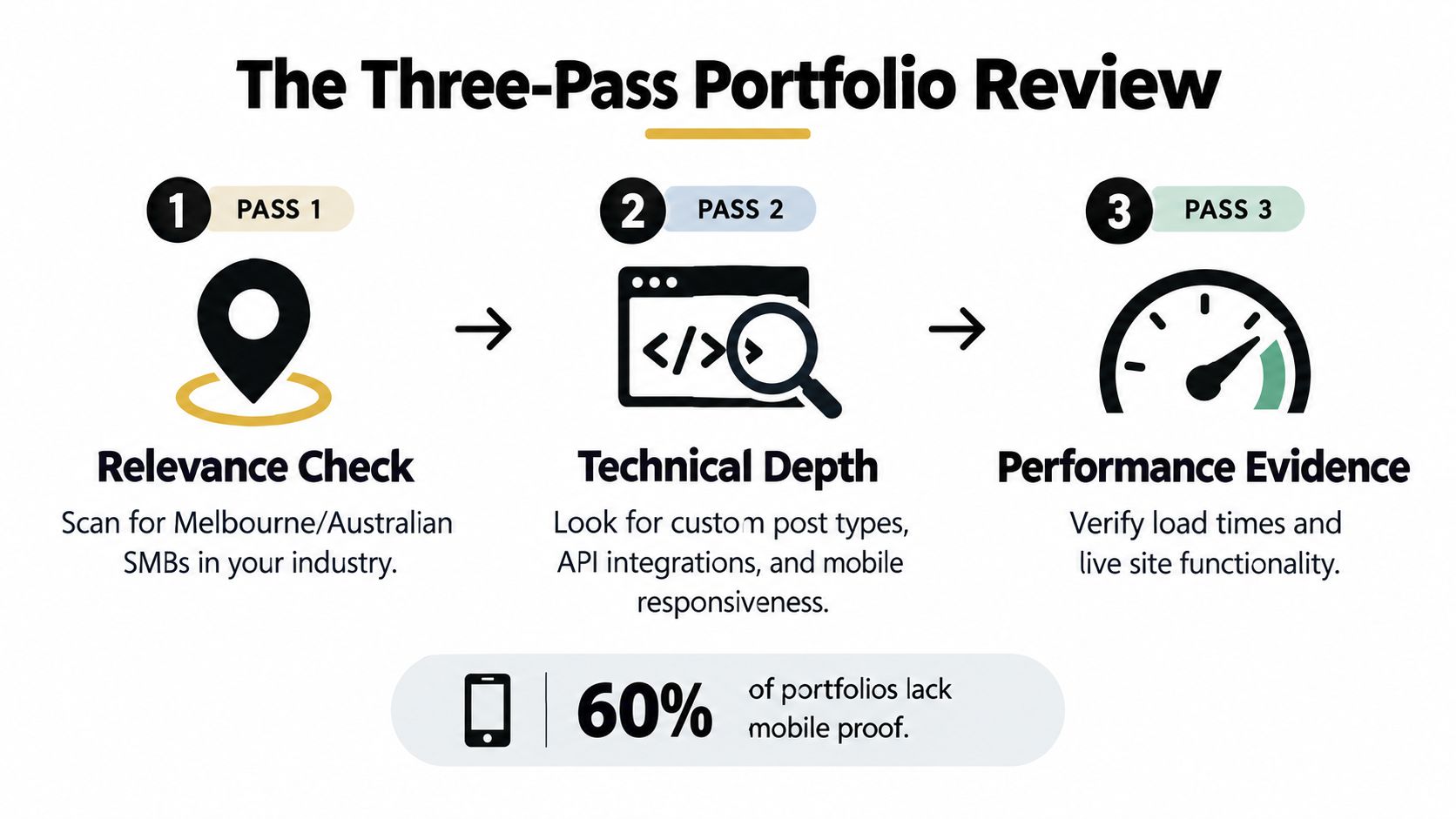
Use a three-pass review rather than scrolling through thumbnails.
Pass one checks relevance
Look for businesses with similar operating conditions. Australian ecommerce, hospitality, health, beauty, retail, and service businesses often have practical constraints that generic international portfolio pieces don't reveal.
Check whether the examples include:
- Comparable journeys: Can customers browse, filter, enquire, book, or buy?
- Local context: Does the work show Australian locations, shipping rules, tax considerations, or local service areas?
- Platform relevance: Are the examples built with WordPress, WooCommerce, Shopify, or a custom integration similar to yours?
The sector itself matters less than the underlying complexity. A simple catalogue site doesn't demonstrate the same capability as a store with subscriptions, product variations, customer accounts, and external inventory systems.
Pass two tests the live sites
Open the examples on your phone. Try the navigation, search, product filters, form fields, add-to-cart flow, and checkout. Don't judge only the homepage.
Look for layout movement, delayed interactions, tiny tap targets, oversized images, intrusive pop-ups, and broken links. If the portfolio owner's own showcase sites feel neglected, ask how your site will receive attention after the invoice is paid.
Pass three asks for evidence
Request live URLs and specific explanations. A strong developer can explain what was custom, what was configured, what was integrated, and what was measured.
Be cautious with portfolios that show only design mock-ups, stock imagery, anonymous testimonials, or screenshots without working links. You should also ask whether the client owns the design, content, code, analytics property, and advertising accounts.
The strongest proof is usually specific. A developer who can discuss a local suburb page, a product data migration, a checkout issue, a speed bottleneck, or a failed integration demonstrates more useful experience than one who only talks about visual style.
Ask for the awkward detail: What went wrong on the project, how was it diagnosed, and what changed in the process afterwards?
The Vetting Questions That Actually Reveal Quality
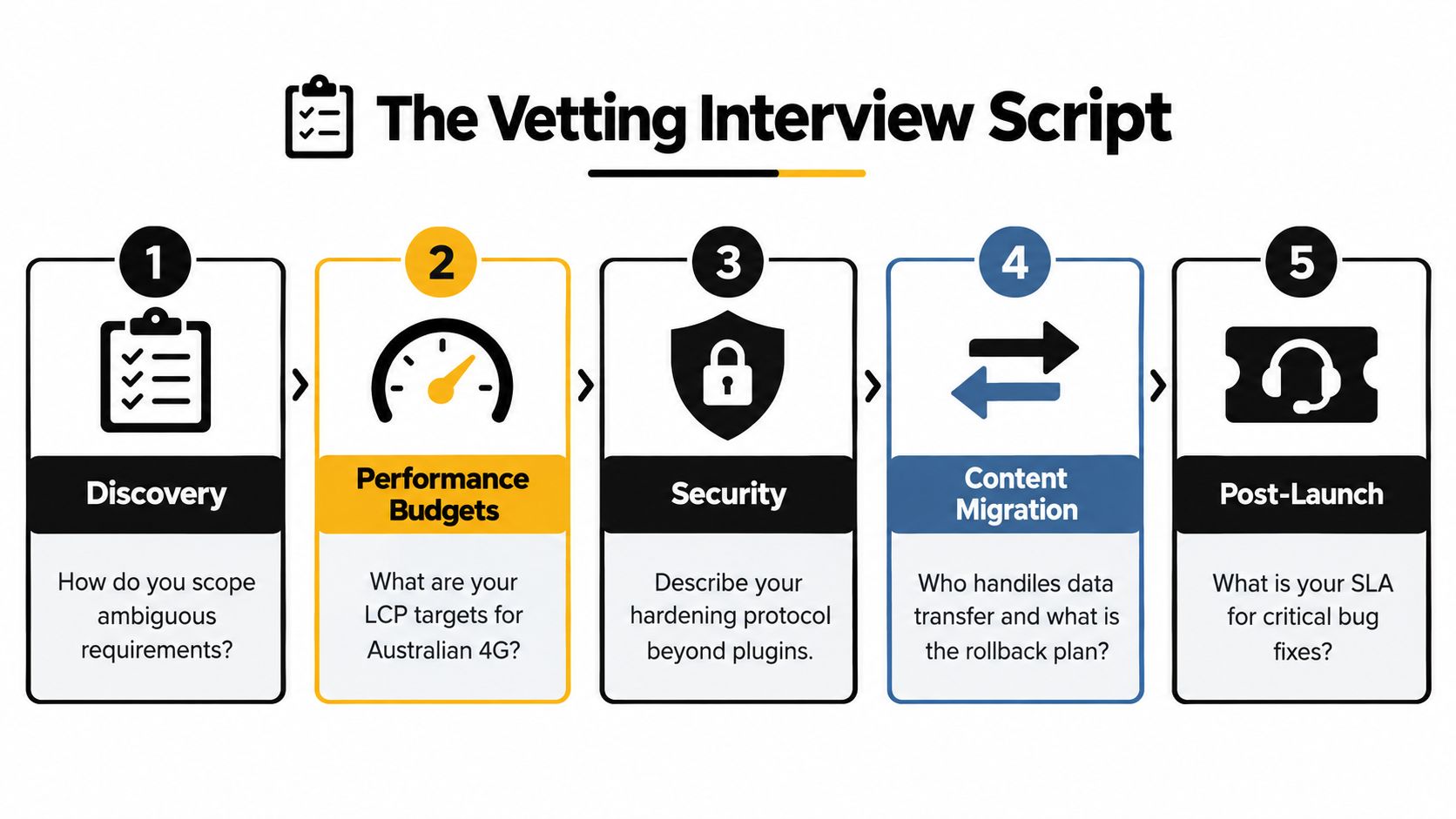
Ask these questions before choosing a WordPress developer. The replies show whether you are buying a documented delivery process or accepting broad promises that become expensive during the next 12 months.
Discovery and scoping
Ask:
- How do you turn an unclear brief into a sitemap and technical scope?
- What do you need to know about products, customers, fulfilment, and internal systems?
- How do you record exclusions, assumptions, and change requests?
- Who approves the scope, content, design, and launch?
A sound answer covers a discovery workshop, written requirements, assumptions, acceptance criteria, and a process for approving changes. “We'll work it out as we go” leaves too much room for disputed scope and unplanned cost. Flexibility has value only when decisions are recorded.
Ask how the scope will protect local SEO requirements, analytics ownership, content updates, and future maintenance. A site that launches well but becomes difficult to edit or expensive to support is a poor 12-month decision.
Performance budgets
Ask:
- What are your Core Web Vitals targets?
- Which templates and devices will you test?
- Will you use field data as well as Lighthouse?
- How will you protect performance after new plugins, products, tracking scripts, and content are added?
A suitable baseline includes LCP under 2.5 seconds, INP under 200 milliseconds, and CLS under 0.1, the thresholds cited in the Australian WordPress performance guidance (Core Web Vitals guidance for WordPress in Australia). Set those targets before development, then retest service pages, location pages, product pages, and other high-intent templates. A developer should explain who monitors performance after launch and what happens when a plugin or campaign slows the site.
Accessibility and security
Ask:
- How will you test keyboard navigation?
- Who checks labels, focus order, colour contrast, alt text, and form errors?
- What does hardening include beyond an installation plugin?
- How are backups, updates, two-factor authentication, and incident response handled?
The Web Content Accessibility Guidelines should guide the build, while human testing checks whether real users can complete key tasks. Australian findings reported that 81.8% of 699 scanned websites failed accessibility checks, with a median score of zero in one report, while about 5.5 million Australians live with disability (Australian web accessibility report). Manual review of navigation, forms, and checkout belongs in the delivery plan, not as an optional extra.
Ownership and support
Ask:
- Will I receive access to the code repository and hosting account?
- Who owns Google Analytics, GTM, Meta Business Manager, Pixel, and advertising accounts?
- What is the response time for a broken checkout or failed lead form?
- What does the monthly care plan include?
Look for named responsibilities, access arrangements, testing duties, escalation paths, update frequency, and exit terms. “Fast”, “secure”, and “fully optimised” are descriptions, not operating agreements. A developer who can explain ongoing costs and maintenance decisions is easier to assess than one focused only on launch day.
What a WordPress Build Really Costs in Melbourne in 2026
A credible quote starts with scope, not a single advertised figure. The price changes with the number of templates, content readiness, product complexity, integrations, migration risk, design depth, and the amount of testing required.
The ranges below are planning bands for Melbourne buyers, not fixed market prices. A developer should replace them with a written scope after reviewing your requirements.
| Build Type | Price Range (AUD) | Typical Timeline | What Drives Cost Up |
|---|---|---|---|
| Brochure or lead-generation site, 5 to 10 pages | AUD $4,000 to $9,000 | Several weeks | Custom UX, copywriting, migration, CRM and booking integrations |
| WooCommerce store with 50 to 500 SKUs | AUD $8,000 to $25,000 | Several weeks to a few months | Product migration, variations, shipping, payment rules, subscriptions |
| Custom theme or plugin-driven build | AUD $15,000 to $50,000 or more | Several months | Bespoke workflows, APIs, permissions, testing, ongoing maintenance |
These bands are deliberately broad because “WordPress website” can mean a small brochure site or a custom ecommerce application. A lower quote may be perfectly reasonable when the design system, content, and functionality are simple. It becomes risky when the quote excludes essential work and presents a template installation as a custom build.
What pushes the quote higher
Custom design increases the amount of decision-making, prototyping, responsive work, and QA. Third-party integrations add another layer because the developer must understand authentication, data mapping, error handling, and future API changes.
Content migration can also consume more effort than clients expect. Product titles, descriptions, images, variations, redirects, customer accounts, order history, and category structures all need checking. Copywriting, photography, translation, and data cleaning should appear as separate line items rather than disappearing inside a vague development allowance.
Use advertising economics as a sanity check
Australian ecommerce buying guidance often frames a starting Google Ads budget at AUD $30 to $50 per day, or approximately AUD $900 to $1,500 per month, to generate enough data for optimisation (Australian ecommerce advertising budget guidance). A 2026 Australian benchmark article places ecommerce Google Ads clicks at about AUD $0.75 to $2.10, while lead-generation categories such as trades, B2B, and professional services sit around AUD $4.20 to $14.20 per click (Australian Google Ads benchmarks).
That context doesn't prove a build will pay back. It does show why tracking, landing-page quality, and a reliable checkout deserve a place in the budget. A cheap site that wastes paid visits can cost more than a properly scoped build.
The Technical Baseline Your Build Should Commit To
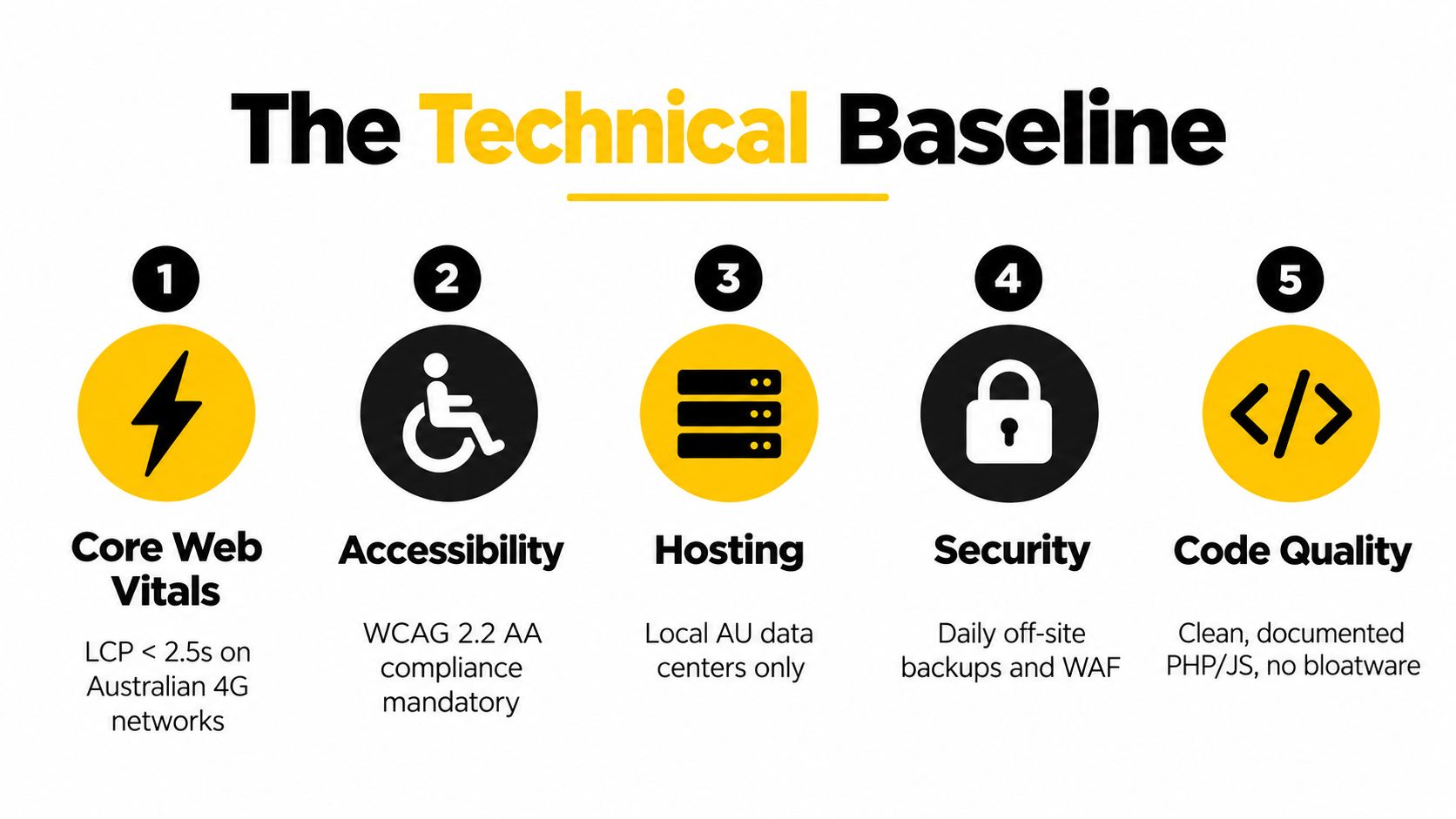
A professional proposal should turn technical promises into checks, owners, and acceptance criteria. “Responsive, SEO-friendly, and secure” is too vague. A Melbourne business needs to know what will be tested before launch, who fixes failures, and what ongoing work is included over the next 12 months.
Performance belongs in the scope
An Australian WordPress performance analysis found that only 43.44% of WordPress sites passed all three Core Web Vitals on mobile, with a median mobile Lighthouse performance score of 38 out of 100 (WordPress performance analysis in Australia). Set performance criteria for the homepage, category pages, product pages, cart, checkout, and paid-traffic landing pages. These pages affect Melbourne local SEO, advertising efficiency, and whether visitors complete enquiries or purchases.
The developer should identify the cause before adding a caching plugin. Slow server response may require better hosting or backend work. Large images, CSS, and JavaScript increase page weight. Poor interaction responsiveness usually means reducing script cost and changing when features load.
Accessibility needs code and human review
Set a WCAG target and name the pages it covers. Automated scans catch many technical issues, but they cannot confirm that a keyboard user can complete checkout or that a screen reader can interpret an error message.
The build should include semantic headings, useful labels, visible focus states, sufficient colour contrast, meaningful alt text, accessible menus, and clear validation messages. Test key journeys with a keyboard and assistive technology before launch.
Hosting, security, and tracking
Choose hosting for response time, support quality, staging, backups, and operational reliability. A local or nearby Australian region may suit the audience, but location alone does not guarantee fast delivery.
Security should cover controlled administrator access, two-factor authentication, tested updates, off-site backups, malware monitoring, and a rollback plan. Tracking should cover first-party analytics, Google Tag Manager, Google Ads conversion measurement, and Meta server-side event support where appropriate.
Use the CMS SEO guide from LLMrefs when assessing crawlability, structure, and search-friendly publishing. Review the implementation as well. A capable CMS can still produce weak local SEO results when its theme, plugins, content, or tracking are poorly maintained. That maintenance plan belongs in the 12-month ownership decision, not just the launch checklist.
Onboarding, Launch, and the First 90 Days
A good WordPress engagement feels organised before anyone writes code. You should know what gets decided, what you need to provide, what can change, and what evidence supports launch approval.
Kickoff and discovery
The first stage turns business knowledge into a usable plan. The developer should document your products, customers, locations, acquisition channels, internal workflows, and commercial priorities.
For an ecommerce brand, that means discussing catalogue structure, product options, inventory sources, shipping rules, returns, payment providers, promotions, customer accounts, and email automation. For a lead-generation business, it means mapping forms, phone calls, bookings, qualification questions, CRM stages, and follow-up ownership.
You should receive:
- A confirmed sitemap: Core pages, categories, product templates, landing pages, and content areas.
- A technical scope: WordPress, WooCommerce, Shopify, APIs, plugins, hosting, analytics, and exclusions.
- A measurement plan: The events that matter, such as product views, add-to-cart actions, purchases, calls, bookings, and form submissions.
- A content list: Required copy, images, product data, brand assets, legal pages, and customer policies.
Locking those decisions early protects the budget. It also prevents a visually complete site from reaching development with no workable product data or conversion plan.
Design and build
The build should happen on a staging environment, not directly on the live site. Weekly demonstrations are useful when they answer decisions rather than just display progress.
A WordPress developer might build custom Gutenberg blocks for product benefits, comparison sections, testimonials, FAQs, and location-specific content. Reusable blocks give your team editing flexibility without forcing every page into a rigid template. They also reduce the temptation to install a plugin for every small visual requirement.
For Shopify projects, the same thinking applies through theme sections, metafields, Shopify API integrations, and custom apps created with Shopify CLI. Shopify is often easier to operate because hosting and core infrastructure are managed, while WordPress offers greater control over code, hosting, and extensions. The right choice depends on the catalogue, operational skills, integration requirements, and ownership preference.
Pre-launch quality assurance
Launch approval should follow a checklist, not a feeling. Review:
- Responsive layouts: Test real phones, tablets, and desktop browsers.
- Commerce flows: Search, filters, product variants, cart, coupons, shipping, payment, order emails, refunds, and account areas.
- Lead journeys: Forms, calls, booking requests, thank-you pages, CRM delivery, and notifications.
- Search foundations: Titles, headings, canonicals, XML sitemap, structured data, redirects, indexation controls, and Google Business Profile links.
- Performance and accessibility: Core Web Vitals checks, keyboard navigation, form errors, contrast, alt text, and focus order.
- Measurement: GTM triggers, Google Analytics events, Google Ads conversions, Meta Pixel events, and server-side events.
A launch can fail even when the website looks correct. A missing purchase event can distort paid campaign optimisation. A broken redirect can remove organic visibility. An incorrectly configured checkout can create customer support issues immediately.
The first 90 days
The first weeks after launch reveal problems that staging can't always reproduce. Customers use unusual devices, submit unexpected form content, search for products in ways the team didn't anticipate, and trigger integrations under real conditions.
Use the stabilisation period to:
- Review real behaviour: Compare analytics events with orders, enquiries, calls, and bookings.
- Fix friction: Improve confusing product information, form fields, navigation, and checkout steps.
- Monitor updates: Apply WordPress, WooCommerce, theme, and plugin updates through a tested workflow.
- Document ownership: Record logins, integrations, tracking properties, backups, and escalation contacts.
- Train the team: Show staff how to edit content, manage products, review orders, and avoid damaging reusable layouts.
- Set the care plan: Agree what receives monitoring, how quickly critical issues are handled, and which improvements are included.
Paid acquisition needs the same operational discipline. Google Ads campaign structure should reflect intent, landing pages, and conversion quality. Shopping campaigns require accurate product data and clear feed diagnostics. Meta campaigns need a deliberate creative testing process, not a collection of attractive images launched without a hypothesis.
For a business spending on Facebook or Instagram, setting up Meta Conversions API means configuring the relevant Business Manager assets, Pixel, Meta application, server connection, and system user. Meta's end-to-end Conversions API implementation guide also stresses sending enough automated funnel events for the account to be considered fully onboarded. The developer and advertising team should agree who owns this setup and how event quality will be checked.
Call tracking deserves the same care. Tools such as CallRail and GoHighLevel can connect campaign source data with phone outcomes, while a custom number through Twilio can support a broader reception workflow. A properly configured Twilio system can answer calls 24 hours a day, doesn't get sick or tired, and can book appointments into your calendar or Calendly. For tradies, hairdressers, beauty therapists, dentists, restaurants, and doctors, capturing missed calls and booking requests can protect thousands in lost business, but only when the routing, scripts, escalation rules, and consent requirements are documented.
Alpha Omega Digital is a Melbourne-based option for businesses that want WordPress or Shopify development connected with Google Ads, Meta advertising, analytics, and conversion-focused optimisation. The team also services clients in Sydney, Brisbane, Newcastle, Perth, Adelaide, Darwin, and Hobart, so the engagement doesn't have to stop at a Melbourne launch.
If you're a business with a paid ads budget of at least 3k a month, I'd love to offer you a low risk deal, a month of paid ads management FREE. Apply now through the contact page.
Alpha Omega Digital can scope a WordPress or Shopify build around your catalogue, customer journey, tracking, and ongoing maintenance needs, then connect the launch with practical Google Ads and Meta campaign management. Visit Alpha Omega Digital to discuss your project and decide whether the platform, support model, and 12-month ownership plan fit your business.
[email protected]
Read more insights from our team on web design, paid ads, and growth strategy.