Most business owners who come to us aren’t starting from zero. They’ve already launched campaigns, spent money, seen traffic come through, and then hit the same wall.
The account looks busy, but the business result feels fuzzy.
That’s where google ads management stops being a dashboard task and starts becoming an operating system for growth. In Melbourne, especially for eCommerce brands on Shopify and service businesses on WordPress, the gap between “ads are live” and “ads are working” usually comes down to structure, tracking, landing pages, and the quality of decisions being made each week.
I’ve seen this firsthand with brands that had decent products, solid websites, and enough budget to compete, yet the account was leaking money through poor query control, weak creative coverage, broken form attribution, or campaigns that were left on autopilot for too long. The fix usually isn’t one dramatic change. It’s disciplined management.
If you’re comparing options from a marketing agency Melbourne businesses can rely on, this is what practical Google Ads management looks like behind the scenes.
The Real Problem with 'Just Running' Google Ads
A lot of accounts aren’t failing because Google Ads “doesn’t work”. They’re failing because nobody is managing the system tightly enough.
We speak to Melbourne business owners every week who are getting clicks and impressions, but can’t answer basic commercial questions. Which campaign is producing profitable sales. Which searches are wasting budget. Whether contact form submissions are turning into qualified leads. Whether the landing page is helping or hurting.
That uncertainty is expensive.
Activity is not the same as management
An account can look active and still be badly run. Ads are serving. Search terms are coming in. Performance Max is spending. Reports exist. None of that proves the account is healthy.
Real google ads management means someone is doing all of this consistently:
- Checking search intent: Not just what keywords you targeted, but what people typed before they clicked.
- Controlling waste: Adding negatives, splitting out stronger themes, and stopping weak traffic from polluting the account.
- Comparing conversion quality: A form submit from the wrong suburb or from an unqualified shopper isn’t equal to a sale-ready lead.
- Matching traffic to the page: If the ad promises one thing and the landing page delivers another, conversion rate usually suffers.
Most underperforming accounts don’t need more hacks. They need tighter decisions made more often.
Where businesses usually get caught
For eCommerce stores, the issue is often product feed quality, weak creative, or campaigns blending high-margin and low-margin products together. For service businesses, it’s usually softer tracking, broad traffic, and landing pages that ask too much from the visitor.
I’ve also seen businesses assume the platform will “figure it out” if they just wait long enough. Sometimes patience is smart. Blind patience isn’t.
A campaign can spend for weeks while teaching the system the wrong lessons if conversion tracking is incomplete or the account structure is muddy.
What strategic management changes
The shift is simple in theory and demanding in practice. You stop treating Google Ads like a slot machine and start treating it like a channel with inputs you can improve.
That means:
| Weak setup | Managed setup |
|---|---|
| Generic campaign structure | Campaigns organised by intent, product type, or lead goal |
| Basic tracking | Proper GTM, GA4, and conversion validation |
| Set-and-forget bidding | Bidding informed by real conversion data |
| Traffic to generic pages | Traffic sent to purpose-built landing pages |
| Monthly guesswork | Weekly optimisation and reporting |
That’s the distinction between “running ads” and proper management. One burns budget and hopes. The other builds a repeatable system.
The Core Components of a Winning Google Ads Account
A Melbourne business can have decent traffic, a fair budget, and still get poor results from Google Ads because the account is built on weak foundations. I see this a lot with Shopify stores that push all products through one campaign, and with service businesses on WordPress that send paid traffic to pages built for general browsing, not conversion.
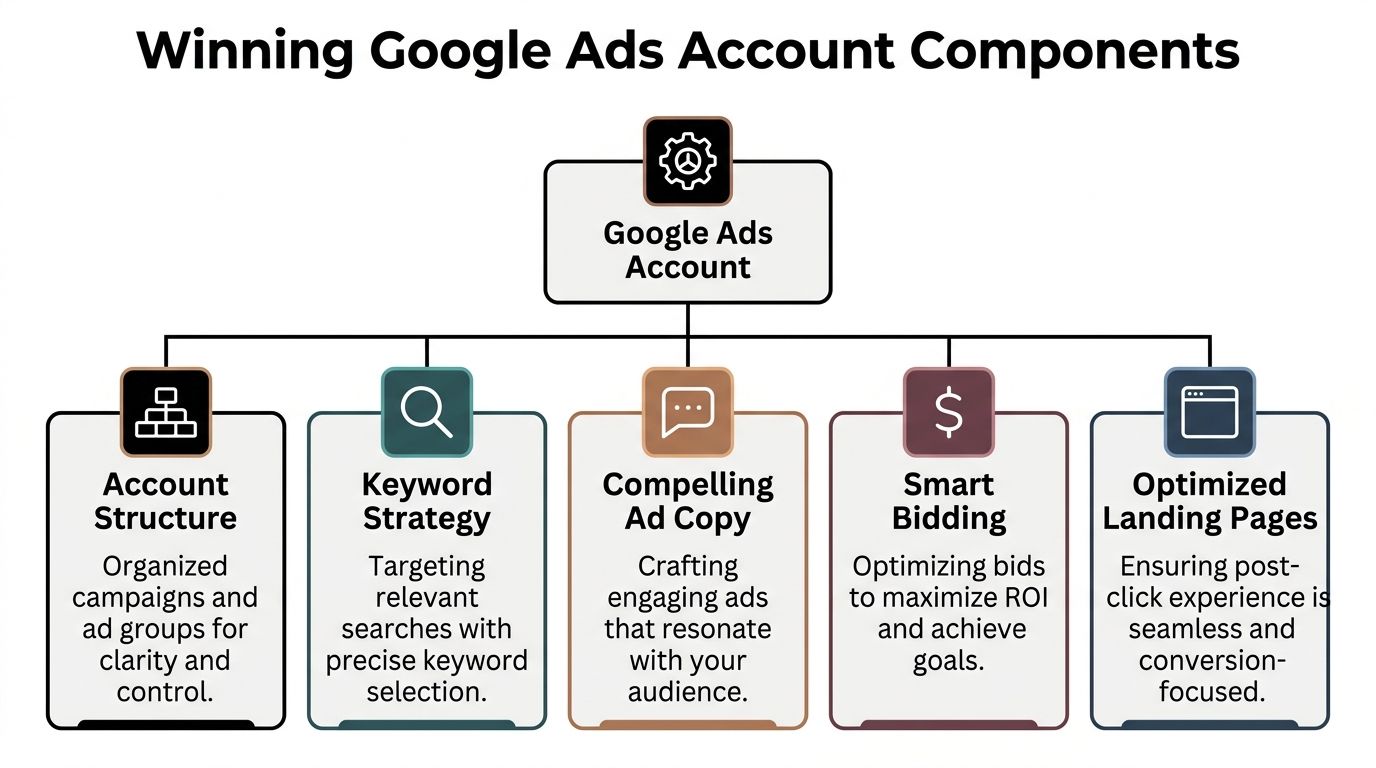
Winning accounts are built so strategy, tracking, creative, and the website work together. If one breaks, performance usually slips somewhere else.
Account structure decides what the algorithm can learn
Structure is not admin work. It sets the rules for how budget is allocated, how search intent is grouped, and how clearly performance can be read later.
For the accounts we manage, the mix usually includes:
- Search campaigns for high-intent queries
- Shopping or Performance Max for eCommerce demand capture
- Remarketing once traffic volume and audience quality are strong enough
The split inside those campaigns matters just as much. Service businesses need campaigns grouped by service line, location, and lead intent. eCommerce stores need segmentation that reflects margins, bestsellers, seasonality, and category differences. If high-margin products and low-margin products sit in the same bucket, bidding tends to chase volume instead of profit.
That is usually where platform setup starts affecting ad performance in a very practical way. On Shopify, feed quality, variant structure, and product data shape what Shopping and PMax can do. On WordPress, form setup, page speed, and event tracking often determine whether lead gen campaigns can optimise properly at all.
Performance Max needs direction, not blind trust
Performance Max can work well, especially for eCommerce, but it is unforgiving when inputs are weak. Analysts at Improvado noted in this Google Ads metrics breakdown that missing or weak creative can reduce reach significantly.
We manage PMax by checking the pieces Google relies on:
- Asset coverage. Enough headlines, descriptions, images, and video to give the system options
- Listing group structure. Product groupings based on commercial priorities, not convenience
- Asset diagnostics. Clear decisions on what to replace, pause, or rewrite
- Audience signals and exclusions. Useful guidance without overcomplicating the setup
PMax is not a campaign type I leave alone for a month and hope for the best. It needs regular review, especially when a catalogue changes, promotions shift, or asset fatigue starts to show.
Bidding only gets better when tracking is trustworthy
Many leads do not end as clean online transactions, so improving observability is critical.
For lead generation, form submits, phone calls, and qualified enquiries need to be tracked properly through Google Tag Manager, checked in GA4, and tied back to real sales outcomes where possible. For eCommerce, purchase value has to pass through correctly so bidding can optimise for revenue and margin, not just conversion count.
A practical stack for many Melbourne SMBs looks like this:
- GTM for implementation and event control
- GA4 for behaviour analysis and validation
- Native Google Ads conversion tracking for optimisation
- Shopify or WordPress platform events to support accurate transaction or lead data
- Meta Conversion API when paid social is part of the wider acquisition mix
This is also where reporting can go wrong. If the tag setup is messy, both Google and Meta can claim credit for the same result, and the business starts making budget decisions on distorted numbers. Teams that want cleaner commercial reporting should also know how to calculate your marketing ROI beyond platform-reported conversions.
Ad copy and landing pages do the hard part
Clicks are easy to buy. Conversion is harder.
A lot of underperforming campaigns are not failing because the keyword choice is terrible. They fail because the ad promise and the landing page experience do not line up. We see this often on service sites with long, generic pages and on eCommerce stores with cluttered templates, unclear shipping info, or weak product imagery.
For buyer-intent traffic, the landing page should do a few things quickly:
- Match the ad message
- Make the offer obvious
- Reduce friction in the next step
- Show trust signals early
- Give the visitor a clear action to take
Sometimes the fix is copy and layout. Sometimes it is technical. A slow template, broken form event, poor mobile UX, or messy product schema can hold back an otherwise solid account. That is why good Google Ads management often overlaps with real platform work in Shopify, WordPress, and GTM, not just campaign edits inside the ad account.
Practical rule: Never judge campaign quality without checking the page experience and the tracking on that page.
Strong accounts make decisions easier
The best account setups make diagnosis faster. That matters when spend is rising, leads are softening, or a previously stable campaign starts slipping.
I want to be able to answer questions like these without digging through a mess:
| Question | What we look at |
|---|---|
| Which campaigns should get more budget | Lead quality, margin, search intent, and conversion rate |
| Why spend is rising | Search term mix, competition, feed changes, or weak assets |
| Why lead volume or sales dropped | Impression loss, tracking issues, stock changes, or page friction |
| What to test next | Search terms, ad angles, product grouping, page layout, or offer clarity |
When the account is built well, optimisation becomes less reactive. You can see what is happening, decide faster, and fix the right thing first. That is what a winning Google Ads account looks like in practice.
Budgeting and Measuring Real Success in Google Ads
“How much should we spend?” gets asked a lot, but the better question is whether your budget gives the account enough room to learn and enough control to stay profitable.
In Australia, that question has become harder because lead costs have been moving in the wrong direction. For startups and SMBs, Cost Per Lead for lead generation rose 28% in Victoria in late 2025, and consolidating ad groups to improve data velocity can boost ROAS by up to 40%, based on the findings referenced in this Search Terms Report analysis.

Start with commercial reality, not platform fantasy
A sensible budget comes from your margins, average order value, close rate, and how competitive the search space is. It doesn’t come from a random recommendation in the Google Ads interface.
For eCommerce, I usually frame budget around product economics. If you’re selling low-margin products, aggressive scaling can make the account look busy while profit disappears.
For lead generation, I care about what happens after the form submit or phone call. A cheap lead can still be expensive if your team can’t close it.
The KPIs that matter
Clicks and impressions tell you the campaign is alive. They don’t tell you the campaign is useful.
These are the numbers I care about most:
- ROAS: Best for eCommerce when purchase value tracking is reliable
- CPA: Useful for lead generation and tightly defined actions
- Conversion rate: Helps diagnose whether the issue is traffic quality or page quality
- Lead quality: Essential for service businesses where not every enquiry has equal value
If you need a clearer framework for working out whether the channel is paying for itself, this guide on how to calculate your marketing ROI is a useful starting point.
Small budgets need tighter structure
A common mistake is spreading a modest budget across too many campaigns, too many ad groups, and too many goals.
That usually creates weak signal quality. The account never gathers enough data in one place to optimise properly.
A better approach for smaller accounts is often narrower:
| Budget condition | Better move |
|---|---|
| Limited monthly spend | Consolidate ad groups and focus on strongest intent |
| Unclear conversion quality | Fix tracking before scaling |
| Broad product catalogue | Prioritise profitable categories first |
| Service area too wide | Tighten geo-targeting and landing page relevance |
If your budget is modest, simplicity is often more profitable than coverage.
Reporting should tie back to decisions
A report isn’t useful because it has lots of widgets. It’s useful because it tells you what to do next.
As a Google Ads agency, we prefer reporting that links spend to outcomes, then turns that into action. Which product category deserves more budget. Which suburb converts poorly. Which search themes need to be excluded. Which landing page is dragging down lead volume.
That’s what measuring success should look like. Not just more data, but better judgement.
Our Agency Roadmap From Onboarding to Optimisation
A Melbourne business comes to us after three months of spend, plenty of clicks, and no clear answer on what is producing sales or qualified leads. Usually the campaigns are live, but the foundations are patchy. Conversion actions are duplicated, GTM is half-configured, Shopify or WordPress forms are not passing clean data, and nobody can explain why budget was split the way it was.
That is why we keep the process visible from day one.

Step 1 through Step 3
Step one is the audit. We review campaign structure, search terms, conversion actions, landing pages, Merchant Center feed quality, and the tracking setup inside GA4 and GTM. The goal is simple. Work out whether the account has a data problem, a strategy problem, or both.
Step two is the commercial strategy. We define what success should look like before changing bids or budgets. For eCommerce, that might mean prioritising margin, product categories, or new customer acquisition over raw revenue. For service businesses, it often means separating any lead from a lead your sales team wants.
Step three is setup. We rebuild or refine the account around that goal. That includes campaign architecture, audience signals, feed rules, location settings, ad assets, and platform integrations across Shopify or WordPress. If the website is fighting the ad strategy, we address that early rather than pretending media buying alone will solve it.
For service businesses, call handling often sits inside this step too. If phone calls drive bookings, we can connect a custom Twilio number into your workflow so calls are tracked properly, routed reliably, and tied back to campaign activity. That matters for tradies, clinics, salons, restaurants, and other businesses where the first response often wins the job.
Step 4 through Step 6
Step four is launch and validation. We check that revenue, form submissions, phone calls, and other key actions are recording correctly once traffic starts flowing. We also test whether the live search queries and placements match the original intent.
Step five is the learning window. Good management here requires restraint. We do not rewrite the account after two noisy days, but we also do not sit on weak lead quality, poor search terms, or obvious feed issues for weeks. The first reviews usually focus on search intent, product group splits, suburb-level performance, device patterns, and landing page behaviour.
Step six is optimisation and scaling. Budget moves toward the campaigns and categories earning their place. Negative keywords expand. Assets are refreshed. Feed rules get cleaned up. Landing pages get revised when the bottleneck is conversion rate rather than traffic quality.
Why measurement is a required part of the roadmap
For lead generation accounts, better measurement changes bidding behaviour. If a business relies on calls, quote requests, booked consults, or offline sales follow-up, the platform needs better signals than a basic thank-you page.
Google explains this clearly in its guidance on Enhanced Conversions for Leads. In practice, we use that approach to improve visibility on lead quality by passing hashed first-party data from Shopify or WordPress forms back into Google Ads. That gives the account a better chance of valuing the clicks that turn into real revenue later, not just the ones that complete a neat online transaction.
Better tracking improves both reporting and bidding decisions.
The operational side most businesses never see
Campaign results depend on execution quality as much as strategy. Someone still has to manage approvals, coordinate developers, fix broken tags, request assets, QA landing pages, and keep all of that moving on time.
For businesses weighing up in-house management against agency support, process matters. This overview of creative agency project management software gives a useful look at how agencies organise delivery across strategy, creative, and production.
In real client work, Google Ads management often spills into adjacent systems. A campaign might need feed fixes, GTM container cleanup, a landing page rebuild, cleaner form tracking, or support from the web team before the account can scale properly.
That is also where a provider like Alpha Omega Digital fits for businesses that want paid ads, website work, and tracking handled together instead of spread across multiple vendors.
How to Choose the Right Digital Marketing Agency in Melbourne
A Melbourne business owner hires an agency, launches campaigns, sees clicks come through, then spends the next three months trying to work out why sales did not follow. The reports look tidy. The account is active. The problem is that nobody fixed the feed, checked the form tracking properly, or tied the campaign back to margin and lead quality.
That is the gap to look for when choosing an agency. Google Ads management is rarely just campaign management, especially for eCommerce brands on Shopify and service businesses running WordPress, GTM, and GA4 across multiple enquiry points.

Ask whether they understand the whole buying path
A good agency should be able to explain what happens after the click.
I would ask direct questions about how they handle product feeds, call tracking, form attribution, landing page edits, and conversion imports. If the answer stays at the level of keywords, CTR, and bid strategy, you are probably talking to a media buyer, not a growth partner.
That distinction matters in real accounts. A search campaign can look healthy inside Google Ads while the business still loses money because the wrong products are being pushed, the quote form is dropping submissions, or the sales team is closing low-value leads. Agencies that work well across ads, website platforms, and tracking tools usually spot those issues earlier.
If you’re speaking to a digital marketing agency Melbourne business owners recommend, ask questions like:
- Who handles tracking setup: Do they work inside GTM and GA4 themselves?
- Who handles platform issues: Can they work with Shopify and WordPress without delays?
- How do they improve landing pages: Do they review page structure, offer, and call to action, or only send traffic?
- How do they report results: Will they show revenue, qualified leads, and cost by outcome?
- How do they judge success: Do they ask about margin, close rate, repeat purchase, and lead quality before proposing strategy?
Red flags to take seriously
Some problems show up in the first meeting.
| Red flag | Why it matters |
|---|---|
| Guaranteed results | No agency controls competition, demand, or your sales process |
| Vague reporting | You will struggle to see what is working and what is wasting budget |
| No questions about margins or lead quality | They may optimise for volume instead of profit |
| No technical depth | Tracking issues and platform problems stay unresolved for too long |
| One-size-fits-all packages | A local service business and a Shopify store need different account structures |
We see this often when taking over accounts from generic providers. Campaigns were live, but the basics underneath were weak. Conversion actions were duplicated, branded traffic was inflating performance, or landing pages had never been tested against actual customer intent.
Pricing matters, but fit matters more
Retainer pricing can work. Percentage-of-spend pricing can work too.
The better question is what the fee includes, who is doing the work, and whether the agency can support the operational load around the ad account. A simple lead generation setup with stable pages and clean CRM feedback needs a different level of management than a growing Shopify brand with feed issues, promo cycles, and ongoing creative changes.
Broader capability can help if it is real and not just a sales line. An agency that can also support Local SEO or web improvements through a broader digital marketing agency in Melbourne offering will usually create fewer handover problems between strategy, tracking, and site updates.
A useful example of the type of thinking worth looking for is below.
The right partner should be commercially aware, technically capable, and comfortable challenging weak assumptions. In practice, that usually matters more than polished pitch decks or a long list of platform badges.
Quick DIY Wins for Hands-On Business Owners
Monday morning, the phone is quiet, spend climbed over the weekend, and the first instinct is to tweak bids. In a lot of DIY accounts, the faster win sits somewhere less exciting. Search terms, landing page clarity, or account sprawl usually explain the problem before bidding does.
These are the checks we make first when a Melbourne business owner wants to steady performance without rebuilding the whole account.
Use the Search Terms Report properly
Search terms review is where wasted spend shows up in plain English. I still find this report underused in both eCommerce and service accounts because people scan for conversions and miss the intent behind the click.
Review it weekly and look for patterns such as:
- Irrelevant intent: searches that are related to your offer but come from people who will not buy
- Research-heavy wording: broad phrases that attract comparison traffic, DIY traffic, or early-stage browsing
- Negative keyword opportunities: terms that keep recurring without producing qualified leads or sales
- New exact-match candidates: high-intent phrases that deserve their own tighter ad group or campaign
For service businesses, local wording often causes trouble. We regularly see searches that include suburb names or service modifiers but signal job seekers, students, or people looking for free help. For Shopify stores, the issue is often product queries that sound commercial but point to the wrong variant, wrong price expectation, or low-intent browsing.
Fix the landing page before blaming the campaign
Weak pages waste good traffic. We see this a lot on WordPress service sites and Shopify product pages that have solid ad intent but poor follow-through once the visitor arrives.
Check four things first:
- Headline match: the page should confirm the promise made in the ad
- Call to action clarity: the next step needs to be obvious on mobile and desktop
- Friction points: slow load times, clunky forms, hidden shipping info, or hard-to-find pricing reduce conversion rate fast
- Trust signals: reviews, service areas, returns, delivery details, FAQs, and product specifics give buyers a reason to continue
You do not need a full site rebuild to improve this. In client work, small changes often move results faster than campaign edits. A stronger headline, cleaner product copy, better spacing around the CTA, or a shorter lead form can change performance within days. If tracking is set up properly through GTM, you can see those improvements clearly instead of guessing.
Keep the account simpler than you think
DIY accounts often get messy for a predictable reason. Business owners add campaigns to solve every dip in performance, then lose the ability to see what is working.
A cleaner structure gives you better control. It also makes platform signals easier to read, especially if you are working across Search, Shopping, and Performance Max with limited budget.
A good rule is simple.
If you cannot explain why a campaign exists, pause it and reassess the structure.
We apply that standard in agency audits all the time. One well-structured campaign with clean intent segmentation will usually outperform three overlapping campaigns fighting each other. The same principle carries into other paid channels too. If you later bring in support from a Facebook ads agency, a tidy account structure makes handover, reporting, and decision-making much easier.
Frequently Asked Questions About Google Ads
PMAX vs Standard Shopping which is better for my Shopify store
A Melbourne retailer launches Google Ads on Shopify, turns on Performance Max, and sees spend within a day. A week later, sales are patchy, search terms are unclear, and nobody is sure whether the problem sits in the campaign, the feed, or the product pages.
That is a common starting point.
For many Shopify stores, Performance Max is the better first test because it can find buyers across Search, Shopping, YouTube, Display, and Gmail. The trade-off is control. If tracking is messy, creative is thin, or the product feed is poorly structured, PMax can spend quickly and hide the underlying issue.
Standard Shopping still earns its place. I use it when a store needs tighter control over product groups, clearer query signals, or a cleaner testing environment before handing more automation to Google.
In practice, the choice is rarely just campaign type. Feed quality, collection structure, GTM setup, Merchant Center health, and the way Shopify passes product data all shape the result.
How long until I see results from Google Ads
Traffic can start fast. Reliable performance takes longer.
In the first few weeks, the goal is usually to confirm direction. Are the right searches coming through? Are people reaching the right pages? Are conversions being tracked properly in GA4 and Google Ads? Those checks matter more than judging the account too early.
Profitable consistency needs enough conversion data for bidding and optimisation to settle. We see this a lot with Melbourne service businesses that expect lead costs to stabilise immediately, even though the account is still collecting its first useful signals.
Patience helps, but passive waiting does not. Results improve when someone is reviewing search terms, fixing weak ads, checking landing pages, and making measured changes instead of resetting the account every few days.
Can Google Ads work for contact form submissions
Yes, especially for service businesses with clear intent and a focused offer.
A dedicated landing page usually works better than sending paid traffic to a homepage with five services, vague copy, and a long menu. For lead generation, I want one service, one audience, one action. That setup makes it easier to track form fills, calls, and qualified enquiries without mixing signals.
The website build matters here too. On WordPress sites, we often find slow forms, broken thank you page tracking, or plugins that interfere with event firing in GTM. Those issues can make a decent campaign look worse than it is.
For trades, medical, legal, and local services, urgency matters. A person searching for help now will respond to clear service areas, fast trust signals, and a form that does not ask for their life story.
If you’re in trades or field services, the same logic applies to vertical campaigns like plumbers and electricians. The offer has to match the urgency.
How much does it cost to start Google Ads
There is no fixed starting budget that suits every business.
The better question is whether the budget can produce enough clicks and conversions to make a sound decision. In a low-competition niche, a modest budget may be enough to test demand. In a competitive Melbourne service category or a higher-ticket eCommerce segment, a small budget can leave you stuck in the learning phase with too little data to judge performance properly.
I would rather see a business fund one tight campaign properly than spread the same budget across Search, Display, YouTube, and PMax with no depth in any of them.
Budget also has to match the full setup. If ads point to weak landing pages, broken tracking, or a poor Shopify or WordPress experience, increasing spend usually exposes the problem faster.
Why is Google Shopping not spending my budget
Shopping campaigns usually fail to spend for operational reasons, not mysterious ones.
Common causes include disapproved or limited products in Merchant Center, weak product titles, poor categorisation, restrictive bidding, low search demand, or overlap with another campaign already catching the traffic. I also check whether tracking is feeding back clean purchase data, because poor signals can limit how confidently Google enters auctions.
Site quality matters as well. If product pages are thin, pricing is unclear, shipping details are buried, or mobile speed is poor, the campaign often struggles even when impressions are available.
For eCommerce brands, ad management often converges with implementation. We regularly end up inside Shopify theme settings, feed rules, GTM containers, and product templates before the campaign issue is solved.
If you're a business with a paid ads budget of at least 3k a month, I'd love to offer you a low risk deal. get a month of paid ads management FREE. Apply now through the contact page.
[email protected]
Read more insights from our team on web design, paid ads, and growth strategy.