Your website probably isn't failing because the logo is wrong or the colours need a refresh. More often, it's failing because it loads poorly, confuses people, makes updates painful, or doesn't support the way your business sells.
I've had plenty of conversations with Melbourne business owners who start in the same place. They thought they needed a redesign. What they really needed was a site structure that helps paid traffic convert, product pages that don't leak sales, cleaner tracking, faster templates, and a team that still answers the phone after launch.
That's where choosing the right WordPress web design company matters. You're not buying a homepage mock-up. You're choosing the system that will hold your content, campaigns, forms, product catalogue, search visibility, and day-to-day operations together.
Why Your Business Needs More Than Just a Website
A lot of business owners come to us after spending money once already. The site looked fine in the handover meeting, then reality kicked in. Pages were hard to edit, plugins clashed, the mobile experience felt clunky, and no one could clearly explain why enquiries were inconsistent.
That's the gap between a website and a business asset. A website can exist online and still do very little for the business behind it. A growth asset has a job. It should help you rank, convert, support ads, capture leads properly, and make content updates manageable for your team.
The platform matters more than most people realise
There's a reason WordPress remains the default foundation for so many businesses. It powers 43.5% of all websites globally, and Pantheon also notes there are 1.19 billion websites online while WordPress holds 62.8% CMS market share and is available in over 200 languages. Pantheon's market summary also notes that over 85% of WordPress sites run Version 6 in the cited 2026 summaries, which tells you the platform is still being actively maintained and modernised for real-world use in Pantheon's WordPress statistics.
That scale matters in Australia. It means stronger hiring availability, better tooling, mature hosting options, and less risk when you need integrations, support, or custom development later.
A good agency behaves like a long-term partner
We don't look at a build in isolation. If you're running Google Ads, your landing pages have to align with search intent. If you're running Meta campaigns, your product pages and collection structure need to support creative testing. If your team writes content in-house, the CMS needs to be easy enough that publishing doesn't turn into a developer task every time.
Practical rule: If the agency only talks about design style and not lead flow, tracking, speed, content editing, and post-launch support, you're looking at a supplier, not a growth partner.
That's why a Melbourne-based team with real delivery experience matters. We've seen how local service businesses, online stores, and multi-location brands run into the same issues. The site isn't just there to look polished. It has to carry commercial weight.
What a WordPress Web Design Company Actually Does
The common perception of a “web design company” involves someone choosing fonts, laying out pages, and installing a theme. That's a small slice of the job.
A proper WordPress web design company works more like an architect, builder, and systems planner rolled into one. We're not just deciding how the shopfront looks. We're deciding how customers move through it, how staff manage it, and how the infrastructure holds up when traffic arrives.
Strategy before layout
The first job is figuring out what the website needs to do. Not vaguely. Specifically.
For an eCommerce brand, that might mean improving collection navigation, reducing friction on mobile product pages, and making sure promotions can be deployed quickly without breaking the layout. For a service business, it usually means tightening the path from first visit to contact form submission or phone call.
That early strategy work usually covers:
- Offer clarity: What are you selling, and is the value obvious fast?
- Traffic intent: Are users coming from SEO, Google Ads, repeat customers, referrals, or local search?
- Conversion points: Should the site push calls, purchases, quote requests, bookings, or enquiries?
- Content ownership: Who updates the site after launch, and how technical are they?
UX and UI that support action
Many builds go off track because of such issues. Good-looking websites still fail if the page order is wrong, if the hierarchy is messy, or if mobile users have to work too hard.
The design side of the job isn't decoration. It's about reducing hesitation. Strong UX and UI help people understand where to click, what matters most, and how to complete the next step with less friction.
A useful design process should define things like:
- Template logic for product, service, blog, and landing pages
- Reusable components so the site stays consistent
- Mobile-first behaviour for menus, forms, and conversion elements
- Clear content structure so editors don't improvise page layouts later
Development that fits the business, not the demo
Once strategy and design are settled, development turns the approved system into something your team can use.
That could mean custom Gutenberg blocks, WooCommerce development, API work, tracking implementation, role-based editing controls, or integration with CRM and email platforms. A capable WordPress development company should be able to explain what's custom, what's plugin-based, and what creates maintenance risk later.
The real test isn't whether the site looks good on launch day. It's whether your team can run campaigns, update content, and grow without fighting the platform every week.
Core Services An Engine Built for Performance and Sales
The difference between an average build and a commercially useful one usually comes down to four areas. If these are handled properly, the website becomes easier to scale, easier to market, and easier to manage.
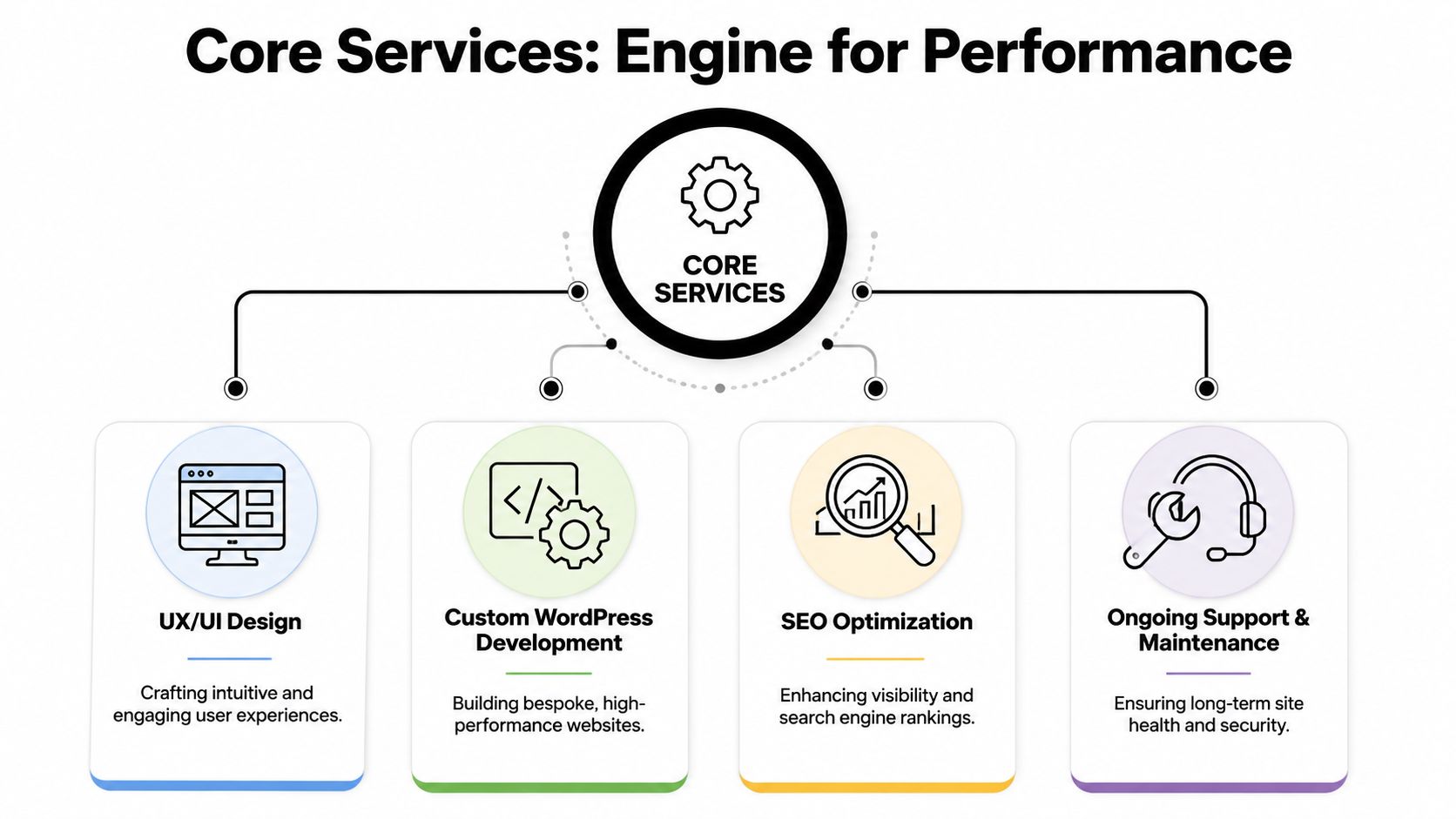
UX and UI that move users forward
For eCommerce, this means cleaner category paths, product filtering that makes sense, clearer merchandising, and a checkout journey that doesn't make users second-guess the purchase. For lead generation sites, it means strong headline structure, useful trust signals, and forms that don't ask for unnecessary effort.
A common mistake is designing every page as if it's a standalone artboard. It shouldn't be. Pages should support a journey. Someone lands, understands the offer, sees proof, and takes the next step.
Custom WordPress development that gives you control
Customized builds outperform off-the-shelf themes. We often build around Gutenberg so clients can edit content without wrestling with bulky page builders.
Custom blocks are especially useful when a business needs repeatable sections such as:
- Promo strips that marketing staff can update without touching layout settings
- Product highlight modules tied to campaign pages
- FAQ and trust sections that stay on-brand across the site
- Location or service blocks for local SEO and scalable page creation
For businesses comparing suppliers, our own WordPress developers in Melbourne service is one example of a delivery model built around custom development rather than template-heavy shortcuts.
Performance work that protects conversions
A slow site costs attention first, then revenue. Google reports that bounce probability increases by 32% as mobile page load time moves from 1 to 3 seconds, which is why performance work should be built in from the start, not left as a cleanup job later in this cited summary referencing Google's finding.
In practice, that means keeping themes lean, compressing images, reducing unnecessary scripts, controlling plugin sprawl, and choosing hosting that suits the build. Heavy visual effects and bloated builders often look impressive in sales demos and then become a problem once paid traffic hits the site.
What works: controlled plugin use, clean templates, server-side caching, image compression, and sensible third-party script management.
Ongoing support that stops the site drifting
Most businesses don't need a website handover and a PDF. They need governance. Updates, compatibility checks, speed monitoring, accessibility QA, and small improvements over time are what keep the site useful.
If you're reviewing your stack, it also helps to look at the broader toolkit your team relies on. This roundup of best marketing tools from NameSnag is useful because it covers the kinds of platforms agencies and in-house teams often combine with a WordPress build, from content operations to campaign management.
WordPress vs Shopify Which Is Right for Your Ecommerce Brand
This decision gets framed too simplistically. WordPress and Shopify are both good platforms. The better question is which one fits your catalogue, team, workflow, and appetite for maintenance.

When WordPress makes sense
WordPress with WooCommerce suits brands that want control. You can shape the site architecture more freely, customise content extensively, and build around marketing requirements rather than fitting everything into a hosted template ecosystem.
That matters if you need content-heavy SEO pages, hybrid catalogues, custom checkout logic, custom product templates, or unique landing page structures for Google Ads and Meta campaigns. A capable WordPress developer can build exactly around those requirements instead of forcing the business to adapt to platform limits.
When Shopify is the better fit
Shopify is often the cleaner choice for smaller teams that want less technical overhead. Recent Australian SME commentary has pushed more businesses to assess platforms through total cost of ownership, internal resourcing, and long-term maintenance overhead, rather than assuming WordPress is always the default as discussed in this platform trade-off article.
That lines up with what we see in practice. If the team is lean, the product model is straightforward, and speed of operation matters more than deep platform control, Shopify can be the more practical choice.
The trade-off in plain English
Here's the short version:
| Platform | Better for | Watch-outs |
|---|---|---|
| WordPress + WooCommerce | Content-rich brands, custom requirements, flexible architecture, advanced editing control | More maintenance responsibility, more decisions around plugins and hosting |
| Shopify | Lean teams, simpler operations, faster store management, lower technical burden | Less freedom in some areas, platform constraints, app dependency in certain setups |
We work on both sides of that decision. If a client needs more content flexibility and custom functionality, WordPress usually wins. If they want operational simplicity, hosted infrastructure, and easier day-to-day store management, Shopify often makes more sense. Our Shopify developers in Melbourne work with brands that need that cleaner operating model.
A more advanced comparison is useful if you're deciding between standard Shopify and a higher-tier setup. SelfServe's guide on choosing the right Shopify platform is worth reading because it helps clarify where platform complexity starts to justify a different setup.
For a closer look at the practical differences in build and management, this video gives a useful overview before you commit to one path.
Our Transparent Six Step Project Process From Concept to Conversion
Website projects go wrong when the process is vague. If the agency can't explain how they move from scoping to launch, you'll usually feel that confusion in missed deadlines, unclear approvals, and expensive revisions.
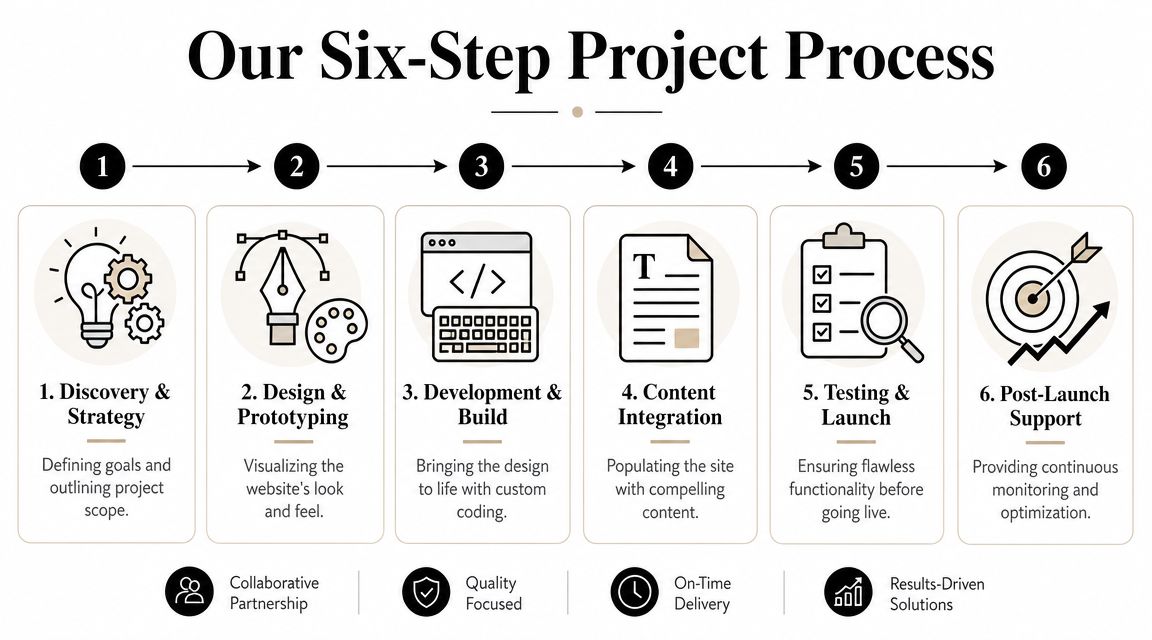
Step 1 and 2 get the direction right
We start with discovery and strategy. That means understanding the business model, product range, margin realities, traffic sources, and what success looks like. For an eCommerce brand, that often includes collection structure, merchandising logic, and what platforms need to connect cleanly.
Then comes design and prototyping. Not just homepage design. We map the templates that matter most, including product, category, cart, landing page, and content layouts, ensuring bad assumptions are caught early.
Step 3 and 4 build the operating system
Next is development and build. This includes theme development, custom blocks, plugin configuration, tracking setup, and integration work. If the business depends on proper attribution, this is also where Google Tag Manager, Google Analytics, and Meta event structure should be handled properly rather than patched in later.
Then comes content integration. A build with no content discipline usually falls apart fast. Product naming, category wording, trust elements, FAQs, imagery, and CTA placement all affect how the site performs once traffic starts landing.
Step 5 protects the launch
Testing should be tedious. That's a good sign.
We check responsive behaviour, browser rendering, form handling, cart flows, checkout behaviour, event firing, redirect rules, template consistency, and admin usability. Launches go more smoothly when there's a controlled checklist and a clear rollback plan if something behaves unexpectedly.
Step 6 is where business value compounds
Post-launch support is where most agencies disappear and where smart businesses pay attention. We examine user behaviour, campaign alignment, search visibility, and friction points that only show up under real traffic.
Typical post-launch work includes:
- Conversion tracking refinement: making sure forms, calls, purchases, and key events are recorded properly
- Speed tuning: reducing drag from scripts, apps, media, and template weight
- Campaign support: aligning landing pages with ad groups and offer intent, often alongside a Google Ads agency workflow
- Operational integrations: for service businesses, that can include call tracking, Twilio-based routing, calendar bookings, and lead handling improvements
A website launch isn't the finish line. It's the point where real user data starts telling you what to fix next.
How to Choose the Right Partner Questions to Ask and Red Flags to Avoid
Choose the agency the same way you would choose an operations partner. You are not buying a homepage and a few templates. You are choosing who will shape how leads come in, how products are found, how the site holds up after updates, and how quickly problems get fixed when revenue is on the line.
I'd ask better questions than “Can you make it look good?” Good design matters, but the true test is whether the team can explain how they handle content structure, conversion flow, integrations, tracking, maintenance, and ownership once the site is live. That matters even more for Australian brands weighing WordPress against Shopify, because the right answer depends on how much flexibility, control, and ongoing support the business needs.
Post-launch support deserves special attention. A site that looks sharp on launch day can become slow, insecure, hard to edit, or unreliable within months if nobody is responsible for updates, plugin conflicts, backups, and monitoring. Security also sits inside that decision, especially for small businesses, as noted in this summary referencing the Australian Cyber Security Centre context: https://cyberset.com/wordpress-design-for-small-business-a-comprehensive-guide/.
Questions worth asking early
Specific questions get specific answers. If the agency stays vague, sells around the question, or avoids accountability, pay attention.
| Area of Inquiry | What to Ask | Why It Matters |
|---|---|---|
| Strategy | How do you connect site structure, landing pages, and user paths to leads or sales? | You need commercial thinking, not just visual presentation. |
| Platform fit | Why are you recommending WordPress instead of Shopify, or Shopify instead of WordPress, for our business model? | The answer shows whether they understand product complexity, marketing needs, and operational trade-offs. |
| CMS setup | Will we get custom blocks and reusable sections, or are we locked into a theme structure? | This affects how easily your team can update the site without breaking layouts. |
| Performance | What do you do during build to keep the site fast once real plugins, apps, and content are added? | Speed issues are cheaper to prevent than clean up later. |
| Tracking | Who sets up forms, events, analytics, and paid media readiness? | If tracking is weak, improvement becomes guesswork. |
| Support | What happens after launch if an update breaks checkout, forms, or page layouts? | This shows whether support is an actual service or a verbal promise. |
| Ownership | Who owns the code, hosting, domains, licences, and admin access after handover? | You should be able to change providers without being trapped. |
A good agency should answer these plainly.
Red flags I'd take seriously
Some problems show up before the proposal lands in your inbox.
- They lead with themes, not business goals: If they prescribe a template before understanding your offer, catalogue, sales process, or internal workflow, they are selling speed of delivery over fit.
- They dodge the WordPress vs Shopify conversation: For eCommerce, that usually means they have a preferred build model, not a platform recommendation shaped around your margins, product logic, or marketing plan.
- They treat launch as the finish line: Sites need maintenance, support, and periodic improvement. If there is no clear plan for that, the risk shifts to your team.
- They speak in design terms only: If forms, search visibility, analytics, content governance, and conversion paths never come up, expect gaps after handover.
- They leave deliverables fuzzy: You should know what is custom, what is licensed, what is recurring, and what happens if you leave.
- They ignore the admin experience: Your staff will live in the CMS long after the agency moves on. If they do not care how easy the site is to manage, they are building for sign-off, not day-to-day use.
One more test helps. Ask who is responsible when performance drops, tracking breaks, or a plugin update causes issues. The answer usually tells you whether you are hiring a design vendor or a long-term web partner.
Understanding Costs and Measuring Your Return on Investment
Website pricing feels confusing because many proposals bundle unlike things together. One quote might mostly be a theme setup with light edits. Another might include strategy, custom design systems, tracking, speed work, copy guidance, and post-launch support. They're not the same product.
The cleaner way to think about cost is by business objective, not page count.
What usually changes the investment
A simpler brochure-style site costs less because the logic is lighter. Once you add custom blocks, WooCommerce complexity, filtering, advanced forms, CRM integration, landing page systems, and analytics requirements, the workload changes quickly.
The main drivers usually include:
- Custom design depth: unique templates take more time than adapting a prebuilt layout
- Functionality requirements: bookings, product logic, subscriptions, account areas, integrations
- Content complexity: migration, product uploads, collection architecture, SEO page structure
- Post-launch support: maintenance, hosting oversight, training, fixes, optimisation
ROI comes from fewer leaks and better leverage
I prefer to talk to clients about return, not just spend. A cheaper website can be more expensive if it wastes paid traffic, slows down campaign launches, or creates admin pain every week.
For eCommerce brands, the return usually shows up when the site supports:
- Better conversion flow from ad click to product page to checkout
- Faster merchandising changes for sales, launches, and seasonal campaigns
- Cleaner attribution through GTM, GA4, and platform event setup
- Stronger content support for SEO, product education, and remarketing audiences
For service businesses, ROI often comes from improved lead quality, easier enquiry handling, and stronger alignment between the website and paid search intent. That's especially important when campaigns are driving calls or contact form submissions and every lost lead has a real cost.
A business looking for integrated web and paid media support might also compare suppliers such as a digital marketing agency Melbourne businesses use when they want website execution tied more closely to conversion strategy.
The real question to ask
Don't ask only, “How much does the website cost?”
Ask, “Will this website make it easier for us to sell, easier for us to manage campaigns, and easier for our team to update without breaking things?” That question usually leads to better decisions than chasing the lowest quote.
Start Building a Website That Actually Grows Your Business
The right WordPress web design company gives you more than a launch date. You get a platform that supports sales, content, paid traffic, product management, and day-to-day operations without creating unnecessary friction for your team.
That matters even more if you're balancing WordPress against Shopify, trying to improve tracking, or rebuilding a site that never really performed the way it should have. The decision isn't about chasing features. It's about choosing the setup and the partner that fit the way your business grows.
If you need custom builds, stronger editing control, and a site architecture that supports marketing properly, WordPress development remains a strong path. If you're based in Melbourne and want the web build tied closely to ad performance, analytics, and conversion thinking, that alignment matters just as much as the design itself.
If you're a business with a paid ads budget of at least 3k a month, I'd love to offer you a low risk deal. Get a month of paid ads management FREE. Apply now through our contact page.
If you're weighing up a new build, a rebuild, or a move between WordPress and Shopify, Alpha Omega Digital is a Melbourne-based agency working with businesses across Melbourne, Sydney, Brisbane, Newcastle, Perth, Adelaide, Darwin and Hobart. We handle websites with the same lens we use for paid traffic and conversion strategy, so the build isn't treated like a standalone design project.
Alpha Omega Digital
Read more insights from our team on web design, paid ads, and growth strategy.